محصول پای ته ورسیدview
This manual provides instructions for the Elekpia Replacement Remote Control, designed for use with various MAG IPTV Linux Set-Top Box models. This remote offers a direct replacement solution, requiring no complex programming or pairing.
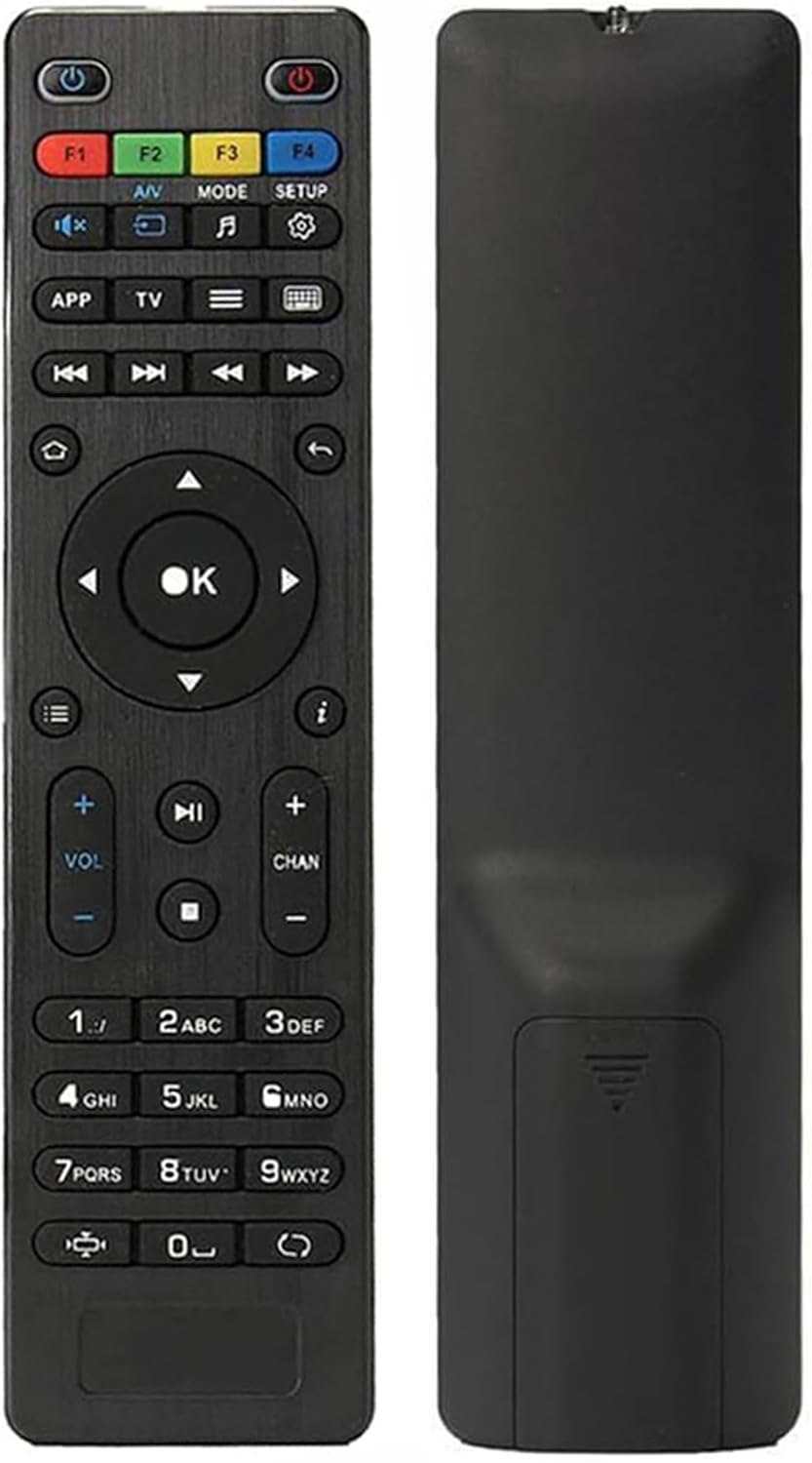
انځور: مخ او شا view of the Elekpia replacement remote control. The remote is black with clearly labeled buttons on the front, and a smooth, ergonomic back.
کلیدي ځانګړتیاوې:
- Compatible with a wide range of MAG IPTV Linux Set-Top Box models, including MAG250, MAG254, 255, 256, 257, 260, 275, 349, 350, 351, 352, and MAG322W1.
- No programming or pairing required; functions immediately upon battery installation.
- Powered by two AAA batteries (not included).

Image: The remote control is shown alongside a list of compatible MAG models, emphasizing its broad compatibility with various MAG IPTV Linux Set-Top Boxes.
چمتو کول
Setting up your new Elekpia remote control is a straightforward process. Follow these steps to begin using your remote.
1. د بیټرۍ نصب کول
- د ریموټ کنټرول شاته د بیټرۍ کڅوړه ومومئ.
- سلایډ د بیټرۍ خونې پوښ خلاص کړئ.
- دوه (2) AAA بیټرۍ دننه کړئ، ډاډ ترلاسه کړئ چې مثبت (+) او منفي (-) ټرمینلونه د کمپارټمنټ دننه شاخصونو سره په سمه توګه سمون لري.
- د بیټرۍ کمپارټ پوښ په خوندي ډول وتړئ.
2. ابتدايي استعمال
This remote control is designed to work directly with compatible MAG IPTV Linux Set-Top Boxes without the need for programming or pairing. Once batteries are installed, point the remote at your set-top box and begin using it.
عملیاتي لارښوونې
Familiarize yourself with the functions of each button on your Elekpia remote control to effectively navigate and control your MAG IPTV Linux Set-Top Box.

Image: A detailed diagram illustrating the layout and function of each button on the remote control, including power, navigation, volume, channel, and media playback controls.
د ریموټ کنټرول تڼۍ دندې| تڼۍ | فعالیت |
|---|
| د بریښنا تڼۍ (🏻) | Turns the Media Player On/Off. |
| F1, F2, F3, F4 | Additional functions (may vary by device). |
| A/V | Changes audio mode. |
| موډ | Accesses setup menu. |
| چمتو کول | Accesses setup menu. |
| APP | د شرایطو مینو. |
| TV | Quick TV access. |
| مینو (☰) | د تلویزیون لارښود. |
| کیبورډ (⌨) | Virtual keyboard. |
| نیویگیشن تیر (پورته، ښکته، کیڼ، ښي) | د مینو او اختیارونو له لارې حرکت کوي. |
| د OK تڼۍ | انتخابونه تاییدوي. |
| بیرته / بیرته ستنیدل (↩) | بیرته پخوانۍ سکرین ته ځي. |
| کور (⌂) | د کور سکرین ته راستنیږي. |
| معلومات (ⓘ) | معلومات ښکاره کوي. |
| حجم پورته / ښکته (VOL + / -) | د حجم کچه تنظیموي. |
| چینل پورته / ښکته (CHAN + / -) | Switches channels. |
| خاموش (🔇) | غږ آن/بند بدلوي. |
| پلی/ودرول (▶⏸) | رسنۍ غږوي یا بندوي. |
| ودریږئ (⏹) | د رسنیو غږول ودروي. |
| مخکې/شاته لاړ شئ (⏭⏮) | Skips to the next/previous track or chapter. |
| چټکه لوبه (⏩) | Fast forwards through media. |
| شمیره کیپډ (۴-۱۲) | Direct input for channel numbers or other numerical data. |
| د اړخ نسبت (◧) | د اړخ تناسب بدلوي. |
| تازه کول (↻) | Initiates an update (functionality may vary). |
ساتنه
مناسب ساتنه ستاسو د ریموټ کنټرول اوږد عمر او غوره فعالیت تضمینوي.
1. د بیټرۍ بدلول
Replace batteries when the remote's responsiveness decreases or it stops functioning. Always use new AAA batteries and dispose of old batteries responsibly according to local regulations.
2. پاکول
د ریموټ کنټرول د پاکولو لپاره، په نرمۍ سره د هغې سطحه د نرم، وچ ټوکر سره پاک کړئ. د سختې خاورې لپاره، یو څه کم کړئampټوکر د اوبو یا یو نرم، غیر خارښونکي کلینر سره ومینځئ. د ډیر مایع یا سخت کیمیاوي موادو کارولو څخه ډډه وکړئ، ځکه چې دا کولی شي د ریموټ بریښنایی وسایلو یا پای ته زیان ورسوي.
3. ذخیره کول
When not in use for extended periods, it is recommended to remove the batteries to prevent potential leakage and damage to the remote.
د ستونزو حل کول
If you encounter issues with your remote control, refer to the following common problems and their solutions.
عام مسایل او حل لارې| ستونزه | احتمالي لامل | د حل لاره |
|---|
| ریموټ ځواب نه ورکوي. | Dead or incorrectly installed batteries. Obstruction between remote and set-top box. Remote out of range. | Replace batteries with new AAA batteries, ensuring correct polarity. Remove any obstructions. Ensure you are within effective range of the set-top box. |
| Buttons are sticky or hard to press. | Accumulation of dirt or debris under the buttons. Internal mechanism issue. | Gently clean around the buttons with a soft, dry cloth or a cotton swab. If the issue persists, it may indicate internal wear. |
| ریموټ په وقفه يي ډول کار کوي. | Low battery power. Infrared sensor on remote or set-top box is dirty or obstructed. | Replace batteries. Clean the infrared sensor on both the remote and the set-top box. Ensure a clear line of sight. |
| Remote does not control the set-top box. | Incompatible set-top box model. | Verify that your MAG IPTV Linux Set-Top Box model is listed as compatible (MAG250, MAG254, 255, 256, 257, 260, 275, 349, 350, 351, 352, MAG322W1). |
مشخصات
د محصول مشخصات| فیچر | تفصیل |
|---|
| د ماډل شمیره | Elekpia mag 254 remote |
| مطابقت لرونکې وسیلې | MAG250, MAG254, 255, 256, 257, 260, 275, 349, 350, 351, 352 IPTV Linux Set-Top Box, MAG322W1 |
| د بریښنا سرچینه | 2 x AAA بیټرۍ (شامل ندي) |
| ابعاد (L x W x H) | 7 x 1.8 x 0.6 انچه (تقریبا) |
| د توکي وزن | ۳.۰۶ اونس (تقریبا) |
| رنګ | تور |
| ځانګړی ځانګړنه | ارګونومیک ډیزاین |
تضمین او ملاتړ
Information regarding product warranty and customer support is not provided within this instruction manual. For warranty details or technical assistance, please refer to the product packaging or contact the retailer/manufacturer directly.
Manufacturer: Elekpia Factory


