پیژندنه
This manual provides instructions for the Feit Electric A1960CL/927CA/FIL/AG Smart Wi-Fi LED Bulb. This bulb is designed to integrate with your home's 2.4 GHz Wi-Fi network, offering remote control and voice command capabilities through the Feit Electric app, Alexa, or Google Assistant. It features a traditional filament design with modern LED technology, providing 2700K soft white light equivalent to a 60-watt incandescent bulb while consuming only 8.8 watts.

Image: Feit Electric Smart Wi-Fi LED Bulb, showing the product packaging and the bulb itself. The packaging highlights Wi-Fi connectivity, Alexa and Google Assistant compatibility, and energy efficiency.
د تنظیم کولو لارښوونې
Follow these steps to set up your Feit Electric Smart Wi-Fi LED Bulb:
- د فیټ بریښنا اپلیکیشن ډاونلوډ کړئ: لټون "Feit Electric" in your smartphone's app store (available for Android and iOS) and install the application.
- بلب نصب کړئ: Screw the smart bulb into a standard E26 medium base light socket. Ensure the fixture is powered off before installation.
- Power On and Initiate Pairing: Turn on the power to the light fixture. The bulb should begin blinking continuously, indicating it is in pairing mode. If it does not blink, cycle the power off and on five times to reset it into pairing mode.
- په اپلیکیشن کې وسیله اضافه کړئ: Open the Feit Electric app. Ensure your phone's Bluetooth is enabled. The app should detect the new device. Follow the on-screen prompts to add the bulb.
- وائی فای سره وصل کړئ: Select your 2.4 GHz Wi-Fi network and enter the password when prompted. The bulb will connect to your home network. Note: This bulb requires a 2.4 GHz Wi-Fi network.
- Rename (Optional): Once connected, you can rename the bulb within the app for easier identification (e.g., "Living Room Lamp," "Bedroom Light").
- د غږ معاونینو سره یوځای کول (اختیاري): To control the bulb using voice commands, link your Feit Electric account with Alexa or Google Assistant through their respective apps.

انځور: مخکینۍ برخه view of the Feit Electric Smart Wi-Fi LED Bulb box, highlighting "Works with Alexa" and "Works with Google Assistant" logos, and the "Smart WiFi Bulb" designation.
عملیاتي لارښوونې
The Feit Electric Smart Wi-Fi LED Bulb offers various control methods:
Control via Feit Electric App:
The Feit Electric app allows comprehensive control from anywhere with internet access.
- لرې لاسرسی: Turn lights on or off from any location.
- دیمینګ: Adjust the brightness level of the bulb.
- ډله کول: Combine multiple smart bulbs to control them simultaneously.
- مهالویش: Set specific times for the bulb to turn on, turn off, or change brightness.
- د وسیلې شریکول: Share control of your smart bulbs with other users.
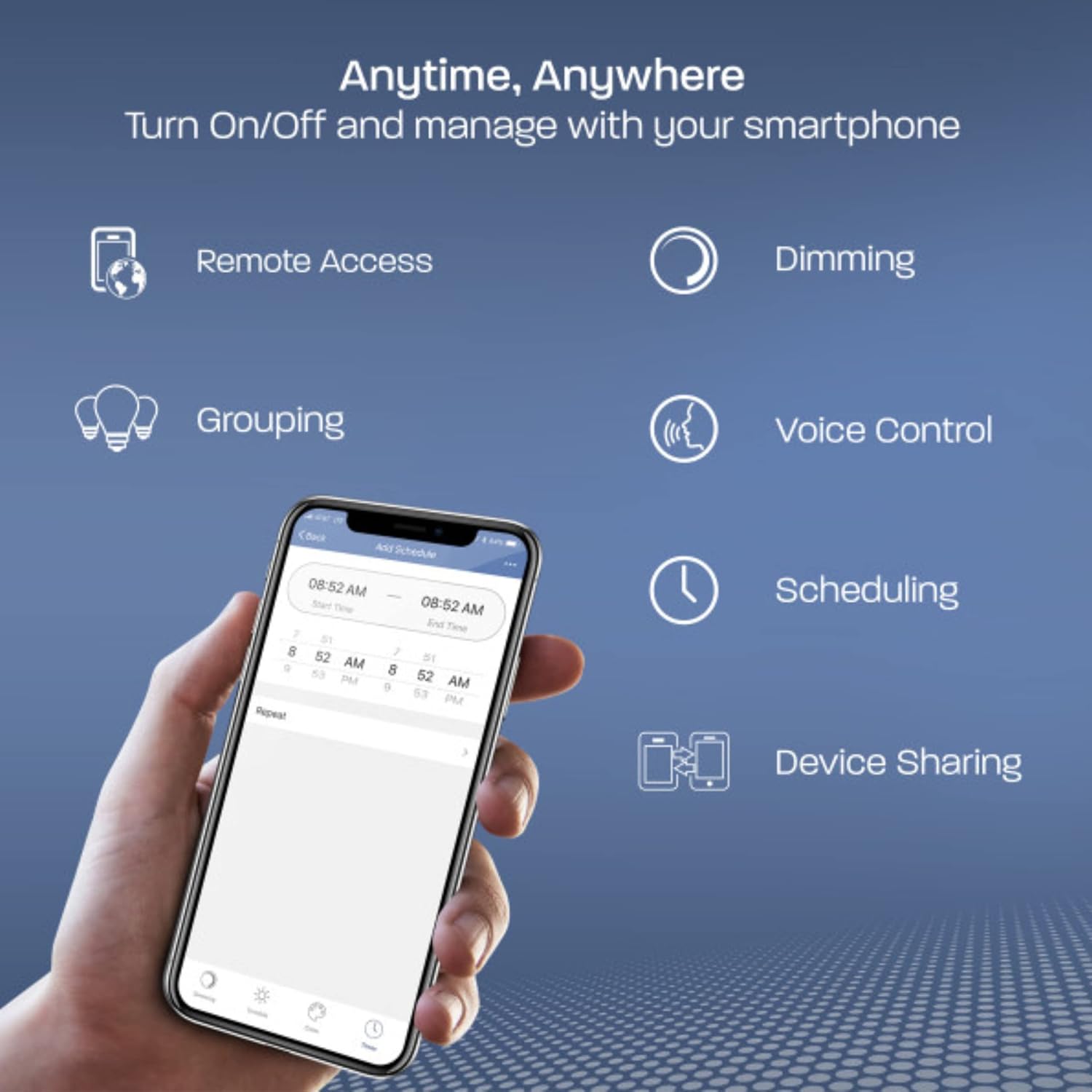
Image: A smartphone displaying the Feit Electric app interface, illustrating features like Remote Access, Dimming, Grouping, Voice Control, Scheduling, and Device Sharing.

Image: A smartphone showing the Feit Electric app controlling a lamp, with options for dimming the light to 50% and setting schedules.

Image: A kitchen scene with pendant lights, and a smartphone displaying the Feit Electric app's "Grouping" feature, allowing multiple lights to be controlled together.
د غږ کنټرول:
Once integrated, use voice commands with Alexa or Google Assistant devices.
- "الیکسا، د خونې څراغ روښانه کړه."
- "Hey Google, dim the Bedroom Light to 50%."
- "Alexa, set the Kitchen Lights to soft white."

Image: An Amazon Echo Dot smart speaker, accompanied by "Works with Alexa" and "Hey Google" logos, indicating voice control compatibility.
ساتنه
The Feit Electric Smart Wi-Fi LED Bulb is designed for long-term, low-maintenance operation.
- پاکول: ډاډ ترلاسه کړئ چې بلب یخ دی او بریښنا بنده ده مخکې له دې چې پاک شي. بلب په نرم او وچ ټوکر سره پاک کړئ. مایع پاکوونکي یا د کثافاتو موادو څخه کار مه اخلئ.
- د عمر موده: The bulb has a rated lifespan of 15,000 hours, minimizing the need for frequent replacement.
- له مرکري څخه پاک: This LED bulb is 100% mercury-free.
د ستونزو حل کول
If you encounter issues with your smart bulb, consider the following:
- Bulb Not Connecting/Flickering:
- Ensure your Wi-Fi network is 2.4 GHz. The bulb is not compatible with 5 GHz networks.
- Avoid using the bulb with a fader (dimmer) switch. It must be on a standard on/off switch for proper operation. Using a fader switch can cause connectivity issues and flickering.
- Try resetting the bulb by cycling the power off and on five times.
- Bulb Not Entering Pairing Mode (Not Blinking):
- Cycle the power to the bulb off and on five times, waiting a few seconds between each cycle. This should force the bulb into pairing mode (continuous blinking).
- د اتصال کمښت:
- Ensure your Wi-Fi router is within a reasonable range of the bulb.
- If you have a mesh network, ensure it is configured to allow 2.4 GHz devices to connect easily.
- Occasionally, resetting the bulb or restarting your router may resolve intermittent connectivity issues.
- د اپلیکیشن مسلې:
- Ensure your Feit Electric app is updated to the latest version.
- اپلیکیشن یا خپل سمارټ فون بیا پیل کړئ.
مشخصات
| فیچر | تفصیل |
|---|---|
| برانډ | فیټ بریښنا |
| د ماډل نوم | 60 Watt Equivalent WiFi Dimmable, No Hub Required, Alexa or Google Assistant, Filament A19 |
| برخه شمیره | A1960CL/927CA/FIL/AG |
| د رڼا ډول | LED |
| د بلب شکل اندازه | A19 |
| د بلب اساس | E26 |
| واټtage | ۴۵ واټه |
| د انډیشینټ مساوي | 60 واټ |
| روښانتیا | 800 Lumens |
| رڼا رنګ | نرم سپین |
| د رنګ د حرارت درجه | 2700 کیلوین |
| د رنګ رینډینګ انډیکس (CRI) | 90 |
| والیtage | ۱۲۰ ولټه (۱۰۰ څخه تر ۱۲۰ ولټه او ۶۰ هرټز) |
| اوسط ژوند | 15,000 ساعته |
| د کنټرول طریقه | App (Feit Electric), Voice (Alexa, Google Assistant) |
| ارتباط | 2.4 GHz وائی فای |
| مواد | پلاستیک |
| د محصول ابعاد | ۱۴.۲۵" واټ x ۹.۳" واټ |
| د توکي وزن | 1.6 اونس |
| د کور دننه / بهر کارول | Outdoor (Suitable for use in enclosed fixtures) |
| تصدیقونه | UL Listed, Energy Star Approved, CEC and FCC Compliant |

Image: A detailed close-up of the Feit Electric Smart Wi-Fi LED Bulb, showcasing its visible LED filaments and E26 screw base.

Image: Diagram illustrating the dimensions of the Feit Electric Smart Wi-Fi LED Bulb, showing a height of 4 inches and a diameter of 2.25 inches.
تضمین او ملاتړ
تضمین: This Feit Electric bulb comes with a one-year warranty from the date of purchase.
د اړیکو معلومات: For customer service or warranty claims, please contact Feit Electric:
- بریښنالیک: info@feit.com
- وړیا تلیفون: 1-866-326-بلب


