پیژندنه
The Razer Tartarus Pro is a gaming keypad designed for enhanced control and customization. It features Analog-Optical Key Switches, Rapid Trigger functionality, Adjustable Actuation, 32 programmable keys, customizable macros, and Chroma RGB Lighting. This manual provides essential information for setting up, operating, and maintaining your device.
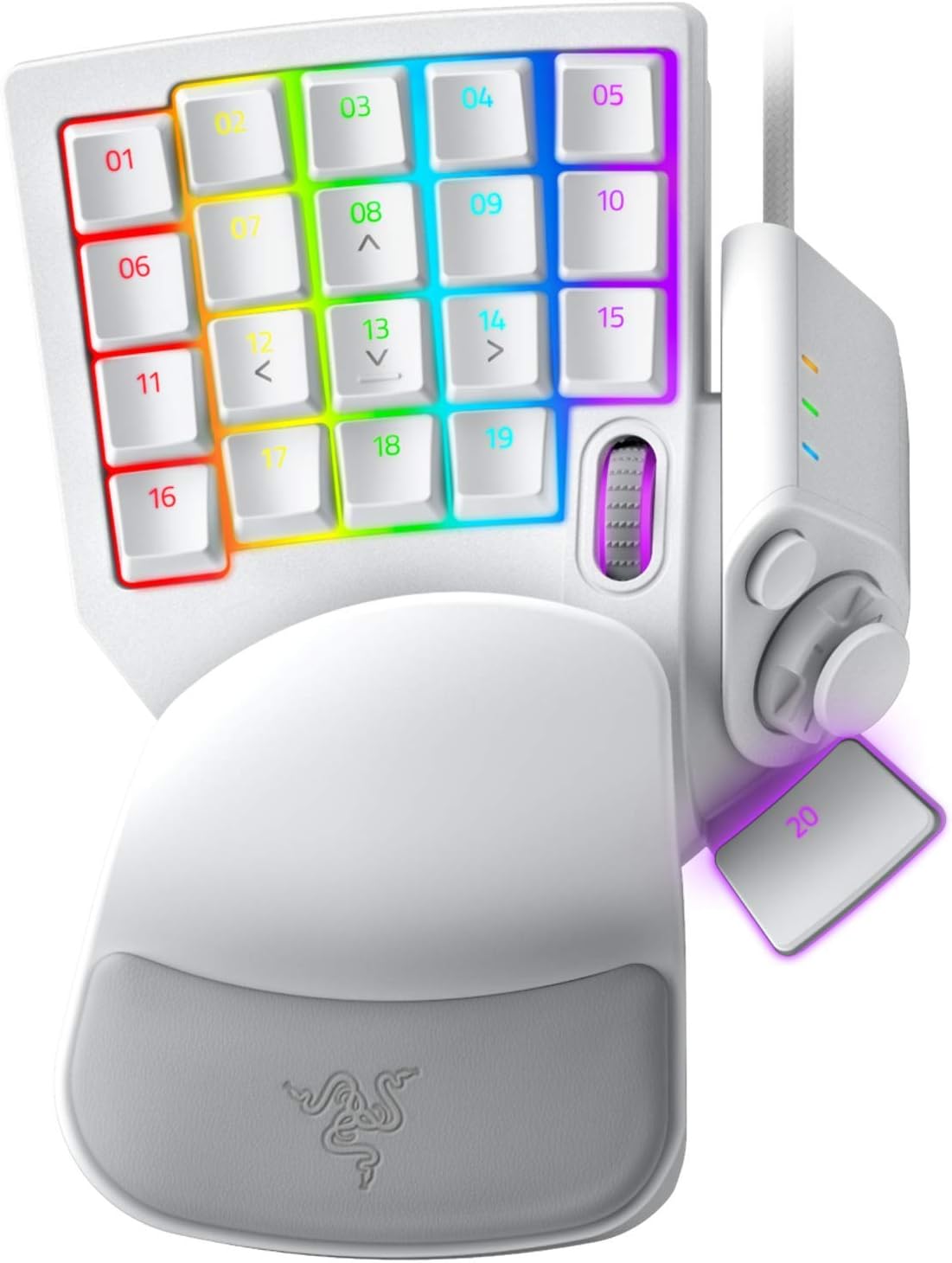
Figure 1: Razer Tartarus Pro Gaming Keypad (Mercury White)
کلیدي ځانګړتیاوې
- Analog-Optical Key Switches: Utilizes light to register keystrokes for precise and rapid input.
- چټک محرک: Keys reset instantly with an upward motion as low as 0.1 mm, enabling faster repeated keystrokes.
- د تنظیم وړ فعالول: Customize actuation points from 1.5 to 3.6 mm for personalized keypress sensitivity.
- ۷ د پروګرام وړ کیلي: Offers an extensive range of commands for gaming or creative workflows.
- د ښه حرکت کنټرول لپاره د ګوتو پیډ: An 8-way directional thumbpad provides natural controls and ergonomic experience.
- په بشپړ ډول د پروګرام وړ میکرو: Razer Hypershift allows remapping of all keys and keypress combinations for complex commands.
- د کروما RGB رڼا: Ultimate personalization with 16.8 million colors on individually backlit keys, syncing with popular games and hardware.
د تنظیم کولو لارښود
- کیپډ وصل کړئ: Plug the USB cable from the Razer Tartarus Pro into an available USB port on your PC.
- Razer Synapse نصب کړئ: Download and install the latest version of Razer Synapse software from the official Razer website. This software is required to customize key bindings, macros, actuation points, and RGB lighting.
- د ډرایور نصب کول: Allow your operating system to automatically install any necessary drivers. This usually happens upon initial connection.
- د سافټویر ترتیب: Launch Razer Synapse. The software should automatically detect your Tartarus Pro. You can then begin customizing your keypad settings.
عملیاتي لارښوونې
Key Customization and Macros
The Razer Tartarus Pro features 32 fully programmable keys. Use Razer Synapse to assign functions, macros, or even launch applications with a single keypress. The 8-way directional thumbpad can also be customized for movement or additional commands.

شکل 2: پایview of 32 programmable keys.
Adjustable Actuation and Rapid Trigger
Leverage the Analog-Optical Key Switches to fine-tune the actuation point of each key. This allows you to set how far a key needs to be pressed to register an input. The Rapid Trigger feature further enhances responsiveness by resetting keys almost instantly upon release, enabling faster consecutive presses.

Figure 3: Adjustable Actuation settings in Razer Synapse.
د کروما RGB رڼا
Personalize your keypad with Razer Chroma RGB lighting. Through Razer Synapse, you can choose from 16.8 million colors and various lighting effects. Create custom lighting profileد مختلفو لوبو یا غوښتنلیکونو لپاره.
پروfile مدیریت
The Tartarus Pro supports multiple profiles, allowing you to switch between different key layouts and lighting effects on the fly. This is useful for optimizing your setup for various games or tasks.

Figure 4: Quick-toggle profiles for instant switching.
مشخصات
| فیچر | تفصیل |
|---|---|
| برانډ | ریزر |
| د ماډل شمیره | RZ07-03110200-R3M1 |
| کلیدي سویچونه | Razer Analog-Optical |
| د پروګرام وړ کیلي | 32 |
| د عمل کولو حد | له 1.5 څخه تر 3.6 ملی مترو پورې |
| ټمبپډ | 8-way directional |
| میکرو | Unlimited length, fully programmable |
| روښنايي | د ریزر کروما RGB (۱۶.۸ میلیونه رنګونه) |
| ارتباط | د USB تار |
| د هارډویر پلیټ فارم | PC |
| عملیاتي سیسټم | وینډوز |
| د توکي وزن | 13 اونس |
| د محصول ابعاد | 5.95 x 7.96 x 2.5 انچه |
ساتنه
- پاکول: یو نرم استعمال کړئ، دamp cloth to clean the surface of the keypad. Avoid harsh chemicals or abrasive materials.
- د کیلي کیپ لرې کول: If necessary, keycaps can be carefully removed for deeper cleaning using a keycap puller.
- د کیبل پاملرنه: د زیان څخه د مخنیوي لپاره د USB کیبل د تیزو کږو یا ډیر کشولو څخه ډډه وکړئ.
د ستونزو حل کول
- Keypad Not Detected: Try plugging the keypad into a different USB port. Ensure Razer Synapse is installed and up to date. Restart your computer.
- د رڼا ستونزې: Check Razer Synapse for lighting settings. Ensure the keypad is properly connected and recognized by the software.
- هغه کیلي چې ځواب نه ورکوي: Verify key bindings in Razer Synapse. Test the keypad on another computer if possible to rule out a hardware issue.
د محصول ویډیوګانې
Razer Tartarus Pro Gaming Keypad Review
Video 1: A gamer's perspective on the Razer Tartarus Pro, highlighting its features and performance.
Review of the Razer Tartarus Pro Gaming Keypad
دریمه ویډیو: تفصيلي بیاکتنهview of the Razer Tartarus Pro, covering various aspects of its design and functionality.
Razer One-Handed Keyboards Side-by-Side Comparison
Video 3: A comparison between Razer's one-handed keyboards, including the Tartarus Pro, showcasing differences and similarities.
Razer Tartarus Pro Product Showcase
Video 4: A brief showcase of the Razer Tartarus Pro, highlighting its design and lighting.
تضمین او ملاتړ
د تضمین معلوماتو او تخنیکي ملاتړ لپاره، مهرباني وکړئ د Razer رسمي ملاتړ ته مراجعه وکړئ. website. You can find detailed information regarding product registration, troubleshooting guides, and contact options for customer service.
Optional protection plans are available for purchase, offering extended coverage beyond the standard manufacturer's warranty. These plans include:
- دوه کلن محافظتي پلان
- دوه کلن محافظتي پلان
- بشپړ محافظت (میاشتنی پلان چې د تیرو او راتلونکو پیرودونو وړ پوښښ لري)


