1. پیژندنه
The BSIDE ADM92CL is a compact, True RMS digital multimeter designed for accurate measurement of various electrical parameters. It features an auto-ranging function, a color display, and capabilities for measuring AC/DC voltage, AC/DC current, resistance, capacitance, frequency, temperature, diode, continuity, NCV (Non-Contact Voltage), and live wire detection. This manual provides essential information for safe and effective operation of the device.
2. د خوندیتوب معلومات
Always adhere to basic safety precautions when using this multimeter to prevent personal injury or damage to the device or equipment under test. Read all safety information before use.
- د هرې لړۍ لپاره ټاکل شوي اعظمي ان پټ ارزښتونو څخه ډیر مه کوئ.
- د حجم سره کار کولو پرمهال خورا احتیاط وکړئtagد 36V DC یا 25V AC RMS څخه پورته. دا حجمونهtagد شاک خطر رامنځته کوي.
- Ensure the test leads are in good condition, without any damage to the insulation.
- تل د سرکټ سره بریښنا قطع کړئ او ټول لوړ ولټ خارج کړئtagد مقاومت، دوام، ډایډ، یا ظرفیت اندازه کولو دمخه د e capacitors.
- که چیرې میټر خراب ښکاري یا د بیټرۍ پوښ په سمه توګه تړل شوی نه وي، نو مه یې چلوئ.
- Use the correct function and range for measurements.
- کله چې د بیټرۍ ټیټ شاخص څرګند شي نو بیټرۍ بدل کړئ ترڅو دقیق لوستل ډاډمن شي.
3. د بسته محتويات
ډاډ ترلاسه کړئ چې ټول توکي په کڅوړه کې شتون لري:
- BSIDE ADM92CL Digital Multimeter
- د ازموینې لیډونه (سور او تور)
- K-type Thermocouple (Temperature Probe)
- د ذخیره کولو کڅوړه
- د کارن لارښود

Contents of the BSIDE ADM92CL Digital Multimeter package, including the device, test leads, temperature probe, and user manual.
4. محصول ختم شوview او د برخو پیژندنه
Familiarize yourself with the components and controls of the BSIDE ADM92CL Digital Multimeter.

Labeled diagram of the BSIDE ADM92CL Digital Multimeter's components and controls.
- د ننوتلو ترمینلونه: Connect test leads for measurements.
- د COM ترمینل: د ټولو اندازه کولو لپاره عام (منفي) ان پټ.
- روټري سویچ: Selects the primary measurement function (e.g., Voltage، مقاومت، جریان).
- ښکاره کول: Color LCD screen showing measurement readings, units, and indicators.
- HOLD / ☀ Button: Press to hold the current reading on the display. Long press to activate/deactivate backlight.
- د SEL تڼۍ: Selects sub-functions within a rotary switch position (e.g., AC/DC voltage, Diode/Continuity).
- د هرټز تڼۍ: Activates frequency measurement mode.
- V~Alert Button: د غیر تماس حجم فعالويtagد (NCV) کشف.
- V~Alert Sensor Area: د AC حجم کشف کويtagد مستقیم تماس پرته.
- سلاټ: For attaching accessories or for convenient storage.

تفصيلي view of the BSIDE ADM92CL Multimeter's color LCD display, input ports, side slot, and back clip.
5. ترتیب کول
5.1 د بیټرۍ نصب کول
ملټي میټر د کار کولو لپاره بیټرۍ ته اړتیا لري. د بیټرۍ نصب یا بدلولو لپاره:
- ډاډ ترلاسه کړئ چې ملټي میټر بند دی.
- د آلې په شا کې د بیټرۍ کڅوړه ومومئ.
- د بیټرۍ کمپارټ پوښ خلاص کړئ.
- Insert the batteries, observing the correct polarity (+/-).
- د بیټرۍ کمپارټ پوښ په خوندي ډول وتړئ.
۶.۲ د ټیسټ لیډونو نښلول
For most measurements, connect the test leads as follows:
- د تور ټیسټ لیډ دننه کړئ COM (عام) ان پټ جیک.
- د سور ټیسټ لیډ دننه کړئ INPUT جیک
6. عملیاتي لارښوونې
This section details how to use the multimeter for various measurements.
6.1 عمومي عملیات
- د روټري سویچ مطلوب اندازه کولو فعالیت ته واړوئ.
- If a function has multiple modes (e.g., AC/DC voltage)، فشار ورکړئ SEL د هغوی له لارې د ګرځولو لپاره تڼۍ.
- د ازموینې لیډونه د ازموینې لاندې سرکټ یا برخې سره وصل کړئ.
- په نندارتون کې د اندازه کولو ارزښت ولولئ.
6.2 ټوکtagد e اندازه کول (AC/DC)
- Set the rotary switch to the “V” position.
- مطبوعاتي SEL to select AC (“ACV”) or DC (“DCV”) voltage.
- د ازموینې لیډونه د سرکټ یا برخې سره موازي سره وصل کړئ.
۶.۲ د اوسني اندازه کول (AC/DC)
- Set the rotary switch to the “mA/A” position.
- مطبوعاتي SEL to select AC (“ACA”) or DC (“DCA”) current.
- Connect the multimeter in series with the circuit. Ensure the circuit is open before connecting the meter.
6.4 د مقاومت اندازه کول
- Set the rotary switch to the “Ω” position.
- Connect the test leads across the component. Ensure the component is de-energized.
6.5 د دوام ازموینه
- Set the rotary switch to the “Ω” position.
- مطبوعاتي SEL until the continuity symbol (“♫”) appears.
- د ازموینې لیډونه د سرکټ یا برخې په اوږدو کې وصل کړئ. دوامداره بیپ دوام په ګوته کوي.
6.6 د ډایډ ټیسټ
- Set the rotary switch to the “Ω” position.
- مطبوعاتي SEL until the diode symbol (“→|”) appears.
- سور لیډ د انود سره او تور لیډ د ډایډ کیتوډ سره وصل کړئ.
6.7 د ظرفیت اندازه کول
- Set the rotary switch to the “Cap” position.
- د ازموینې لیډونه د کپاسیټر سره وصل کړئ. ډاډ ترلاسه کړئ چې د ازموینې دمخه کپاسیټر خارج شوی دی.
6.8 دحرارت اندازه کول
- Set the rotary switch to the “Temp” position.
- د K ډوله ترموکوپل د ان پټ جیکونو سره وصل کړئ، د قطبیت مشاهده وکړئ.
- Place the thermocouple tip on or in the object whose temperature is to be measured.
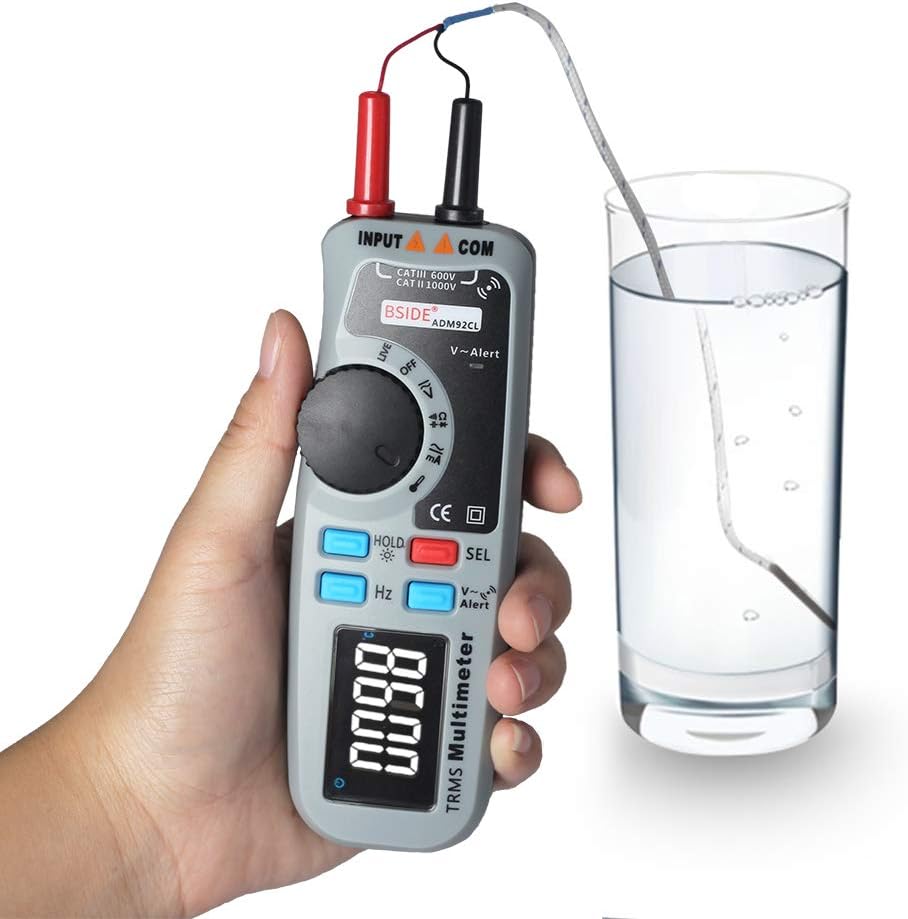
BSIDE ADM92CL Digital Multimeter measuring temperature with a K-type thermocouple.
۵.۴ NCV (غیر اړیکې والیومtage) کشف
- فشار ورکړئ وی - خبرتیا تڼۍ
- Move the top end of the multimeter (V~Alert sensor area) close to an AC voltage source. The meter will beep and the display will indicate the presence of AC voltage.
۶.۲ د ژوندۍ تار کشف
- Set the rotary switch to the “Live” position.
- Insert the red test lead into the live wire socket. The display will indicate if the wire is live.
۶.۷ فریکونسي (Hz) اندازه کول
- Set the rotary switch to a voltage or current function.
- فشار ورکړئ Hz button. The meter will display the frequency of the measured signal.
۶.۵ د معلوماتو ساتل او شاته رڼا
- د معلوماتو ساتل: فشار ورکړئ هوډ په لنډ ډول تڼۍ فشار ورکړئ ترڅو په ښودنه کې اوسنی لوستل کنګل شي. د خوشې کولو لپاره بیا فشار ورکړئ.
- شاته رڼا: اوږد فشار ورکړئ هوډ button to turn the display backlight ON or OFF.
7. ساتنه
7.1 پاکول
قضیه د اعلان سره پاک کړئamp ټوکر او نرم صابون. د کثافاتو یا محلولونو څخه کار مه اخلئ. د ننوتلو ټرمینلونه د خاورې او رطوبت څخه پاک وساتئ.
7.2 د بیټرۍ بدلول
کله چې د ټیټ بیټرۍ شاخص په ښودنه کې څرګند شي، نو سمدلاسه بیټرۍ بدل کړئ ترڅو دقیق اندازه کول ډاډمن شي. د بیټرۍ نصبولو لارښوونو لپاره 5.1 برخې ته مراجعه وکړئ.
7.3 ذخیره کول
If the meter is not used for an extended period, remove the batteries to prevent leakage and damage. Store the device in a cool, dry place, away from direct sunlight and extreme temperatures.
8. ستونزه حل کول
که ملټي میټر په سمه توګه کار نه کوي، لاندې عامو ستونزو او حل لارو ته مراجعه وکړئ:
| ستونزه | احتمالي لامل | د حل لاره |
|---|---|---|
| هیڅ ښودنه نشته یا تیاره ښودنه نشته | مړه یا ټیټ بیټرۍ | بیټرۍ بدل کړئ. |
| غلط لوستل | ناسم فعالیت/حد غوره شوی؛ د ټیسټ لیډ خراب اړیکه؛ د ټیسټ لیډونه زیانمن شوي. | Verify function/range; ensure secure connections; inspect and replace test leads if damaged. |
| میټر ځواب نه ورکوي | Internal fault; battery issue. | Remove and reinsert batteries. If problem persists, contact support. |
| Continuity test always beeps | Test leads shorted. | Separate test leads; check for internal short in leads. |
9. مشخصات
Technical specifications for the BSIDE ADM92CL Digital Multimeter:
- د اندازه کولو ډول: ملټي میټر
- ښکاره کول: Color LCD, 6000 Counts
- ریښتینی RMS: هو
- د موټرو لړۍ: هو
- د بریښنا سرچینه: د بیټرۍ چلول
- سټایل: ډیجیټل
- جوړونکی: چین
- د توکي ماډل شمېره: BSIDE ADM92CL
- UPC: 630282713741
10. تضمین او ملاتړ
For warranty information or technical support, please refer to the documentation included with your purchase or contact the retailer. Keep your purchase receipt as proof of purchase.


