1. پیژندنه
This manual provides detailed instructions for the safe and effective operation of the MCH OS-3040A 40MHz Dual Channel Analogue Oscilloscope. The OS-3040A is designed for laboratory and testing applications, featuring a 6-inch rectangular screen with an internal graticule and multiple display modes for waveform analysis. Please read this manual thoroughly before using the instrument.
2. د خوندیتوب معلومات
To prevent electric shock or personal injury, and to avoid damage to the instrument or connected equipment, observe the following safety precautions:
- وسیله په ځمکه کېښودل: Ensure the oscilloscope is properly grounded using the supplied power cord.
- د بریښنا سرچینه: Connect the instrument to a power source within the specified voltage range (110V/220V AC, 50/60Hz).
- د لوند شرایطو څخه ډډه وکړئ: اوسیلوسکوپ په لوند یا وچ حالت کې مه چلوئamp چاپیریالونه
- د شکمنو ناکامیو سره کار مه کوئ: If the instrument appears damaged or is not operating correctly, do not use it. Refer servicing to qualified personnel.
- وینټیلیشن: د ډیر تودوخې مخنیوي لپاره مناسب هوا ورکول ډاډمن کړئ. د وینټیلیشن خلاصون مه بندوئ.
- Use Proper Probes: Use only probes rated for the voltage and current of the measurement.
3. د بسته محتويات
Verify that all items listed below are included in your package. If any items are missing or damaged, contact your supplier.

شکل ۳.۱: شامل شوي لوازمات. This image displays the standard accessories: a power cord, a user manual, a screwdriver with color-coded rings, and two oscilloscope probes.
- MCH OS-3040A Analogue Oscilloscope Unit
- د بریښنا تار
- د کارن لارښود
- Oscilloscope Probes (x2)
- Adjustment Tool (Screwdriver)
4. محصول ختم شوview
The MCH OS-3040A is a 40MHz dual-channel analogue oscilloscope. Familiarize yourself with the main components and controls.
4.1 مخکښ پینل
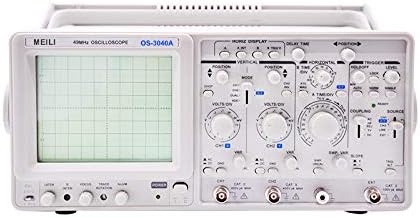
شکل ۲: مخکینۍ تخته. This image shows the front panel of the oscilloscope, featuring the CRT display on the left and various control knobs and input connectors on the right.
- CRT Display: 6-inch rectangular screen with internal graticule (8x10 divisions).
- Vertical Controls (CH1/CH2): VOLTS/DIV, POSITION, AC/DC/GND coupling, MODE (CH1, CH2, DUAL, ADD).
- Horizontal Controls: TIME/DIV, POSITION, X-Y mode.
- د محرک کنټرولونه: LEVEL, MODE (AUTO, NORM, TV-V, TV-H), SOURCE (CH1, CH2, LINE, EXT), COUPLING (AC, DC, HF REJ, LF REJ).
- ان پټ نښلونکي: CH1, CH2, EXT TRIG.
- د کیلیبریشن محصول: For probe compensation.
- د بریښنا سویچ: آن/بند کنټرول.
4.2 شاته پینل

شکل ۳.۲: شاته پینل. This image shows the rear panel of the oscilloscope, including the power input, fuse holder, and various warning labels.
- د AC بریښنا داخلول: د بریښنا تار لپاره نښلونکی.
- د فیوز هولډر: محافظتي فیوز لري.
- والیtage ټاکونکی: Allows selection between 110V and 220V AC operation.
- Z-AXIS Input: For external intensity modulation.
- CAL Output: Calibration signal output.
5. ترتیب کول
- د بسته بندۍ او تفتیش کول: Carefully remove the oscilloscope from its packaging. Inspect the instrument for any signs of physical damage.
- د بریښنا پیوستون:
- ډاډ ترلاسه کړئ چې د بریښنا سویچ په بند حالت کې دی.
- والیت تایید کړئtage selector on the rear panel matches your local power supply (110V or 220V).
- Connect the supplied power cord to the AC power input on the rear panel and then to a grounded power outlet.
- د پلټنې اړیکه: Connect the oscilloscope probes to the CH1 and/or CH2 input BNC connectors on the front panel.
- د پلټنې جبران: Before taking measurements, compensate your probes. Connect the probe tip to the CAL output terminal and the ground clip to the ground terminal. Adjust the probe's compensation trimmer (usually on the probe body) until a stable, square waveform is displayed on the screen.
6. عملیاتي لارښوونې
This section outlines the basic operation of the MCH OS-3040A oscilloscope.
۴.۱ پاور آن او ابتدايي ښودنه
- د بریښنا سویچ چالان کړئ.
- Allow a few moments for the display to stabilize. Adjust the INTENSITY and FOCUS knobs for a clear trace.
- Set the vertical MODE to CH1, horizontal TIME/DIV to a mid-range setting (e.g., 1ms), and trigger MODE to AUTO.
6.2 Vertical System (CH1, CH2)
- VOLTS/DIV: Selects the vertical sensitivity (voltage per division). Rotate to adjust the amplitude of the displayed waveform.
- موقف: Moves the waveform vertically on the screen.
- AC/DC/GND Coupling:
- AC: Blocks DC components, displaying only the AC portion of the signal.
- ډي سي: Displays both AC and DC components of the signal.
- GND: Disconnects the input signal and grounds the input amplifier, displaying a zero-volt reference line.
- لارښوونه: Selects the display mode for multiple channels.
- CH1: Displays only the signal from Channel 1.
- CH2: Displays only the signal from Channel 2.
- DUAL (ALT/CHOP): Displays both CH1 and CH2.
- ALT (Alternate): Displays channels alternately, suitable for higher frequencies.
- CHOP (Chopped): Displays channels by rapidly switching between them, suitable for lower frequencies.
- اضافه کول: Displays the algebraic sum of CH1 and CH2 signals.
6.3 Horizontal System
- TIME/DIV: Selects the horizontal sweep speed (time per division). Rotate to adjust the time scale of the displayed waveform.
- موقف: Moves the waveform horizontally on the screen.
- XY حالت: Used for displaying Lissajous figures or phase relationships between two signals. CH1 typically controls the X-axis, and CH2 controls the Y-axis.
۵.۲ د محرک سیسټم
The trigger system synchronizes the horizontal sweep with a specific point on the input signal, providing a stable waveform display.
- کچه: حجم تنظیمويtage level at which the trigger occurs.
- لارښوونه:
- اتو: Provides a free-running sweep if no trigger signal is present, ensuring a trace is always visible.
- نورم (نورمال): Requires a trigger signal to initiate a sweep. If no trigger is present, no trace will be displayed.
- TV-V (TV-Vertical): For triggering on vertical sync pulses of video signals.
- TV-H (TV-Horizontal): For triggering on horizontal sync pulses of video signals.
- سرچینه: Selects the signal source for triggering.
- CH1: Triggers from the Channel 1 signal.
- CH2: Triggers from the Channel 2 signal.
- کرښه: Triggers from the AC power line frequency.
- EXT: Triggers from an external signal connected to the EXT TRIG input.
- یوځای کول: Determines how the trigger signal is coupled.
- AC: AC couples the trigger signal, blocking DC components.
- ډي سي: DC couples the trigger signal, including DC components.
- HF REJ (High Frequency Reject): Filters out high-frequency components from the trigger signal.
- LF REJ (Low Frequency Reject): Filters out low-frequency components from the trigger signal.
7. ساتنه
- پاکول: Clean the exterior of the oscilloscope with a soft, damp cloth. Do not use abrasive cleaners or solvents. Ensure the instrument is powered off and unplugged before cleaning.
- د فیوز بدلول: If the oscilloscope does not power on, check the fuse located on the rear panel. Replace it only with a fuse of the same type and rating. Refer to the specifications for fuse details.
- ذخیره کول: Store the oscilloscope in a clean, dry environment, away from direct sunlight and extreme temperatures.
- خدمت کول: Internal adjustments or repairs should only be performed by qualified service personnel.
8. ستونزه حل کول
| ستونزه | احتمالي لامل | د حل لاره |
|---|---|---|
| نه ښودنه/نه بریښنا | Power cord disconnected, fuse blown, power switch off. | Check power cord connection, replace fuse if necessary, ensure power switch is ON. |
| No trace on screen | INTENSITY too low, FOCUS out of adjustment, POSITION off-screen, trigger MODE set to NORM with no signal. | Adjust INTENSITY and FOCUS, center POSITION controls, set trigger MODE to AUTO or ensure a valid trigger signal is present. |
| بې ثباته څپې بڼه | Incorrect trigger settings (LEVEL, MODE, SOURCE, COUPLING), probe compensation incorrect. | Adjust trigger LEVEL, MODE, SOURCE, and COUPLING. Perform probe compensation. |
| تحریف شوی څپې | Incorrect VOLTS/DIV or TIME/DIV settings, probe attenuation mismatch, input signal exceeding limits. | Adjust VOLTS/DIV and TIME/DIV. Ensure probe attenuation matches oscilloscope setting. Verify input signal is within instrument limits. |
9. مشخصات
The following are the technical specifications for the MCH OS-3040A Analogue Oscilloscope:
| پیرامیټر | مشخصات |
|---|---|
| ماډل | OS-3040A |
| بانډ ویت | 40 MHz (Vertical) |
| چینلونه | دوه ګونی چینل |
| CRT Display | 6-inch Rectangular, Internal Graticule, 8x10 divisions (1 div = 1 cm) |
| عمودی حساسیت | 5mV/div to 5V/div (10 steps) |
| د وخت پورته کیدل | ≤17.5 ns |
| د ننوتلو خنډ | 1 MΩ ±2%, 25 pF ±5 pF |
| د میکس داخلي حجمtage | 400 V (DC+AC لوړوالی) |
| د ښودلو طریقې | CH1, CH2, DUAL (ALT/CHOP), ADD |
| Horizontal Sweep Time | 0.2 µs/div to 0.5 s/div (20 steps) |
| سویپ میګنیفیکیشن | x10 |
| X-Y Phase Difference | ≤3° DC-50 kHz |
| د محرک حالتونه | AUTO, NORM, TV-V, TV-H |
| د ټریګر سرچینه | CH1, CH2, LINE, EXT |
| ټریګر جوړه کول | AC, DC, HF REJ, LF REJ |
| Calibration Output | 0.5 Vp-p ±10%, 1 kHz ±20% |
| د بریښنا رسول | 110V/220V AC ±10%, 50/60Hz |
| د بریښنا مصرف | نږدې 40 W |
| ابعاد (W×H×D) | 310 × 130 × 370 mm |
| وزن | 8.5 کیلو ګرامه (خالص) |

شکل ۵: تفصيلي مشخصات. This image provides a comprehensive table of technical specifications for the OS-3040A model.
یادونه: مشخصات د مخکینۍ خبرتیا پرته د بدلون تابع دي.
10. تضمین او ملاتړ
For warranty information, technical support, or service inquiries, please contact your authorized MCH dealer or the point of purchase. Keep your purchase receipt as proof of purchase for warranty claims.


