پیژندنه
This instruction manual provides detailed information on the installation, operation, and maintenance of your Blaupunkt DENVER 212 DAB BT car radio. Please read this manual thoroughly before using the device to ensure proper functionality and to prevent damage. Keep this manual for future reference.

Image: Blaupunkt DENVER 212 DAB BT product banner.
د خوندیتوب معلومات
- Ensure proper installation by a qualified professional to avoid electrical hazards or damage to your vehicle.
- وسیله په داسې ډول مه چلوئ چې ستاسو د موټر چلولو مخه ونیسي. تل د سړک خوندیتوب ته لومړیتوب ورکړئ.
- د واحد د سختې تودوخې، مستقیم لمر وړانګو، یا رطوبت سره د مخ کیدو څخه ډډه وکړئ.
- Use only approved accessories and parts.
- Disconnect the vehicle's battery before installation to prevent short circuits.
د بسته محتويات
ډاډ ترلاسه کړئ چې ټول توکي په کڅوړه کې شتون لري:
- Blaupunkt DENVER 212 DAB BT Car Radio Unit
- د پورته کولو چوکاټ
- د تارونو هارنس (ISO نښلونکی)
- DAB+ Antenna (if included with specific models)
- بهرنی مایکروفون
- Disassembly Keys
- د کارونکي لارښود (دا لاسوند)
محصول پای ته ورسیدview
The Blaupunkt DENVER 212 DAB BT is a 1-DIN car radio featuring DAB+ digital radio, Bluetooth hands-free calling, and media streaming. It offers a robust design and short installation depth for versatile vehicle compatibility.

Image: Front panel of the Blaupunkt DENVER 212 DAB BT, showing display, control knobs, and buttons.
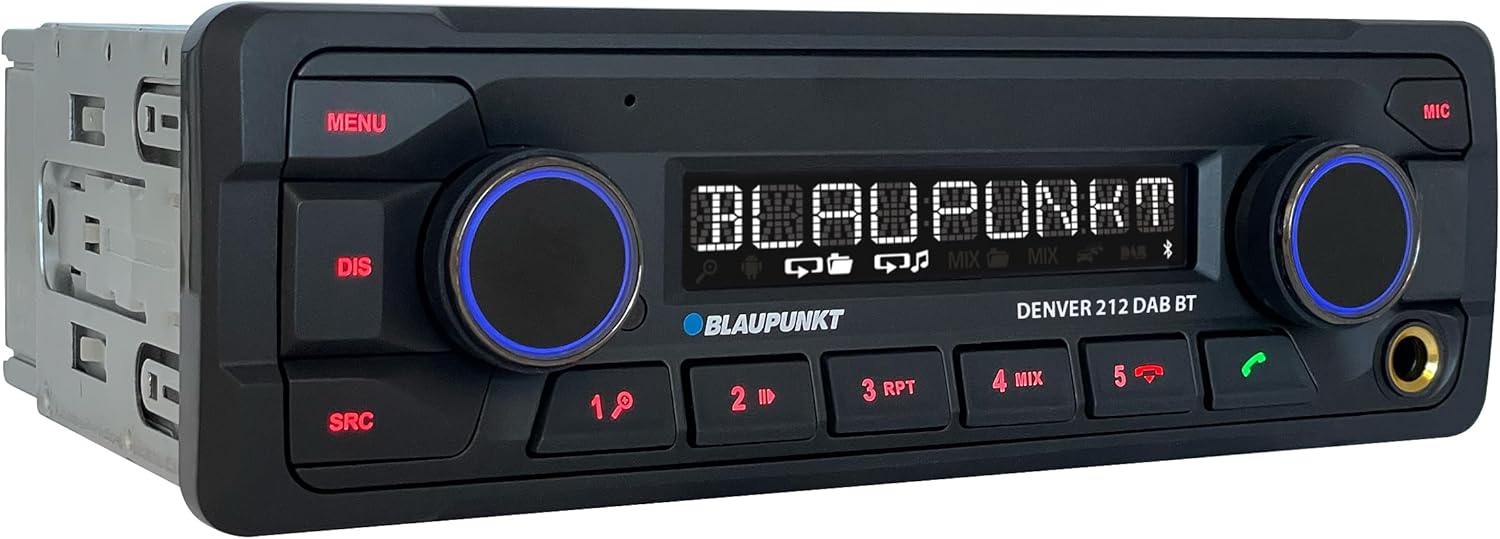
انځور: زاویه لرونکی view of the Blaupunkt DENVER 212 DAB BT, highlighting its compact design.
د مخکینۍ پینل کنټرولونه:
- د مینو تڼۍ: د سیسټم ترتیباتو او اختیارونو ته لاسرسی لري.
- د DIS تڼۍ: د معلوماتو ښودنه بدلوي.
- د SRC تڼۍ: Selects audio source (Radio, DAB, Bluetooth, USB, AUX).
- Volume Knob (Left): Adjusts audio volume. Press to mute/unmute.
- Selection Knob (Right): مینو ته ځي او انتخابونه غوره کوي.
- مخکې ټاکل شوي تڼۍ (۱-۶): Store and recall radio stations, control media playback.
- د زنګ وهلو تڼۍ (شنه/سور): د بلوتوث زنګونو ته ځواب ورکړئ/پای ورکړئ.
- USB پورټ: د میډیا پلې بیک لپاره د USB ذخیره کولو وسایل وصل کړئ.
- د AUX ان پټ (۳.۵ ملي میتر جیک): بهرنۍ آډیو سرچینې وصل کړئ.
تنظیم او نصب کول
د نصبولو مرحلې:
- چمتووالی: د خپل موټر د بیټرۍ منفي ټرمینل جلا کړئ.
- پورته کول: Insert the supplied mounting frame into the vehicle's 1-DIN opening. Bend the tabs to secure it.
- تارونه: Connect the wiring harness according to the diagram below. Ensure all connections are secure.
- د انتن پیوستون: Connect the FM antenna and the DAB+ antenna (if applicable) to the corresponding inputs on the rear of the radio.
- د مایکروفون اړیکه: Connect the external microphone to the designated input for optimal hands-free call quality.
- Insert Unit: Slide the radio unit into the mounting frame until it clicks into place.
- وروستی چک: Reconnect the vehicle's battery and test the unit.
د تارونو ډیاګرام (عمومي):
| د تار رنګ | فعالیت |
|---|---|
| ژیړ | ثابت ۱۲ ولټ (بیټرۍ) |
| سور | سویچ شوی 12V (اوریدل) |
| تور | ځمکه |
| آبي | د بریښنا انتن / Ampلیفایر ریموټ |
| نارنجي/سپين | روښانه کول |
| Speaker Wires (e.g., White, Grey, Green, Purple pairs) | Connect to vehicle speakers (Front Left, Front Right, Rear Left, Rear Right) |
| د سټیرینګ ویل کنټرول ان پټ | Connect to vehicle's steering wheel control interface (if applicable) |
Note: Specific wire colors may vary. Always refer to your vehicle's wiring diagram and the radio's included diagram for precise connections.

Image: The Blaupunkt DENVER 212 DAB BT car radio seamlessly integrated into a vehicle's dashboard.
عملیاتي لارښوونې
1. اساسي دندې:
- پاور آن/بند: Press the volume knob (left) briefly to turn the unit on. Press and hold to turn off.
- د حجم کنټرول: Rotate the volume knob (left) to adjust the sound level.
- د سرچینې انتخاب: فشار ورکړئ SRC button repeatedly to cycle through available audio sources (FM, DAB, Bluetooth Audio, USB, AUX).
- مینو نیویگیشن: فشار ورکړئ مینو button to enter the main menu. Use the right knob to navigate and select options.
2. Radio (FM/DAB+):
- د راډیو حالت غوره کول: مطبوعاتي SRC until FM or DAB is selected.
- اتوماتیک ټوننګ: In FM/DAB mode, press and hold the right knob or seek buttons (if available) to automatically search for stations.
- لاسي لارښود: Briefly press the right knob or seek buttons to fine-tune frequencies.
- د زېرمو ذخیره کول: Tune to a desired station, then press and hold one of the numeric preset buttons (1-6) until you hear a confirmation beep.
- د وړاندې کولو یادول: Briefly press a numeric preset button (1-6) to recall a stored station.
۳. د بلوتوث عملیات:
- د وسیلې جوړه کول:
- ډاډ ترلاسه کړئ چې ستاسو په ګرځنده وسیله کې بلوتوټ فعال دی.
- Select "Bluetooth" as the source on the car radio. The display will show "PAIRING".
- On your mobile device, search for Bluetooth devices and select "BLAUPUNKT DENVER".
- که غوښتنه وشي، په دواړو وسیلو کې جوړه تایید کړئ.
- د لاسونو څخه وړیا تلیفون کول:
- د زنګ په ځواب کې: د شنه کال تڼۍ فشار ورکړئ.
- د زنګ وهلو پای: Press the red call button.
- تلیفون کول: Dial from your phone; audio will transfer to the car radio.
- د بلوتوث آډیو سټریمینګ: Once paired, select "Bluetooth Audio" as the source. Play music from your mobile device, and it will stream through the car radio. Use the preset buttons (e.g., 4 for MIX, 5 for RPT) for playback control (play/pause, skip tracks).
4. USB and AUX Input:
- USB پلیباک: Insert a USB storage device into the front USB port. The unit will automatically switch to USB mode and begin playback.
- AUX داخلول: Connect an external audio device (e.g., MP3 player) to the 3.5mm AUX input jack using an audio cable. Select "AUX" as the source.
5. Sound Settings (Equalizer):
- فشار ورکړئ مینو button, then navigate to "AUDIO" or "EQ" settings.
- Adjust bass, treble, balance, and fader settings to your preference.
- Pre-set equalizer modes (e.g., Pop, Rock, Classic) may be available.
ویډیو: یو اوورview of the Blaupunkt DENVER 212 DAB BT car radio's features and basic operation.
ساتنه
- پاکول: د واحد د مخکینۍ تختې د پاکولو لپاره نرم، وچ ټوکر وکاروئ. د کثافاتو پاکوونکي یا محلولونه مه کاروئ.
- USB پورټ: د USB پورټ د دوړو او کثافاتو څخه پاک وساتئ.
- د فرم ویئر تازه معلومات: رسمي بلوپنکټ وګورئ webستاسو د ماډل لپاره د هر ډول شته فرم ویئر تازه معلوماتو لپاره په دوره یي ډول سایټ وګورئ.
د ستونزو حل کول
| ستونزه | احتمالي لامل | د حل لاره |
|---|---|---|
| هیڅ ځواک نشته | Blown fuse; incorrect wiring (constant/switched 12V); loose connection. | Check vehicle fuses and the radio's fuse. Verify wiring connections, especially constant and ignition power. Ensure the unit is properly seated. |
| غږ نشته | غږ ډېر ټیټ دی؛ خاموش فعال شوی دی؛ د سپیکر ناسم تارونه؛ ampد ژوندي کولو مسلې. | Increase volume. Check if mute is active. Verify speaker connections. If an external ampکه چیرې لایفیر کارول کیږي، نو د هغې بریښنا او اتصالات وګورئ. |
| Poor radio reception (FM/DAB) | Antenna not connected; damaged antenna; weak signal area. | Ensure antenna is securely connected. Check antenna for damage. Consider a stronger antenna or signal booster if in a weak signal area. For DAB+, ensure the DAB antenna is correctly installed and positioned. |
| د بلوتوث پیوستون مسلې | Device not in pairing mode; incorrect wiring (ignition+ and constant+); interference. | Ensure both devices are in pairing mode. Delete previous pairings and try again. Verify that the constant 12V and switched 12V wires are correctly connected to the radio, as improper wiring can affect Bluetooth stability. Move away from other Bluetooth devices. |
| USB نه پیژندل شوی | بې ملاتړه file format; USB drive not formatted correctly; damaged USB drive. | غږ ډاډمن کړئ files are in supported formats (e.g., MP3, WMA). Format the USB drive to FAT32. Try a different USB drive. |
مشخصات
| فیچر | تفصیل |
|---|---|
| برانډ | BLAUPUNKT |
| د ماډل شمیره | Denver 212 DAB BT |
| رنګ | تور |
| د ارتباط ټیکنالوژي | بلوتوث، USB |
| د نښلونکي ډول | 3.5 mm Jack, USB |
| ځانګړي ځانګړتیاوې | DAB, RDS, Equalizer, Bluetooth Hands-free |
| مطابقت لرونکې وسیلې | سمارټ فون |
| ټول USB پورټونه | 1 |
| د آډیو وتلې حالت | سټیریو |
| شاوخوا د غږ چینل ترتیب کول | 4.0 |
| د محصول ابعاد | 12D x 17.8W x 5.2H سانتي متره |
| جوړونکی | Blaupunkt |
| د پرزو شتون | 1 کال |
تضمین او ملاتړ
This Blaupunkt product comes with a manufacturer's warranty. For specific warranty terms and conditions, please refer to the warranty card included with your product or visit the official Blaupunkt website. For technical support, troubleshooting assistance, or spare parts inquiries, please contact Blaupunkt customer service through their official channels.
اضافي پرزې عموما د پیرود نیټې څخه د یو کال لپاره شتون لري.
رسمي بلوپنکټ Webسایټ: www.blaupunkt.com