1. پیژندنه
The Elitech Tlog B100EH is a wireless temperature and humidity data logger designed for precise environmental monitoring. It features an external sensor, a large recording capacity of 32,000 points, and the ability to generate PDF reports. This manual provides detailed instructions for the setup, operation, maintenance, and troubleshooting of your device.

Image 1.1: Elitech Tlog B100EH Data Logger with external temperature and humidity sensor.
2. محصول ختم شوview
Familiarize yourself with the components of your Tlog B100EH data logger.

Image 2.1: Key components of the Elitech Tlog B100EH, including the external sensor, LED indicators, LCD screen, control buttons, and USB cover.
- بهرني سینسر: د تودوخې او رطوبت اندازه کوي.
- LED Indicator (Mode): Indicates device status (e.g., logging, stopped).
- LED Indicator (Alarm): Indicates if recorded data exceeds set alarm thresholds.
- LCD سکرین: Displays current readings, battery status, and logging status.
- د پیل تڼۍ: Initiates data logging.
- د بندولو تڼۍ: Halts data logging.
- د USB پوښ: Protects the integrated USB connector for PC connection.
3. ترتیب کول
3.1 د بیټرۍ نصب کول
The Tlog B100EH uses a replaceable lithium battery (included). Ensure the battery is correctly installed before first use.

انځور 3.1: شاته view of the data logger showing the battery compartment. Ensure proper battery orientation.
۵.۳ د سافټویر او اپلیکیشن نصبول
To configure the data logger and view detailed reports, install the Elitech software on your computer or the Elitech App on your iOS/Android device.
- د کمپیوټر سافټویر: Download the Elitech data management software from the official Elitech webسایټ. د نصبولو لپاره په سکرین کې لارښوونې تعقیب کړئ.
- د موبایل اپلیکیشن: لټون 'Elitech' in the Apple App Store or Google Play Store and install the application.
3.3 ابتدايي ترتیب
Before starting a new logging session, connect the device to your computer via USB or pair it with the Elitech App via Bluetooth to set parameters.

Image 3.2: The data logger connected to a computer via USB and displaying data on a mobile application.
Using the software/app, you can configure:
- د ننوتلو وقفه
- Start/Stop mode
- Alarm thresholds for temperature and humidity
- د پیل وخت ځنډول
- Unit of measurement (°C/°F)
4. عملیاتي لارښوونې
4.1 Starting and Stopping Logging
The Tlog B100EH features a button recess design to prevent accidental activation or deactivation during transport.
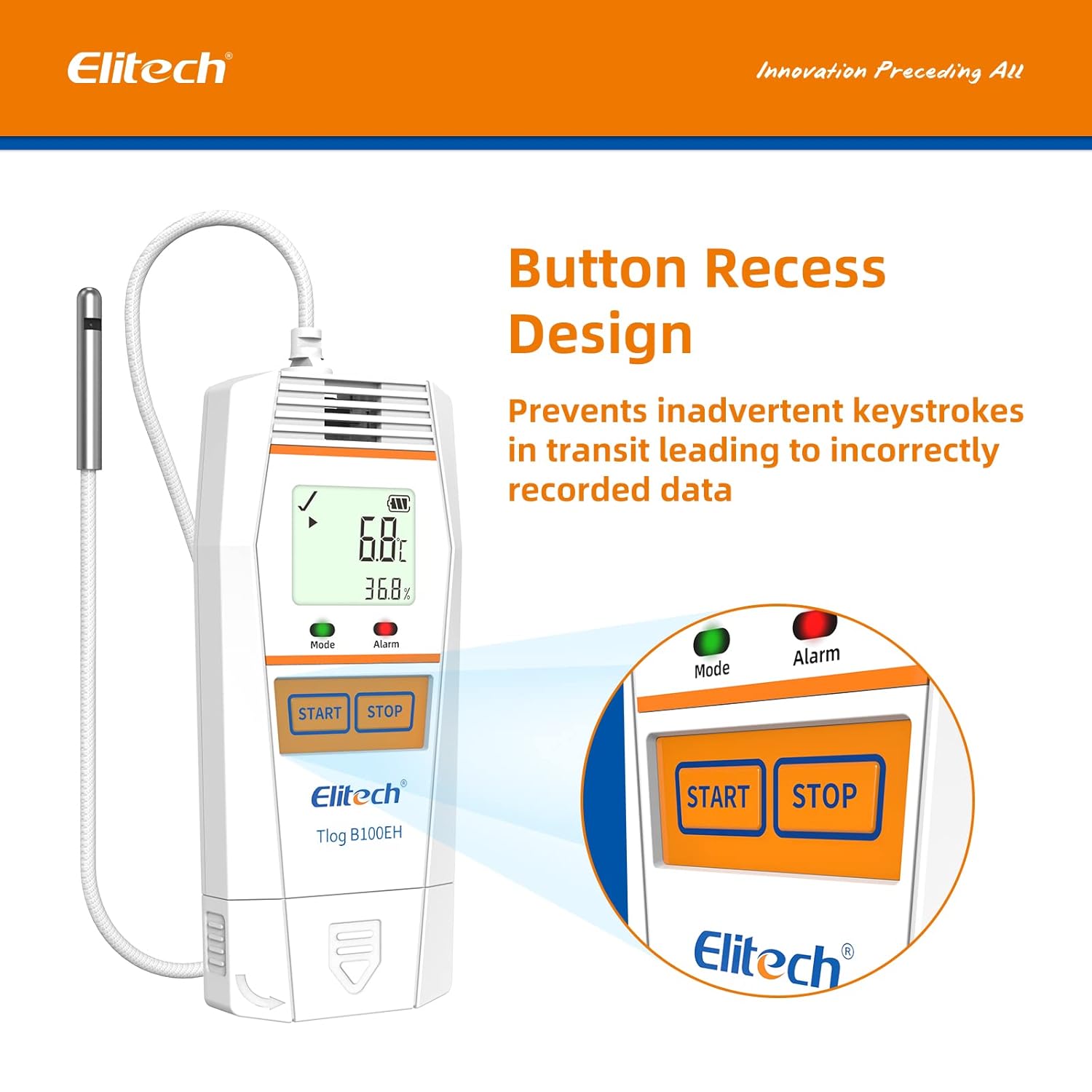
انځور ۳.۱: نږدې انځور view of the recessed START and STOP buttons on the data logger.
- To Start Logging: فشار ورکړئ او ونیسئ START button until the 'Mode' LED flashes green, indicating logging has begun.
- To Stop Logging: فشار ورکړئ او ونیسئ ودروئ button until the 'Mode' LED stops flashing, indicating logging has ceased.
۵.۱ د څارنې معلومات
The LCD screen displays real-time temperature and humidity readings, battery level, and logging status. The 'Alarm' LED will illuminate if readings exceed configured thresholds.
4.3 Data Export and Report Generation
After logging is complete, connect the data logger to a computer via USB or use the Elitech App to download the recorded data.

Image 4.2: Data export interface showing the data logger connected to a computer and a mobile device, illustrating multi-format data export options.

Image 4.3: Icons representing the available data report formats: PDF, Excel, and TXT.
The software/app allows you to generate reports in various formats, including PDF, Excel, and TXT, for analysis and record-keeping.
5. ساتنه
5.1 د بیټرۍ بدلول
When the battery indicator on the LCD shows low power, replace the lithium battery to ensure continuous operation. Refer to Section 3.1 for battery access.
5.2 پاکول
وسیله د نرم او وچ ټوکر سره پاک کړئ. د کثافاتو پاکوونکي مه کاروئ او نه هم وسیله په اوبو کې ډوب کړئ.
5.3 ذخیره کول
د معلوماتو لاګر په یخ او وچ ځای کې د مستقیم لمر وړانګو او سختو تودوخې څخه لرې وساتئ کله چې کارول نه وي.
6. ستونزه حل کول
- وسیله نه فعاله کیږي: د بیټرۍ نصب او د چارج کچه وګورئ. که اړتیا وي نو بیټرۍ بدله کړئ.
- د بلوتوث له لارې نشي نښلول کیدی: Ensure Bluetooth is enabled on your mobile device and the data logger is within range. Restart both devices and try pairing again.
- Data not logging: Verify that logging was initiated correctly by checking the 'Mode' LED. Ensure sufficient memory is available.
- ناسم لوستل: Ensure the external sensor is clean and unobstructed. Avoid placing the sensor in direct sunlight or near heat sources.
- Software/App issues: Ensure you have the latest version of the software/app. Refer to the Elitech support website for common software issues.
For further assistance, contact Elitech customer support.
7. مشخصات

Image 7.1: Physical dimensions and operational temperature/humidity ranges of the data logger.

Image 7.2: Details on sensor accuracy, resolution, and total data logging capacity.

Image 7.3: Visual representation of the temperature and humidity sensor accuracy.
| فیچر | تفصیل |
|---|---|
| د ماډل شمیره | Tlog B100EH |
| د حرارت درجه | -40 °F څخه تر 185 °F (-40 ° C څخه تر 85 ° C) |
| د رطوبت اندازه | د 10٪ څخه تر 90٪ RH |
| د تودوخې دقت | ±۱.۸℉ (±۱.۰ درجې سانتي ګراد) |
| د رطوبت دقت | ±3% RH |
| د ثبتولو وړتیا | 32,000 ټکي |
| د بیټرۍ ډول | 1 لیتیم فلزي بیټرۍ (شامل) |
| د محصول ابعاد | 6.12 x 1.85 x 0.64 انچه |
| د توکي وزن | 4.97 اونس (0.14 کیلوګرامه) |
| د نصب کولو ډول | ټابلیټ |
7.1 Quality Certifications

انځور 7.4: اوورview of Elitech's quality certifications, including WHO PQS, FDA, and NIST compliance.
The Elitech Tlog B100EH complies with various quality standards, including:
- World Health Organization PQS Approved
- FDA21 CFR Part 11 Compliance
- ISO9001:2015

انځور ۶: پخوانیample of a calibration certificate, showing calibration and expiration dates.
Calibration certificates are available upon request. Please contact Elitech customer support for details.
8. تضمین
Elitech provides a standard manufacturer's warranty for this product. Please refer to the warranty card included with your purchase or visit the official Elitech webد تضمین د تفصيلي شرایطو او مقرراتو لپاره سایټ.
9. ملاتړ
For technical assistance, troubleshooting, or any inquiries regarding your Elitech Tlog B100EH data logger, please contact Elitech customer support. 24/7 US Technician Support is available via email and phone.
- بریښنالیک: د خپل محصول بسته بندۍ یا ایلیټیک ته مراجعه وکړئ webد اړیکو معلوماتو لپاره سایټ.
- تلیفون: د خپل محصول بسته بندۍ یا ایلیټیک ته مراجعه وکړئ webد اړیکو معلوماتو لپاره سایټ.
- آنلاین سرچینې: د ایلیټیک رسمي ویب پاڼې ته مراجعه وکړئ webد FAQs، سافټویر ډاونلوډونو، او اضافي ملاتړ موادو لپاره سایټ.


