پیژندنه
This manual provides essential information for the safe and efficient operation of your Dual MCR 4 Portable DAB+/FM Radio. This device offers both digital DAB+ and analog FM radio reception, ensuring a wide range of listening options. Its color TFT display enhances usability by showing station names and additional information. With intuitive controls, auxiliary input, and headphone jack, the MCR 4 is designed for versatile and enjoyable audio experiences.
د خوندیتوب معلومات
- د وسیلې کارولو دمخه ټولې لارښوونې په دقت سره ولولئ.
- وسیله د اوبو، رطوبت او لوړې تودوخې څخه لرې وساتئ.
- د واحد د جلا کولو یا بدلولو هڅه مه کوئ. ټول خدمتونه وړ پرسونل ته راجع کړئ.
- Use only the provided power adapter or recommended battery types.
- د عملیاتو په جریان کې د وسیلې شاوخوا مناسب هوا ورکول ډاډمن کړئ.
- د بیټرۍ د ځایی مقرراتو سره سم په مسؤلیت سره تصفیه کړئ.
د بسته محتويات
مهرباني وکړئ وګورئ چې ټول توکي په بسته کې شتون لري:
- Dual MCR 4 Main Unit
- د بریښنا اډاپټر
- د کارن لارښود
محصول پای ته ورسیدview
The Dual MCR 4 features a compact design with intuitive controls for easy access to its functions. Key components include:
- Color TFT Display: د سټیشن معلومات، وخت، او د مینو اختیارونه ښیې.
- روټري نوب: For tuning, volume control, and menu navigation.
- Memory Buttons: To save and recall your favorite radio stations.
- دوربین انتن: For optimal radio signal reception.
- Auxiliary Input (AUX-IN): Located at the back, for connecting external audio devices.
- د سر غوږ جیک: Located at the back, for private listening.
- Mechanical On/Off Switch: Located at the back, for direct power control.
- Passive Membrane: Located at the back, contributing to exceptional sound quality.
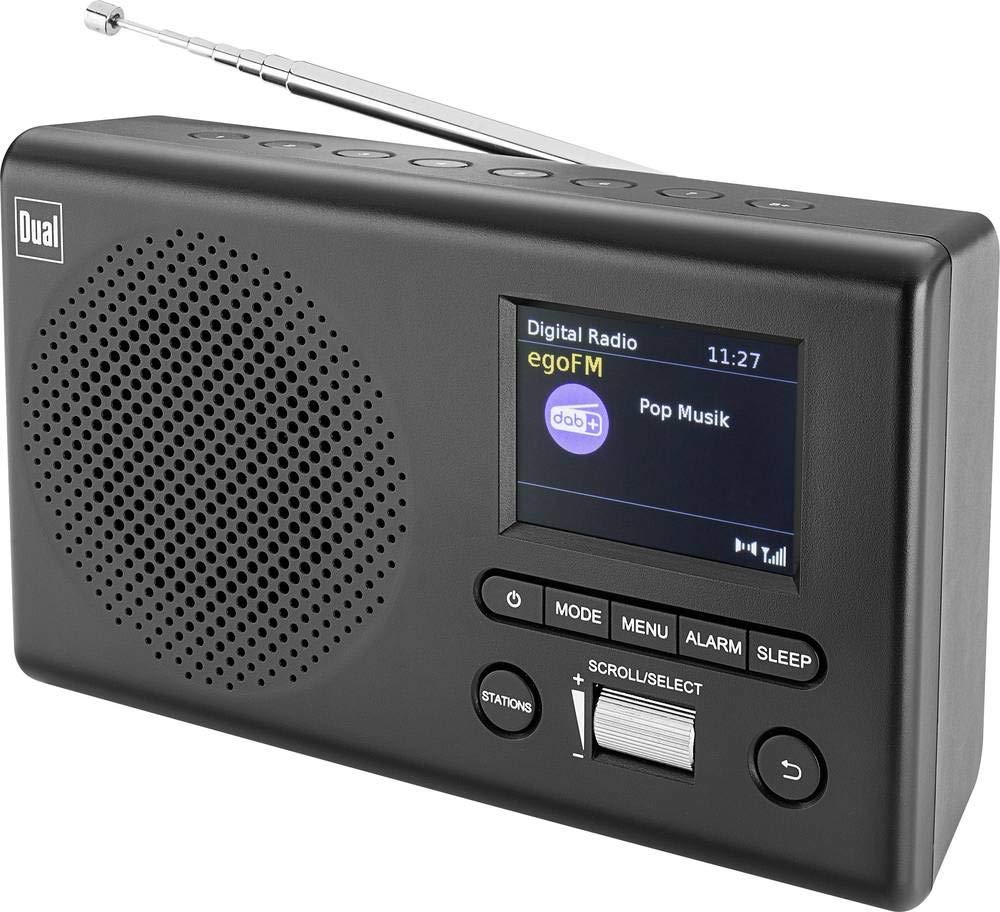
انځور: مخکینۍ برخه view of the Dual MCR 4 Portable DAB+/FM Radio, showing the color TFT display, rotary knob, and control buttons. The radio has a black and silver finish.
چمتو کول
1. وسیلې ته ځواک ورکول
The Dual MCR 4 can be powered by either the included AC power adapter or batteries, offering portability.
- د AC اډاپټر کارول: Connect the power adapter to the DC IN port on the back of the radio and plug the other end into a standard wall outlet.
- د بیټرۍ کارول: Open the battery compartment on the bottom/back of the radio and insert the required batteries (type and quantity usually specified inside the compartment or in the full manual). Ensure correct polarity.
۴. د انتن تنظیم کول
Extend the telescopic antenna fully for optimal reception of both DAB+ and FM radio signals. Adjust its position for the best signal quality.
3. Initial Power On and Station Scan
After connecting power, switch on the radio using the mechanical ON/OFF switch at the back. The radio will typically perform an automatic station scan upon first use, searching for available digital (DAB+) and analog (FM) radio stations. This process may take a few moments.
عملیاتي لارښوونې
1. بنسټیز عملیات
- پاور آن/بند: Use the mechanical switch at the back. For standby, a dedicated button on the front might be available (refer to physical unit).
- د حجم کنټرول: Rotate the main rotary knob to adjust the listening volume.
۷.۱. د DAB+ راډیو حالت
- Selecting DAB+ Mode: Press the MODE button (if available) or navigate through the menu using the rotary knob until DAB+ mode is selected.
- د سټیشن انتخاب: After an automatic scan, use the rotary knob to scroll through the list of available DAB+ stations. Press the knob to confirm your selection.
- د پریزیټ خوندي کول: Tune to your desired station. Press and hold a memory button (e.g., 1-5) until the display confirms the station is saved.
- د وړاندې کولو یادول: Briefly press the corresponding memory button to recall a saved station.
- معلومات ښکاره کول: The color TFT display will show station name, program information (DLS), and potentially station logos or slideshows.
3. د ایف ایم راډیو حالت
- Selecting FM Mode: Press the MODE button or navigate through the menu until FM mode is selected.
- لاسي لارښود: Rotate the tuning knob to manually adjust the frequency.
- اتوماتیک سکین: Press and hold the tuning knob or a dedicated scan button to automatically search for the next available FM station.
- د پریزیټ خوندي کول: Tune to your desired FM station. Press and hold a memory button until the display confirms the station is saved.
- د وړاندې کولو یادول: Briefly press the corresponding memory button to recall a saved station.
۴. مرستندویه ان پټ (AUX-IN)
Connect an external audio device (e.g., smartphone, MP3 player) to the AUX-IN port on the back of the radio using a 3.5mm audio cable. Select AUX mode on the radio to play audio from the connected device.
۷. د هیډفون کارول
For private listening, plug standard 3.5mm headphones into the headphone jack located on the back of the unit. The internal speaker will automatically mute.
ساتنه
- پاکول: راډیو په نرم او وچ ټوکر سره پاک کړئ. د کثافاتو پاکوونکي یا محلول مه کاروئ.
- ذخیره کول: If storing for an extended period, remove batteries and store the unit in a cool, dry place.
- د انتن پاملرنه: د زیان د مخنیوي لپاره د ټیلسکوپیک انتن په نرمۍ سره سمبال کړئ.
د ستونزو حل کول
| ستونزه | احتمالي حل |
|---|---|
| هیڅ ځواک نشته |
|
| د راډیو ضعیف استقبال |
|
| د سپیکرو څخه هیڅ غږ نشته |
|
مشخصات
| برانډ | دوه ګونی |
| د ماډل شمیره | 76074 |
| رنګ | تور، سپین زر |
| د ټون کولو ټیکنالوژي | DAB+، FM |
| د ارتباط ټیکنالوژي | Auxiliary (AUX-IN) |
| ځانګړي ځانګړتیاوې | Portable, Color TFT Display |
| مطابقت لرونکې وسیلې | Headphones, External Audio Devices (via AUX-IN) |
| د بریښنا سرچینه | Mains (AC Adapter), Battery Powered |
| شاملې برخې | Main Unit, Power Adapter, User Manual |
| وړاندیز شوی کارول | موسیقي |
تضمین او ملاتړ
For warranty information and technical support, please refer to the specific warranty card included with your product or contact Dual customer service. The included user manual provides detailed instructions and contact information.