پیژندنه
This manual provides detailed instructions for the proper setup, operation, and maintenance of your Supvan TP76E Black & White Label Printer. Please read this manual thoroughly before using the device to ensure optimal performance and longevity. The Supvan TP76E is designed for efficient label printing, offering monochrome output at speeds up to 25 labels per minute.
د بسته محتويات
د پیل کولو دمخه، ډاډ ترلاسه کړئ چې ټول توکي په کڅوړه کې شتون لري:
- Supvan TP76E Label Printer
- د بریښنا اډاپټر
- USB کیبل
- Sampد لیبل رول
- د کارونکي لارښود (دا لاسوند)
چمتو کول
۱. خلاصول او ځای پر ځای کول
Carefully remove the printer from its packaging. Place the printer on a stable, flat surface with adequate ventilation. Ensure there is enough space around the printer for easy access to ports and for label output.

Figure 1: Supvan TP76E Label Printer (Side View)
This image displays the Supvan TP76E label printer from a side angle, highlighting its integrated keyboard, the transparent cover over the label compartment, and the overall compact design. The handle on the right side is also visible.
2. د بریښنا پیوستون
- Connect the power adapter to the power input port on the printer.
- د بریښنا اډاپټر بله پای په معیاري بریښنایی آوټ لیټ کې ولګوئ.
- Press the power button to turn on the printer. The display should illuminate.
3. Loading Label Roll
The TP76E uses thermal label rolls. Follow these steps to load a new roll:
- Open the transparent cover of the label compartment located at the top of the printer.
- Place the label roll onto the spindle, ensuring the labels feed from the bottom of the roll towards the print head.
- Feed the leading edge of the label through the guide until it is positioned under the print head.
- شفاف پوښ په خوندي توګه وتړئ.
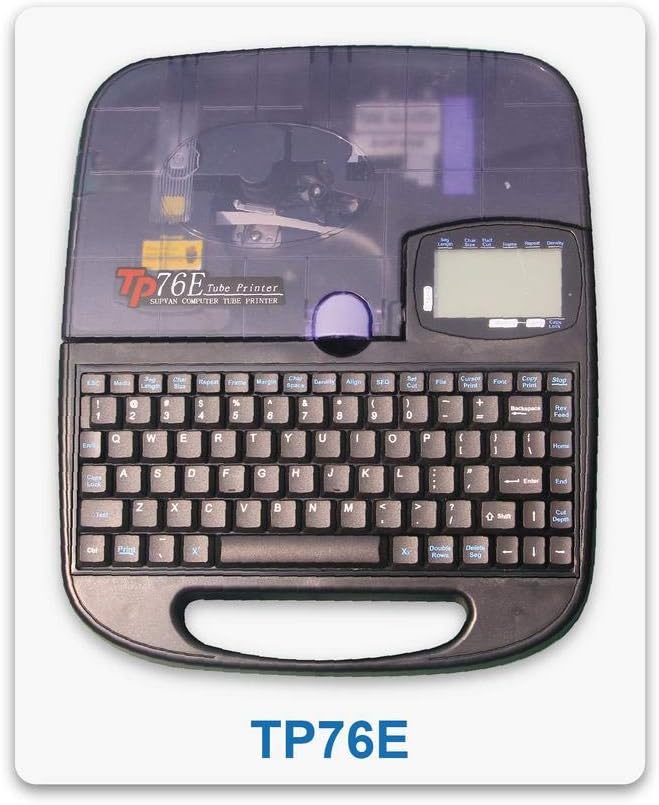
Figure 2: Supvan TP76E Label Printer (Top View)
دا انځور له پورته څخه ښکته وړاندې کوي view of the Supvan TP76E, clearly showing the full QWERTY keyboard layout, the LCD display, and the transparent cover of the label roll compartment. This perspective is useful for understanding the user interface.
4. Connecting to a Computer (Optional)
The TP76E supports USB connectivity for printing from a computer.
- Connect one end of the provided USB cable to the USB port on the printer.
- د USB کیبل بل پای ستاسو په کمپیوټر کې موجود USB پورټ سره وصل کړئ.
- Install the necessary drivers and software from the official Supvan website or the included installation media (if applicable).
عملیاتي لارښوونې
۱. د لیبل بنسټیز جوړول
- پرنټر چالان کړئ.
- Use the integrated QWERTY keyboard to type your desired text. The text will appear on the LCD display.
- Utilize the navigation keys to move the cursor and edit text.
- فشار ورکړئ چاپ د لیبل چاپولو لپاره تڼۍ.
2. Formatting Options
The TP76E offers various formatting options accessible via dedicated keys or menu functions:
- د فاڼې اندازه: Adjust the size of the text to fit your label requirements.
- Bold/Italic: Apply bold or italic styling to your text for emphasis.
- زیری: Add an underline to text.
- چوکاټ: Add decorative frames around your text.
- سمون: Choose left, center, or right alignment for your text.
3. Saving and Recalling Labels
The printer allows you to save frequently used label designs for quick recall:
- After creating a label, navigate to the خوندي کړئ function (refer to the display menu).
- Select an empty memory slot to store the label.
- To recall a saved label, navigate to the یادول or خلاص function and select the desired label from the list.
ساتنه
۴.۱. د چاپ سر پاکول
Regular cleaning of the print head ensures clear and consistent print quality. Clean the print head if you notice faded or incomplete prints.
- Turn off the printer and disconnect the power adapter.
- د لیبل کمپارټمینټ پوښ خلاص کړئ.
- د چاپ سر سطحه په نرمۍ سره د کاټن سویب سره پاک کړئampened with isopropyl alcohol. Do not use water or abrasive cleaners.
- د چاپ سر ته اجازه ورکړئ چې په بشپړه توګه وچ شي مخکې لدې چې پوښ وتړئ او بریښنا بیا وصل کړئ.
2. Replacing Label Rolls
When the label roll is depleted, replace it as follows:
- د لیبل کمپارټمینټ پوښ خلاص کړئ.
- Remove the empty label roll core.
- Insert a new label roll as described in the چمتو کول برخه
- پوښ وتړئ.
د ستونزو حل کول
This section addresses common issues you might encounter with your Supvan TP76E printer.
| ستونزه | احتمالي لامل | د حل لاره |
|---|---|---|
| چاپګر نه چالانیږي | No power supply; Power adapter faulty | Ensure power adapter is securely connected to printer and outlet. Try a different outlet. |
| No labels are printing | Label roll empty; Labels incorrectly loaded; Print head dirty | Replace label roll. Re-load labels correctly. Clean the print head as per maintenance instructions. |
| Print quality is poor/faded | Print head dirty; Low quality labels | Clean the print head. Ensure you are using high-quality thermal labels. |
| چاپګر د کمپیوټر لخوا نه پیژندل کیږي | USB cable faulty; Drivers not installed or outdated | Try a different USB cable or port. Install or update printer drivers from the Supvan webسایټ |
مشخصات
Key technical specifications for the Supvan TP76E Label Printer:
- د ماډل شمیره: Supvan TP76E
- د چاپګر محصول: مونوکروم (تور او سپین)
- د چاپ ټکنالوژي: حرارتي
- ارتباط: USB
- چاپي رسنۍ: لیبلونه
- د اعظمي داخل شیټ ظرفیت: 25 (labels per minute)
- دوه اړخیزه چاپ: نه
- بیټرۍ ته اړتیا ده: نه
تضمین او ملاتړ
For warranty information, technical support, or to purchase accessories and replacement parts, please contact Supvan customer service or visit their official webسایټ
تاسو کولی شئ په رسمي ویب پاڼه کې نور معلومات او ملاتړ سرچینې ومومئ SUPVAN Store on Amazon.
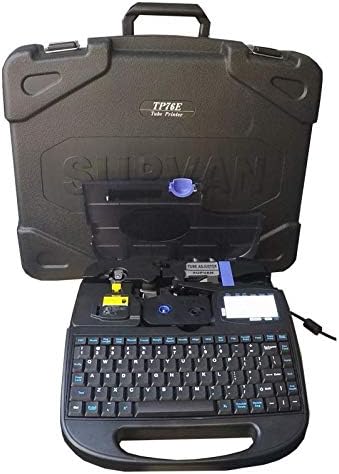
Figure 3: Supvan TP76E Label Printer in Carrying Case
This image shows the Supvan TP76E label printer neatly stored within its custom-fitted protective carrying case, emphasizing its portability and secure storage solution.


