1. پیژندنه
Thank you for choosing the MI MDZ-27-DI Wireless Bluetooth Soundbar. This soundbar is designed to enhance your audio experience for movies, gaming, and music playback. Featuring 8 sound drivers, it delivers rich and balanced audio. Its minimalist design integrates seamlessly with various home décors. This manual provides essential information for setup, operation, and maintenance of your new soundbar.
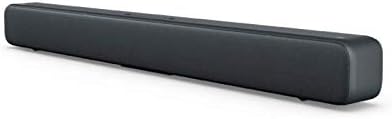
Figure 1.1: The MI MDZ-27-DI Wireless Bluetooth Soundbar, showcasing its sleek, dark grey design and compact form factor.
2. د خوندیتوب معلومات
- Do not expose the soundbar to water or moisture.
- د هوا د بهېدو لارې مه بندوئ. د جوړونکي د لارښوونو سره سم نصب کړئ.
- د تودوخې کومې سرچینې ته نږدې مه نصب کړئ لکه ریډیټرونه، د تودوخې راجسترونه، بخارۍ، یا نور وسایل (په شمول ampلایفیر) چې تودوخه تولیدوي.
- د بریښنا تار د چلولو یا پنچ کیدو څخه خوندي کړئ، په ځانګړې توګه په پلګونو، د اسانتیاو استخراج، او هغه ځای چې دوی د وسایلو څخه وځي.
- یوازې د جوړونکي لخوا مشخص شوي ضمیمې / لوازم وکاروئ.
- دا آله د بریښنا د طوفانونو په جریان کې یا کله چې د اوږدې مودې لپاره نه کارول کیږي خلاص کړئ.
- ټول خدمتونه وړ خدمت پرسونل ته راجع کړئ. خدمت کول اړین دي کله چې وسایل په هر ډول زیانمن شوي وي، لکه د بریښنا رسولو تار یا پلګ زیانمن شوی وي، مایع توی شوي وي یا توکي په وسایلو کې راوتلي وي، وسیله د باران یا رطوبت سره مخ شوې وي، په نورمال ډول کار نه کوي. ، یا غورځول شوی دی.
3. د بسته محتويات
مهرباني وکړئ د لاندې توکو لپاره په بسته کې وګورئ:
- MI MDZ-27-DI Wireless Bluetooth Soundbar
- د بریښنا اډاپټر/کیبل
- S/PDIF Cable (Note: Optical/Aux cables may need to be purchased separately depending on your TV model)
- د کارونکي لارښود (دا لاسوند)
4. د محصول ب Featuresې
The MI MDZ-27-DI Soundbar offers a range of features designed for an immersive audio experience:
- ۶ غږیز چلونکي: Equipped with multiple drivers for a rich and balanced audio profile.
- د ارتباط ډیری اختیارونه: Supports S/PDIF, Optical, Aux-in, Line-in, and Bluetooth 4.2 LE for versatile connection to various devices.
- لږترلږه ډیزاین: A sleek bar shape with a fabric mesh exterior that complements any décor.
- پرمختللی باس: Delivers deep and clear bass for an improved listening experience.
- اسانه ترتیب: Designed for a quick and hassle-free installation, whether on a table or wall-mounted.
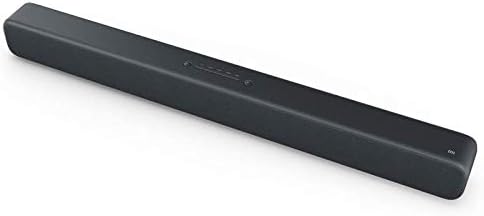
Figure 4.1: The soundbar's top panel, featuring integrated control buttons for power and input selection.
5. ترتیب او نصب کول
۴.۴ د ځای پر ځای کولو اختیارونه
The MI Soundbar can be placed on a tabletop or mounted on a wall.
د ټابلیټ ځای پرځای کول:
Place the soundbar on a stable, flat surface in front of your TV or desired listening area. Ensure there is adequate space around the soundbar for proper ventilation.
دیوال نصبول:
The soundbar is designed for easy wall mounting. To mount, determine the desired mounting height. Mark the position for the first wall hole (A1). Then, horizontally to the right of A1, mark the position for the second wall hole (A2) at a distance of 416 mm. Ensure the wall can support the weight of the soundbar (approximately 1.92 kg).
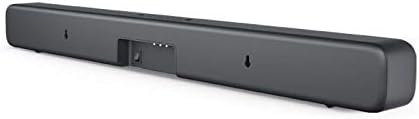
Figure 5.1: The rear of the soundbar, highlighting the input ports and the integrated wall mounting points.
5.2 ابتدايي ترتیب
- بریښنا وصل کړئ: Plug the power cable into the soundbar's power input and then into a wall outlet.
- د آډیو سرچینه وصل کړئ: Choose your preferred audio connection method (S/PDIF, Optical, Aux-in, or Bluetooth) and connect the soundbar to your TV, mobile device, or other audio source. Refer to Section 6 for detailed connectivity instructions.
- پاور آن: د فعالولو لپاره د غږ بار کې د بریښنا تڼۍ فشار ورکړئ.
6. عملیاتي لارښوونې
6.1 کنټرولونه
The MI Soundbar features integrated controls on its top panel:
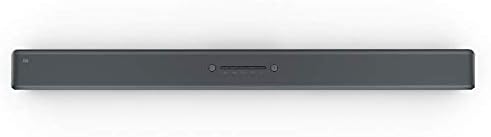
Figure 6.1: Close-up of the soundbar's top-mounted control buttons, including power, volume, and input selection.
- د بریښنا تڼۍ: Press to turn the soundbar On or Off.
- حجم پورته / ښکته: Adjust the sound output level.
- د ننوتلو/سرچینې تڼۍ: Cycle through available input sources (Bluetooth, S/PDIF, Optical, Aux-in, Line-in).
Note: The MI MDZ-27-DI Soundbar does not include a remote control. Volume and source selection must be adjusted directly on the unit or via the connected device (e.g., TV remote for TV volume).
۳.۱ د ارتباط اختیارونه
The soundbar offers several ways to connect to your audio sources:
- بلوتوث:
- ډاډ ترلاسه کړئ چې غږ بار فعال دی.
- Press the Input/Source button until the Bluetooth indicator light is active.
- On your mobile device or computer, enable Bluetooth and search for "MI Soundbar" (or similar).
- Select the soundbar from the list to pair. Once paired, the indicator light will become solid.
- S/PDIF (Coaxial Digital Audio):
Connect the provided S/PDIF cable from your TV's S/PDIF output to the soundbar's S/PDIF input. Select S/PDIF as the input source on the soundbar.
- Optical (Digital Audio):
Connect an optical audio cable (not included) from your TV's Optical output to the soundbar's Optical input. Select Optical as the input source on the soundbar.
- Aux-in (3.5mm Analog Audio):
Connect a 3.5mm audio cable (not included) from your device's headphone jack or Aux output to the soundbar's Aux-in port. Select Aux-in as the input source on the soundbar.
- Line-in (RCA Analog Audio):
Connect an RCA audio cable (not included) from your device's Line-out to the soundbar's Line-in ports. Select Line-in as the input source on the soundbar.
7. ساتنه
To ensure the longevity and optimal performance of your MI Soundbar, follow these maintenance guidelines:
- پاکول: Use a soft, dry cloth to wipe the exterior of the soundbar. Do not use liquid cleaners, aerosols, or abrasive cleaning agents.
- وینټیلیشن: Ensure that the ventilation openings are not blocked by dust or debris. Periodically clean around these areas.
- ذخیره کول: If storing the soundbar for an extended period, unplug it from the power outlet and store it in a cool, dry place away from direct sunlight and extreme temperatures.
8. ستونزه حل کول
If you encounter issues with your MI Soundbar, refer to the following common troubleshooting steps:
| ستونزه | احتمالي لامل | د حل لاره |
|---|---|---|
| هیڅ ځواک نشته | د برېښنا کیبل نه دی وصل شوی؛ د برېښنا رسۍ کار نه کوي. | ډاډ ترلاسه کړئ چې د برېښنا کیبل په خوندي ډول وصل دی. د برېښنا بل سوري هڅه وکړئ. |
| غږ نشته | Incorrect input source selected; Volume too low; Cable not connected properly. | Press the Input/Source button to select the correct input. Increase the volume on the soundbar and your source device. Check all audio cable connections. |
| د بلوتوټ جوړه کولو مسلې | Soundbar not in pairing mode; Device too far; Previous device still connected. | Ensure soundbar is in Bluetooth pairing mode. Move device closer to soundbar. Disconnect from any previously paired devices. |
| په لوړ حجم کې د غږ تحریف | Volume set too high; Poor audio source quality. | Reduce the volume. Try a different audio source to check if the issue persists. |
9. مشخصات
| فیچر | تفصیل |
|---|---|
| د محصول ابعاد | 83 x 7.2 x 8.7 سانتي متره |
| وزن | 1.92 کیلو ګرامه |
| د ماډل شمیره | MDZ-27-DI |
| برانډ | MI |
| د ارتباط ټیکنالوژي | Bluetooth (4.2 LE), S/PDIF, Optical, Aux-in, Line-in |
| د آډیو وتلې حالت | سټیریو |
| د نصب کولو ډول | د دیوال غر، د میز ټاپ غر |
| مواد | Fabric mesh exterior |
| جوړونکی | Xiaomi |
10. تضمین او ملاتړ
For warranty information and technical support, please refer to the warranty card included with your product or visit the official MI webسایټ. د هر ډول تضمین ادعا لپاره د پیرود ثبوت په توګه د پیرود رسید وساتئ.
For further assistance, you may contact MI customer service through their official channels.