1. پیژندنه
Thank you for choosing the TechniSat DIGITRADIO 371 CD BT. This versatile stereo digital radio system offers a wide range of audio entertainment options, including DAB+ digital radio, FM radio, a CD player, Bluetooth audio streaming, and USB playback. This manual provides detailed instructions to help you set up, operate, and maintain your device for optimal performance.
2. د خوندیتوب مهمې لارښوونې
- د وسیله چلولو دمخه ټولې لارښوونې په دقت سره ولولئ.
- دا لارښود د راتلونکي حوالې لپاره وساتئ.
- د اور یا بریښنا شاک څخه د مخنیوي لپاره وسیله باران یا رطوبت ته مه ښکاره کوئ.
- د هوا مناسبه هوا ورکول ډاډمن کړئ. د هوا د بهېدو هیڅ لاره مه بندوئ.
- وسیله په مستحکم، فلیټ سطح کې ځای په ځای کړئ.
- یوازې د جوړونکي لخوا مشخص شوي ضمیمې / لوازم وکاروئ.
- وسیله د بریښنایی طوفانونو په جریان کې یا کله چې د اوږدې مودې لپاره نه کارول کیږي خلاص کړئ.
- ټول خدمتونه وړ خدمت پرسونل ته راجع کړئ.
- The device may only be operated within the specified environmental conditions.
3. د بسته محتويات
مهرباني وکړئ وګورئ چې ټول توکي په بسته کې شتون لري:
- TechniSat DIGITRADIO 371 CD BT unit
- ریموټ کنټرول
- د کارن لارښود (دا سند)
- دوه AAA بیټرۍ (د ریموټ کنټرول لپاره)
4. محصول ختم شوview
4.1 مخکښ پینل

The front panel features a clear color display, control buttons for mode selection, information, menu navigation, and preset access. Two rotary knobs are provided for volume control and tuning/entering selections.
4.2 شاته پینل
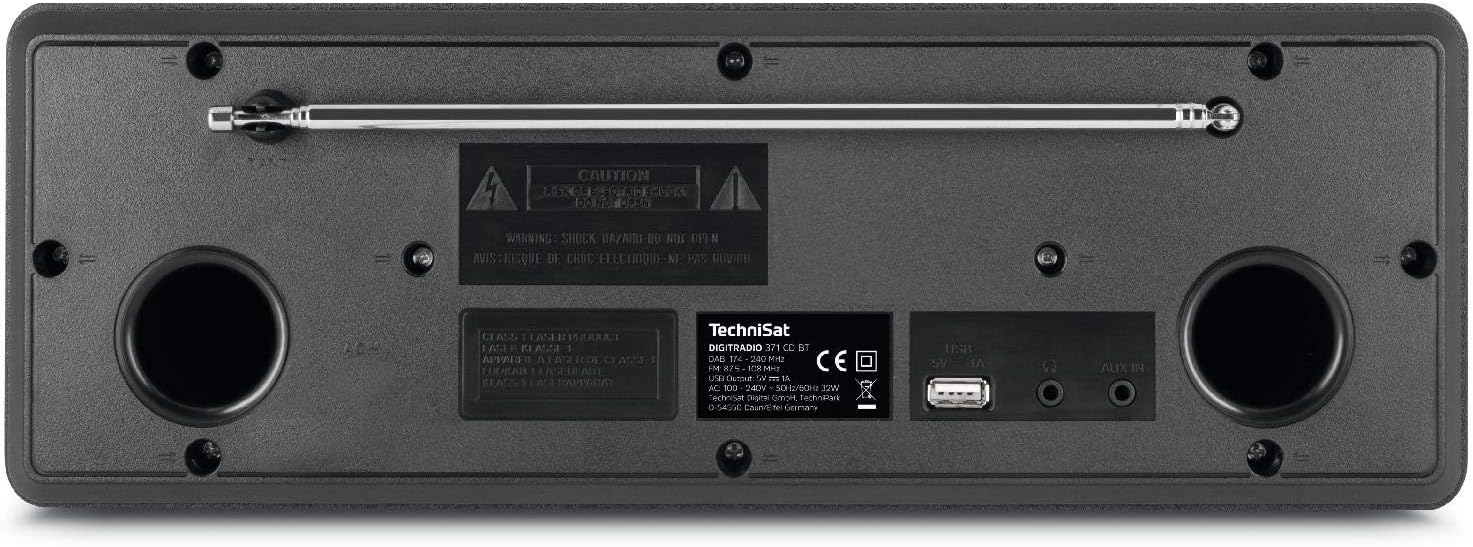
The rear panel includes the telescopic antenna for radio reception, a USB port for MP3 playback and device charging, and a 3.5mm AUX input for connecting external audio sources.
4.3 ریموٹ کنټرول

The included remote control provides convenient access to all functions of the DIGITRADIO 371 CD BT, including power, mode selection, volume, tuning, and preset management.
5. ترتیب کول
5.1 د بریښنا نښلول
- ډاډ ترلاسه کړئ چې وسیله په باثباته سطح کې کیښودل شوې.
- Connect the power cable to the AC inlet on the rear of the unit.
- Plug the other end of the power cable into a standard wall outlet (230V).
۵.۲ د انتن تنظیم کول
For optimal DAB+ and FM radio reception, fully extend the telescopic antenna located on the rear of the unit. Adjust its position and angle to achieve the best signal quality.
5.3 Initial Power On and Scan
- Press the Power button on the front panel or remote control to turn on the device.
- Upon first use, the radio will typically initiate an automatic scan for DAB+ stations. This process may take a few minutes.
- Once the scan is complete, the first available DAB+ station will begin playing.
6. عملیاتي لارښوونې
6.1 د حالت انتخاب
فشار ورکړئ موډ button on the front panel or remote control to cycle through available modes: DAB+, FM, CD, Bluetooth, and AUX.
۶.۳ DAB+ راډیو
- د DAB+ حالت غوره کړئ چې په کارولو سره موډ تڼۍ
- If an automatic scan has not been performed or you wish to rescan, navigate to the menu and select 'Full Scan'.
- د کارولو TUNING/ENTER knob or the navigation buttons on the remote to browse available stations. Press ننوتل سټیشن غوره کول.
- د سټیشن د مخکینۍ برخې په توګه د خوندي کولو لپاره، فشار ورکړئ او ونیسئ PRESET button, then select a preset number (1-20) and confirm.
6.3 ایف ایم راډیو
- د FM حالت غوره کړئ چې په کارولو سره موډ تڼۍ
- To automatically scan for stations, press the سکین button on the remote or navigate through the menu.
- To manually tune, rotate the TUNING/ENTER غوټۍ
- د سټیشن د مخکینۍ برخې په توګه د خوندي کولو لپاره، فشار ورکړئ او ونیسئ PRESET button, then select a preset number (1-20) and confirm.
6.4 سي ډي پلیر
- د CD حالت غوره کړئ چې په کارولو سره موډ تڼۍ
- Gently insert an audio CD or MP3 CD into the CD slot. The device will automatically load and begin playback.
- Use the playback control buttons (Play/Pause, Skip Forward/Backward) on the front panel or remote control.
۵.۳ د بلوتوث آډیو سټریمینګ
- د بلوتوث حالت غوره کړئ چې په کارولو سره موډ button. The display will show 'Pairing'.
- On your Bluetooth-enabled device (e.g., smartphone, tablet), search for available Bluetooth devices and select 'DIGITRADIO 371 CD BT'.
- Once paired, you can stream audio from your device to the DIGITRADIO 371 CD BT.
۵.۳ د USB پلې بیک او چارج کول
- یو USB فلش ډرایو داخل کړئ چې MP3 ولري fileد شا پینل په USB پورټ کې.
- Select USB mode (if available, otherwise it may automatically switch).
- Use the navigation and playback controls to browse and play MP3 files.
- The USB port also provides a charging function for compatible devices like smartphones.
6.7 AUX داخلول
- Connect an external audio device (e.g., MP3 player) to the 3.5mm AUX IN jack on the rear panel using an appropriate audio cable (not included).
- د AUX حالت غوره کړئ چې په کارولو سره موډ تڼۍ
- Audio from the external device will now play through the DIGITRADIO 371 CD BT speakers. Control playback from the external device.
۴.۳ د الارم ساعت او د خوب وخت
- د الارم ساعت: د الارم ترتیباتو ته د دې له لارې لاسرسی ومومئ مینو button. Follow the on-screen prompts to set alarm time, source (buzzer, radio), and volume.
- د خوب وخت Access the sleep timer settings via the مینو button. Set a duration after which the radio will automatically turn off.
7. ساتنه
7.1 پاکول
- تل د پاکولو دمخه وسیله د بریښنا له سایټ څخه جلا کړئ.
- د بهرنۍ سطحې د پاکولو لپاره نرم، وچ ټوکر وکاروئ.
- د کثافاتو پاکوونکي، موم یا محلول مه کاروئ ځکه چې دوی ممکن پای ته زیان ورسوي.
- For the display, use a soft, lint-free cloth.
۷.۳ د سي ډي پلیر پاملرنه
- سي ډي ګانې د هغوی له څنډو سره ونیسئ ترڅو د ګوتو نښې ونه لیدل شي.
- سي ډي ګانې د نرم، لینټ نه پاک ټوکر سره پاکې کړئ، او له مرکز څخه بهر ته یې پاک کړئ.
- Do not use scratched or damaged CDs, as they may harm the player mechanism.
8. ستونزه حل کول
| ستونزه | احتمالي لامل | د حل لاره |
|---|---|---|
| هیڅ ځواک نشته | د برېښنا کیبل نه دی وصل شوی؛ د برېښنا ساکټ فعال نه دی | د بریښنا کیبل اتصال وګورئ؛ یو بل سوري هڅه وکړئ |
| د راډیو ضعیف استقبال | انتن نه دی غځول شوی؛ د سیګنال کمزورې ساحه | Fully extend and adjust antenna; Try repositioning the unit |
| سي ډي نه غږېږي | سي ډي په غلط ډول داخل شوې ده؛ سي ډي چټله ده یا سکریچ شوې ده | Reinsert CD correctly; Clean or replace CD |
| بلوتوث نه نښلي | وسیله د جوړې کولو په حالت کې نه ده؛ په بهرني وسیله کې بلوتوټ غیر فعال شوی دی | Ensure radio is in Bluetooth mode; Enable Bluetooth on your device and search again |
| د AUX څخه هیڅ غږ نشته | Cable not connected; Incorrect mode selected | Check AUX cable connection; Select AUX mode |
9. مشخصات
- د ماډل شمیره:
- DIGITRADIO 371 CD BT (0000/2948)
- ابعاد (W x H x D):
- 34.5 x 12.3 x 21 سانتي متره
- وزن:
- 2.7 کیلوګرامه
- د بریښنا سرچینه:
- Wired, internal power supply
- والیtage:
- 230 ولټه
- واټtage:
- 10 watts (speaker output)
- د ويناوالو شمېر:
- 2 (سټریو)
- د راډیو ټونر:
- DAB+، FM
- ارتباط:
- Bluetooth (reception), USB (MP3 playback, charging), 3.5mm AUX In, 3.5mm Headphone Jack
- ښکاره کول:
- 2.4 inch color display (dimmable)
- سي ډي غږونکی:
- Plays Audio CDs, MP3 CDs, CD-R, CD-RW
- ځانګړتیاوې:
- Alarm clock, Sleep timer, Station memory (20x DAB+/20x FM), EQ Predefined
- د OSD ژبې:
- انګلیسي، جرمني، فرانسوي، ایټالوی
10. تضمین او ملاتړ
For warranty information, please refer to the warranty card included with your product or contact your local TechniSat dealer or customer support. If you encounter any issues not covered in the troubleshooting section, please visit the official TechniSat webسایټ یا د مرستې لپاره د دوی پیرودونکي خدمت سره اړیکه ونیسئ.


