پیژندنه
This manual provides instructions for the Elekpia NS-RC4NA-14 remote control, designed as a replacement for various Insignia LCD LED TV models. This remote control is pre-programmed and does not require any additional setup or pairing. Simply insert batteries, and it is ready for immediate use.
The NS-RC4NA-14 remote control is compatible with most 2013 and 2014 Insignia TV models, including but not limited to:
- NS-28ED200NA14, NS-50D400NA14, NS-19ED200NA14, 55E4400A14, NS-58E4400A14, NS-24E400NA14, NS-60E4400A14, NS-65E4400A14, NS-50L440NA14, NS-46D400NA14, NS-65D4400A14, NS-22E400NA14, NS-46L400NA14, NS-46E440NA14, NS-32E2000A14, NS-39D400NA14, NS-32DD2000A14, NS-39L400NA14, NS-55E4400A14, NS-19E200NA14, NS-50E440NA14, NS-24E200NA14, NS-32E400NA14, NS-32D200NA14, NS-55D440NA14
- NS-39D310NA15, NS-48D510NA15, NS-19E310NA15, NS-24D510NA15, NS-28D310NA15, NS-32D310NA15, NS-32D510NA15, NS-50D550NA15, NS-42D510NA15, NS-40D510NA15, NS-32D311NA15, NS-55D550NA15, NS-29D310NA15, NS-32D512NA15, NS-32D312NA15, NS-65D550NA15
- NS-32D200NA14, NS-46D400NA14, NS-28E200NA14, NS-32E830N14, NS-42E860N14, NS-50E860N14, NS-39E850N14, NS-50L440NA14, NS-39L700A12, NS-40D40SNA14, NS-24E40SNA14, NS-37D20SNA14, NS-32D20SNA14, NS-39D40SNA14, NS-32D201NA14, NS-46D40SNA14, NS-50DSNA14, NS-42D40SNA14, NS-19E310A13
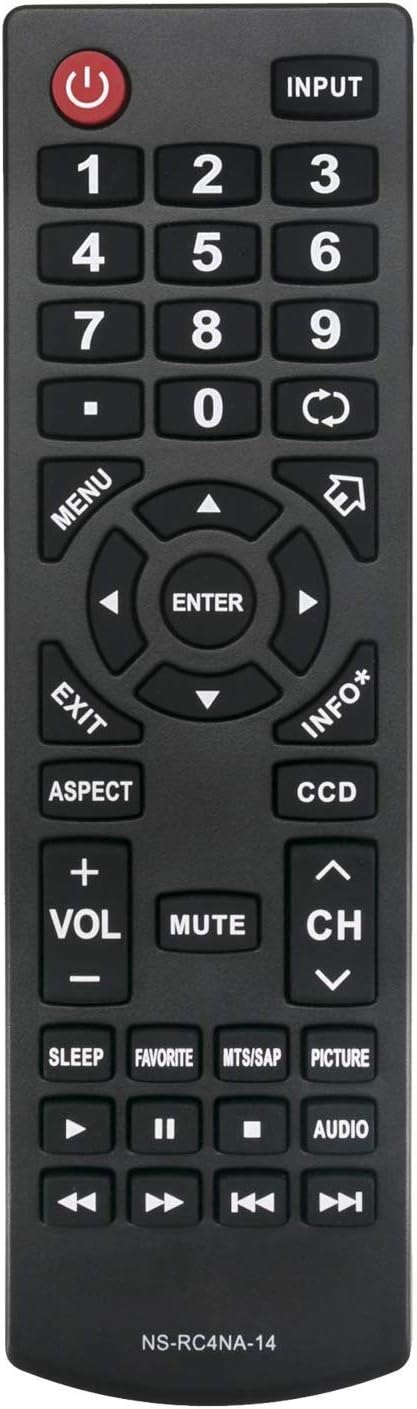
شکل 1: مخکی view of the NS-RC4NA-14 Remote Control.
چمتو کول
د بیټرۍ نصب کول
The NS-RC4NA-14 remote control requires two (2) 1.5V AAA alkaline batteries for operation. Batteries are not included with the remote control.
- د ریموټ کنټرول شاته د بیټرۍ کڅوړه ومومئ.
- د بیټرۍ د برخې پوښ ښکته خوا ته یا په هغه لوري کې چې د تیر لخوا ښودل شوی وي د خلاصولو لپاره یې وغورځوئ.
- Insert two AAA batteries, ensuring that the positive (+) and negative (-) terminals align correctly with the markings inside the compartment. Incorrect insertion can prevent the remote from functioning.
- د بیټرۍ پوښ بیرته خپل ځای ته وغورځوئ تر هغه چې په خوندي ډول کلیک وکړي.
Once batteries are installed, the remote control is ready for use with your compatible Insignia TV without any further programming or pairing.
عملیاتي لارښوونې
This section details the functions of the buttons on your NS-RC4NA-14 remote control.

شکل ۳: زاویه لرونکی view of the NS-RC4NA-14 Remote Control, showing button layout.
بنسټیز کارونه
- ځواک (🏻): تلویزیون چالان یا بند کړئ.
- پیژندنه: Cycles through available input sources (e.g., HDMI 1, AV, Component).
- د شمېرې تڼۍ (0-9): Directly select channels or input numerical values.
- Volume (+VOL-): Adjusts the sound volume. Press +VOL زیاتول، -ول کمول
- خاموش: Silences the TV audio. Press again to restore audio.
- Channel (CH ∧/∨): Changes the TV channel. Press CH ∧ to go up, CH to go down.
د نیویګیشن او مینو کنټرول
- مینو: د تلویزیون اصلي مینو پرانیزي.
- Arrow Buttons (◄ ▲ ► ▼): د مینو اختیارونو او ترتیباتو له لارې حرکت وکړئ.
- ننوتل: یو انتخاب تاییدوي یا فرعي مینو ته ننوځي.
- وتون: Closes the current menu or on-screen display.
- INFO*: د اوسني پروګرام یا ان پټ په اړه معلومات ښکاره کوي.
Special Functions and Playback Controls
- اړخ: د سکرین اړخ تناسب بدلوي (د مثال په توګه، 16:9، 4:3).
- DCC: تړل شوی کیپشن فعال یا غیر فعالوي.
- خوب: د تلویزیون د بندیدو لپاره ټایمر تنظیموي.
- د خوښې وړ: د خوښې چینلونو لیست ته لاسرسی لري.
- MTS/SAP: Selects Multi-channel Television Sound (MTS) or Secondary Audio Program (SAP) audio tracks.
- انځور: Adjusts picture modes (e.g., Standard, Movie, Dynamic).
- آډیو: Adjusts audio modes or settings.
- Playback Controls (◄◄, ►►, ❚❚, ■, ►): Used for controlling media playback (e.g., rewind, fast forward, pause, stop, play) when connected to compatible devices or media.
ساتنه
د ریموټ کنټرول پاکول
د ریموټ کنټرول ظاهري بڼه او فعالیت ساتلو لپاره، په منظم ډول یې پاک کړئ:
- د ریموټ کنټرول سطحه د نرم، وچ ټوکر څخه پاکه کړئ.
- د سختې خاورې لپاره، لږ څهampټوکر د اوبو یا یو نرم، غیر خارښونکي پاکونکي سره ومینځئ. د ډیر رطوبت څخه ډډه وکړئ.
- سخت کیمیاوي مواد، د کثافاتو پاکوونکي، یا محلولونه مه کاروئ، ځکه چې دا کولی شي د ریموټ پای یا داخلي برخو ته زیان ورسوي.
د بیټرۍ پاملرنه
- Replace batteries when the remote control's response becomes sluggish or stops working.
- Always replace both batteries at the same time with new ones. Do not mix old and new batteries, or different types of batteries.
- که چیرې ریموټ کنټرول د اوږدې مودې لپاره ونه کارول شي، نو د لیکیدو او احتمالي زیان مخنیوي لپاره بیټرۍ لرې کړئ.
- د ځایی مقرراتو سره سم کارول شوي بیټرۍ تصفیه کړئ.
د ستونزو حل کول
If you experience issues with your NS-RC4NA-14 remote control, refer to the following common problems and solutions:
| ستونزه | احتمالي لامل | د حل لاره |
|---|---|---|
| ریموټ کنټرول کار نه کوي. | بیټرۍ مړه شوي یا په غلط ډول داخل شوي. | Replace batteries with new 1.5V AAA alkaline batteries. Ensure correct polarity (+/-). |
| Remote control has limited range or intermittent response. | Low battery power; Obstruction between remote and TV; Infrared sensor on TV is blocked. | Replace batteries. Ensure a clear line of sight between the remote and the TV's infrared sensor. Remove any obstructions. |
| Remote control does not control the TV. | TV is not a compatible Insignia model; Remote control is faulty. | Verify your TV model is listed in the compatible models section. This remote does not require programming; if it's not working with a compatible TV after new batteries, the remote may be defective. |
یادونه: This remote control is designed to work out of the box with compatible Insignia TVs and does not require any programming or pairing procedures.
مشخصات
- د ماډل شمیره: NS-RC4NA-14 (Elekpia Insignia-14)
- نښه: الیکپیا
- مطابقت لرونکي وسایل: Insignia LCD LED Televisions (specific models listed in Introduction)
- د بریښنا رسول: ۲ x ۱.۵V AAA الکلین بیټرۍ (شامل نه دي)
- د محصول ابعاد: 6.5 x 2 x 0.7 انچه (تقریبا)
- د توکي وزن: ۳.۰۶ اونس (تقریبا)
- رنګ: تور
- ځانګړې ځانګړنه: ارګونومیک ډیزاین
تضمین او ملاتړ
Information regarding specific warranty terms or direct customer support contact for the Elekpia NS-RC4NA-14 remote control was not provided in the product details. For any issues or inquiries, please refer to the retailer or the original point of purchase for assistance.


