1. پیژندنه او وروستهview
The ESX INFOTAINMENT VN1015-MA-DAB-4G is an advanced Android-based naviceiver designed for vehicle integration, offering a comprehensive multimedia and navigation experience. This unit features a 10.1-inch anti-glare multi-angle touchscreen, Android operating system, 4G/LTE connectivity, DAB+ digital radio, and Google Maps navigation. It supports Bluetooth hands-free calling and audio streaming, USB and MicroSD media playback, and includes inputs for rearview cameras and auxiliary devices.
کلیدي ځانګړتیاوې عبارت دي له:
- 10.1-inch high-resolution, anti-glare multi-angle touchscreen.
- Android Operating System for versatile app usage.
- Integrated 4G/LTE dongle for mobile internet (requires optional SIM card).
- DAB+ digital radio reception with station logos and AM/FM radio with RDS.
- Google Maps navigation (online and offline capabilities).
- Bluetooth hands-free system with audio streaming.
- Multiple connectivity options: 2x USB ports, 1x MicroSD slot, 1x camera input, 2x video outputs, 1x AUX/video input, 1x AUX/audio input.
- Support for steering wheel controls (optional adapter may be required).
2. ترتیب او نصب کول
Proper installation is crucial for the optimal performance of your ESX VN1015-MA-DAB-4G naviceiver. It is highly recommended that installation be performed by a qualified professional to ensure correct wiring and vehicle compatibility.
2.1. د اجزاو پیژندنه
Familiarize yourself with the various ports and connections on the rear of the unit before installation.
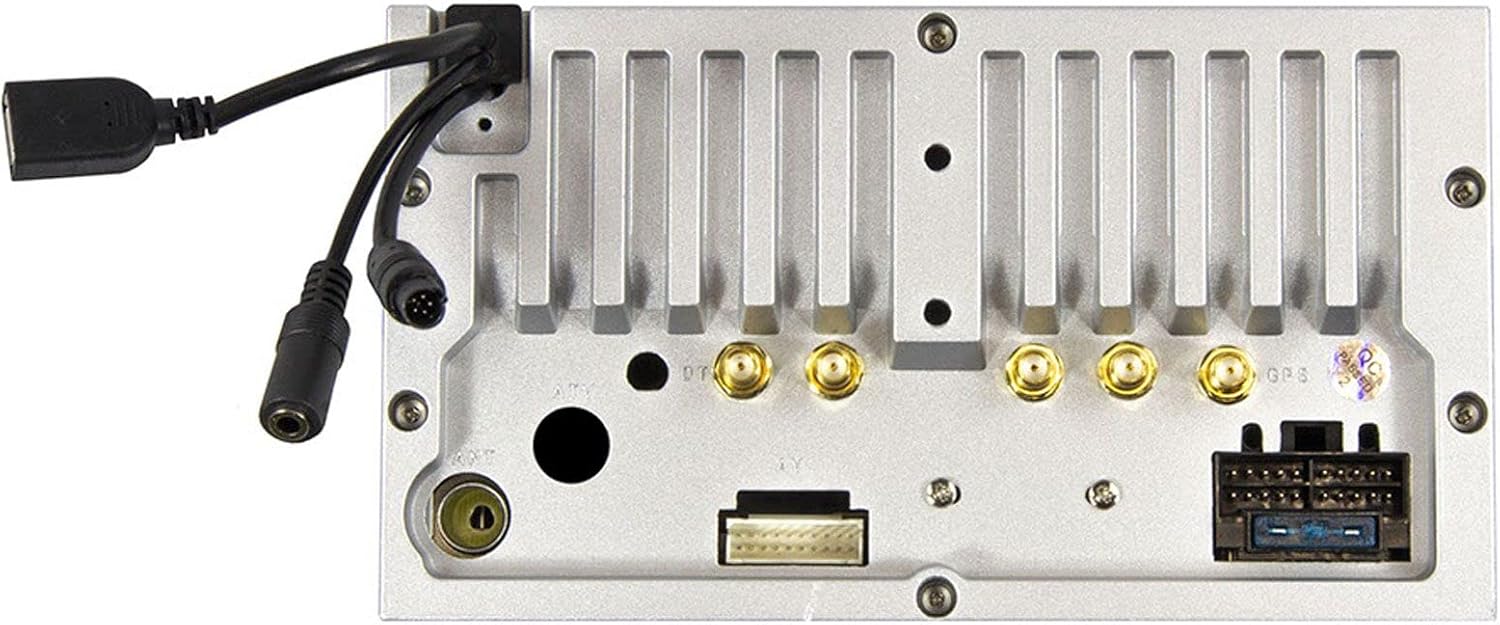
شکل 2.1: شاته view of the ESX VN1015-MA-DAB-4G unit, illustrating the power harness, antenna inputs, USB ports, and auxiliary connections.
2.2. د تارونو نښلول
- د بریښنا رسول: Connect the main power harness to your vehicle's electrical system, ensuring correct positive, negative, and accessory (ACC) connections.
- د سپیکر محصولات: Connect your vehicle's speakers to the corresponding outputs on the naviceiver.
- د انتن پیوستون: Connect the FM/AM antenna. For DAB+ digital radio, connect the included DAB+ antenna to the designated port.
- د GPS انټینا: د GPS انتن سره وصل کړئ او په یو روښانه ځای کې یې نصب کړئ view د غوره سیګنال استقبال لپاره د اسمان څخه.
- USB پورټونه: Connect external USB devices for media playback or smartphone connectivity.
- مایکروفون: Connect the external microphone (VNA-MIC-AND, optional) for improved hands-free call quality.
- شاتهview کمره: یو شاته وصل کړئview camera to the dedicated camera input. Ensure the reverse trigger wire is correctly connected for automatic display switching.
- د ویډیو پایلې: Utilize the two video outputs for connecting external monitors.
- د AUX داخلونه: Connect external audio/video sources to the AUX/video and AUX/audio inputs.
- 4G/LTE Dongle: If using mobile internet via 4G/LTE, insert a compatible SIM card into the optional 4G/LTE dongle and connect it to a USB port.
- د سټیرینګ ویل کنټرول: If your vehicle supports steering wheel controls, an optional adapter may be required to integrate this functionality.
۱. لومړنی پاور اپ
After all connections are secure, turn on your vehicle's ignition. The naviceiver should power on. Follow any on-screen prompts for initial setup, such as language selection and time zone.
3. عملیاتي لارښوونې
This section details the primary functions and operations of your ESX VN1015-MA-DAB-4G naviceiver.
۱. اساسي کنټرولونه او انٹرفیس
The unit features a responsive touchscreen and physical buttons for common functions.

شکل 3.1: The main screen showing the radio interface with frequency display and control buttons.
- د بریښنا تڼۍ: Press and hold to turn the unit on/off. A short press may mute audio or put the unit into standby.
- د حجم کنټرول: د آډیو د وتلو کچه تنظیم کړئ.
- د کور تڼۍ: د Android اصلي کور سکرین ته راستنیږي.
- د شا تڼۍ: Navigates back one step in menus or applications.
- د کیمرې تڼۍ: Direct access to the camera input display (e.g., rearview کیمره).
۳.۱. د Android عملیاتي سیسټم
The naviceiver runs on an Android operating system, allowing access to various applications and customization options.
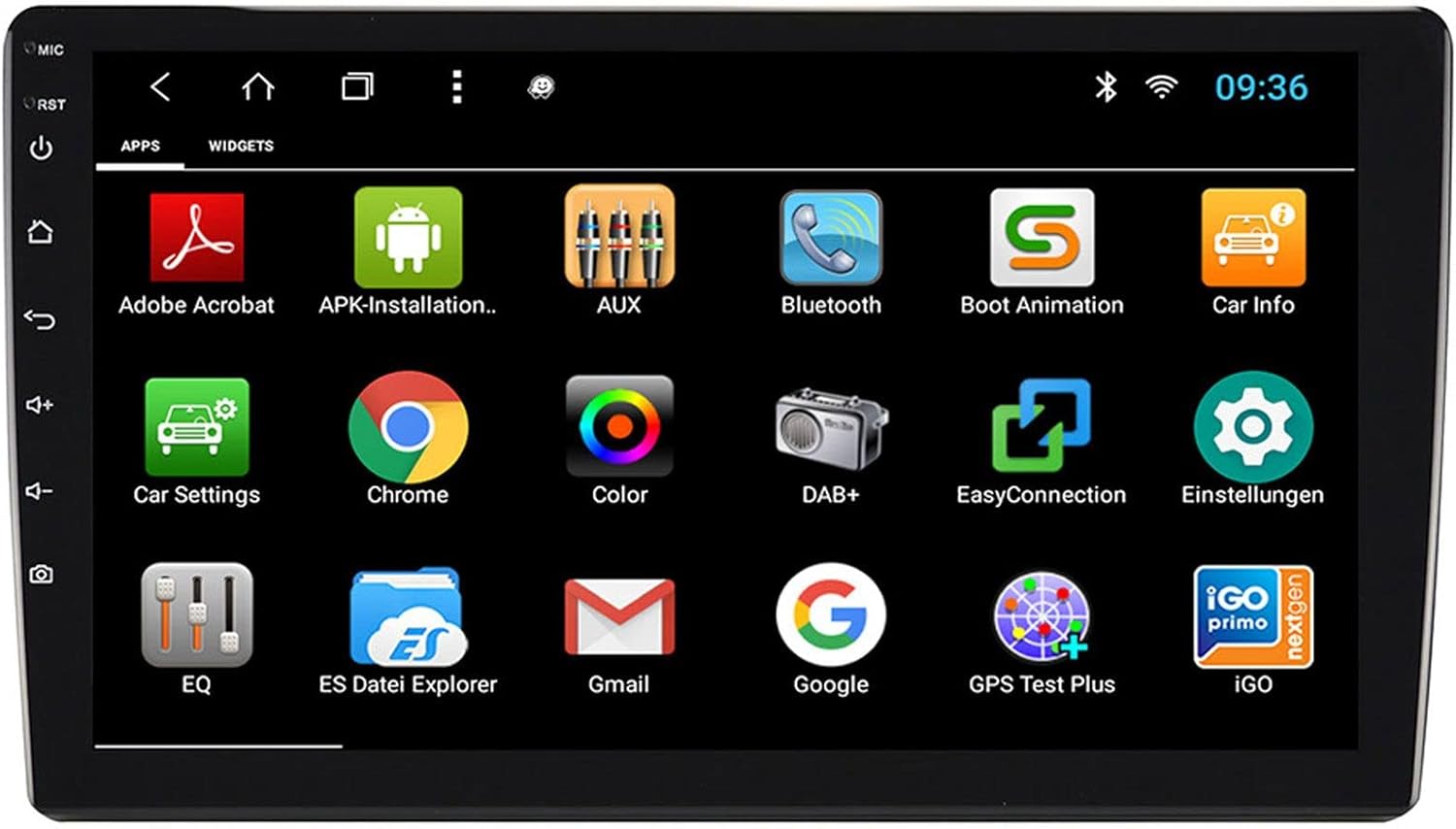
شکل 3.2: The applications screen, displaying various pre-installed and user-installed Android apps.
- د اپلیکیشن لانچر: Access all installed applications from the app drawer.
- ویجټونه: Customize your home screen with widgets for quick access to information or functions.
- ترتیبات: Adjust system settings, network connections, display, audio, and more.
- د انټرنیټ اتصال: Connect to the internet via a WiFi hotspot (from a compatible smartphone) or by inserting a SIM card into the 4G/LTE dongle.
3.3. Radio Functions (AM/FM/DAB+)
The unit supports both analog and digital radio broadcasts.
- د بندونو انتخاب: Switch between AM, FM, and DAB+ bands.
- ه هماهن: Manually tune or use the auto-scan function to find available stations.
- پریسیسټونه: د چټک لاسرسي لپاره خپل غوره سټیشنونه خوندي کړئ.
- RDS (FM): Radio Data System displays station information (e.g., station name, song title).
- DAB+ Features: Enjoy higher quality digital audio and view station logos where available.
3.4. د بلوتوټ ارتباط
Pair your smartphone for hands-free communication and audio streaming.
- جوړه کول: Enable Bluetooth on your smartphone and search for the naviceiver. Select the unit and confirm the pairing code.
- د لاسونو څخه وړیا تلیفون کول: Make and receive calls directly from the naviceiver screen.
- غږیزې خپرونې: Play music from your smartphone wirelessly through the naviceiver.
3.5. Navigation (Google Maps)
Utilize Google Maps for turn-by-turn navigation.

شکل 3.3: The navigation interface showing a map with a selected destination.
- آنلاین نیویګیشن: Requires an active internet connection (WiFi hotspot or 4G/LTE).
- آفلاین نقشې: Download maps for specific regions to use navigation without an internet connection.
- د منزل ننوتل: Enter addresses or points of interest using the touchscreen keyboard.
۵. د رسنیو غږول
آډیو او ویډیو غږول fileد مختلفو سرچینو څخه.
- USB: Connect USB drives containing media files.
- مایکرو ایس ډی: Insert a MicroSD card into the dedicated slot for media or navigation data.
- ملاتړ شوي بڼې: The unit supports a wide range of audio and video formats. Refer to the system settings for a complete list.
۵.۸. د کیمرې ان پټ
The naviceiver automatically displays the rearview camera feed when the vehicle is in reverse, or manually via the camera button.

شکل 3.4: شاتهview camera display with dynamic parking guidelines.
- اتوماتیک فعالیت: When connected correctly, the rearview camera image appears automatically when shifting into reverse.
- د پارکینګ لارښوونې: Adjustable parking lines assist with maneuvering.
4. ساتنه
Regular maintenance ensures the longevity and optimal performance of your naviceiver.
- د سکرین پاکول: د ټچ سکرین د نرمۍ سره پاکولو لپاره د نرم، لینټ نه پاک ټوکر څخه کار واخلئ. د سختو داغونو لپاره، لږ څهampټوکر د اوبو یا سکرین خوندي پاکوونکي سره ومینځئ. د سخت کیمیاوي موادو یا خړوبونکي موادو څخه ډډه وکړئ.
- د سافټویر تازه معلومات: Periodically check for available software updates through the system settings or the manufacturer's website. Updates can improve performance, add features, and fix bugs.
- عمومي پاملرنه: Avoid exposing the unit to extreme temperatures, direct sunlight for prolonged periods, or excessive moisture. Ensure all connections remain secure.
5. ستونزه حل کول
This section addresses common issues you might encounter with your ESX VN1015-MA-DAB-4G naviceiver.
| ستونزه | احتمالي لامل | د حل لاره |
|---|---|---|
| واحد فعال نه دی. | د برېښنا نشتوالی؛ فیوز چاودېدلی؛ ناسم تارونه. | Check vehicle's fuse box and the unit's power connections. Ensure ACC wire is receiving power. |
| غږ نشته. | Volume too low; Mute activated; Incorrect speaker wiring; Audio source issue. | Increase volume. Check if mute is active. Verify speaker connections. Try a different audio source. |
| GPS signal loss or inaccurate navigation. | GPS antenna obstructed or disconnected; Outdated maps. | ډاډ ترلاسه کړئ چې د GPS انتن روښانه دی view of the sky and is securely connected. Update maps if necessary. |
| د بلوتوث اتصال ستونزې. | Device not in pairing mode; Interference; Unit not discoverable. | Ensure both devices are in pairing mode. Restart both devices. Check Bluetooth settings on the naviceiver. |
| د ټچ سکرین بې ځوابه. | System freeze; Software error. | Perform a soft reset (refer to the unit's specific reset procedure, often a small reset button). If persistent, a factory reset might be needed (data loss may occur). |
| DAB+ radio not receiving stations. | DAB+ antenna not connected or faulty; Poor signal area. | Check DAB+ antenna connection. Ensure the antenna is correctly installed. Try rescanning for stations in a different location. |
If you encounter issues not listed here or if the suggested solutions do not resolve the problem, please contact ESX customer support or your authorized dealer.
6. مشخصات
Below are the technical specifications for the ESX VN1015-MA-DAB-4G Naviceiver:
| فیچر | تفصیل |
|---|---|
| برانډ | ESX |
| ماډل | VN1015-MA-DAB-4G |
| د سکرین اندازه | 10.1 انچه (25.6 سانتي متره) |
| د ښودلو ډول | High-resolution, anti-glare multi-angle touchscreen |
| عملیاتي سیسټم | Android |
| RAM | 4 جي بي |
| فلش حافظه | 64 جي بي |
| ارتباط | Bluetooth, USB, 4G/LTE (via dongle), WiFi (via hotspot) |
| د راډیو تونر | AM/FM with RDS, DAB+ Digital Radio |
| نیویګیشن | Google Maps (online/offline) |
| داخلونه | 1x Camera Input, 1x AUX/Video Input, 1x AUX/Audio Input, 2x USB Ports, 1x MicroSD Slot |
| محصولات | 2x Video Outputs, Pre-amplified outputs (Front/Rear/Subwoofer) |
| د کنټرول طریقه | ټچ سکرین |
| مطابقت لرونکې وسیلې | سمارټ فون |
7. تضمین او ملاتړ
Your ESX VN1015-MA-DAB-4G naviceiver comes with a Certificate of Authenticity. For specific warranty terms and conditions, please refer to the documentation provided with your purchase or contact your authorized ESX dealer.
For technical support, troubleshooting assistance beyond this manual, or inquiries regarding parts and service, please contact your point of purchase or visit the official ESX webد پیرودونکو خدماتو د اړیکو معلوماتو لپاره سایټ.


