1. پیژندنه
This manual provides detailed instructions for the safe and effective use of your Elecom LBT-TWS05BK True Wireless Bluetooth Earphones. Please read this manual thoroughly before using the product and retain it for future reference.
The Elecom LBT-TWS05BK earphones are designed for stable connectivity, superior comfort, and high usability, delivering rich audio performance. They feature an ergonomic design, advanced communication technology, and convenient smart features.
2. د خوندیتوب معلومات
د خوندي عملیاتو ډاډ ترلاسه کولو او د زیان مخنیوي لپاره، مهرباني وکړئ لاندې احتیاطي تدابیر په پام کې ونیسئ:
- د غوږونو یا چارج کولو کیس د لوړې تودوخې، رطوبت یا مایعاتو سره مه مخ کوئ.
- د قوي تاثیراتو سره د وسیله له مینځه وړلو یا تابع کولو څخه ډډه وکړئ.
- د محصول د جلا کولو یا تعدیل هڅه مه کوئ. دا به تضمین باطل کړي.
- د ماشومانو او څارویو د لاسرسي څخه لرې وساتئ.
- د اورېدو د زیان د مخنیوي لپاره په منځنۍ کچه غږ واورئ.
- Be aware of your surroundings when using the earphones, especially in traffic or dangerous situations.
3. د بسته محتويات
ډاډ ترلاسه کړئ چې ټول توکي ستاسو د محصول په کڅوړه کې شتون لري:
- Elecom LBT-TWS05BK True Wireless Bluetooth Earphones (Left and Right)
- د چارج کولو قضیه
- USB Charging Cable (Type-A to Type-C)
- Ear Caps (XS, S, M, L sizes; M size pre-installed)
- د لارښوونې لارښود
4. محصول ختم شوview
Familiarize yourself with the components of your Elecom LBT-TWS05BK earphones.

انځور: نږدې انځور view of the Elecom LBT-TWS05BK true wireless earbuds, showcasing their sleek black design and the ELECOM branding.

Image: The Elecom LBT-TWS05BK earbuds placed inside their compact charging case, ready for storage or charging.
The earphones feature a compact design with a 6.0mm diameter external magnetic dynamic driver for clear sound. The charging case is designed for single-handed operation with a push-button lid.
5. ترتیب کول
۲. د غوږونو او کیس چارج کول
- Connect the supplied USB Type-A to Type-C cable to the charging case's USB Type-C port and a USB power source.
- The LED indicators on the charging case will show the charging status. Four LEDs indicate a full charge.
- اییرفونونه د چارج کولو په قضیه کې واچوئ. دوی به په اتوماتيک ډول چارج پیل کړي.
- A 15-minute charge provides approximately 1 hour of music playback. A full charge of the earphones allows for about 5 hours of continuous music playback or 4.5 hours of talk time. The charging case can recharge the earphones up to 2.5 times, providing a total of about 17.5 hours of use.
۹. لومړنۍ جوړه کول
The Elecom LBT-TWS05BK supports auto-pairing and Google Fast Pair for compatible Android devices.

Image: An illustration demonstrating the Google Fast Pair feature, where simply opening the charging case near a compatible smartphone prompts a pairing notification. Also shows the one-push open mechanism of the case.
- ډاډ ترلاسه کړئ چې ستاسو د سمارټ فون بلوتوث فعال دی.
- د چارج کولو کیس خلاص کړئ. اییرفونونه به په اتوماتيک ډول د جوړې کولو حالت ته ننوځي.
- For Android devices with Google Fast Pair, a notification will appear on your screen. Tap to connect.
- For other devices, go to your device's Bluetooth settings and select "LBT-TWS05BK" from the list of available devices.
- Once paired, the earphones will automatically connect to the last paired device when removed from the case.
۴. د غوږونو اییربډونه لګول
The earphones feature an ergonomic design for optimal fit and stability.
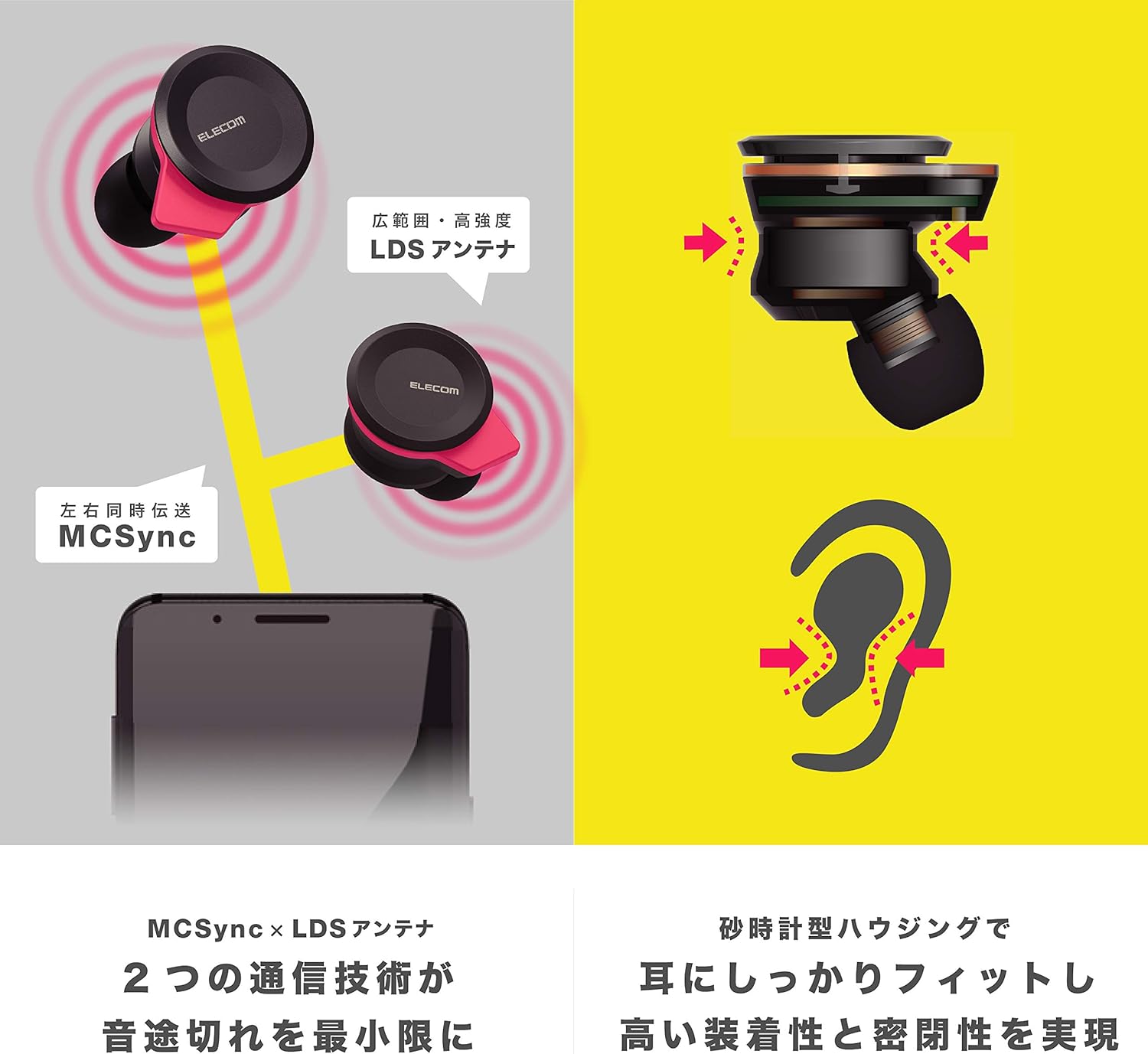
Image: An illustration showing the ergonomic hourglass shape of the earbud designed to fit securely in the ear, alongside a diagram explaining the MCSync and LDS antenna technologies for stable communication.
- Select the ear caps that provide the best seal and comfort from the four included sizes (XS, S, M, L). The M size is pre-installed.
- په نرمۍ سره د غوږ کانال ته غوږ بډ دننه کړئ.
- Adjust the earbud so that the hourglass shape is firmly seated between your ear tragus and anti-tragus for a stable fit.
6. عملیاتي لارښوونې
The Elecom LBT-TWS05BK earphones offer various functions for audio playback, calls, and smart assistant interaction.
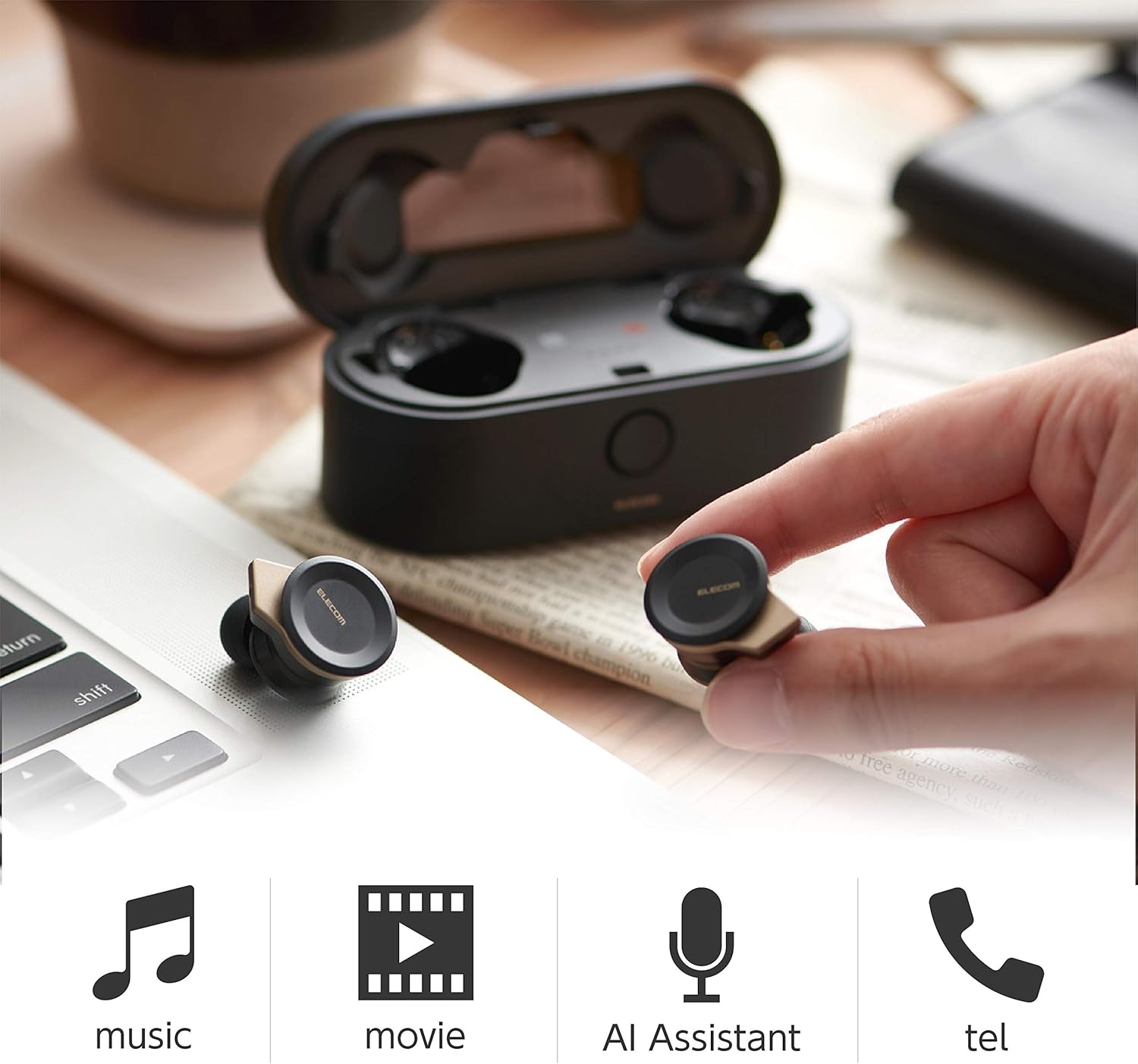
Image: The Elecom LBT-TWS05BK earbuds displayed with icons representing their versatile uses: music playback, movie watching, AI assistant activation, and phone calls.
6.1. بریښنا فعال/بند
- پاور آن: Remove the earphones from the charging case. They will power on automatically.
- بندول: اییرفونونه بیرته د چارج کولو په قضیه کې کیږدئ. دوی به په اتوماتيک ډول بریښنا بند کړي.
6.2. د میوزیک غږول
Use the buttons on the earphones to control music playback (specific button functions may vary, refer to quick start guide for exact mapping):
- پلی کول / ودرول: په دواړو غوږونو کې یو ځل فشار ورکړئ.
- بله لار: په ښي غوږۍ کې دوه ځله فشار ورکړئ.
- مخکینی لار په چپ غوږۍ کې دوه ځله فشار ورکړئ.
- د حجم کنټرول: Adjust via your connected device or voice assistant.
۶.۲. د زنګ وهلو اداره کول
The right earbud supports calls and voice AI functions.
- ځواب / پای کال: Single press on the right earbud.
- زنګ رد کړئ: د 2 ثانیو لپاره ښی غوږۍ فشار کړئ او ونیسئ.
6.4. Voice AI Activation
Compatible with voice AI assistants like Siri and Google Assistant.
- Activate Voice AI: په ښي غوږۍ کې درې ځله فشار ورکړئ.
6.5. External Sound Capture Function
This function allows you to hear surrounding sounds while wearing the earphones.
- فعال/غیر فعالول: د 2 ثانیو لپاره کی ear غوږۍ کی Press واچوئ.
7. ساتنه
سمه ساتنه ستاسو د غوږونو اوږد عمر او فعالیت تضمینوي.
- پاکول: د غوږونو او چارج کولو کیس پاکولو لپاره نرم، وچ ټوکر وکاروئ. د کثافاتو پاکوونکي یا محلول مه کاروئ.
- د غوږونو خولۍ: Remove and clean ear caps regularly with water and mild soap. Ensure they are completely dry before reattaching.
- ذخیره کول: کله چې په کارولو کې نه وي، نو اییرفونونه د چارج کولو په قضیه کې وساتئ ترڅو د دوړو او زیان څخه یې خوندي کړئ.
- د بیټرۍ پاملرنه: Avoid fully discharging the battery frequently. Charge regularly to maintain battery health.
8. ستونزه حل کول
If you encounter issues with your Elecom LBT-TWS05BK earphones, refer to the following common solutions:
- د غږ / پیوستون ستونزې نشته:
- Ensure earphones are charged and powered on.
- چیک کړئ که بلوټوت ستاسو په وسیله فعال شوی وي.
- هڅه وکړئ چې اییرفونونه له خپل وسیله سره بیا ونښلوئ.
- Ensure earphones are within the 10m transmission distance.
- اییرفونونه چې چارج نه کیږي:
- ډاډ ترلاسه کړئ چې د چارج کولو کیبل په خوندي ډول د قضیې او بریښنا سرچینې دواړو سره وصل دی.
- وګورئ چې د چارج کولو کیس کافي بیټرۍ لري که نه.
- Ensure the earphones are correctly seated in the charging case.
- ضعیف غږ کیفیت:
- Ensure ear caps provide a good seal in your ear.
- د غوږ د غوږونو د نوزلونو څخه هر ډول کثافات پاک کړئ.
- د سیګنال ځواک ښه کولو لپاره خپل وصل شوي وسیلې ته نږدې شئ.
- Voice AI/Calls Not Working on Left Earbud:
- Note that calls and voice AI functions are only compatible with the right earbud.
9. مشخصات
| فیچر | مشخصات |
|---|---|
| د ماډل شمیره | د LBT-TWS05BK لپاره تفتیش وسپارئ، موږ به په 24 ساعتونو کې له تاسو سره اړیکه ونیسو. |
| د مخابراتو طریقه | د بلوتوث معیاري نسخه ۵.۳ |
| محصول | د بلوتوټ پاور کلاس 1 |
| د لیږد اعظمي فاصله | نږدې 10 م |
| د فریکونسی بند | 2.4GHz |
| د انډول کولو طریقه | FHSS (د فریکونسۍ سپید سپیکٹرم) |
| ملاتړ شوی بلوتوث پروfiles | A2DP، AVRCP، HFP، HSP |
| A2DP Compatible Codec | SBC ، AAC |
| A2DP Compatible Content Protection | SCMS-T |
| Maximum Registration Capacity | 8 وسایل |
| Multipoint (Simultaneous Standby) | مطابقت نلري |
| د موټر چلوونکي ډول | 6.0mm diameter external magnetic dynamic driver (ETEMDriver) |
| د مخابراتو ټیکنالوژي | MCSync (MultiCast Synchronization), LDS Antenna |
| مایکروفون | High-quality MEMS microphone with HDVoice |
| د دوامداره خبرو وخت | نږدې 4.5 ساعته |
| Continuous Music Playback Time | نږدې 5 ساعته |
| د پلې بیک ټول وخت (د چارج کولو کیس سره) | نږدې 17.5 ساعته |
| د چارج کولو بندر | د USB ډول-C |
| چټک چارج | 15 min charge for 1 hour playback |
| وزن | ۵۵۲.۲ ګرامه (د ټول پیکج وزن) |
| مواد | پلاستیک |
| د اوبو د مقاومت کچه | د اوبو مقاومت |
| مطابقت لرونکې وسیلې | Smartphones, Tablets, iOS Devices, Android Devices |
10. تضمین او ملاتړ
For warranty information and customer support, please refer to the official ELECOM webسایټ یا خپل محلي پرچون پلورونکي سره اړیکه ونیسئ. د تضمین ادعاوو لپاره د پیرود ثبوت وساتئ.


