پیژندنه
The Globe Electric Wi-Fi Smart Security Light is designed to provide enhanced home security and smart lighting control. This device integrates a 1080p Wi-Fi camera with motion-activated floodlights, offering features such as live view, two-way audio, motion detection notifications, and customizable lighting. It operates without a separate hub, connecting directly to your home's 2.4 GHz Wi-Fi network and can be controlled via the GLOBE SUITE App or voice commands through compatible smart assistants.
د خوندیتوب معلومات
Please read and understand all instructions before installing and operating this product. Failure to do so may lead to electric shock, fire, or other injuries that could be hazardous or even fatal. Keep this manual for future reference.
- بریښنایی خوندیتوب: Always disconnect power at the circuit breaker before installation or servicing. Ensure proper grounding.
- لګول: This product must be installed by a qualified electrician in accordance with local electrical codes.
- بهر استعمال: Designed for outdoor use. Ensure all connections are waterproof and sealed to prevent moisture ingress.
- د رڼا سرچینه: کله چې روښانه شي نو مستقیم د LED رڼا سرچینې ته مه ګورئ.
- دحرارت درجه: Do not operate in temperatures outside the specified range.
د بسته محتويات
د نصبولو پیل کولو دمخه ډاډ ترلاسه کړئ چې ټولې برخې شتون لري.
- Globe Electric Wi-Fi Smart Security Light (Model 50240)
- Mounting Accessories (screws, wire nuts, mounting plate)
- د چټک پیل لارښود

Image: The Globe Electric Smart Outdoor Security Floodlight shown in its retail packaging, highlighting its features and design.
چمتو کول
1. Installation (Hardware)
- بریښنا بند کړئ: Locate the circuit breaker controlling the outdoor light fixture and turn off the power. Verify power is off using a voltage ټیسټر.
- موجوده فکسچر لرې کړئ: Carefully remove your existing outdoor light fixture.
- چوکۍ پلیټ: Attach the provided mounting plate to the junction box using the supplied screws.
- تارونه: Connect the security light's wires to your home's electrical wires:
- Black wire (Live) to Black wire (Live)
- White wire (Neutral) to White wire (Neutral)
- Green/Bare copper wire (Ground) to Green/Bare copper wire (Ground)
- خوندي فکسچر: Mount the security light to the mounting plate, ensuring a tight and secure fit.
- مهر: Apply weather-resistant sealant around the base of the fixture to prevent water entry.
- د بریښنا بیرته راګرځول: په سرکټ بریکر کې بریښنا بیرته فعاله کړئ.
2. App Setup (Software)
- اپلیکیشن ډاونلوډ کړئ: Download the "GLOBE SUITE" app from the Apple App Store or Google Play Store.
- ګڼون جوړول: اپلیکیشن خلاص کړئ او یو نوی حساب جوړ کړئ یا لاګ ان شئ که تاسو دمخه لرئ.
- وسیله اضافه کړئ: Tap the "+" icon in the app to add a new device. Select "Security Camera" or "Smart Light" category.
- وائی فای سره وصل کړئ: Follow the in-app instructions to connect the security light to your home's 2.4 GHz Wi-Fi network. Ensure your phone is also connected to the 2.4 GHz network during setup. You can switch back to 5 GHz after successful pairing.
- جوړه کول: The app will guide you through the pairing process, which may involve scanning a QR code on the device or entering a code.
- د وسیلې نوم: Once connected, give your security light a descriptive name (e.g., "Front Yard Light").
عملیاتي لارښوونې
ژوندی View او دوه طرفه آډیو
Access real-time video and audio from your security light at any time through the GLOBE SUITE App.
- ژوندۍ فیډ ته لاسرسی: Open the GLOBE SUITE App and select your security light from the device list. The live video feed will appear.
- دوه طرفه آډیو: Tap the microphone icon in the app to speak through the security light's speaker. Tap the speaker icon to hear audio from the security light's microphone.
- ثبتول: Use the record button to manually record video clips to your phone.
- سکرین شاټ: Use the camera icon to capture still images from the live feed.

Image: A smartphone screen showing a live view from the security camera, capturing a driveway scene, demonstrating remote monitoring capabilities.
د حرکت کشف او خبرتیاوې
The security light detects motion up to 68 feet (21 meters) and sends instant notifications to your phone.
- خبرتیاوې فعال کړئ: In the app settings for your device, ensure motion detection alerts are enabled.
- حساسیت تنظیم کړئ: You can adjust the motion detection sensitivity to minimize false alerts.
- Review پیښې: All motion-triggered events are recorded and can be reviewed in the app's playback history.

Image: A smartphone displaying a push notification from the GLOBE SUITE app, indicating "Motion Detection: Security Floodlight has detected movement," with a black dog resting in the background.
Light Control (Brightness, Color Temperature, RGB)
Customize your lighting experience directly from the GLOBE SUITE App.
- د روښانتیا سمون: Use the slider in the app to dim or brighten the floodlights (1600 Lumens max).
- د وړ وړ سپین: Adjust the color temperature from warm white (2200K) to cool daylight (5000K) to suit your preference or time of day.
- Multicolor RGB: Select from a wide spectrum of colors to create ambient lighting or festive displays.
- Schedules and Scenes: Set up automated schedules for lighting on/off times or create custom scenes for different moods or events.
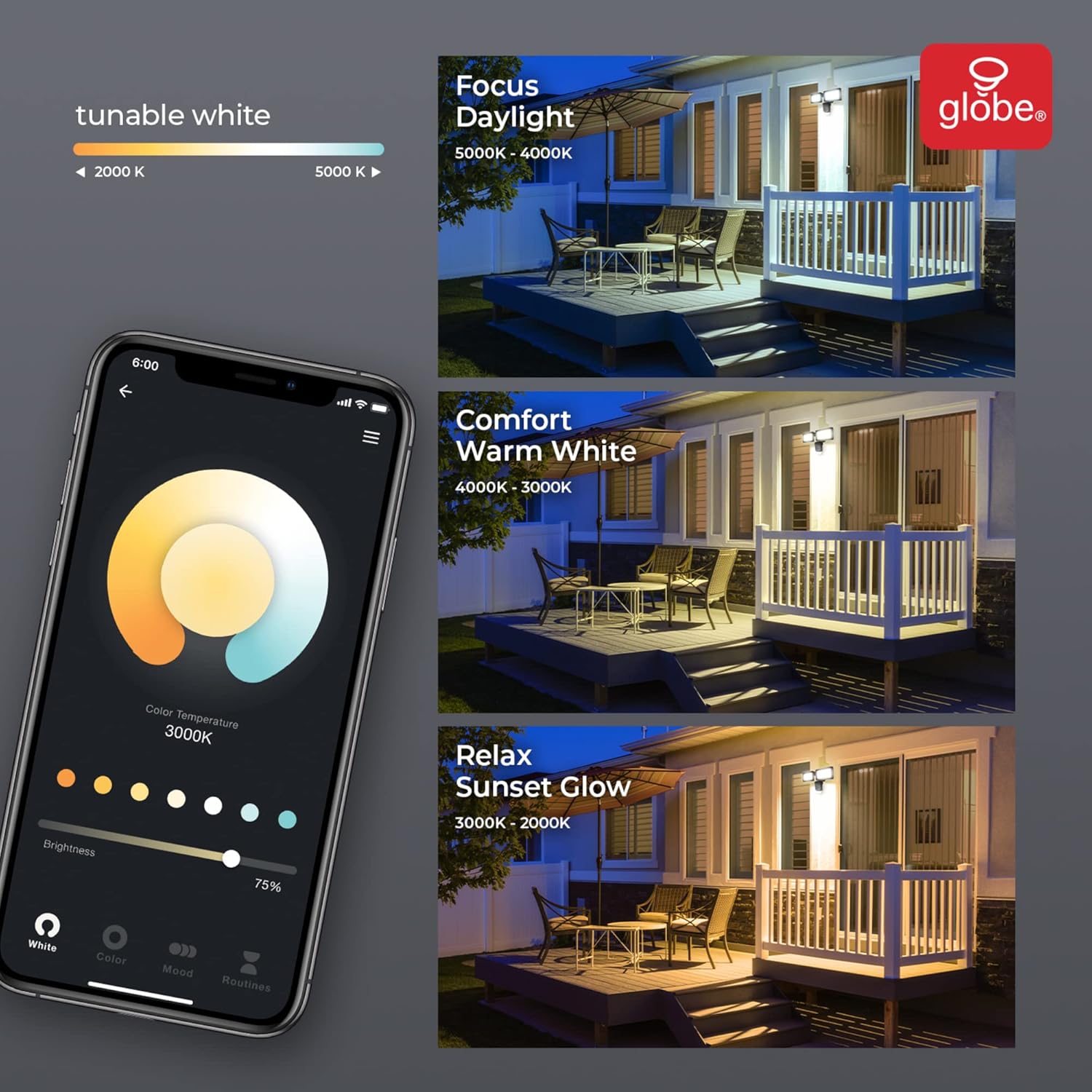
Image: A smartphone displaying the GLOBE SUITE app interface for tunable white light, showing options for Focus Daylight (5000K-4000K), Comfort Warm White (4000K-3000K), and Relax Sunset Glow (3000K-2000K), with corresponding outdoor lighting examples.
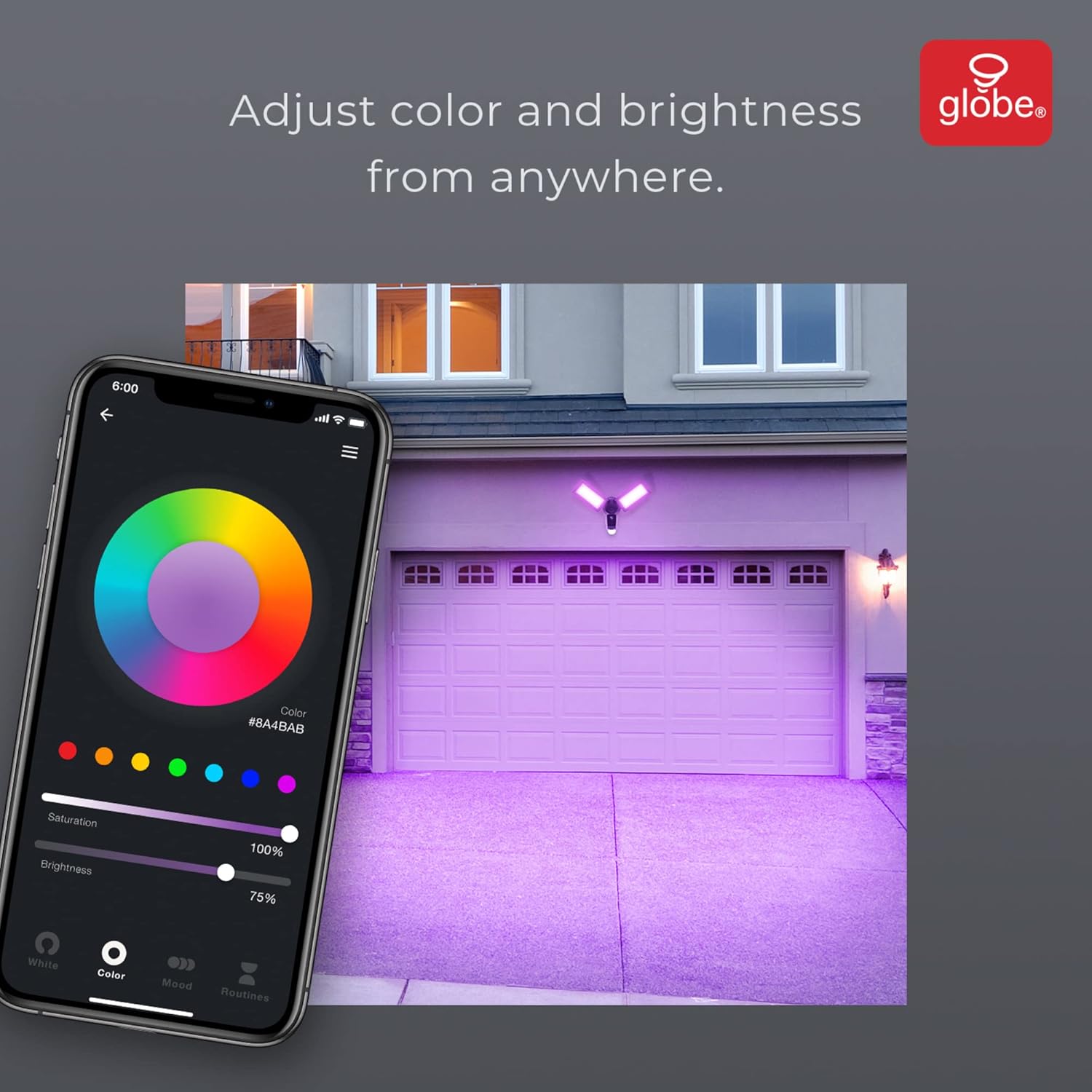
Image: A smartphone displaying the GLOBE SUITE app interface for adjusting color and brightness, showing a color wheel and saturation/brightness sliders, with an outdoor garage illuminated in purple light.
Voice Activation and Smart Home Integration
Control your security light using voice commands through compatible smart assistants.
- ملاتړ شوي پلیټ فارمونه: Works with Amazon Alexa, Google Assistant, and can be added to Apple HomeKit (via Siri Shortcuts) and SmartThings.
- د حسابونو نښلول: Follow the instructions in your smart assistant's app (e.g., Alexa app, Google Home app) to link your GLOBE SUITE account.
- غږیز حکمونه:
- "Alexa, turn on Front Yard Light."
- "Hey Google, set Front Yard Light to blue."
- "Siri, show me the Front Yard Camera." (Requires Siri Shortcut setup)

Image: The Globe Electric Smart Security Floodlight displayed with logos indicating compatibility with Amazon Alexa, Hey Google, Add to Siri, and Works with SmartThings, emphasizing its smart home integration.
د شپې لید
The camera automatically switches to night vision mode in low-light conditions, providing clear black and white video.
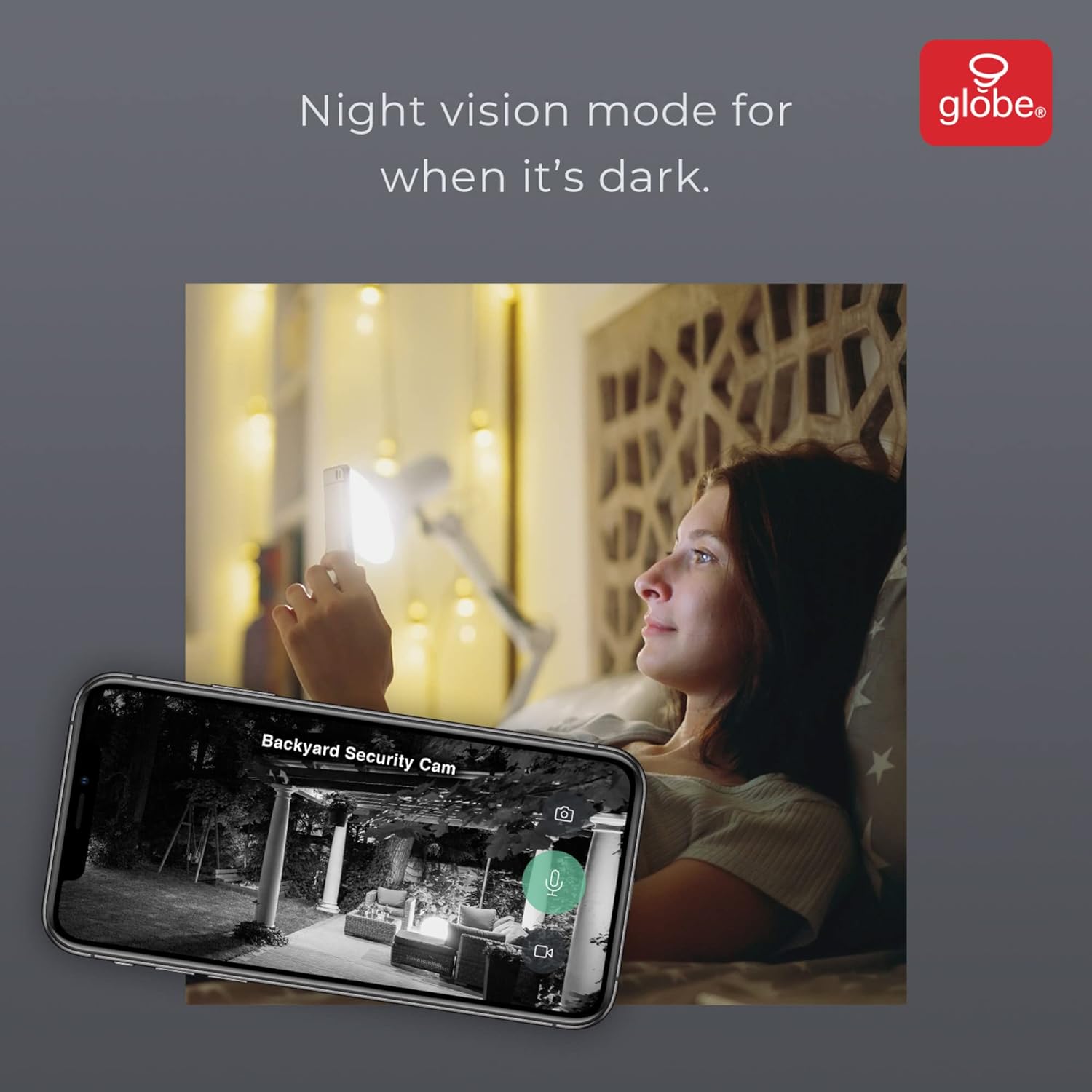
Image: A smartphone screen showing a night vision view from the security camera, displaying a backyard scene in monochrome, demonstrating its low-light capabilities.
ساتنه
- پاکول: Periodically wipe the camera lens and light surfaces with a soft, damp د دوړو او کثافاتو د لرې کولو لپاره ټوکر. سخت کیمیاوي توکي یا د کثافاتو پاکوونکي مه کاروئ.
- د فرم ویئر تازه معلومات: Keep the GLOBE SUITE App and your security light's firmware updated to ensure optimal performance and access to new features. The app will notify you of available updates.
- د مایکرو ایس ډی کارت: If using a MicroSD card, periodically check its status in the app and format it if necessary to maintain recording quality. Replace the card if it becomes corrupted or full.
د ستونزو حل کول
| ستونزه | احتمالي لامل | د حل لاره |
|---|---|---|
| وسیله په اپلیکیشن کې آفلاین ده. | No power; Wi-Fi signal weak or disconnected; Router settings changed. | Check power supply. Ensure Wi-Fi router is on and within range. Restart router and device. Re-pair device if necessary. |
| د حرکت کشف کار نه کوي یا ډیر حساس دی. | Incorrect sensitivity settings; Obstructions; Environmental factors (e.g., swaying trees). | Adjust motion detection sensitivity in the app. Clear any obstructions. Consider placement to avoid false triggers. |
| د تنظیم کولو پرمهال د وای فای سره وصل نشو. | Incorrect Wi-Fi password; Not on 2.4 GHz network; Device too far from router. | Double-check Wi-Fi password. Ensure your phone and device are on a 2.4 GHz network. Move device closer to router or use a Wi-Fi extender. |
| Lights not responding to app/voice commands. | Device offline; App glitch; Voice assistant not linked. | Check device status in app. Restart app. Re-link voice assistant account if disconnected. |
مشخصات
| فیچر | تفصیل |
|---|---|
| د ماډل شمیره | 50240 |
| د بریښنا سرچینه | هارډوارډ |
| والیtage | 120 ولټه |
| واټtage | 24 واټ |
| روښانتیا | 1600 Lumens |
| د رنګ د حرارت درجه | ۲۷۰۰K - ۴۵۰۰K (د ټون وړ سپین) |
| د رنګ اختیارونه | څو رنګه (آر جي بي) |
| د رڼا سرچینې ډول | LED |
| د کیمرې ریزولوشن | 1080p FHD |
| د ډګر View | 240 درجې |
| د حرکت کشف رینج | تر 68 فوټو پورې (21 متره) |
| د وائی فای ارتباط | 2.4 GHz |
| ځایی ذخیره | مایکرو ایس ډی کارت (تر ۱۲۸ جي بي پورې، شامل نه دی) |
| ابعاد | 5.63 x 21.1 x 4.35 انچه |
| وزن | 2 پونډه |
| مواد | پلاستیک |
| رنګ | تور |
تضمین او ملاتړ
This Globe Electric Wi-Fi Smart Security Light (Model 50240) comes with a د جوړونکي پنځه کلن محدود تضمین د پیرود نیټې څخه. دا تضمین د عادي کارونې الندې د موادو او کارموندنې نیمګړتیاوې پوښي.
For warranty claims, technical support, or further assistance, please contact Globe Electric Customer Service:
- Webسایټ: Visit the official Globe Electric webد ملاتړ سرچینو، FAQs، او د اړیکو معلوماتو لپاره سایټ.
- تلیفون: Refer to the Quick Start Guide or Globe Electric webد پیرودونکو خدماتو د تلیفون شمیرو لپاره سایټ.
- آنلاین ملاتړ: Many issues can be resolved by checking the GLOBE SUITE App's help section or online knowledge base.
مهرباني وکړئ د ملاتړ سره د تماس په وخت کې خپل د ماډل شمیره (50240) او د پیرود ثبوت چمتو ولرئ.


