1. محصول ختم شوview
This manual provides comprehensive instructions for the Retro-Bit Official Sega Saturn 2.4 GHz Wireless Controller. This controller is designed for use with Sega Saturn, Sega Genesis Mini, Nintendo Switch, PlayStation 3, PC, and Mac systems, offering a wireless gaming experience with classic control.

Image description: The Retro-Bit Official Sega Saturn 2.4 GHz Wireless Controller in white, shown with its packaging, a Sega Saturn port receiver, and a USB receiver.
2. د بسته محتويات
- 1x Retro-Bit Official Sega Saturn 2.4 GHz Wireless Controller (White)
- 1x Sega Saturn Port Receiver
- 1x USB Port Receiver
- د 1x ذخیره کولو قضیه
- 1x 3.3ft Charging Cable

Image description: The Retro-Bit wireless controller neatly stored within its protective case, alongside both the Sega Saturn and USB receivers.
۴. د تنظیم لارښوونې
3.1. د کنټرولر چارج کول
Connect the included 3.3ft charging cable to the controller's charging port and a USB power source. The LED indicator on the controller will show charging status. A full charge provides approximately 550 mAh of battery life.
۳. د یوې وسیلې سره نښلول
- Select the appropriate receiver: Use the Sega Saturn Port Receiver for Sega Saturn consoles or the USB Port Receiver for Sega Genesis Mini, Nintendo Switch, PlayStation 3, PC, and Mac.
- Insert the receiver: Plug the chosen receiver into the corresponding port on your gaming system or computer.
- Power on the controller: Press the HOME button on the controller to power it on. The controller will automatically attempt to pair with the receiver.
- جوړه کول (که اړتیا وي): If the controller does not connect automatically, press the pairing button on the receiver and then the HOME button on the controller simultaneously until the connection is established. The LED indicator on both the controller and receiver will become solid when successfully paired.

د انځور توضیحات: نږدې انځور view of the Sega Saturn port receiver, which connects the wireless controller to a Sega Saturn console.
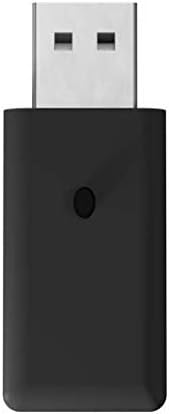
د انځور توضیحات: نږدې انځور view of the USB port receiver, used to connect the wireless controller to various modern systems like PC, Mac, Switch, and PS3.
۳. د کنټرولر چلول
۳.۱. د تڼۍ ترتیب او دندې
The controller features a classic 6-button layout with a responsive D-Pad, HOME, SELECT, and START buttons, along with shoulder buttons (L, R, Z, Y, X, A, B, C).
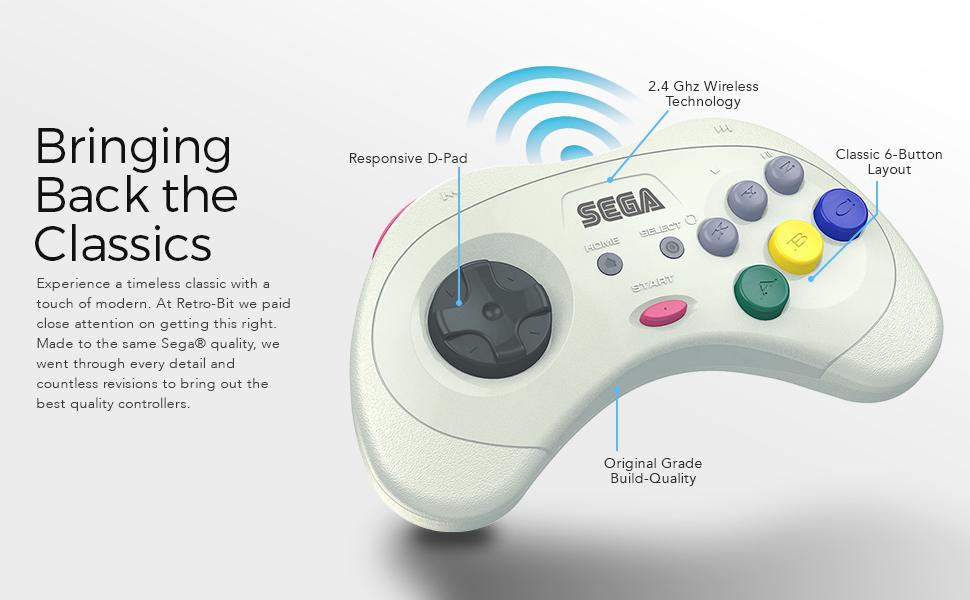
Image description: An annotated image of the Retro-Bit wireless controller highlighting its key features: Responsive D-Pad, 2.4 GHz Wireless Technology, Classic 6-Button Layout, and Original Grade Build-Quality.
4.2. Compatibility Modes
The controller automatically adapts to the connected system via the receiver.
- Sega Saturn: Full functionality for Sega Saturn games.
- Sega Genesis Mini: Compatible with the Sega Genesis Mini console.
- د نینټینډو سویچ: Functions as a Pro Controller.
- PlayStation 3: Functions as a standard PS3 controller.
- PC/Mac: Recognized as a standard gamepad, compatible with most games supporting XInput or DirectInput.
4.3. د خوب حالت
To conserve battery, the controller will enter sleep mode after 5 minutes of inactivity. Press any button to wake it up.
5. ساتنه
- پاکول: د کنټرولر پاکولو لپاره نرم، وچ ټوکر وکاروئ. د کثافاتو پاکوونکو یا محلولونو څخه ډډه وکړئ.
- ذخیره کول: Store the controller in its included storage case when not in use to protect it from dust and damage.
- د بیټرۍ پاملرنه: د بیټرۍ د غوره ژوند لپاره، د کنټرولر په مکرر ډول په بشپړه توګه چارج کولو څخه ډډه وکړئ. په منظم ډول یې چارج کړئ.
6. ستونزه حل کول
6.1. Controller Not Responding
- ډاډ ترلاسه کړئ چې کنټرولر چارج شوی.
- Verify the receiver is securely plugged into the device.
- Re-attempt the pairing process as described in the "Connecting to a Device" section.
- Check for interference from other 2.4 GHz wireless devices.
6.2. د پیوستون مسلې
- Ensure you are within the 30ft gaming range.
- Try a different USB port on your PC/Mac/PS3 if using the USB receiver.
- Ensure the correct receiver is used for your system.
6.3. Buttons Not Functioning Correctly
- Test the controller on a different game or system to isolate the issue.
- ډاډ ترلاسه کړئ چې د تڼیو لاندې هیڅ کثافات نه وي.
7. تخنیکي مشخصات
| فیچر | تفصیل |
|---|---|
| د ماډل شمیره | RB-SGA-048 |
| ارتباط | 2.4 GHz بې سیم |
| مطابقت | Sega Saturn, Sega Genesis Mini, Switch, PS3, PC, Mac |
| بیټرۍ | 550 mAh Rechargeable |
| د چارج کیبل | 3.3ft USB |
| د بیسیم رینج | تر 30ft پورې |
| د خوب حالت | د 5 دقیقو غیر فعالیت وروسته |
| د کڅوړې ابعاد | 7.36 x 5.83 x 2.05 انچه |
| د توکي وزن | 15.5 اونس |
8. تضمین او ملاتړ
For warranty information and technical support, please refer to the official Retro-Bit webسایټ ته مراجعه وکړئ یا د دوی د پیرودونکو خدماتو سره اړیکه ونیسئ. د تضمین ادعاوو لپاره د پیرود ثبوت وساتئ.


