1. پیژندنه
The Sandberg USB Office Headset Pro Mono is designed for clear communication in office environments, online meetings, and calls. This manual provides essential instructions for setting up, operating, maintaining, and troubleshooting your headset to ensure optimal performance.
2. د بسته محتويات
مهرباني وکړئ تصدیق کړئ چې ټول توکي ستاسو په کڅوړه کې شتون لري:
- Sandberg USB Office Headset Pro Mono (with integrated USB cable)

Image 1: The Sandberg USB Office Headset Pro Mono packaging, showing the headset and its features.
3. ترتیب کول
Follow these steps to connect your headset to your computer:
- په خپل کمپیوټر کې یو موجود USB-A بندر ومومئ.
- Plug the USB-A connector of the headset into the USB-A port on your computer.
- Your operating system (Windows, macOS, etc.) should automatically detect and install the necessary drivers. This process typically takes a few moments.
- Once installed, the headset will be ready for use. You may need to select it as the default audio input and output device in your computer's sound settings or within your communication application (e.g., Zoom, Microsoft Teams, Skype).
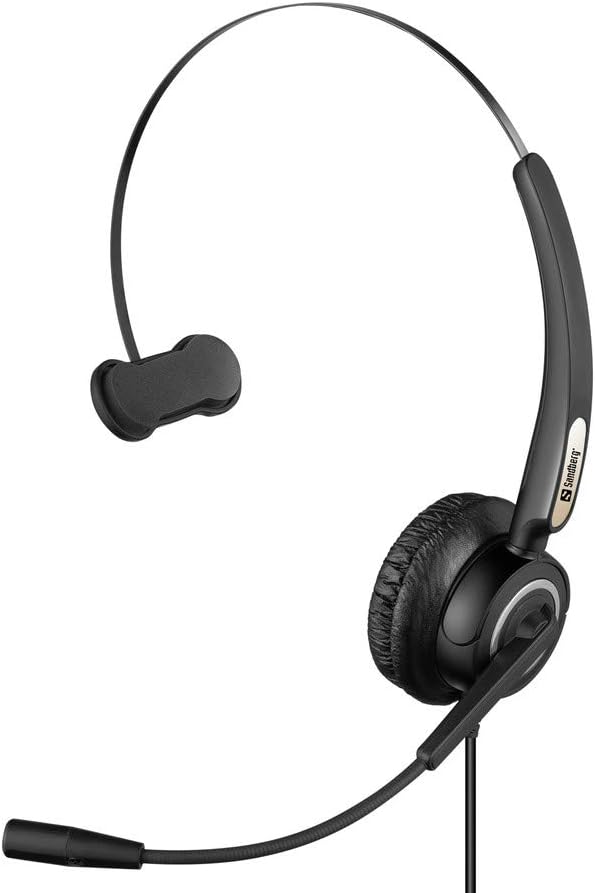
Image 2: The Sandberg USB Office Headset Pro Mono, illustrating its design for single-ear use with an adjustable microphone boom.
4. عملیاتي لارښوونې
۶ د هیډسیټ اغوستل
- Place the earcup over one ear and adjust the headband for a comfortable fit.
- Position the microphone boom so that the microphone is approximately 1-2 inches (2.5-5 cm) from your mouth for optimal voice pickup.
4.2 Volume Control and Mute
The headset features an inline control unit on the USB cable for easy access to audio functions:
- حجم پورته کول: د اوریدلو حجم زیاتولو لپاره '+' تڼۍ فشار ورکړئ.
- کموالی: د اوریدلو حجم کمولو لپاره '-' تڼۍ فشار ورکړئ.
- د مایکروفون خاموش کول: Press the microphone button to mute or unmute your microphone. An indicator light on the control unit typically shows the mute status.
4.3 Making Calls and Using Applications
Once connected and selected as the default audio device, your headset will function with most communication applications. Ensure the headset is selected as the audio input (microphone) and output (speaker) device within the settings of your specific application (e.g., video conferencing software, softphone client).
5. ساتنه
5.1 پاکول
- په نرمۍ سره هیډسیټ د نرم، وچ ټوکر سره پاک کړئ.
- د غوږونو د کشنونو لپاره، لږ څه d وکاروئamp که اړتیا وي، ټوکر په نرم صابون سره ومینځئ، بیا سمدلاسه وچ کړئ.
- سخت کیمیاوي مواد، محلولونه، یا د کثافاتو پاکوونکي مه کاروئ.
- Avoid getting moisture into the earcup or microphone openings.
5.2 ذخیره کول
- هیډسیټ په پاک او وچ ځای کې د سختې تودوخې او مستقیم لمر وړانګو څخه لرې وساتئ.
- د زیان څخه د مخنیوي لپاره د کیبل له ګډوډولو څخه ډډه وکړئ.
6. ستونزه حل کول
۷.۱ د هیډسیټ څخه غږ نشته
- ډاډ ترلاسه کړئ چې د USB نښلونکی په بشپړ ډول د کمپیوټر USB پورټ ته داخل شوی دی.
- Check the volume level on the inline control unit and on your computer's operating system.
- Verify that the Sandberg USB Office Headset Pro Mono is selected as the default playback device in your computer's sound settings.
- هڅه وکړئ چې هیډسیټ په خپل کمپیوټر کې بل USB پورټ سره وصل کړئ.
۷.۲ مایکروفون کار نه کوي
- Ensure the microphone is not muted via the inline control unit.
- Check that the Sandberg USB Office Headset Pro Mono is selected as the default recording device in your computer's sound settings.
- د خپل کمپیوټر د غږ ترتیباتو کې د مایکروفون د ننوتلو کچه تنظیم کړئ.
- Confirm that the microphone boom is positioned correctly near your mouth.
6.3 Headset Not Detected by Computer
- Unplug the headset and plug it back into a different USB port.
- خپل کمپیوټر بیا پیل کړئ.
- Check your computer's Device Manager (Windows) or System Information (macOS) to see if the USB device is listed.
7. مشخصات
| فیچر | تفصیل |
|---|---|
| د ماډل نوم | Pro Mono |
| د ماډل شمیره | 126-14 |
| نښلونکی | 1 x USB A Male Plug |
| د کیبل اوږدوالی | 6.6 فوټ (2.0 متر) |
| د کنټرول ډول | Volume Control (Inline) |
| ځانګړی ځانګړنه | مایکروفون شامل دی |
| مواد | پلاستیک |
| د توکي وزن | ۰.۰۳۵ اونس (تقریبا ۱ ګرام) |
| د محصول ابعاد | 6.3 x 4.72 x 6.69 انچه |
8. تضمین او ملاتړ
For warranty information, please refer to the documentation provided with your purchase or visit the official Sandberg website. For technical support or further assistance, please contact Sandberg customer service or your retailer.
تاسو کولی شئ په دې اړه نور معلومات او ملاتړ سرچینې ومومئ سندبرګ webسایټ.


