پیژندنه
This manual provides detailed instructions for the setup, operation, and maintenance of your HXSJ J800 Wired Gaming Mouse. Please read this manual thoroughly to ensure proper use and to maximize your gaming and productivity experience.
د بسته محتويات
- 1 x HXSJ J800 Wired Gaming Mouse
- 1 x د کارونکي لارښود
چمتو کول
- موږک سره وصل کړئ: Insert the USB connector of the HXSJ J800 mouse into an available USB port on your computer.
- د ډرایور نصب کول: موږک پلګ او پلی دی. ستاسو عملیاتي سیسټم به په اتوماتيک ډول اړین ډرایورونه کشف او نصب کړي. د اساسي فعالیت لپاره اضافي سافټویر نصبولو ته اړتیا نشته.
- ابتدايي استعمال: Once connected, the mouse is ready for immediate use.

Image: The HXSJ J800 mouse with its braided USB cable, ready for connection to a computer.
عملیاتي لارښوونې
1. Mode Switching (Office Mode / Game Mode)
The HXSJ J800 mouse features two operational modes: Office Mode and Game Mode.
- ډیفالټ حالت: The mouse defaults to Office Mode upon connection.
- د بدلولو طریقې: To switch between Office Mode and Game Mode, press and hold the Scroll Wheel button او د د ښي موږک تڼۍ په ورته وخت کې د 3 ثانیو لپاره.
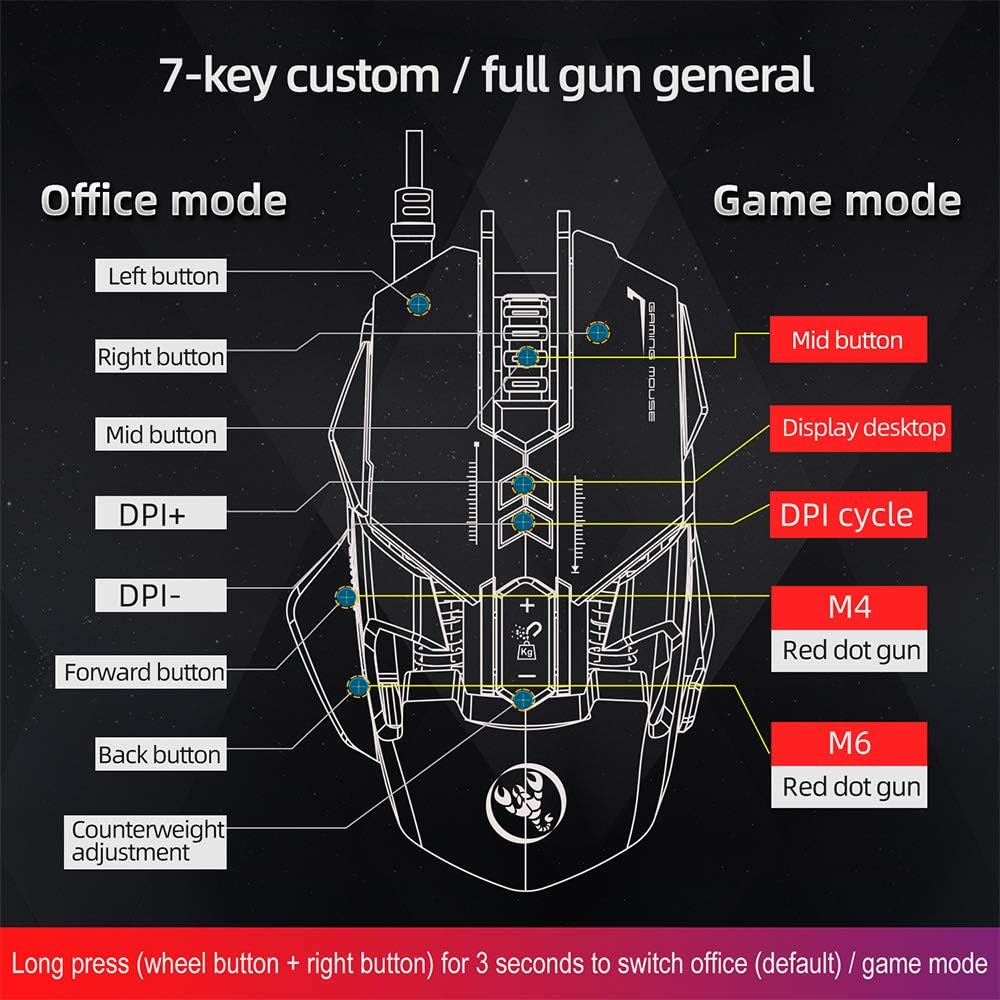
Image: A diagram illustrating the different button assignments for Office Mode (left) and Game Mode (right), including the mode switching instruction.
۴.۴. د DPI سمون
The mouse supports six adjustable DPI settings for varying cursor sensitivity.
- د DPI کچه: 800, 1600, 2400, 3200, 4800, 6400 DPI.
- د DPI بدلول: Use the dedicated DPI+ and DPI- buttons located on the top of the mouse to cycle through the available DPI settings.
- بصری شاخص: The RGB lighting will flash with a corresponding color when the DPI setting is changed.
۴.۴. میکرو پروګرامینګ
The HXSJ J800 features an A6653 E-sports Game Chip with onboard storage for hardware macro definition.
- فعالیت: Record and write macro definition commands directly to the mouse.
- Software-Free Operation: Once macros are recorded, no additional software is required for their execution, making it convenient for use across different computers.

انځور: یو مفصل view of the A6653 E-sports Game Chip, highlighting its role in hardware macro definition.
4. RGB Light Effect
The mouse features 16.8 million color RGB backlight modes.
- اصلاح کول: The RGB lighting provides various color effects.
- د DPI شاخص: The light of the corresponding gear will flash every time the DPI changes.

Image: The HXSJ J800 mouse illuminated with vibrant RGB lighting, showcasing its aesthetic features.
5. Removable Weight Adjustment
Customize the mouse's weight for enhanced stability and accuracy.
- Weight System: The mouse incorporates a suction magnet design with two 5g removable weights.
- سمون: The weights can be easily inserted into or removed from the weight chamber. The magnetic design ensures the weights are securely held and not easily lost.

Image: A user adjusting the removable 5g weights in the HXSJ J800 mouse's magnetic weight chamber.
ځانګړتیاوې ختمې شوېview
- Seven-Key Macro Programming: Supports recording and writing macro definition commands for personalized control.
- Six Adjustable DPI Levels: Easily switch between 800-1600-2400-3200-4800-6400DPI to suit various tasks and games.
- E-sports Game Chip (A6653): Features onboard storage for true hardware macro definition, eliminating the need for software after initial setup.
- Cool RGB Light Effect: 16.8 million color RGB backlight modes with dynamic effects and DPI change indicators.
- Removable Weight Design: Two 5g magnetic weights allow for customization of mouse weight for optimal feel and precision.
- دوامدار سویچونه: Rated for 20 million cycles.
- Aluminum Alloy Roller: Provides a high-grade feel and comfortable damping.

انځور: یو داخلي view of the HXSJ J800 mouse, highlighting key components such as the A6653 chip, aluminum alloy roller, and weight counterweights.

Image: A close-up of the HXSJ J800 mouse, focusing on the aluminum alloy scroll wheel and its textured design.
ساتنه
- پاکول: د موږک سطحه پاکولو لپاره نرم، وچ ټوکر وکاروئ. د سختې خاورې لپاره، یو څه وچampټوکر د اوبو سره ومینځئ. د سختو کیمیاوي موادو یا خړوبونکو موادو کارولو څخه ډډه وکړئ.
- د سینسر پاملرنه: د موږک په لاندې برخه کې نظري سینسر پاک او د دوړو یا کثافاتو څخه پاک وساتئ ترڅو دقیق تعقیب ډاډمن شي.
- د کیبل مدیریت: د زیان څخه د مخنیوي لپاره د USB کیبل د تیزو کږو یا ډیر کشولو څخه ډډه وکړئ.
- ذخیره کول: موږک په پاک او وچ چاپیریال کې وساتئ کله چې کارول نه وي.
د ستونزو حل کول
- موږک ځواب نه ورکوي:
- - Ensure the USB cable is securely connected to your computer's USB port.
- - Try connecting the mouse to a different USB port.
- - خپل کمپیوټر بیا پیل کړئ.
- د DPI سمون کار نه کوي:
- - Ensure you are pressing the correct DPI+ or DPI- buttons.
- - Check if the mouse is in a mode that supports DPI adjustment (both Office and Game modes support it).
- RGB lighting not functioning:
- - Verify the mouse is properly connected and receiving power.
- - The lighting should activate automatically. If not, ensure no software is overriding the mouse's default lighting settings (though this mouse is designed to be software-free for basic functions).
- Macros not executing:
- - Ensure the macros were correctly recorded and saved to the mouse's onboard memory.
- - Confirm the mouse is in Game Mode if the macros are assigned to Game Mode specific buttons.
مشخصات
| توکي | مشخصات |
|---|---|
| ماډل | J800 |
| رنګ | خړ |
| د کلیدونو شمیر | 7 |
| د DPI تنظیمات | 800-1600-2400-3200-4800-6400DPI |
| انٹرفیس | USB |
| ژوند بدل کړئ | 20 ملیون سایکلونه |
| والیtage/اوسنی | DC 5V/100mA |
| ملاتړ شوی سیسټم | Windows 2000/XP/Win7/Win8/Win10 Vista 32bit, iOS or latest |
| د توکي اندازه | 13 x 8 x 4 سانتي متره (L x W x H) |
| د توکي وزن | نږدې 154 ګرامه |
| چپ | A6653 E-sports Game Chip |
| ځانګړي ځانګړتیاوې | Programmable Buttons, Adjustable DPI, RGB Lighting, Removable Weights |
تضمین او ملاتړ
For warranty information or technical support, please refer to the retailer where you purchased the HXSJ J800 Wired Gaming Mouse or visit the official HXSJ webسایټ. مهرباني وکړئ د تضمین ادعاوو لپاره د پیرود ثبوت وساتئ.


