پیژندنه
Thank you for choosing the Tecno Minipod M1 True Wireless Stereo (TWS) Earbuds. This manual provides detailed instructions on how to set up, operate, and maintain your Minipod M1 earbuds to ensure optimal performance and longevity. The Minipod M1 offers a seamless audio experience with its portable charging case, long playback time, IPX4 water resistance, and smart touch controls.
په بکس کې څه دي
- 1 x Tecno Minipod M1 TWS Earphone (Left and Right)
- 1 x د پورټ ایبل چارج کولو قضیه
- 1 x د USB چارج کیبل
- 1 x د کارونکي لارښود
- د غوږونو دوه جوړې (مختلف اندازې)
- ۱ x سیلیکون محافظتي پوښ
- 1 x Hook (Carabiner)

Image: Infographic highlighting key features of the Tecno Minipod M1, including 18 hours non-stop music, ENC Noise Reduction Technology, Bluetooth 5.0, cool touch controls, portable charging case, IPX4 water resistance, and 4.2gm ultra-light body.
محصول پای ته ورسیدview
The Tecno Minipod M1 consists of two lightweight earbuds and a compact charging case. The case not only protects the earbuds but also provides additional battery life for extended listening.
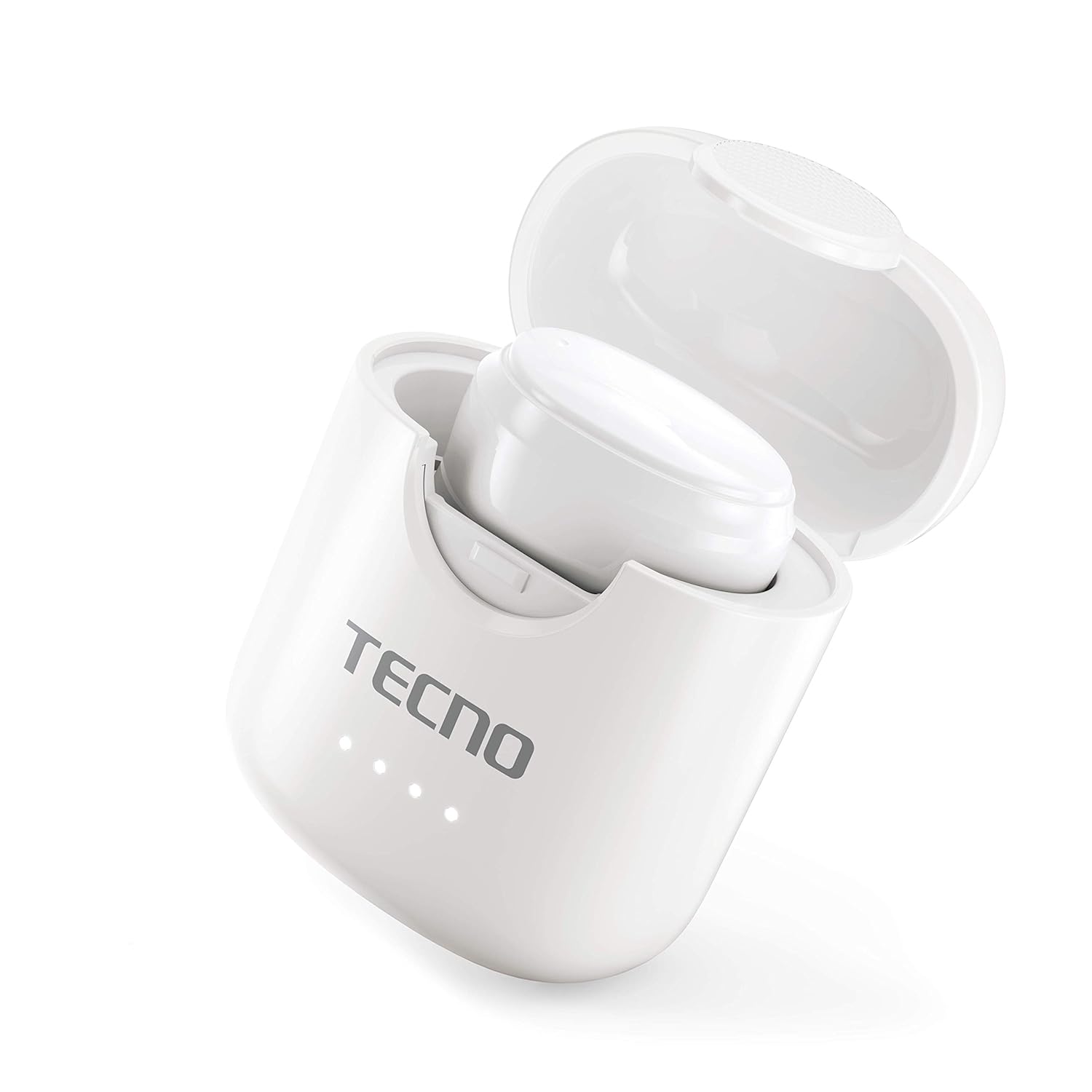
Image: The Tecno Minipod M1 earbud securely placed inside its open charging case, showing the compact design and charging indicators.

Image: A detailed close-up of a single Tecno Minipod M1 earbud, highlighting its ergonomic shape and touch-sensitive surface.
اجزا:
- ایربودز: Left and Right, each with touch controls and built-in microphone.
- د چارج کولو قضیه: Houses and charges the earbuds, with LED indicators for battery status.
- د USB چارج بندر: د بریښنا ان پټ لپاره د چارج کولو په قضیه کې موقعیت لري.
چمتو کول
1. ابتدايي چارج کول:
Before first use, fully charge the Tecno Minipod M1 earbuds and their charging case.
- دواړه ایربډونه د چارج کولو په بکس کې ځای په ځای کړئ. ډاډ ترلاسه کړئ چې دوی په خپلو اړوندو سلاټونو کې په سمه توګه ځای پر ځای شوي دي.
- ورکړل شوی USB چارجینګ کیبل د کیس د چارج کولو پورټ سره او بل پای یې د USB بریښنا سرچینې سره وصل کړئ (د مثال په توګه، کمپیوټر، دیوال اډاپټر).
- The LED indicators on the charging case will illuminate to show charging status. Once fully charged, the indicators may change color or turn off.

Image: The Tecno Minipod M1 charging case in a closed position, showing the LED indicators on the front that display charging status.
2. ستاسو د وسیلې سره جوړه کول:
The Minipod M1 earbuds use Bluetooth 5.0 for a stable and quick connection.
- د چارج کولو قضیه پرانیزئ. د غوږ بډونه به په اتوماتيک ډول د جوړې کولو حالت ته ننوځي.
- په خپل سمارټ فون یا بلوتوث فعال شوي وسیله کې، د بلوتوث ترتیباتو ته لاړ شئ.
- لټون available devices and select "Tecno Minipod M1" from the list.
- یوځل چې وصل شو، تاسو به د تایید غږ واورئ، او د غوږونو شاخص څراغونه به بدل شي.
- د راتلونکو استعمالونو لپاره، د غوږ بډونه به په اتوماتيک ډول د وروستي جوړه شوي وسیلې سره وصل شي کله چې له قضیې څخه ایستل شي.
عملیات
د سمارټ ټچ کنټرولونه:
The Tecno Minipod M1 features intuitive touch controls on each earbud.
| عمل | کنټرول |
|---|---|
| میوزیک پلی کړئ / بند کړئ | په هر غوږ کې یو نل |
| بله لار | په ښي غوږۍ کې دوه ځله ټایپ کړئ |
| مخکینی ټریک | په چپ غوږۍ کې دوه ځله ټایپ کړئ |
| ځواب / پای کال | په هر غوږ کې یو نل |
| زنګ رد کړئ | د 2 ثانیو لپاره هر یو ایربډ فشار ورکړئ او ونیسئ |
| د غږ معاون فعال کړئ | په دواړو غوږونو درې ځله ټایپ کړئ |
د غوږونو اغوستل:
Choose the correct size of eartips for a comfortable and secure fit. Insert the earbuds gently into your ear canal and twist slightly to ensure a snug fit. A proper fit enhances sound quality and noise cancellation.
ساتنه
پاکول:
- په منظم ډول د غوږ بډونه او د چارج کولو کیس د نرم، وچ، لینټ نه پاک ټوکر سره پاک کړئ.
- د کثافاتو پاکوونکي، الکول، یا کیمیاوي محلولونه مه کاروئ.
- د غوږونو او سپیکر میش څخه د غوږونو موم یا کثافات په نرمۍ سره د کوچني، نرم برش یا کاټن سویب په کارولو سره لرې کړئ.
ذخیره کول:
- کله چې په کارولو کې نه وي، تل د غوږ بډونه د چارج کولو په قضیه کې وساتئ ترڅو دوی خوندي او چارج شي.
- وسیله په یخ او وچ ځای کې وساتئ، د سختې تودوخې او مستقیم لمر وړانګو څخه لرې.
د اوبو مقاومت (IPX4):
The Tecno Minipod M1 earbuds are IPX4 water resistant, meaning they are protected against splashing water from any direction. This makes them suitable for workouts and light rain. However, they are not designed for swimming or submersion in water. Do not charge the earbuds or case if they are wet.

Image: The Tecno Minipod M1 charging case shown with various colorful silicone protective covers, emphasizing the included accessory for better protection and portability.
د ستونزو حل کول
| ستونزه | احتمالي حل |
|---|---|
| ایربډونه چارج نه کوي | ډاډ ترلاسه کړئ چې د چارج کولو کیبل په خوندي ډول وصل دی. وګورئ چې د چارج کولو کیس بریښنا لري که نه. د ایربډ او کیس دواړو کې د چارج کولو تماسونه پاک کړئ. |
| د وسیلې سره جوړه نشي کیدی | Make sure Bluetooth is enabled on your device. Ensure earbuds are in pairing mode (open case). Forget "Tecno Minipod M1" from your device's Bluetooth list and try pairing again. Move closer to your device. |
| یوازې یو ایربډ غږ کوي | دواړه غوږوالۍ بیرته د چارج کولو په قضیه کې کېږدئ، سر یې وتړئ، څو ثانیې انتظار وکړئ، بیا سر یې خلاص کړئ او بیا هڅه وکړئ. ډاډ ترلاسه کړئ چې دواړه غوږوالۍ چارج شوي دي. |
| ټیټ حجم یا د غږ خراب کیفیت | Adjust the volume on your device. Ensure earbuds are properly seated in your ears. Clean any debris from the speaker mesh and eartips. |
| د زنګ وهلو پر مهال مایکروفون کار نه کوي | Ensure the earbuds are connected as a "headset" profile in your device's Bluetooth settings. Check for any obstructions on the microphone opening. |
مشخصات
| فیچر | تفصیل |
|---|---|
| د ماډل نوم | Tecno Minipod M1 |
| بلوتوث نسخه | 5.0 |
| د پلې بیک ټول وخت | تر ۲۴ ساعتونو پورې (په ایربډونو کې ۶ ساعته + د چارج کولو کیس سره ۱۸ ساعته) |
| د اوبو مقاومت | IPX4 (د خولې او څاڅکو په وړاندې مقاومت لرونکی) |
| د شور لغوه کول | د چاپیریال شور لغوه کول (ENC) |
| کنټرولونه | د سمارټ ټچ کنټرولونه |
| د ایربود وزن | تقریبا ۴.۲ ګرامه په هر غوږ کې |
| ابعاد (محصول) | 2.4 x 1.7 x 2.7 سانتي متره |
| مواد | پولی کاربونیټ (PC)، اکریلونیټریل بوټاډین سټیرین (ABS) |
| د عملیاتي سیسټم مطابقت | iOS، Android |
تضمین او ملاتړ
The Tecno Minipod M1 comes with a د 6 میاشتو تضمین د پیرود نیټې څخه. دا تضمین د تولید نیمګړتیاوې پوښي. مهرباني وکړئ د تضمین ادعاوو لپاره د پیرود ثبوت وساتئ.
For technical support, warranty claims, or any other inquiries, please contact Tecno customer service through their official website or the contact information provided with your purchase documentation. You can also visit the په ایمیزون کې د ټیکنو پلورنځی د نورو معلوماتو لپاره.


