پیژندنه
This manual provides comprehensive instructions for the setup, operation, and maintenance of your Trust Ymo Wireless Keyboard and Mouse Set. This set is designed for comfortable and efficient use with its German QWERTZ layout, quiet keys, and splash-proof design.

Image: The Trust Ymo Wireless Keyboard and Mouse Set, featuring a full-size German QWERTZ keyboard and a compact wireless mouse.
د بسته محتويات
مهرباني وکړئ ډاډ ترلاسه کړئ چې ټول توکي په بسته کې شتون لري:
- Trust Ymo Wireless Keyboard (German QWERTZ Layout)
- Trust Ymo Wireless Mouse
- د USB مایکرو ریسیور
- د AAA بیټرۍ (۲ پکې شاملې دي)
- د کارونکي لارښود (دا لاسوند)

Image: The retail packaging for the Trust Ymo Wireless Keyboard and Mouse Set, indicating the contents.
د تنظیم کولو لارښوونې
- بیټرۍ نصب کړئ:
Open the battery compartments on both the keyboard and the mouse. Insert the included AAA batteries, ensuring correct polarity (+/-). Close the compartments securely.
- د USB رسیدونکي سره وصل کړئ:
Locate the USB micro receiver, typically stored within the mouse's battery compartment or a dedicated slot. Plug the USB receiver into an available USB port on your computer (PC, Laptop, Mac, or Chromebook).
- Automatic Connection (Plug & Play):
The keyboard and mouse are designed for plug-and-play functionality. Your operating system (Windows, MacOS, Chrome OS) should automatically detect and install the necessary drivers. No additional software installation is required.

Image: A user setting up the Trust Ymo Wireless Keyboard and Mouse, illustrating the "Plug & Play" feature and the shared micro USB receiver.
عملیاتي لارښوونې
د کیبورډ ځانګړتیاوې
- German QWERTZ Layout: The keyboard features a standard German QWERTZ layout with a full numeric keypad for efficient data entry.
- خاموشې کیلي: The keys are designed for a soft and quiet keystroke, minimizing disturbance in shared environments.
- ملټي میډیا او فعالیت کیلي: Access 13 dedicated office and multimedia buttons for quick control over volume, media playback, and common applications.
- د تنظیم وړ ټیکټ: The keyboard includes foldable feet to adjust the typing angle for ergonomic comfort.

Image: Close-up of the Trust Ymo keyboard, highlighting its quiet keys, adjustable feet, and multimedia function keys.
د موږک ځانګړتیاوې
- خاموش تڼۍ: The mouse buttons are designed for silent clicking, reducing noise during use.
- د DPI تڼۍ: Adjust the mouse sensitivity (DPI) between 600 and 1400 DPI to suit your preference and task requirements.
- د بې سیم لړۍ: The mouse operates wirelessly with a range of up to 10 meters from the USB receiver.
- محیطي ډیزاین: The mouse features a comfortable design suitable for both left-handed and right-handed users.
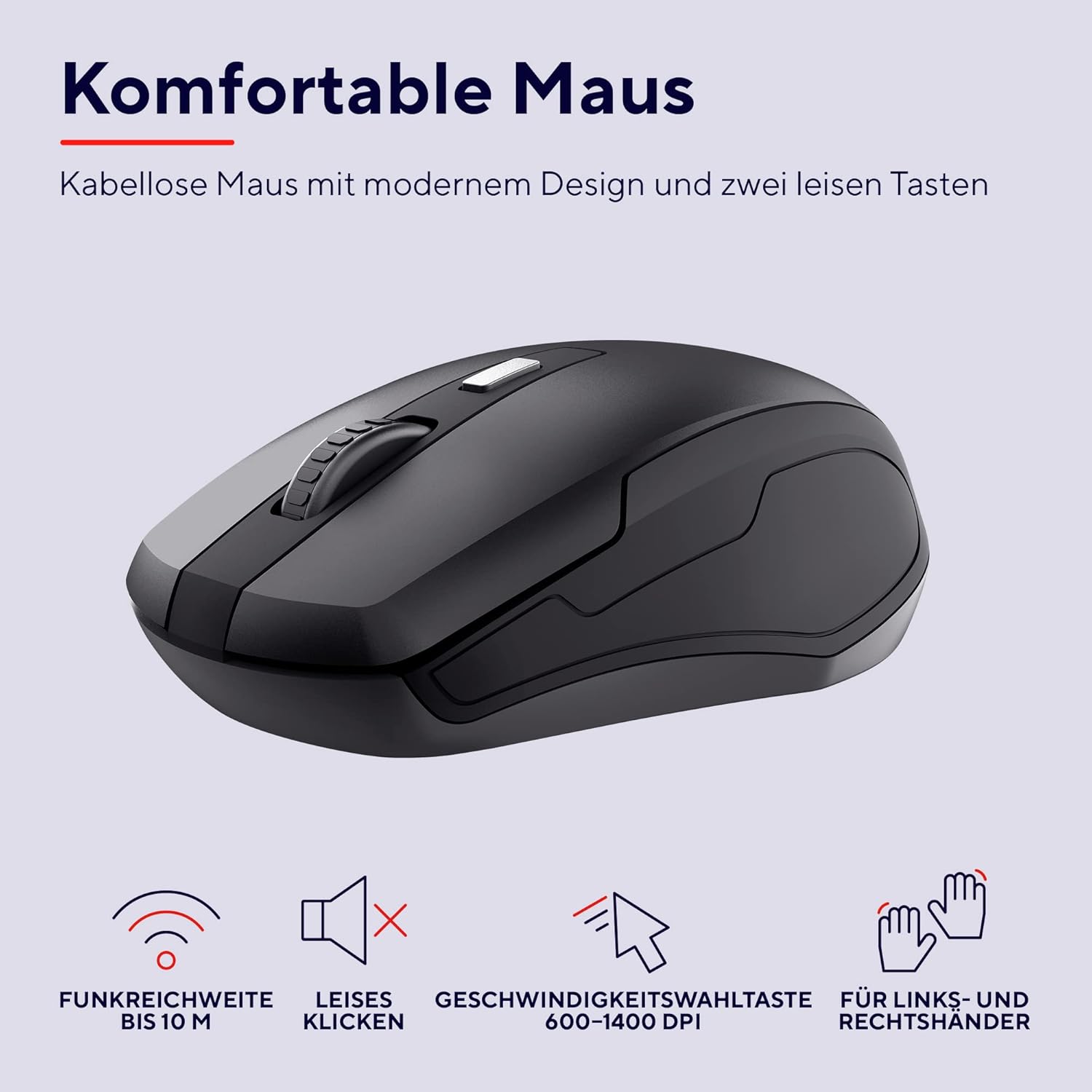
انځور: یو مفصل view of the Trust Ymo wireless mouse, showing its ergonomic shape, quiet click functionality, and DPI adjustment button.
ساتنه
- پاکول: د کیبورډ او موږک سطحې پاکولو لپاره نرم، وچ ټوکر وکاروئ. د سختې خاورې لپاره، یو څه damp ټوکر کارول کیدی شي، ډاډ ترلاسه شي چې هیڅ مایع وسیله ته ننوځي.
- Splash-Proof Feature: The keyboard is designed to be splash-proof, offering protection against accidental spills. However, it is not waterproof. Avoid submerging the keyboard in liquid. If a spill occurs, gently wipe away the liquid and allow the keyboard to dry completely before continued use.
- د بیټرۍ بدلول: Replace batteries when performance degrades or the low battery indicator illuminates.

Image: A close-up of the Trust Ymo keyboard demonstrating its splash-proof design, with water droplets on the keys.
د ستونزو حل کول
- هیڅ اړیکه:
- ډاډ ترلاسه کړئ چې د USB ریسیور په خوندي ډول په یو کاري USB پورټ کې پلګ شوی دی.
- Check if the batteries in both the keyboard and mouse are correctly installed and have sufficient charge.
- هڅه وکړئ چې د USB ریسیور په خپل کمپیوټر کې په بل USB پورټ کې ولګوئ.
- کیبورډ او موږک د USB ریسیور ته نږدې کړئ ترڅو د رینج مسلو مخه ونیسئ.
- ځنډ یا وقفه ای فعالیت:
- په دواړو وسایلو کې بیټرۍ بدل کړئ.
- Ensure there are no large metallic objects or other wireless devices interfering with the signal between the receiver and the devices.
- د موږک کرسر نه حرکت کوي:
- Check the mouse batteries.
- Ensure the mouse sensor on the bottom is clean and unobstructed.
- هڅه وکړئ موږک په بل سطح کې وکاروئ.
مشخصات
| برانډ | باور |
| د ماډل شمیره | 24080 |
| د ارتباط ټیکنالوژي | د راډیو فریکونسی (بې سیم) |
| د کیبورډ ترتیب | German QWERTZ |
| د موږک DPI | ۸۰۰-۱۶۰۰ DPI (د تنظیم وړ) |
| د بیسیم رینج | تر 10 مترو پورې |
| د بریښنا سرچینه | د بیټرۍ چلول (4x AAA پکې شامل دی) |
| مطابقت | Windows, Mac OS, Chrome OS |
| ځانګړي ځانګړتیاوې | Splash-proof keyboard, Quiet keys and mouse buttons |
| د محصول ابعاد | 2 x 44.2 x 14.2 cm (Keyboard); 560 g (Total weight) |
تضمین او ملاتړ
د تضمین معلوماتو او تخنیکي ملاتړ لپاره، مهرباني وکړئ رسمي ټرسټ ته مراجعه وکړئ webسایټ یا خپل محلي پرچون پلورونکي سره اړیکه ونیسئ. د تضمین ادعاوو لپاره د پیرود ثبوت وساتئ.
د چاپیریال معلومات
The packaging for the Trust Ymo Wireless Keyboard and Mouse Set is made from recycled materials, reflecting a commitment to environmental sustainability. Please dispose of the product and its batteries responsibly according to local regulations.

Image: Illustration of the sustainable packaging used for the Trust Ymo set, made from recycled cardboard.


