پیژندنه
This manual provides essential information for the proper setup, operation, and maintenance of your NEC DTZ-12D-3 DT400 12-Button Display Phone. Please read these instructions carefully to ensure optimal performance and longevity of your device. This phone is designed for business communication environments, offering a range of features to enhance productivity.
محصول پای ته ورسیدview
The NEC DTZ-12D-3 DT400 is a corded 12-button display phone, featuring a clear LCD screen for call information and menu navigation. It is designed for efficient communication in a professional setting.
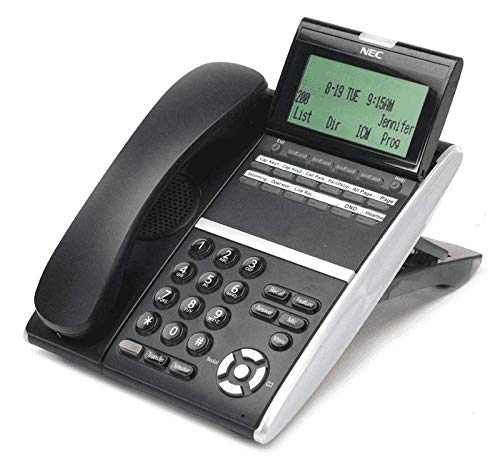
شکل 1: NEC DTZ-12D-3 DT400 12-Button Display Phone. This image shows the black corded desk phone with its adjustable display unit. The display shows time, date, and soft-key options. The phone features a standard dial pad, 12 programmable function keys, and dedicated buttons for speaker, transfer, redial, and navigation.
مهمې برخې:
- هینډسیټ: د شخصي خبرو اترو لپاره.
- د ښودلو سکرین: Shows call status, time, date, and menu options.
- Programmable Feature Keys (12): Customizable buttons for speed dials, line access, or specific functions.
- د ډایل پیډ: Standard numeric keys (0-9, *, #) for dialing.
- د نیویګیشن کیلي: For scrolling through menus and lists.
- د سپیکر تڼۍ: Activates the speakerphone function.
- Transfer Button: Used to transfer an active call to another extension.
- د ریډیل تڼۍ: Dials the last number called.
- DND (Do Not Disturb) Button: Activates/deactivates the Do Not Disturb feature.
چمتو کول
1. خلاصول
- په احتیاط سره د بسته بندۍ څخه ټولې برخې لرې کړئ.
- Verify that all items are present: phone unit, handset, coiled handset cord, and telephone line cord.
۲. د هینډسیټ نښلول
Connect one end of the coiled handset cord to the handset and the other end to the handset jack located on the side or back of the phone unit.
3. Connecting to the Telephone Line
Plug one end of the telephone line cord into the LINE jack on the phone unit and the other end into a standard telephone wall jack.
4. د نښلولو بریښنا
This phone is designed for corded electric operation. Ensure it is connected to a compatible telephone system that provides power, or use the appropriate power adapter if supplied separately (check your system's requirements).
عملیاتي لارښوونې
زنګ وهل
- هینډسیټ پورته کړئ یا فشار ورکړئ سپیکر تڼۍ
- Dial the desired telephone number using the dial pad.
- د زنګ وهلو لپاره انتظار وکړئ.
یو زنګ ته ځواب ورکول
- کله چې تلیفون زنګ ووهي، هینډسیټ پورته کړئ یا فشار ورکړئ سپیکر تڼۍ
Using Programmable Feature Keys
The 12 programmable keys can be configured for various functions such as speed dialing, line access, or system features. Consult your system administrator for specific programming details and assigned functions.
Caller Identification (Caller ID)
If subscribed to Caller ID service, the incoming caller's number and name (if available) will be displayed on the screen before you answer the call.
د تلیفون لیږد
- د فعال تلیفون پرمهال ، فشار ورکړئ لیږد تڼۍ
- Dial the extension or number to which you want to transfer the call.
- Wait for the recipient to answer, then announce the call and hang up. Alternatively, you may hang up immediately for an unsupervised transfer.
وروستنۍ شمیره بیا ډایل کول
هینډسیټ پورته کړئ یا فشار ورکړئ سپیکر تڼۍ، بیا فشار ورکړئ سرخیل د وروستي ډایل شوي شمیرې ته د زنګ وهلو لپاره تڼۍ.
ګډوډ مه کوئ (DND)
فشار ورکړئ DND button to activate or deactivate the Do Not Disturb feature. When active, incoming calls may be redirected to voicemail or a busy signal, depending on system configuration.
ساتنه
پاکول
- د تلیفون بهرنۍ برخه په نرم، داغ سره پاک کړئamp ټوکر
- سخت کیمیاوي مواد، د کثافاتو پاکوونکي، یا ډیر رطوبت مه کاروئ.
- Ensure the phone is disconnected from the power source before cleaning.
ذخیره کول
تلیفون په یخ او وچ ځای کې وساتئ، د مستقیم لمر وړانګو او سختې تودوخې څخه لرې، کله چې د اوږدې مودې لپاره نه کارول کیږي.
د ستونزو حل کول
د ډایل ټون نشته
- Check all cable connections, especially the telephone line cord.
- Ensure the phone system is operational.
- Test with another phone if available to rule out line issues.
ښودل کار نه کوي
- Verify the phone is properly connected to the system and receiving power.
- Adjust the display contrast if applicable (refer to system administrator).
زنګونه نشي وهلی یا یې نه شي ترلاسه کولی
- Check if the DND feature is accidentally activated.
- Ensure the telephone line is active.
- Contact your system administrator for assistance with line configuration.
مشخصات
| فیچر | تفصیل |
|---|---|
| ماډل | DTZ-12D-3 DT400 |
| برانډ | NEC Co |
| د تلیفون ډول | کوډ شوی |
| رنګ | تور |
| مواد | پلاستیک |
| د توکي وزن | ۲.۴۵ پونډه |
| د کڅوړې ابعاد | 12.28 x 9.21 x 4.61 انچه |
| د بریښنا سرچینه | د بریښنا تار شوی |
| د ډایلر ډول | Single Keypad (tone dialing) |
| د ځواب ورکولو سیسټم ډول | ډیجیټل |
| څو کرښې عملیات | د واحد کرښه عملیات |
| د زنګ وهونکي پیژندنه | هو |
| مطابقت لرونکې وسیلې | Traditional telephone networks (PSTN, ISDN), potential integration with other communication devices. |
تضمین او ملاتړ
For warranty information and technical support, please refer to the documentation provided by your system vendor or contact your NEC authorized dealer. As this product may be a renewed item, specific warranty terms may vary from new products. Please consult your purchase agreement for details.
For further assistance, it is recommended to contact your IT department or the telecommunications system administrator responsible for your NEC phone system.


