1. پیژندنه
Welcome to the Surfans Kids Tablet T57 user manual. This guide provides detailed instructions on how to set up, operate, maintain, and troubleshoot your new 7-inch Android tablet. Designed specifically for children, this tablet features a durable kid-proof case, parental control functions, and pre-installed educational and entertainment applications.
۲. په بکس کې څه دي؟
مهرباني وکړئ د خپل کڅوړې محتويات وګورئ ترڅو ډاډ ترلاسه کړئ چې ټول توکي شتون لري:
- 1x Surfans Kids Tablet
- 1x Tablet Stand
- 1x USB کیبل
- 1x Kids Tablet User Manual (this document)
3. محصول ختم شوview او ځانګړتیاوې
The Surfans Kids Tablet T57 is built with a robust design and features tailored for young users. Below is an overview of its components and key functionalities.
۳.۲ د ټابلیټ اجزا
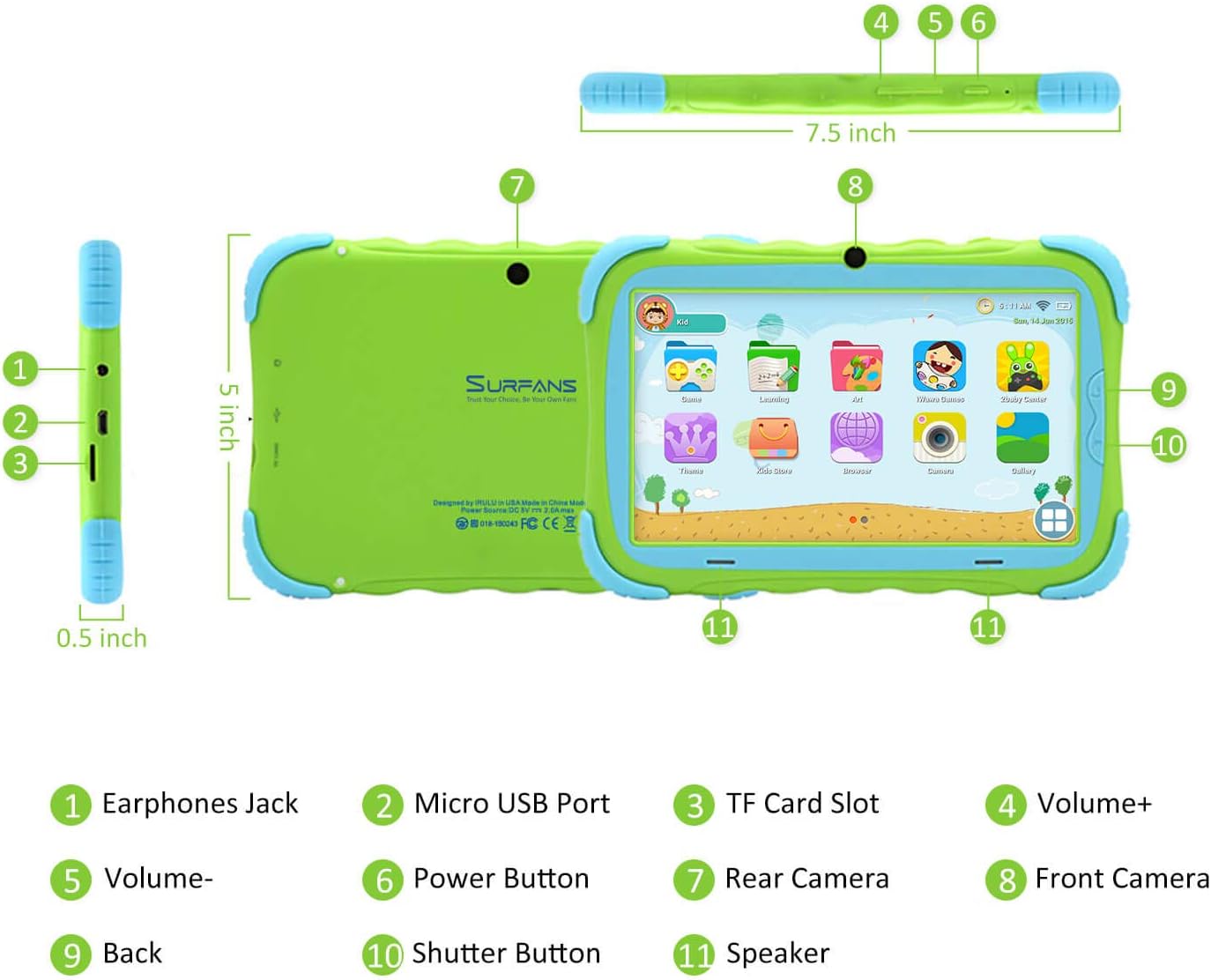
- د غوږونو جک: د هیډفونونو یا بهرني آډیو وسیلو سره د نښلولو لپاره.
- د مایکرو USB پورټ: Used for charging the tablet and connecting to a computer for data transfer.
- د TF کارت سلاټ: For inserting a Micro SD card to expand storage capacity (up to 32GB).
- حجم +: Increases the tablet's audio volume.
- حجم- Decreases the tablet's audio volume.
- د بریښنا تڼۍ: Press and hold to turn the tablet on/off or restart. Press briefly to turn the screen on/off.
- شاته کیمره: The primary camera located on the back of the tablet.
- مخکینۍ کیمره: The camera located on the front, typically used for video calls or selfies.
- د شا تڼۍ: Navigates back to the previous screen or closes the current application.
- د شټر تڼۍ: Used to capture photos or start/stop video recording in the camera application.
- سپیکر: Provides audio output from the tablet.
3.2 کلیدي ځانګړتیاوې
- Kid-Proof Design: Comes with a durable, lightweight, and skin-friendly case designed to protect against drops and bumps.
- 7-inch IPS HD Eye Protection Display: Provides clear visuals while minimizing eye strain.
- د انډرایډ ۹.۰ عملیاتي سیسټم: Runs on the latest Google Android 9.0 Pie operating system for smooth performance.
- څلور-کور پروسسر: Ensures responsive performance for apps, games, and videos.
- 1GB RAM & 16GB ROM: Sufficient memory for basic operations and storage, expandable up to 32GB via Micro SD card.
- Parental Control Mode: Allows parents to manage content, set time limits, and configure user settings for a safe digital environment.
- Pre-installed Kids Apps: Includes a variety of educational and entertaining apps, with access to the Google Play Store for more content.
- د وای فای اتصال: Supports 802.11g for fast browsing, streaming, and video calls.
- د بیټرۍ اوږد ژوند: 3000mAh Li-ion Battery provides 3-5 hours of working time, or up to 8 hours of mixed use on a single charge.


4. د تنظیم کولو لارښود
Follow these steps to set up your Surfans Kids Tablet for the first time.
4.1 ابتدايي چارج
Before first use, fully charge the tablet. Connect the included USB cable to the Micro USB Port (2) on the tablet and plug the other end into a compatible USB power adapter (not included) or a computer USB port. The charging indicator will show the charging status.
۸ پاور آن/بند
- د فعالولو لپاره: Press and hold the Power Button (6) until the screen lights up.
- د بریښنا بندولو لپاره: Press and hold the Power Button (6) until a power-off menu appears. Select "Power off" and confirm.
- د بیا پیلولو لپاره: Press and hold the Power Button (6) until the power-off menu appears. Select "Restart" and confirm.
- سکرین آن/بند: Briefly press the Power Button (6) to turn the screen on or off without powering down the tablet.
4.3 د وای فای اتصال
To access online content and download apps, connect your tablet to a Wi-Fi network:
- د کور سکرین څخه، د چټک ترتیباتو پینل خلاصولو لپاره له پورته څخه ښکته سویپ کړئ.
- د وای فای ترتیباتو ته د تګ لپاره د وای فای آیکون ټایپ او ونیسئ.
- که وای فای بند وي نو فعال یې کړئ.
- له لیست څخه خپل مطلوب وای فای شبکه غوره کړئ.
- که غوښتنه وشي، د شبکې پټنوم دننه کړئ، بیا "وصل شئ" کلیک وکړئ.
4.4 Setting Up Parental Control
The Parental Control mode is a key feature for managing your child's tablet usage. This allows you to filter website content, set time limits, and control app access.

Specific steps for setting up parental controls will be available within the tablet's pre-installed Kids app or settings menu. Look for an icon or section labeled "Parental Control" or "Kids Mode" to configure user profiles, allowed applications, and usage schedules.
۳. د ټابلیټ چلول
This section covers basic operations and how to use the tablet's features.
5.1 بنسټیز نیویګیشن
- Touch and Tap: To open apps, select items, or type.
- سوائپ: د سکرینونو، مینو، یا له لارې سکرول کولو لپاره web پاڼې
- د زوم کولو لپاره پنچ: د انځورونو زوم ان یا آوټ کولو لپاره یا web پاڼې
- کور سکرین: اصلي سکرین چیرې چې تاسو ایپسونو او ویجټونو ته لاسرسی کولی شئ.
- د نیویګیشن بار: Located at the bottom of the screen, typically includes Back, Home, and Recent Apps buttons.
5.2 Using Kids Mode and Apps
The tablet comes with a dedicated Kids Mode interface, providing a safe and engaging environment for children. This mode typically features a simplified layout and access to pre-approved content.

- Accessing Kids Mode: Usually, there's a specific app icon or a setting to switch to Kids Mode.
- مخکې نصب شوي ایپسونه: Explore the various educational games, books, music, and art learning applications.
- د ګوګل پلی پلورنځي: For additional apps, exit Kids Mode (if applicable) and access the Google Play Store. Ensure parental supervision for downloads.


5.3 Media Playback and Camera
- Videos and Music: Use pre-installed media players or download others from the Play Store to enjoy videos and music.
- کمره: Open the Camera app to use the Front (8) or Rear (7) cameras. Tap the Shutter Button (10) to take photos or record videos.
۵.۴ د پراخېدو وړ ذخیره
To expand the tablet's storage, insert a Micro SD card (up to 32GB, not included) into the TF Card Slot (3). This allows for more space for photos, music, movies, and apps.
6. ساتنه
مناسب ساتنه ستاسو د ټابلیټ اوږد عمر او غوره فعالیت تضمینوي.
- پاکول: د سکرین او ټابلیټ د بدن پاکولو لپاره له نرم، لینټ څخه پاک ټوکر څخه کار واخلئ. د کثافاتو پاکونکو یا محلولونو څخه ډډه وکړئ.
- د بیټرۍ پاملرنه:
- د بیټرۍ په مکرر ډول د بشپړ چارج کولو څخه ډډه وکړئ.
- ټابلیټ د لوړې تودوخې سره مه مخ کوئ.
- د چارج کولو لپاره یوازې چمتو شوي USB کیبل وکاروئ.
- د سافټویر تازه معلومات: په دوره یي ډول د ټابلیټ په ترتیباتو کې د سیسټم تازه معلومات وګورئ ترڅو ډاډ ترلاسه کړئ چې تاسو وروستي ځانګړتیاوې او امنیتي پیچونه لرئ.
- د ذخیرې مدیریت: په منظم ډول غیر ضروري پاک کړئ fileد ذخیره کولو ځای خالي کولو او فعالیت ساتلو لپاره غیر استعمال شوي ایپسونه ډاونلوډ او غیر نصب کړئ.
7. ستونزه حل کول
If you encounter issues with your tablet, refer to the following common problems and solutions.
| ستونزه | احتمالي حل |
|---|---|
| ټابلیټ نه چالانیږي. | Ensure the battery is charged. Connect the charger and wait a few minutes before attempting to power on again. If unresponsive, press and hold the Power Button for 10-15 seconds to force a restart. |
| د وای فای اتصال ستونزې. | وګورئ چې آیا وای فای په ترتیباتو کې فعال شوی دی. خپل وای فای روټر بیا پیل کړئ. شبکه هیر کړئ او بیا وصل شئ. ډاډ ترلاسه کړئ چې تاسو د وای فای سیګنال په حد کې یاست. |
| ورو فعالیت یا د ایپسونو خرابیدل. | Close unused apps. Clear app caches. Free up storage space by deleting unnecessary files or uninstalling unused apps. Restart the tablet. |
| سکرین غیر ځواب ورکوونکی دی. | Restart the tablet by holding the Power Button. Ensure the screen is clean and dry. |
| Cannot download apps from Google Play Store. | Check your Wi-Fi connection. Ensure sufficient storage space. Verify parental control settings are not blocking downloads. Clear cache and data for Google Play Store app. |
| ټابلیټ چارج نه کوي. | Check the USB cable and charger for damage. Try a different USB port or power adapter. Ensure the Micro USB Port is clean and free of debris. |
If the problem persists after trying these solutions, please contact Surfans customer support for further assistance.
8. مشخصات
Detailed technical specifications for the Surfans Kids Tablet T57:
| فیچر | تفصیل |
|---|---|
| د ماډل نوم | T57 |
| عملیاتي سیسټم | د Android 9 پای |
| د سکرین اندازه | ۷۸۷ انچه |
| د سکرین ریزولوشن | ۱۲۸۰x۸۰۰ IPS HD |
| پروسیسر | 1.5 GHz Quad-core Cortex-X7 (ARM) |
| RAM | 1GB |
| داخلي ذخیره (ROM) | 16GB |
| د پراخیدو وړ ذخیره | د مائیکرو SD کارډ د 32GB پورې ملاتړ کوي |
| بې سیم ډول | ۸۰۲.۱۱ ګرامه وای فای |
| کیمرې | Front Camera, Rear Camera (2 MP) |
| بیټرۍ | 3000mAh لی آئن بیټرۍ |
| د اوسط بیټرۍ ژوند | 3-5 hours (working time), 8 hours (mixed use) |
| ابعاد (LxWxH) | 7.5 x 5 x 0.5 انچه |
| د توکي وزن | ۲.۴۵ پونډه |
| رنګ | شین |
9. تضمین او ملاتړ
For warranty information, technical support, or any inquiries regarding your Surfans Kids Tablet T57, please refer to the contact details provided on the product packaging or the official Surfans website. Surfans is committed to providing fast response and technical assistance for any issues encountered during use.


