1. پیژندنه
This manual provides detailed instructions for the installation, operation, and maintenance of your MoesGo Smart RF433 WiFi Wall Switch. This smart switch is designed for convenient control of your lighting, offering multiple control methods including touch, app, voice, and RF433 remote.
کلیدي ځانګړتیاوې:
- د نصبولو لپاره هیڅ بې طرفه تار ته اړتیا نشته.
- Supports 2.4GHz WiFi connectivity for Smart Life/Tuya App control.
- Compatible with Alexa and Google Home for hands-free voice control.
- RF433 frequency support for remote control (remote not included).
- Programmable timing schedules and countdowns.
- Relay status memory and backlight preferences.

Image 1.1: MoesGo Smart RF433 WiFi Wall Switch, showcasing its sleek design and "No neutral" indicator.
2. د خوندیتوب معلومات
WARNING: Electrical installation should only be performed by a qualified electrician. Always turn off power at the circuit breaker before installation or maintenance.
- Ensure the power supply is disconnected before handling any wiring.
- This device is designed for 2.4GHz Wi-Fi networks only. It is not compatible with 5.0GHz Wi-Fi.
- A capacitor is required for proper operation and must be connected to both ends of the bulb.
- Only use with certified bulbs that have a rated power of 5W or higher.
- This switch is not designed for use as a 3-way switch.
- The capacitor may produce a faint humming sound during operation. This is normal.
3. د بسته محتويات
مهرباني وکړئ د لاندې توکو لپاره په بسته کې وګورئ:
- MoesGo Smart RF433 WiFi Wall Switch (1 unit)
- Capacitor (1 unit)
- د نصبولو پیچونه (۲ واحدونه)
- د کارن لارښود (دا سند)
4. مشخصات
| فیچر | تفصیل |
|---|---|
| برانډ | MoesGo |
| د ماډل شمیره | WS-EU1-LB-N-MG |
| عملیاتي حالت | آن - بند |
| د اړیکو ډول | په نورمال ډول تړل شوی |
| مواد | شیشه |
| د نصب کولو ډول | دیوال غر |
| د نړیوال خوندیتوب درجه بندي | IP65 |
| رنګ | تور |
| ابعاد (پکیج) | 11 x 10.2 x 5.1 سانتي متره |
| وزن (پیکج) | 193 ګرامه |

Image 4.1: Detailed dimensions of the MoesGo Smart Switch and a basic wiring diagram for single-wire installation with capacitor.
5. نصب او تنظیم کول
5.1 د نصب کولو دمخه چک لیست
- تایید کړئ چې ستاسو د وای فای شبکه 2.4GHz ده. د 5GHz شبکې ملاتړ نه کیږي.
- Ensure the bulbs connected to the switch have a rated power of 5W or higher.
- Confirm you are not attempting to install this as a 3-way switch.
- Have the included capacitor ready.
5.2 د تار لګولو لارښوونې
- بریښنا بند کړئ: خپل سرکټ بریکر ومومئ او هغه سویچ ته بریښنا بنده کړئ چې تاسو یې بدلوئ. د حجم په کارولو سره تایید کړئ چې بریښنا بنده دهtage ټیسټر.
- زوړ سویچ لرې کړئ: خپل موجوده دیوال سویچ په احتیاط سره د دیوال بکس څخه لرې کړئ.
- Connect Capacitor: The included capacitor is essential for stable operation with no neutral wire. Connect the capacitor across the two terminals of the light bulb (in parallel with the load). This helps prevent flickering and ensures proper functionality.
- سمارټ سویچ وصل کړئ:
- Connect the live wire (L) from your electrical box to the 'L IN' terminal on the MoesGo switch.
- Connect the load wire (L1) going to your light fixture to the 'L OUT' terminal on the MoesGo switch.
- ډاډ ترلاسه کړئ چې ټولې اړیکې خوندي دي.
- سویچ نصب کړئ: Gently push the wired switch into the wall box and secure it with the provided screws. Attach the glass panel.
- د بریښنا بیرته راګرځول: په سرکټ بریکر کې بریښنا بیرته فعاله کړئ.

Image 5.1: Visual guide highlighting critical installation requirements: 2.4GHz Wi-Fi, minimum 5W bulb power, not for 3-way use, and no neutral wire needed.

Image 5.2: Illustration showing the capacitor and its importance for the MoesGo Smart Switch, indicating it should be connected to the bulb.
5.3 App Pairing (Smart Life/Tuya)
- اپلیکیشن ډاونلوډ کړئ: د خپل سمارټ فون د اپل سټور (iOS یا Android) څخه "سمارټ لایف" یا "تویا سمارټ" ایپ ډاونلوډ کړئ.
- نوم لیکنه/ننوتل: اپلیکیشن پرانیزئ او د نوي حساب لپاره راجستر کړئ یا د موجوده حساب سره ننوتل وکړئ.
- د جوړه کولو حالت دننه کړئ: On the MoesGo switch, press and hold the touch button for approximately 5-10 seconds until the indicator light starts blinking rapidly. This indicates it's in pairing mode.
- وسیله اضافه کړئ: In the app, tap the "+" icon (usually in the top right corner) to add a device. Select "Switch (Wi-Fi)" or "Wall Switch".
- د سترګو رپېدل تایید کړئ: Confirm that the indicator light on the switch is blinking rapidly in the app.
- د وای فای توضیحات دننه کړئ: د خپل 2.4GHz Wi-Fi شبکې نوم او پټنوم دننه کړئ.
- نښلول: The app will begin connecting to the switch. Once connected, the indicator light on the switch will stop blinking and remain solid.
- د وسیلې نوم بدلول: You can rename the switch in the app for easier identification (e.g., "Living Room Light").
6. عملیات
The MoesGo Smart Switch offers multiple ways to control your lighting:
د ټچ کنټرول
Simply touch the designated area on the glass panel of the switch to turn the light ON or OFF. The touch control functions independently of app or voice commands.

Image 6.1: A hand touching the MoesGo Smart Switch, illustrating the touch control functionality.
6.2 App Control (Smart Life/Tuya)
Once paired with the Smart Life or Tuya Smart app, you can control your switch from anywhere with an internet connection.
- ریموټ آن/بند: Tap the switch icon in the app to turn the light ON or OFF.
- Relay Status Settings: Access the switch settings in the app to configure the relay status after a power outage (ON/OFF/Remember last status). You can also adjust backlight preferences.
- د شریکولو کنټرول: Share control of the switch with family members or friends through the app, allowing multiple users to manage the device.
- د ګروپ کنټرول: Create groups within the app to control multiple smart switches simultaneously.

Image 6.2: Screenshot of the Smart Life/Tuya app interface showing options for setting relay status and backlight preferences for the MoesGo Smart Switch.
۵.۴ د غږ کنټرول (الیکسا او ګوګل کور)
Integrate your MoesGo Smart Switch with Amazon Alexa or Google Home for convenient hands-free voice control.
- د حساب لینک: In the Alexa or Google Home app, enable the "Smart Life" or "Tuya Smart" skill/service and link your account.
- وسایل کشف کړئ: Ask Alexa or Google Home to discover new devices.
- غږیز حکمونه: د لاندې امرونو څخه کار واخلئ:
- "الیکسا، [نوم بدل کړئ] چالان کړئ"
- "هي ګوګل، [د نوم بدلول] بند کړه"
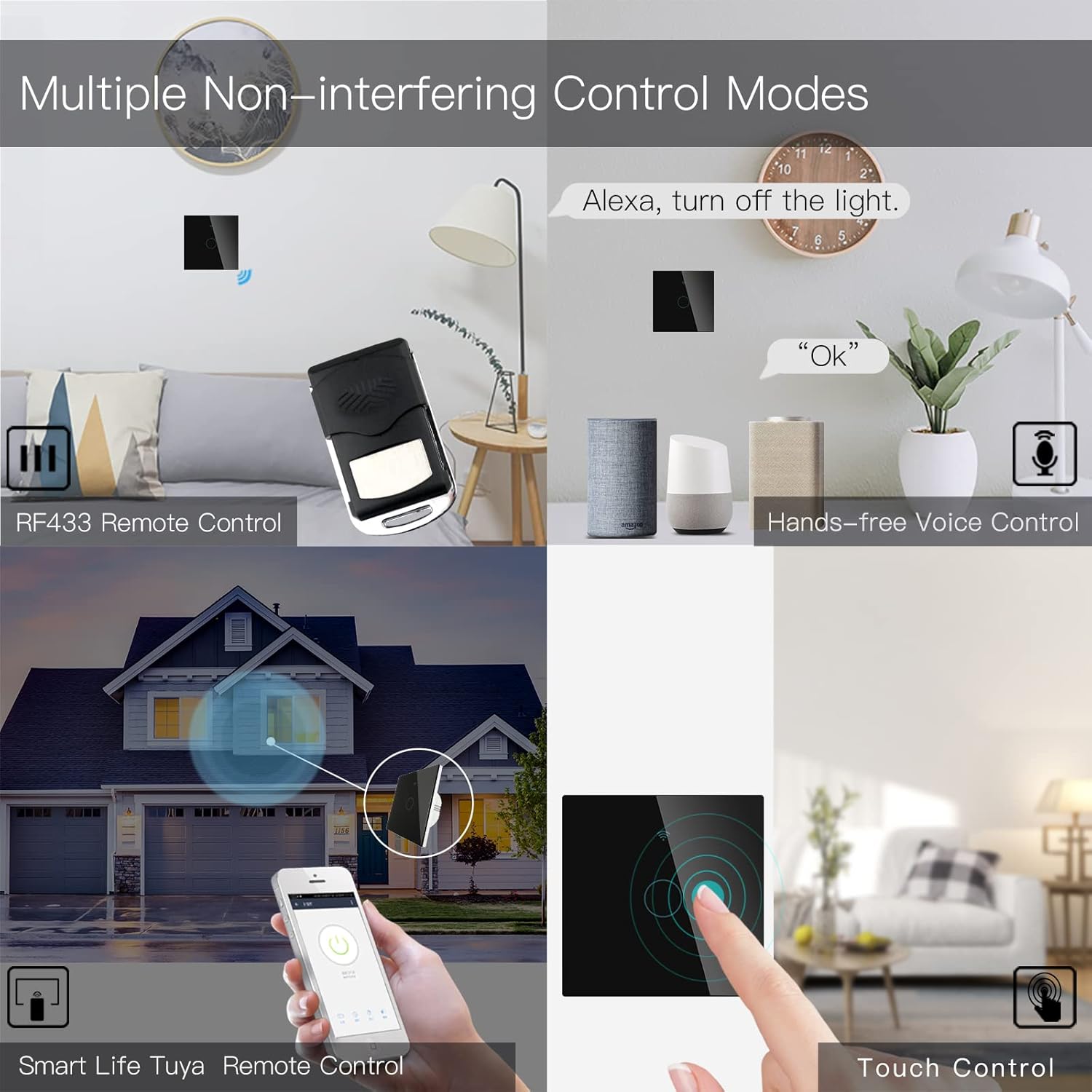
Image 6.3: Depiction of the MoesGo Smart Switch being controlled via voice commands using Amazon Alexa and Google Home devices.
۵.۲ RF433 ریموټ کنټرول
The switch supports RF433 frequency for remote control. An RF433 remote (not included) with 1527 encoding can be paired with the switch.
- Enter RF Pairing Mode: In the Smart Life/Tuya app, navigate to the switch settings and find the "RF area" to enter pairing mode.
- ریموټ جوړه: Press a button on your RF433 remote. Ensure a one-second delay between presses to avoid errors. The switch will confirm successful pairing.
6.5 Timing Schedules and Countdown
Utilize the Smart Life/Tuya app to set up automated schedules for your lights.
- مهالویش: Program specific times for the light to turn ON or OFF daily or on selected days of the week.
- شمېرنه: Set a countdown timer for the light to turn OFF after a specified duration (e.g., 1, 5, 30 minutes, 1 hour).

انځور ۲.۲: یو پخوانیample of setting a timing schedule in the Smart Life/Tuya app, showing lights turning on at 7:00 AM and off at 10:00 PM.
7. ساتنه
To maintain your MoesGo Smart Switch:
- پاکول: Gently wipe the glass panel with a soft, dry cloth. Avoid abrasive cleaners or solvents.
- د فرم ویئر تازه معلومات: Periodically check the Smart Life/Tuya app for available firmware updates to ensure optimal performance and security.
8. ستونزه حل کول
- سویچ ځواب نه ورکوي:
- وګورئ چې سرکټ بریکر فعال دی که نه.
- Ensure the wiring is correct and secure.
- Verify the capacitor is properly installed across the bulb terminals.
- روښانه څراغ:
- This often indicates an issue with the capacitor installation or an incompatible bulb. Ensure the capacitor is correctly wired and the bulb meets the 5W minimum power requirement.
- د وائی فای سره نښلول کیدی نشي:
- تایید کړئ چې ستاسو د وای فای شبکه 2.4GHz ده.
- Ensure the switch is in pairing mode (rapidly blinking indicator light).
- د دقت لپاره د خپل وای فای پټنوم وګورئ.
- Move the switch closer to your Wi-Fi router during pairing.
- Faint Humming Sound:
- A faint humming sound from the capacitor is normal for no-neutral switches. If the sound is loud or concerning, recheck the capacitor installation and bulb compatibility.
- RF433 Remote Pairing Issues:
- Ensure the switch is in RF pairing mode via the app.
- Press remote buttons with a one-second delay between presses.
- Verify the remote uses 1527 encoding.
9. تضمین او ملاتړ
For warranty information and technical support, please refer to the official MoesGo website or contact their customer service directly. Details are typically provided on the product packaging or the manufacturer's official online resources.


