پیژندنه
This manual provides instructions for the proper setup, operation, and maintenance of your ELECOM EX-G Left Handed Trackball Mouse, model M-XT4DRBK-G. This wireless trackball mouse is designed for left-handed users, featuring ergonomic design, thumb control, and programmable buttons for enhanced productivity and comfort.

Image: The ELECOM EX-G Left Handed Trackball Mouse, showcasing its ergonomic design and red trackball.
چمتو کول
1. د بسته محتويات
ډاډ ترلاسه کړئ چې ټول توکي په کڅوړه کې شتون لري:
- ELECOM EX-G Left Handed Trackball Mouse
- د USB بې سیم رسیدونکی
- د AA بیټرۍ (۴)
- د لارښود لارښود (دا سند)

Image: The trackball mouse, a single AA battery, and the USB receiver, representing the items included in the box.
2. د بیټرۍ نصب کول
- د موږک لاندې برخه کې د بیټرۍ کڅوړه ومومئ.
- د بیټرۍ کمپارټ پوښ خلاص کړئ.
- چمتو شوی AA بیټرۍ دننه کړئ، د سم قطبیت ډاډ ترلاسه کړئ (+/-).
- د بیټرۍ کمپارټ پوښ په خوندي ډول وتړئ.

Image: A diagram showing the battery installation process for the trackball mouse.
۲.۱. د USB رسیور اتصال
- د USB ریسیور د موږک په لاندې برخه کې د ذخیره کولو سلاټ څخه لرې کړئ.
- د USB ریسیور په خپل کمپیوټر کې موجود USB پورټ کې ولګوئ.
- Your computer should automatically detect the device.

Image: A diagram illustrating how to insert the USB receiver into a computer's USB port.
4. بریښنا فعاله کړئ
Locate the power switch on the underside of the mouse and slide it to the "ON" position. The mouse is now ready for use.

Image: A diagram showing the power switch on the underside of the trackball mouse in the "ON" position.
5. Software Installation (ELECOM Mouse Assistant)
To customize the 6 programmable buttons and other settings, download and install the "ELECOM Mouse Assistant" software from the official ELECOM website. This software allows you to assign various functions to each button.

Image: Screenshot of the ELECOM website showing the download links for the Mouse Assistant software for Windows and Mac.

Image: Screenshot of the ELECOM Mouse Assistant software interface, showing button customization options and DPI settings.
عملیاتي لارښوونې
1. Basic Trackball Operation
Control the cursor by rolling the red trackball with your thumb. The optical tracking technology provides precise movement.

Image: A left hand operating the trackball mouse, demonstrating thumb control of the red trackball.
Video: Official product video demonstrating the ELECOM Left-Handed Wireless Thumb-Operated Trackball Mouse (M-XT4DRBK-G) in use, highlighting its features and ergonomic design.
۴.۴. د DPI سمون
The DPI button allows you to switch between two cursor speeds: 750 DPI (Low) and 1500 DPI (High). Press the DPI button located near the scroll wheel to toggle between these settings.

Image: Close-up of the trackball mouse showing the DPI switch button, labeled "HIGH", located above the trackball.
3. د تڼۍ دندې
The mouse features 6 physical buttons, which can be customized using the ELECOM Mouse Assistant software. Default functions include:
- کیڼ کلیک: لومړني انتخاب.
- ښي کلیک: د شرایطو مینو.
- د سکرول ویل کلیک: Middle click or auto-scrolling.
- د شا تڼۍ: بیرته دننه ځي web براوزرونه یا file سپړونکي
- د وړاندې کولو تڼۍ: مخ په وړاندې ځي web براوزرونه یا file سپړونکي
- د فعالیت تڼۍ: Customizable via software.
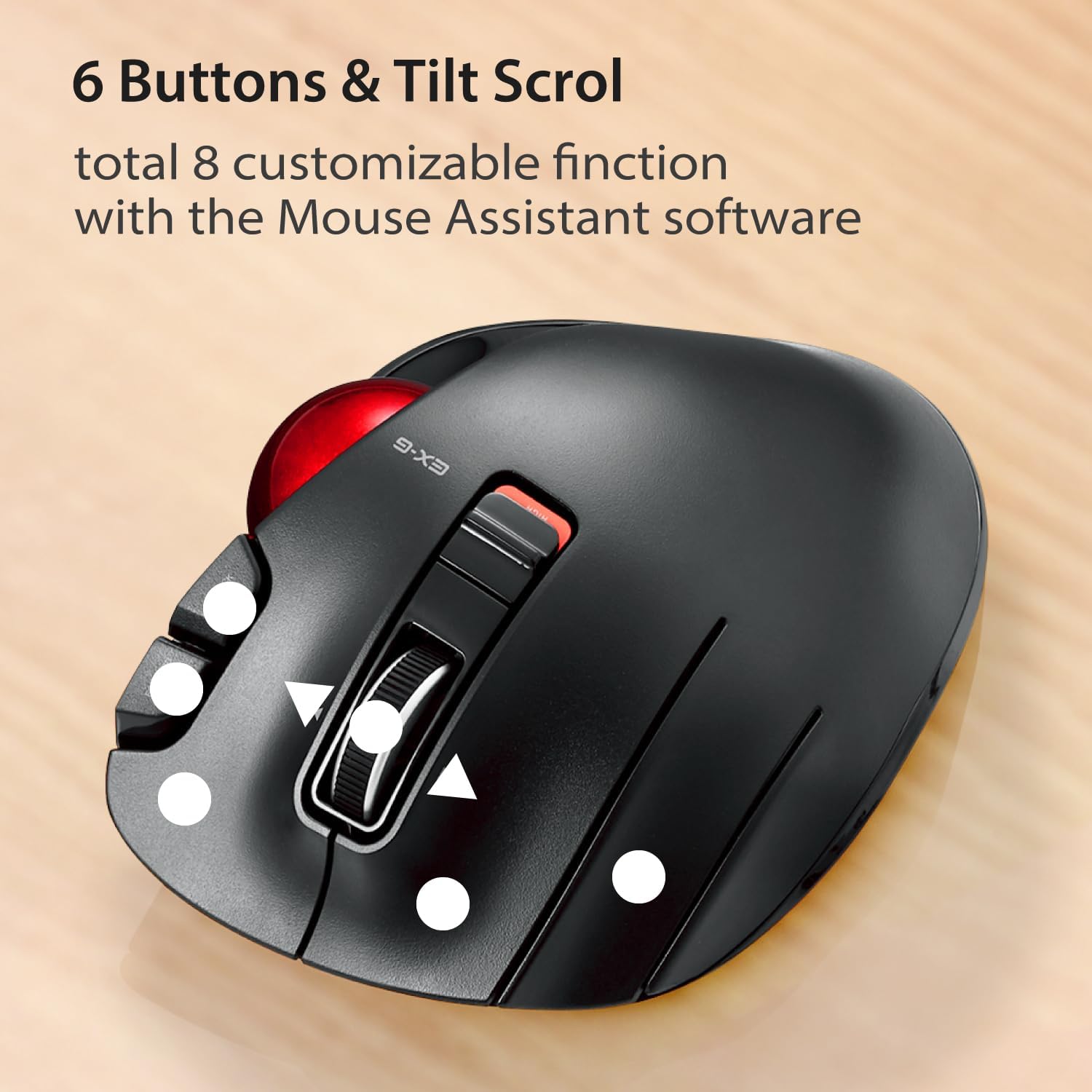
انځور: پورته-ښکته view of the trackball mouse highlighting the positions of its 6 buttons and tilt scroll wheel.

Image: Detailed diagram labeling the tilt wheel, function button, back/forward buttons, DPI switch, 34mm ball, ball removal hole, power switch, low power indicator, high speed indicator, and USB receiver storage.
4. Tilt Scroll
The scroll wheel can be tilted left or right to enable horizontal scrolling, useful for navigating wide documents or spreadsheets. This function may not be supported on all operating systems (e.g., Windows RT8.1).
5. Ergonomic ډیزاین
The mouse is designed to support the left hand in a natural, angled position, promoting comfort during extended use and reducing strain.

Image: A left hand resting comfortably on the trackball mouse, illustrating its ergonomic shape.
ساتنه
1. Trackball Cleaning
د وخت په تیریدو سره، دوړې او کثافات ممکن د ټریکبال شاوخوا راټول شي، چې د هغې په اسانه فعالیت اغیزه کوي. د پاکولو لپاره:
- موږک بند کړئ.
- Locate the trackball removal hole on the underside of the mouse.
- Use a pen or a similar blunt object to push the trackball out from the bottom.
- Clean the trackball and the inside of the trackball housing with a soft, lint-free cloth.
- Reinsert the trackball until it clicks into place.
Image: Diagram showing the location of the trackball removal hole on the underside of the mouse, indicating where to push to remove the trackball for cleaning.
2. د بیټرۍ بدلول
When the battery remaining light lamp indicates low power, replace the AA battery following the installation steps in the Setup section.
د ستونزو حل کول
| ستونزه | احتمالي لامل | د حل لاره |
|---|---|---|
| کرسر نه حرکت کوي یا په ناڅاپي ډول حرکت کوي. |
|
|
| Buttons are not responding as expected. |
|
|
| Horizontal scrolling not working. |
|
|
مشخصات
| فیچر | تفصیل |
|---|---|
| د ماډل شمیره | M-XT4DRBK-G |
| ابعاد (L x W x H) | 4.9 x 3.73 x 1.89 انچه (124.4 x 94.7 x 47.9 mm) |
| وزن (د بیټرۍ پرته) | ۵.۱۲ اونس (تقریبا ۱۴۵ ګرامه) |
| ارتباط | ۲.۴ GHz بېسیم (USB رسیور) |
| د DPI کچه | 750 / 1500 count (switchable) |
| تڼۍ | 6 (Programmable) + Tilt Scroll |
| د تعقیب ټیکنالوژي | Optical (Red Ball) |
| د بریښنا سرچینه | د 1 ایکس AA بیټرۍ (شامل) |
| د سیسټم اړتیاوې | Windows Vista, 7, 8, 10 or later; macOS 10.10 or later |

Image: Diagram showing the length, width, and height dimensions of the trackball mouse.
د تضمین معلومات
ELECOM products are typically covered by a limited manufacturer's warranty. For specific details regarding the warranty period and terms for your M-XT4DRBK-G trackball mouse, please refer to the warranty card included with your product or visit the official ELECOM webسایټ
ملاتړ
For further assistance, technical support, or to download the latest version of the ELECOM Mouse Assistant software, please visit the official ELECOM-USA webسایټ:
You can also find additional product information and FAQs on the ELECOM brand store on Amazon.


