پیژندنه
Thank you for choosing the MOUNTUP Full Motion TV Wall Mount, model MU0018. This manual provides detailed instructions for the safe and proper installation, operation, and maintenance of your new TV wall mount. Designed for most 26-50 inch TVs, this mount offers full motion capabilities including swivel, tilt, and extension, allowing you to achieve optimal viewing angles. Please read this manual thoroughly before installation and keep it for future reference.

Image: The MOUNTUP Full Motion TV Wall Mount MU0018, showcasinد هغې د نښلولو لاس او VESA پلیټ.
د خوندیتوب معلومات
Always ensure proper safety precautions are followed during installation. Failure to do so may result in property damage, serious injury, or death. If you are unsure about any part of the installation process, please consult a qualified professional.
- د وزن ظرفیت: This mount is designed for TVs up to 53 LBS (24 kg). Do not exceed this weight limit.
- د VESA مطابقت: ډاډ ترلاسه کړئ چې ستاسو د تلویزیون VESA نمونه د 75x75mm او 300x300mm ترمنځ ده.
- د دیوال ډول: This mount is suitable for single wood studs, concrete walls, and brick walls.
- WARNING: DO NOT MOUNT ON DRYWALL ALONE. For concrete or brick walls, appropriate anchors (not included) are required. Contact MOUNTUP customer service if you need wall anchors.
- وسیلې: د نصبولو لپاره مناسب وسایل وکاروئ. تل د خوندیتوب عینکې واغوندئ.

Image: Illustration showing compatible wall types: single wood stud, concrete wall (requires anchors), and brick wall (requires anchors). A warning states not to mount on drywall alone.
د بسته محتويات
مهرباني وکړئ د نصبولو پیل کولو دمخه تصدیق کړئ چې ټولې برخې شتون لري او زیانمن شوي ندي.
- د تلویزیون دیوال ماونټ اسمبلۍ
- د نصبولو هارډویر کټ (مختلف پیچونه، واشیرونه، فاصلې)
- د لارښوونې لارښود
مشخصات
| فیچر | مشخصات |
|---|---|
| برانډ | ماونټ اپ |
| د ماډل شمیره | موکسومکس |
| د مطابقت وړ تلویزیون اندازه | 26-50 انچه |
| د اعظمي وزن ظرفیت | 53 LBS (24 kg) |
| د VESA مطابقت | لږ تر لږه ۱۰۰x۱۰۰ ملي میتره تر اعظمي حد ۶۰۰x۴۰۰ ملي میتره پورې |
| سویول زاویه | +/-90° |
| د تللو زاویه | +5°/-15° |
| د کچې سمون | +/-3° (after installation) |
| د دیوال څخه غځول | ۲.۴ انچه (بیرته ایستل شوی) تر ۱۸.۳ انچه (غزول شوی) |
| مواد | د الماس فولاد |
تنظیم او نصب کول
۴.۱. د VESA مطابقت وګورئ
Before installation, measure the horizontal and vertical distance between the mounting holes on the back of your TV. This is your TV's VESA pattern. The MU0018 mount supports VESA patterns from 75x75mm up to 300x300mm.

Image: Diagram illustrating how to measure VESA hole distance (horizontal x vertical) and a table of suitable VESA patterns for the MU0018 mount (Max 300x300mm).

Image: Comparison of VESA patterns, showing the MU0018's maximum 300x300mm VESA and noting that for VESA larger than 300x300mm, models MU0009 or MU0014 should be considered.
2. Wall Type Selection
Identify your wall type. The mount is designed for single wood studs. For concrete or brick walls, specialized anchors are required and are not included in the standard package. Do not attempt to mount on drywall alone without securing to a stud.
۲. د دیوال پلیټ نصب کول
Locate the center of your wood stud using a stud finder. Mark the drilling points for the wall plate. For concrete or brick walls, use a hammer drill and appropriate masonry bits to drill holes, then insert the correct anchors. Secure the wall plate firmly to the wall using the provided lag bolts.
۳. تلویزیون ته د قوسونو نښلول
Attach the TV brackets to the back of your television using the appropriate screws, washers, and spacers from the hardware kit. Ensure the brackets are securely fastened and evenly aligned.
۴. د تلویزیون ځړول
Carefully lift the TV with the attached brackets and hook them onto the wall plate. Secure the TV to the wall plate using the safety screws or locking mechanisms provided. Ensure the TV is level and stable.
عملیاتي لارښوونې
The MOUNTUP MU0018 offers full motion capabilities for enhanced viewانعطاف پذیري.
د څنډې سمول
The mount allows for a swivel angle of +/-90°. Gently push or pull the TV to the desired left or right position. The maximum swivel angle depends on your TV size and its distance from the wall.

Image: A TV mounted in a corner, demonstrating the +/-90° swivel capability of the mount.
د خښتو سمون
Adjust the vertical tilt angle from +5° (tilt up) to -15° (tilt down) to reduce glare and optimize your viewing experience. Loosen the tilt knobs on the TV brackets, adjust to the desired angle, and then tighten the knobs to secure the position.

Image: An illustration showing a TV tilting down by 15 degrees and tilting up by 5 degrees, demonstrating the range of tilt adjustment to reduce glare.
Extension and Retraction
The articulating arm allows the TV to extend up to 14.6 inches (370mm) from the wall and retract to a slim 2.6 inches (65mm) for space-saving. Gently pull or push the TV to extend or retract the arm.
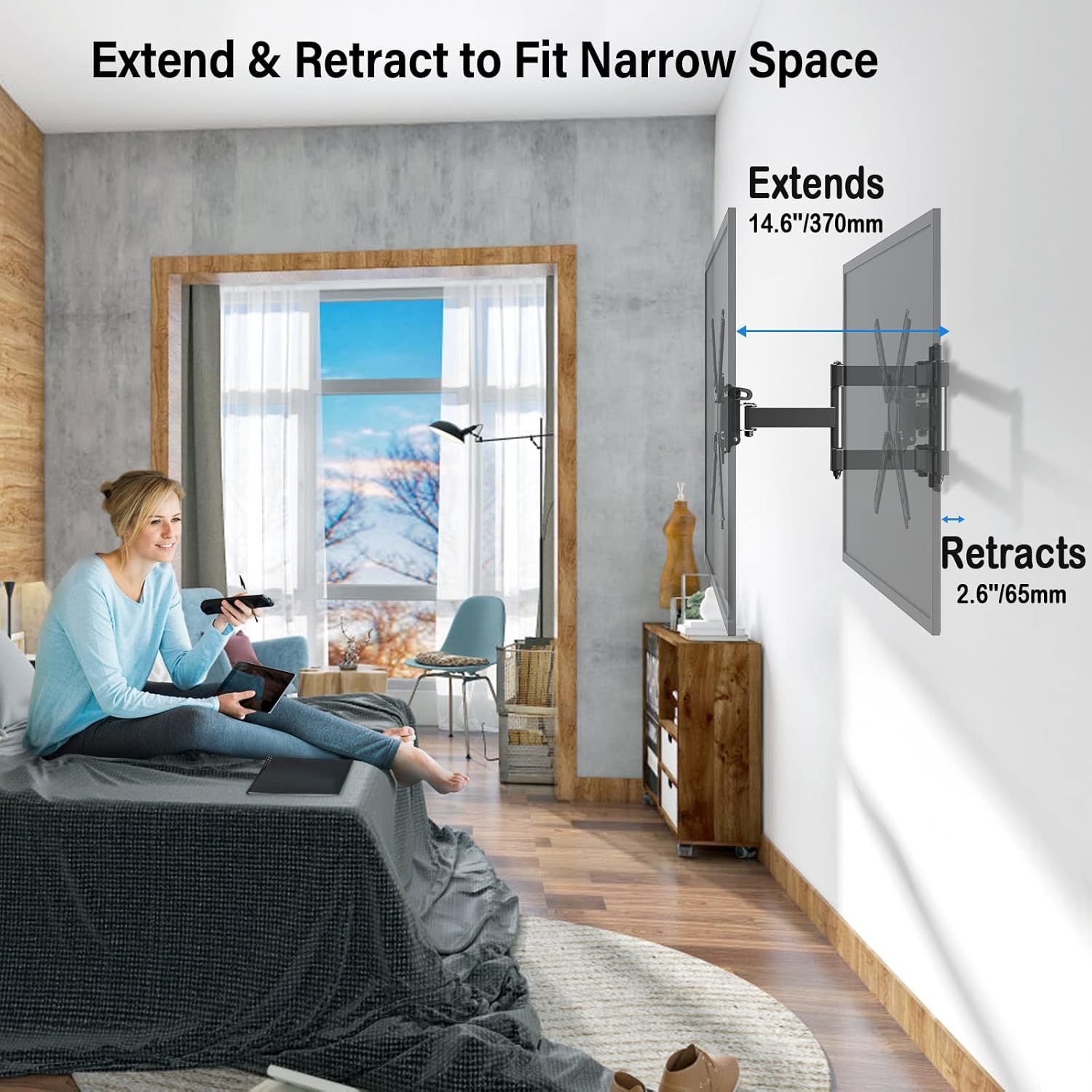
Image: A TV mounted on a wall, showing the mount extended 14.6 inches and retracted 2.6 inches, illustrating its ability to fit narrow spaces.
د کچې سمون
After installation, you can make minor level adjustments of +/-3° to ensure your TV is perfectly horizontal. This feature helps correct any slight misalignment during mounting.

Image: A TV mounted on a wall, with arrows indicating a +/-3 degree level adjustment, demonstrating how to fine-tune the TV's horizontal position after installation.
ساتنه
منظم ساتنه ستاسو د تلویزیون دیوال ماونټ اوږد عمر او خوندي عملیات تضمینوي.
- وختي معاینات: په دوره یي ډول ټول پیچونه او اړیکې وګورئ ترڅو ډاډ ترلاسه شي چې دوی کلک او خوندي پاتې دي.
- پاکول: غره د نرم او وچ ټوکر سره پاک کړئ. د کثافاتو پاکوونکو یا محلولونو کارولو څخه ډډه وکړئ.
- خوځنده برخې: If the articulating arm feels stiff, a small amount of silicone-based lubricant can be applied to the joints.
د ستونزو حل کول
| ستونزه | احتمالي لامل | د حل لاره |
|---|---|---|
| د نصبولو وروسته تلویزیون په سطحه نه دی. | Slight misalignment during mounting. | Use the +/-3° level adjustment feature to fine-tune the TV's horizontal position. |
| غره نرم یا بې ثباته احساس کوي. | Screws are not fully tightened or incorrect wall anchors used. | Re-check all mounting screws and wall connections. Ensure appropriate anchors were used for concrete/brick walls. Do not mount on drywall alone. |
| تلویزیون په ماونټ کې نه ځایېږي. | د VESA ناسمه نمونه یا د تلویزیون وزن له ظرفیت څخه ډیر دی. | Verify your TV's VESA pattern (75x75mm to 300x300mm) and weight (max 53 LBS). If larger, consider other MOUNTUP models like MU0009 or MU0014. |
تضمین او ملاتړ
MOUNTUP TV stands come with a full 3-year protection. For any questions regarding purchase or installation, please feel free to contact our friendly support team. We are dedicated to providing comprehensive and advanced technology solutions.
د پیرودونکو خدمت: Please refer to the contact information provided with your product packaging or visit the official MOUNTUP webد ملاتړ لپاره سایټ.


