1. پیژندنه
Thank you for choosing the YISSVIC YGH397S Wireless Weather Station. This device provides accurate indoor and outdoor temperature and humidity readings, a weather forecast, time display, calendar, and an alarm clock function. Please read this manual carefully before use to ensure proper operation and to maximize the product's lifespan.
2. د بسته محتويات
مهرباني وکړئ د خلاصولو پر مهال د کڅوړې محتويات وګورئ. که کوم توکي ورک یا زیانمن شوي وي، مهرباني وکړئ د پیرودونکو ملاتړ سره اړیکه ونیسئ.
- YISSVIC YGH397S Main Weather Station Unit
- د بې سیم بیروني سینسر
- د USB بریښنا کیبل
- د بریښنا اډاپټر
- د کارن لارښود

انځور 2.1: Contents of the YISSVIC YGH397S Weather Station package. The image displays the main weather station unit, a wireless outdoor sensor, a USB power cable, a power adapter, and the user manual, all neatly arranged next to the product box.
3. محصول ختم شوview
3.1 Main Unit Display and Buttons

انځور 3.1: مخکی view of the YISSVIC YGH397S Weather Station main unit. The large LCD color display shows time, date, weather forecast, indoor temperature/humidity, and outdoor temperature/humidity. Buttons on the right side include SNOOZE, M/S, -/CF, +/CH, and MEM.
The main unit features a clear LCD color display and several control buttons:
- ننوز Activates snooze function during an alarm; adjusts backlight brightness.
- M/S (Mode/Set): Switches display modes; enters setting mode.
- -/CF: Decreases values during setting; switches between Celsius and Fahrenheit.
- +/CH: Increases values during setting; switches display channels for multiple outdoor sensors.
- MEM (حافظه): Displays maximum/minimum temperature and humidity records.
3.2 بې سیم بیروني سینسر

انځور 3.2: شاته view of the YISSVIC YGH397S Wireless Outdoor Sensor. It features a hanging hole for wall mounting and a red LED indicator light. The image also shows examples of suitable placement locations: outdoors, in a bedroom, and in a living room.
The outdoor sensor transmits temperature and humidity data wirelessly to the main unit. It has a small LED indicator and a mounting hole for easy placement.
4. ترتیب کول
4.1 د بیټرۍ نصب کول
- بهر سینسر: Open the battery compartment on the back of the outdoor sensor. Insert 2 x AAA batteries (not included) according to the polarity markings (+/-). Close the compartment.
- اصلي واحد: Open the battery compartment on the back of the main unit. Insert 3 x AAA batteries (not included) according to the polarity markings (+/-). Close the compartment. Note: Batteries for the main unit are for backup only. For continuous display and backlight, use the power adapter.
۲.۱ د اصلي واحد ځواک ورکول
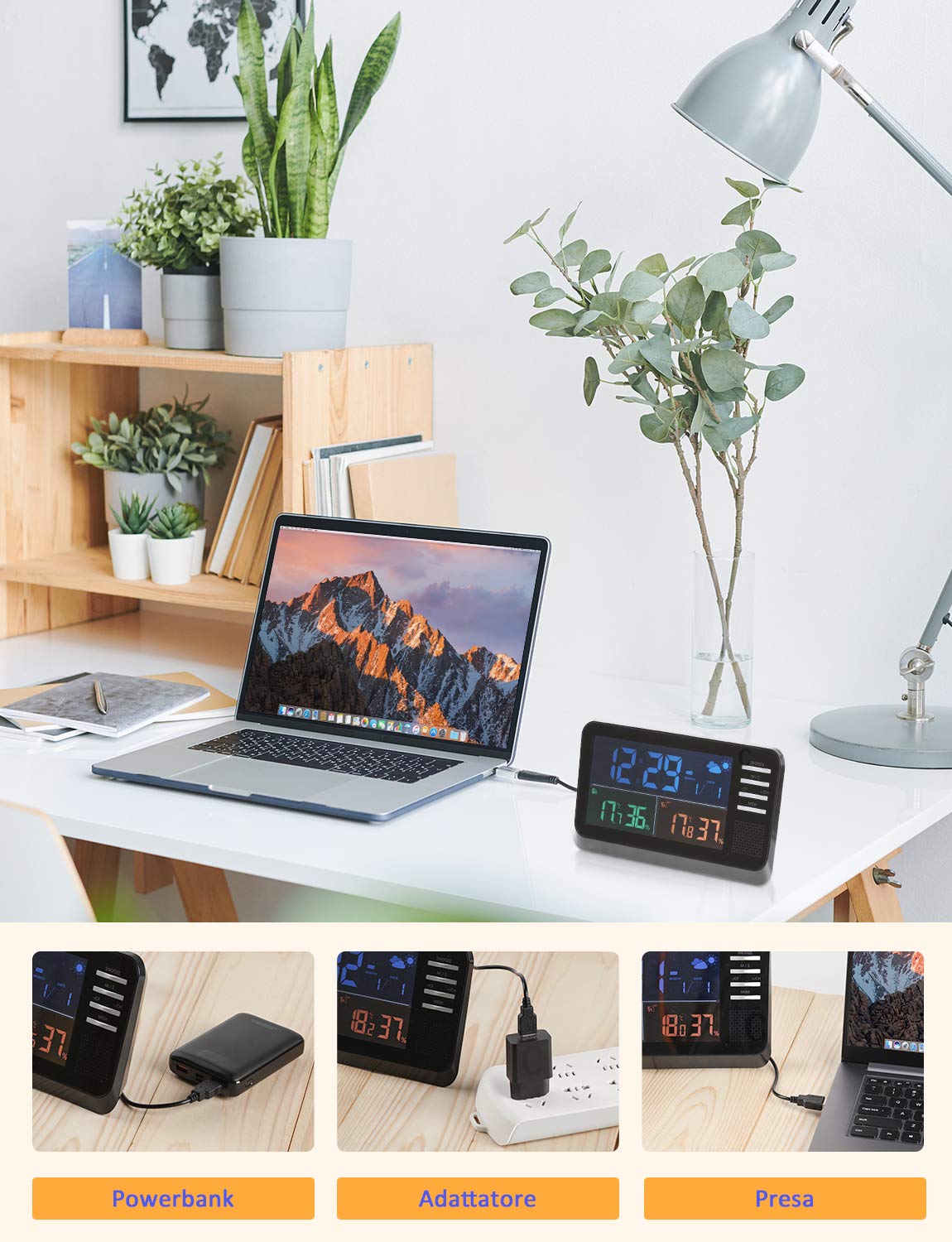
For optimal performance and continuous display, connect the main unit to power using the provided USB cable and power adapter.

انځور 4.1: Powering options for the YISSVIC YGH397S Weather Station. The device can be powered via a power bank, a standard wall adapter, or a laptop's USB port, offering flexible power solutions.
۵.۲ د سینسر جوړه کول
After inserting batteries into both the main unit and the outdoor sensor, the main unit will automatically search for the outdoor sensor. The outdoor temperature and humidity will appear on the display within a few minutes. If the outdoor data does not appear, press and hold the "+/CH" button on the main unit to manually initiate a search for the sensor.
4.4 د سینسر ځای په ځای کول
Place the outdoor sensor in a shaded, dry location, protected from direct sunlight and rain, to ensure accurate readings. Avoid placing it near heat sources or metal objects that could interfere with the wireless signal.
5. عملیاتي لارښوونې
5.1 د وخت او نیټې ترتیب
- Press and hold the "M/S" button for 3 seconds to enter time setting mode. The hour digit will flash.
- Use the "+/CH" and "-/CF" buttons to adjust the hour.
- Press "M/S" again to confirm and move to the next setting (minute, year, month, day, 12/24 hour format).
- Repeat steps 2 and 3 until all settings are complete. Press "M/S" to exit setting mode.
5.2 د الارم ترتیب کول
- Press the "M/S" button repeatedly until the alarm time is displayed (usually indicated by an alarm icon).
- Press and hold the "M/S" button for 3 seconds. The alarm hour digit will flash.
- Use the "+/CH" and "-/CF" buttons to adjust the alarm hour.
- Press "M/S" again to confirm and move to the alarm minute setting.
- Repeat steps 2 and 3. Press "M/S" to exit alarm setting mode.
- To activate/deactivate the alarm, press the "+/CH" button while the alarm time is displayed. An alarm icon will appear/disappear on the screen.
5.3 د سنوز فعالیت
انځور 5.1: The YISSVIC YGH397S Weather Station showing an alarm set for 8:00. The snooze function is indicated by the 'SNZ' icon and can be activated by pressing the SNOOZE button when the alarm sounds.
When the alarm sounds, press the "SNOOZE" button to activate the snooze function. The alarm will temporarily stop and sound again after approximately 5 minutes. To stop the alarm completely, press any other button.
۵.۳ د تودوخې واحد بدلون (℃/℉)
Press the "-/CF" button to switch between Celsius (℃) and Fahrenheit (℉) temperature units.
5.5 د هوا وړاندوینه

انځور 5.2: The YISSVIC YGH397S Weather Station's display showing different weather forecast icons. These icons represent Sunny, Partially Cloudy, Cloudy, and Rainy conditions, indicating the predicted weather for the next 12-24 hours.
The weather station provides a forecast for the next 12-24 hours based on atmospheric pressure changes. The display shows one of four icons:
- لمر: د روښانه اسمان تمه ده.
- Partially Cloudy: Some clouds with periods of sun.
- وريځي ورېځې او باراني حالات.
- باراني: د باران اټکل شوی دی.
Note: The weather forecast is an estimation and may not always reflect current conditions.
5.6 Max/Min Temperature and Humidity Records
Press the "MEM" button to view the maximum and minimum recorded indoor and outdoor temperature and humidity values. Press "MEM" again to cycle through Max, Min, and current readings. To clear the records, press and hold the "MEM" button for 3 seconds while viewing the Max/Min values.
5.7 د شاتنۍ رڼا تنظیم کول
When the main unit is powered by the adapter, press the "SNOOZE" button to adjust the backlight brightness (3 levels) or turn it off.
6. ساتنه
- وسیله په نرمۍ سره پاکه کړئ، دamp ټوکر د کثافاتو پاکوونکي یا محلول مه کاروئ.
- د اصلي واحد د مستقیم لمر وړانګو، سختې تودوخې یا رطوبت سره د مخ کیدو څخه ډډه وکړئ.
- If the device will not be used for an extended period, remove the batteries from both the main unit and the outdoor sensor.
- Ensure the outdoor sensor is protected from heavy rain and snow to prolong its lifespan.
7. ستونزه حل کول
| ستونزه | احتمالي لامل | د حل لاره |
|---|---|---|
| په اصلي واحد کې هیڅ ښودنه نشته | Batteries are dead or incorrectly inserted; power adapter not connected or faulty. | Check battery polarity and replace if necessary. Ensure power adapter is securely connected. |
| د بهر تودوخه/رطوبت نه ښودل کیږي | د بیروني سینسر بیټرۍ مړه دي؛ سینسر له حد څخه بهر دی؛ مداخله؛ سینسر جوړه نه ده. | Replace sensor batteries. Move sensor closer to the main unit. Avoid obstacles. Press and hold "+/CH" to re-pair. |
| ناسم لوستل | Sensor exposed to direct sunlight, rain, or heat sources. | Relocate the outdoor sensor to a shaded, protected area. Ensure proper ventilation around both units. |
| الارم نه غږیږي | الارم فعال شوی نه دی. | Ensure the alarm icon is displayed on the screen (refer to section 5.2). |
8. مشخصات
- ماډل: YGH397S
- د کور دننه د حرارت درجه: 0 ℃ تر 50 ℃ (32 ℉ تر 122 ℉)
- د بهر د حرارت درجه: -20 ℃ تر 50 ℃ (-4 ℉ تر 122 ℉)
- د تودوخې دقت: ±0.1 ℃
- د رطوبت اندازه: د 20٪ څخه تر 95٪ RH
- د رطوبت دقت: ±1% RH
- د بې سیم لړۍ: تر ۸۰ مترو پورې (خلاصه هوا)
- د برېښنا رسونه (اصلي واحد): USB power adapter (included) or 3 x AAA batteries (not included)
- د بریښنا رسولو (بیرونی سینسر): 2 x AAA بیټرۍ (شامل ندي)
- ابعاد (اصلي واحد): نږدې ۱۵۰ سانتي متره x ۱۰۰ سانتي متره x ۱۲.۷ سانتي متره (۵۹.۰۶ x ۳۹.۳۷ x ۵ انچه)
- Dimensions (Outdoor Sensor): نږدې ۱۵۰ سانتي متره x ۱۰۰ سانتي متره x ۱۲.۷ سانتي متره (۵۹.۰۶ x ۳۹.۳۷ x ۵ انچه)
- وزن: Approximately 600g (total package)

انځور 8.1: Detailed dimensions of the YISSVIC YGH397S Weather Station main unit and its wireless outdoor sensor, showing measurements in inches.
9. تضمین او ملاتړ
YISSVIC products are designed for reliability and performance. For warranty information or technical support, please refer to the contact details provided with your purchase or visit the official YISSVIC webسایټ. مهرباني وکړئ د تضمین ادعاوو لپاره د پیرود ثبوت وساتئ.