1. پیژندنه
The FLIR T540-EST thermal imaging camera is designed for high-precision, non-contact temperature screening, specifically for elevated skin temperature detection in public health scenarios. This manual provides essential information for the proper setup, operation, and maintenance of your device, ensuring accurate and efficient screenings.
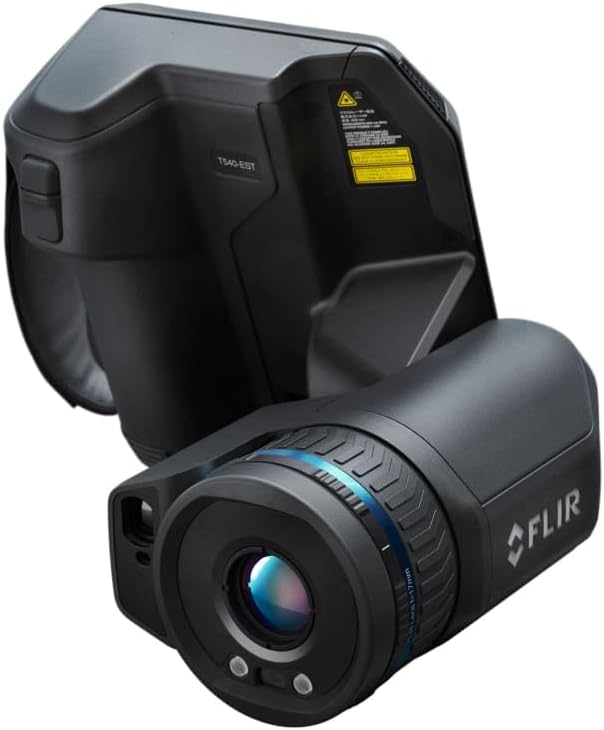
شکل 1: The FLIR T540-EST thermal screening camera, showcasing its ergonomic design and integrated lens.
2. ترتیب کول
Follow these steps to prepare your FLIR T540-EST for operation:
- ان باکس کول: Carefully remove all components from the packaging. Verify that all items listed in the packing slip are present.
- د بیټرۍ نصب کول: The camera requires two Lithium Ion batteries (included). Insert the batteries into the designated compartment, ensuring correct polarity. Charge batteries fully before first use using the provided charger.
- د لینز ضمیمه: The 24-degree lens is typically pre-attached. If interchanging lenses, align the lens with the camera body's mount and rotate until it clicks securely into place.
- پورته کول: For stable and consistent screening, mount the camera on a tripod or a stable surface. Ensure the camera is positioned at an appropriate height for the subjects being screened.
- لومړنی بریښنا فعالول: Press and hold the power button until the FLIR logo appears on the screen.
3. عملیاتي لارښوونې
The FLIR T540-EST is designed for intuitive operation. Familiarize yourself with its key features:
- پاور آن/بند: Press and hold the power button to turn the camera on or off. A short press will put the camera into standby mode.
- Screen-EST Mode: Activate the dedicated Screen-EST mode for streamlined temperature screening. This mode provides visual positioning guides, automatically samples to maintain an updated temperature average, and displays graphic pass/fail indicators.
- د تودوخې اندازه کول: The camera measures temperatures from 15°C to 45°C (59°F to 113°F). Ensure subjects are within the optimal screening distance for accurate readings.
- Laser-Assisted Autofocus: Utilize the laser-assisted autofocus feature to ensure sharp focus on the subject's face, which is critical for precise temperature readings.
- ارګونومیک ډیزاین: The 180° rotating optical block allows for comfortable viewing angles during extended screening sessions. The vivid 4-inch capacitive touchscreen provides an interactive interface for settings and viewing.
- د تفسیر پایلې: In Screen-EST mode, the camera will provide clear visual cues (e.g., green for pass, red for fail) based on configured temperature thresholds.
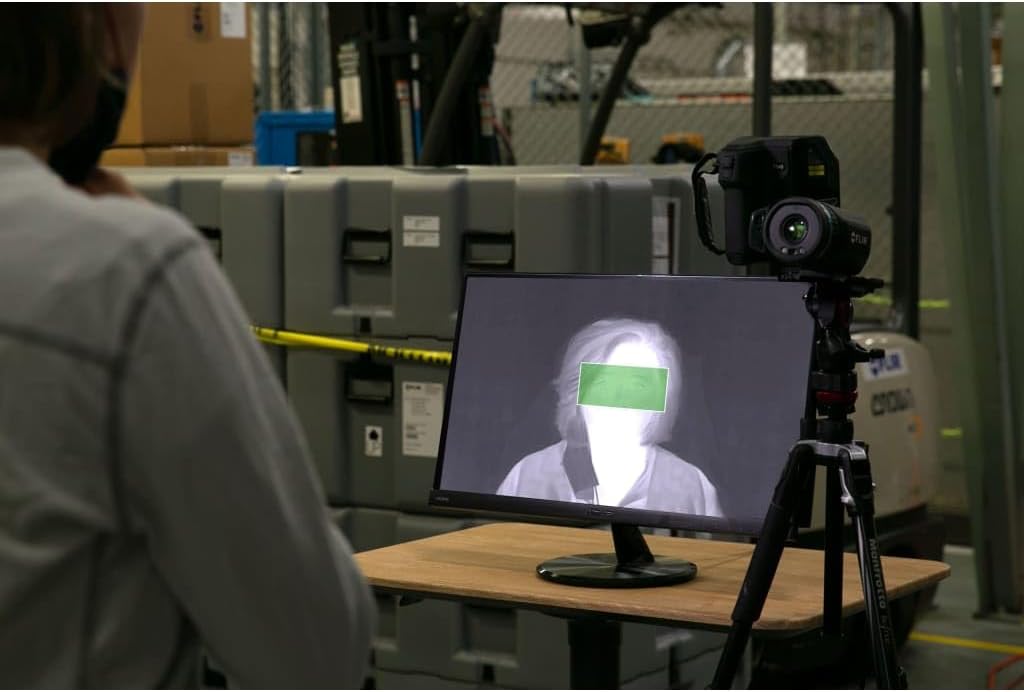
شکل 2: The FLIR T540-EST camera set up with an external monitor, displaying a thermal image of a person during a screening process.

شکل 3: یو مفصل view of the FLIR T540-EST's integrated screen, showing real-time thermal data and a highlighted area for temperature assessment.

شکل 4: یو پخوانیample of a thermal screening station, demonstrating the FLIR T540-EST in a practical application with a subject awaiting screening.
4. ساتنه
Proper maintenance ensures the longevity and accuracy of your FLIR T540-EST:
- د لینز پاکول: Use a soft, lint-free cloth specifically designed for optical lenses. Gently wipe the lens surface to remove dust or smudges. Avoid abrasive materials or harsh chemicals.
- Cleaning the Screen and Body: یو نرم استعمال کړئ، دamp cloth with a mild cleaning solution (if necessary) to clean the touchscreen and camera body. Do not spray liquids directly onto the camera.
- د بیټرۍ پاملرنه: Always use the FLIR-approved charger. Do not expose batteries to extreme temperatures. If storing the camera for an extended period, ensure batteries are partially charged (around 50%) and remove them from the device.
- ذخیره کول: Store the camera in its protective case in a cool, dry environment, away from direct sunlight and extreme temperatures.
5. ستونزه حل کول
د عامو ستونزو او د هغوی د حل لارو لپاره دې برخې ته مراجعه وکړئ:
| ستونزه | احتمالي لامل | د حل لاره |
|---|---|---|
| کیمره نه چالانېږي | بېټرۍ ټیټه یا ختمه شوې ده؛ بېټرۍ په ناسم ډول نصب شوې ده | Charge batteries fully; ensure batteries are correctly inserted. |
| د تودوخې ناسم لوستل | Incorrect focus; improper screening distance; environmental factors | Use autofocus; maintain recommended screening distance; ensure stable ambient conditions. |
| ښودنه خالي یا کنګل شوې ده | د سافټویر خرابوالی؛ ټیټ بیټرۍ | Restart the camera; charge batteries. If issue persists, contact support. |
| Laser autofocus not working | Obstruction; dirty lens | Ensure clear path to subject; clean the lens. |
If you encounter issues not listed here or if solutions do not resolve the problem, please contact FLIR customer support.
6. مشخصات
Key technical specifications for the FLIR T540-EST camera:
- جوړونکی: FLIR Systems, Inc
- برخه شمیره: 79302-0302
- د توکي ماډل شمېره: T540-EST-24
- د کشف حل: 464 x 348 پکسله
- لینز: 24-درجې
- د تودوخې اندازه کولو اندازه: له 15°C څخه تر 45°C (59°F څخه تر 113°F)
- د محصول ابعاد: 9.1 x 9.1 x 9.1 انچه
- د توکي وزن: 1 پونډه
- بیټرۍ: 2 لیتیم آئن بیټرۍ (شامل دي)
- د بیټرۍ حجرو ډول: لیتیم ایون
7. تضمین او ملاتړ
For detailed warranty information, please refer to the documentation included with your product or visit the official FLIR Systems, Inc. website. For technical support, service, or additional inquiries, please contact FLIR customer service through their official channels.


