پیژندنه
Thank you for choosing the Hoover H-PURIFIER 300 HHP30C Air Purifier. This device is designed to improve your indoor air quality by effectively filtering various pollutants. Equipped with advanced sensors and a triple-action HEPA13 filter, it captures PM2.5, PM10, VOCs, CO, and removes up to 99.97% of bacteria and pollen. This manual provides essential information for the safe and efficient use of your air purifier.
د خوندیتوب مهم معلومات
Please read all safety instructions before operating the appliance. Keep this manual for future reference.
- ډاډ ترلاسه کړئ چې وسیله د سم حجم سره د ځمکې لاندې بریښنا سایټ سره وصل دهtage (230V).
- وسیله د خراب شوي تار یا پلګ سره مه چلوئ.
- د هوا دننه او بهر د خنډونو څخه پاک وساتئ.
- وسیله د اوبو سره نږدې یا په ډیر مرطوب چاپیریال کې مه کاروئ.
- دا وسیله یوازې د داخلي کارونې لپاره ده.
- د پاکولو یا هر ډول ساتنې ترسره کولو دمخه وسیله خلاص کړئ.
محصول پای ته ورسیدview
The Hoover H-PURIFIER 300 features an intuitive design with integrated sensors and a multi-layer filtration system.

شکل 1: مخکی view of the Hoover H-PURIFIER 300 Air Purifier, showcasing its sleek design and multi-sensor area.

شکل 2: پورته view of the air purifier, highlighting the control panel with its various indicators and buttons.
مهمې برخې:
- د تضمین اداره: Located on the top, with touch controls and a 4-color LED light ring indicating air quality.
- Multi-Sensors: Detects PM2.5, PM10, VOCs, and CO levels in the air.
- د هوا داخله: Located around the lower section of the unit for 360° air intake.
- د هوا له لارې: Located at the top for purified air release.
- HEPA13 Filter: A triple-action filter system for comprehensive air purification.
- پټ لاسونه: د اسانه لیږدونې لپاره.
د تنظیم کولو لارښوونې
۱. خلاصول او ځای پر ځای کول
- د هوا پاکونکی په احتیاط سره د هغې له بسته بندۍ څخه لرې کړئ.
- Place the unit on a flat, stable surface, ensuring at least 20 cm of clear space around all sides for optimal airflow. The unit is designed to purify areas up to 100m².
- د تودوخې سرچینو، مستقیم لمر وړانګو، یا د لوړ رطوبت لرونکو سیمو ته نږدې د واحد له ایښودلو څخه ډډه وکړئ.
2. د فلټر نصب کول
The HEPA13 filter is typically pre-installed but may require removal of protective packaging before first use.
- Locate the filter access panel, usually at the bottom or side of the unit.
- Open the panel and ensure the HEPA13 filter is correctly seated and any plastic wrapping is removed.
- د فلټر لاسرسي پینل په خوندي ډول بند کړئ.
3. د بریښنا پیوستون
- د برېښنا تار په مناسب برېښنايي آلې (۱۲۰ وولټ) کې ولګوئ.
- واحد به د سټینډ بای حالت ته ننوځي.
4. App Connection (hOn App)
For advanced control and real-time air quality monitoring, connect your air purifier to the hOn app.
- د خپل سمارټ فون د اپل پلورنځي څخه د hOn ایپ ډاونلوډ کړئ.
- یو ګڼون جوړ کړئ او لاګ ان شئ.
- Follow the in-app instructions to add your Hoover H-PURIFIER 300. This typically involves enabling Wi-Fi and Bluetooth on your phone and pressing a specific button on the purifier to initiate pairing.

Figure 3: A smartphone screen showing the hOn app, used for controlling the air purifier and monitoring air quality.
عملیاتي لارښوونې
1. بریښنا فعال/بند
- Press the power button on the control panel or via the hOn app to turn the unit on or off.
2. عملیاتي طریقې
The H-PURIFIER 300 offers several operating modes:
- د موټرو حالت: The purifier automatically adjusts fan speed based on detected air quality levels (PM2.5, PM10, VOC, CO). This is the recommended mode for continuous operation.
- Night Mode (Sleep Function): Reduces fan speed to its lowest setting (21 dB) and dims the control panel lights for quiet operation during sleep.
- د توربو حالت: Operates at maximum fan speed for rapid air purification.
- لاسي سرعت: Allows you to manually select a fan speed (e.g., 3 speeds available).
3. Air Quality Indicator (LED Ring)
The LED light ring on the control panel changes color to indicate current air quality:
- شین: د هوا عالي کیفیت.
- ژیړ: د هوا کیفیت معتدل.
- نارنجي: د هوا خراب کیفیت.
- سور: Very poor air quality.
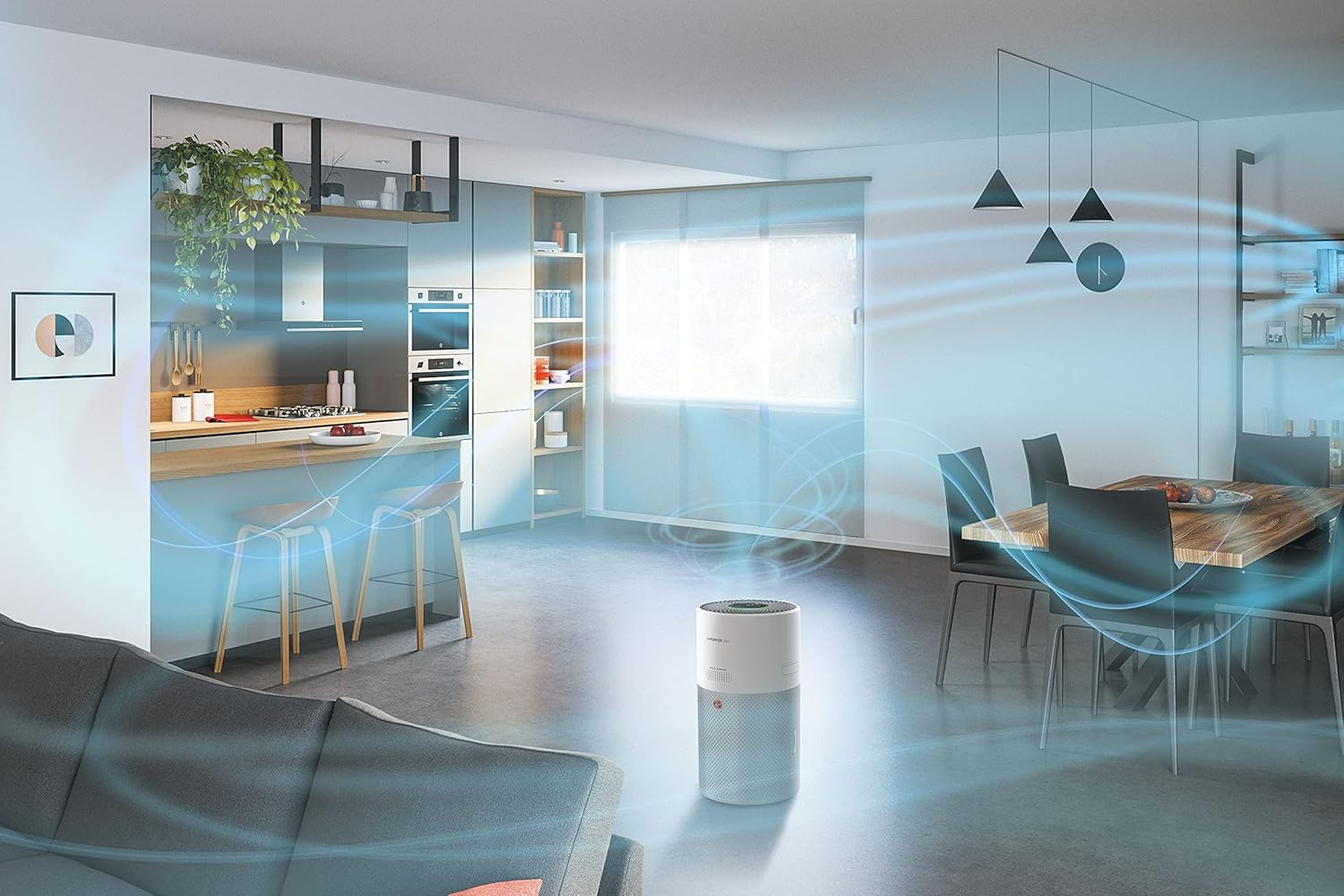
Figure 4: Illustration of the 360-degree airflow system, showing air intake from all sides and purified air expulsion from the top.
ساتنه
منظم ساتنه غوره فعالیت تضمینوي او ستاسو د هوا پاکونکي ژوند اوږدوي.
1. د فلټر بدلول
The HEPA13 filter has a limited lifespan and needs to be replaced periodically. The hOn app will notify you when a filter change is due.
- د بریښنا د ځای څخه د هوا پاکونکی لرې کړئ.
- د فلټر لاسرسي پینل پرانیزئ.
- زوړ فلټر لرې کړئ او په سمه توګه یې وغورځوئ.
- Insert a new genuine Hoover HEPA13 filter, ensuring it is correctly oriented.
- د فلټر لاسرسي پینل په خوندي ډول بند کړئ.
- Plug the unit back in. Reset the filter life indicator via the control panel or hOn app if prompted.
۶.۵. د سینسر پاکول
Dust and debris can accumulate on the sensors, affecting their accuracy. Clean them regularly, especially if you notice inconsistent air quality readings.
- واحد خلاص کړئ.
- Gently wipe the sensor area (located on the side/back of the unit) with a soft, dry cloth or a cotton swab. Do not use liquids or abrasive cleaners.
3. بهرنۍ پاکول
- Wipe the exterior surfaces of the air purifier with a soft, damp ټوکر
- اوبه په واحد کې د ننوتلو اجازه مه ورکوئ.
- Avoid using harsh chemicals or abrasive cleaning agents.
د ستونزو حل کول
If you encounter issues with your Hoover H-PURIFIER 300, refer to the following table:
| ستونزه | احتمالي لامل | د حل لاره |
|---|---|---|
| واحد نه خلاصیږي. | بریښنا نشته. | Check if the power cord is securely plugged into the outlet and the unit. Test the outlet with another device. |
| د هوا د پاکولو ضعیف فعالیت. | Clogged or incorrectly installed filter. | Check filter installation. Replace the filter if it is dirty or expired. |
| Inaccurate air quality readings. | Dirty sensors. | Clean the air quality sensors as described in the Maintenance section. |
| Cannot connect to hOn app. | Wi-Fi/Bluetooth issues; incorrect pairing process. | Ensure your phone's Wi-Fi and Bluetooth are on. Restart the air purifier and your phone. Follow the app's pairing instructions carefully. Try disabling Wi-Fi on the unit for 30 minutes, then re-enabling and trying to connect again. |
| واحد شور دی. | Operating in Turbo mode; obstruction in fan. | Switch to Auto or Night mode for quieter operation. Check for any foreign objects obstructing the fan. |
مشخصات
| فیچر | تفصیل |
|---|---|
| برانډ | هوور |
| د ماډل شمیره | HHP30C |
| رنګ | سپین |
| د محصول ابعاد (L x W x H) | 27.99 x 31.39 x 52.04 سانتي متره |
| د توکي وزن | 6.3 کیلوګرامه |
| ځواک | 35 واټ |
| والیtage | 230V |
| د غږ کچه | 21 Decibels (in Night Mode) |
| د فلټر ډول | HEPA13 (Triple-action) |
| د پوړ ساحه پوښښ | تر 100 m² پورې |
| د کنټرول طریقه | Control Panel, hOn App (Wi-Fi + BLE) |
| ځانګړي ځانګړتیاوې | Sleep Function, Gas Sensor, Night Mode, Turbo Mode, Pollen Filtering |
| د بریښنا سرچینه | بریښنایی تار |
| مطابقت لرونکي مشخصات | TUV |
تضمین او ملاتړ
The Hoover H-PURIFIER 300 HHP30C comes with a manufacturer's warranty. Please refer to the warranty card included in your product packaging for specific terms and conditions.
د پرزو شتون:
د دې ماډل اضافي پرزې د پیرود نیټې څخه د 2 کلونو مودې لپاره شتون لري.
د پیرودونکي ملاتړ:
For technical assistance, troubleshooting beyond this manual, or to inquire about spare parts, please contact Hoover customer support. Contact details can be found on the official Hoover webسایټ یا ستاسو د محصول اسنادو کې.


