پیژندنه
This manual provides comprehensive instructions for the Elekpia Universal Remote Control, designed as a direct replacement for your original remote for all ONN Roku TVs. This remote offers seamless control of your television and features dedicated buttons for popular streaming services like Netflix, Sling, Hulu, and VUDU.
Please read this manual carefully to ensure proper setup and operation of your new remote control.
چمتو کول
1. د بیټرۍ نصب کول
The Elekpia Universal Remote Control requires two (2) AAA alkaline batteries (not included) for operation. Follow these steps to install the batteries:
- د ریموټ کنټرول شاته د بیټرۍ کڅوړه ومومئ.
- د بیټرۍ د برخې پوښ د خلاصولو لپاره ښکته خوا ته وغورځوئ.
- دوه AAA بیټرۍ دننه کړئ، ډاډ ترلاسه کړئ چې مثبت (+) او منفي (-) ټرمینلونه د خونې دننه د نښانونو سره په سمه توګه سمون لري.
- د بیټرۍ پوښ بیرته خپل ځای ته وغورځوئ تر هغه چې په خوندي ډول کلیک وکړي.
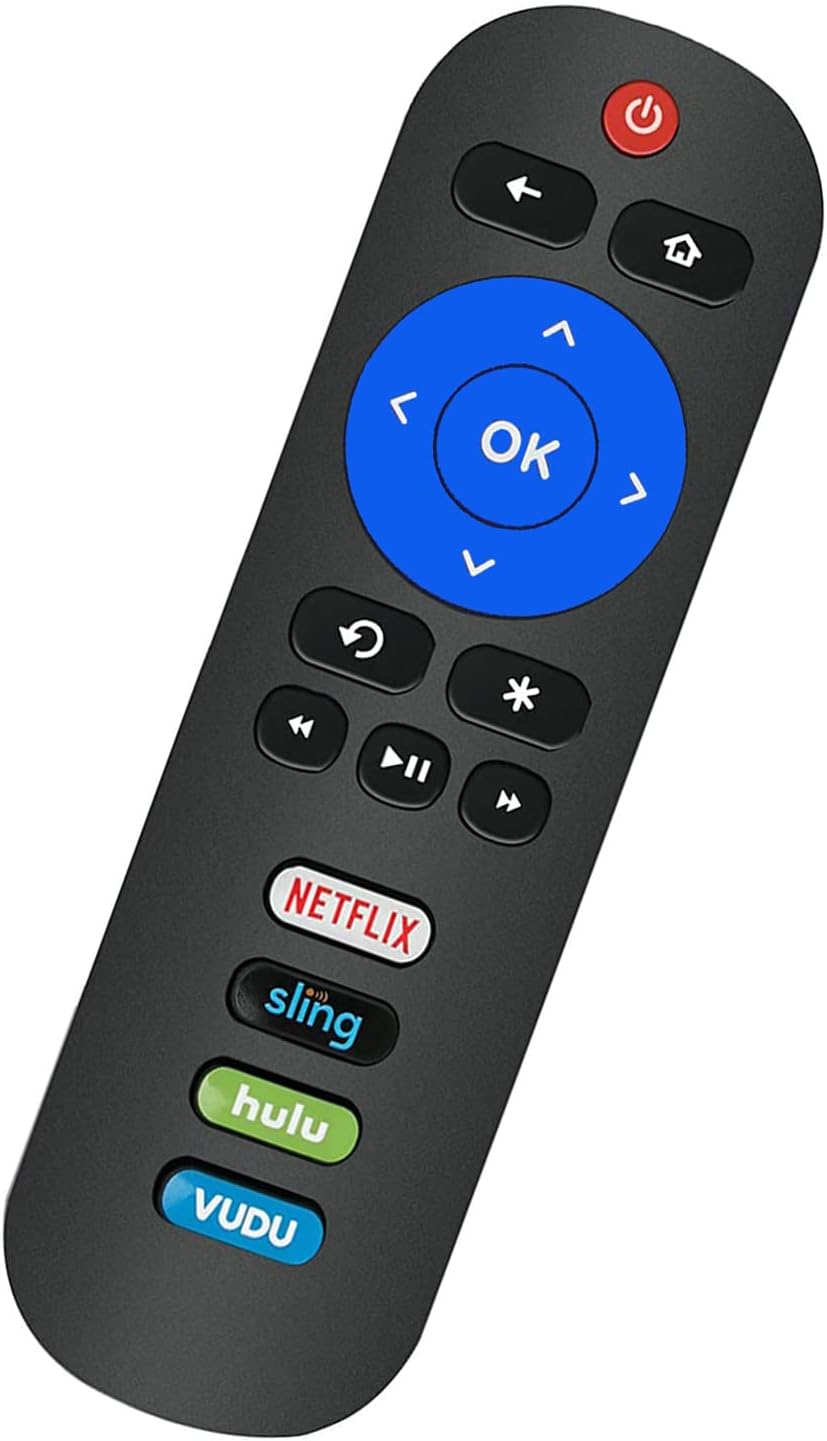
Image: Back of the remote control with the battery compartment visible.
۴.۲. لومړنی استعمال (د پروګرام کولو اړتیا نشته)
This remote control is pre-programmed to work with all ONN Roku TVs. No programming or pairing is needed. Once the batteries are installed, the remote is ready for immediate use with your compatible ONN Roku TV.
مهمه یادونه: This remote control operates via Infrared (IR) technology and is specifically designed for ONN Roku TVs. It کار نه کوي with Roku sticks, Roku players, Roku boxes, or any other non-TV Roku devices. It also lacks a pairing button, voice function, and headphone jack.
عملیاتي لارښوونې
Familiarize yourself with the buttons on your Elekpia Universal Remote Control:

انځور: مخکینۍ برخه view of the Elekpia remote control, displaying all control buttons.
- د چالانېدو تڼۍ (🏻): Turns your ONN Roku TV on or off.
- د شا تڼۍ (←): مخکینۍ سکرین یا مینو ته راستنیږي.
- کور تtonۍ (⌂): Navigates to the Roku Home screen.
- لارښوونه پیډ (پورته، ښکته، کیڼ، ښي): Used to navigate through menus and select options.
- د OK تtonۍ: Confirms a selection or opens an item.
- Instant Replay Button (↻): د ویډیو وروستۍ څو ثانیې بیا خپروي.
- Asterisk Button (*): Accesses options or settings within an app or menu.
- شاته کړئ (⏮), Play/Pause (⏸), Fast Forward (⏭): د میډیا د غږولو معیاري کنټرولونه.
- حجم پورته/ ښکته (🔊 / 🔉): د تلویزیون حجم تنظیموي.
- د خاموش تڼۍ (🔇): د ټلویزیون آډیو خاموش یا غیر خاموش کوي.
- Dedicated App Buttons (Netflix, Sling, Hulu, VUDU): Directly launch the corresponding streaming application.

انځور: اړخ view of the remote control, showing the volume and mute buttons located on the side.
ساتنه
- د بیټرۍ بدلول: Replace batteries when the remote's response becomes sluggish or stops working. Always replace both batteries at the same time with new AAA alkaline batteries. Do not mix old and new batteries, or different types of batteries.
- پاکول: To clean the remote control, wipe it with a soft, dry cloth. Do not use liquid cleaners, sprays, or abrasive materials, as these may damage the remote's surface or internal components.
- ذخیره کول: ریموټ کنټرول په یخ او وچ ځای کې د مستقیم لمر وړانګو او سختو تودوخې څخه لرې وساتئ. که چیرې ریموټ د اوږدې مودې لپاره ونه کارول شي، نو سپارښتنه کیږي چې د لیکیدو مخنیوي لپاره بیټرۍ لرې کړئ.
- سمبالول: Avoid dropping the remote control or subjecting it to strong impacts, which can cause internal damage.
د ستونزو حل کول
| ستونزه | احتمالي لامل / حل |
|---|---|
| ریموټ ځواب نه ورکوي. |
|
| Remote works for some functions but not others. |
|
| Remote does not work with my Roku device. | This remote is specifically designed for ONN Roku TVs (televisions with Roku built-in). It is مطابقت نلري with standalone Roku streaming sticks, Roku players, Roku boxes, or Roku gaming consoles. |
مشخصات
- ماډل: Elekpia-ONN-RK
- د محصول ابعاد: 5.5 x 1.5 x 0.6 انچه (13.97 x 3.81 x 1.52 سانتي متره)
- د توکي وزن: 1.76 اونس (50 ګرامه)
- د بریښنا رسول: ۲ x ۱.۵V AAA الکلین بیټرۍ (شامل نه دي)
- د ارتباط ټیکنالوژي: انفراریډ (IR)
- مطابقت لرونکي وسایل: All ONN Roku TVs (e.g., models 100012585, 100012584, 100012586, 100012587, 100012589, 100018971, 100012590, 100005844, 3226000855, 3226000858, 100007147, 100005395, 100005397, 100005396, 100012588)
- ځانګړي ځانګړتیاوې: Universal compatibility with ONN Roku TVs, dedicated streaming service buttons.
د تضمین معلومات
Specific warranty details for the Elekpia Universal Remote Control are typically provided by the seller or manufacturer at the time of purchase. Please refer to your purchase documentation or contact the retailer from whom you purchased this product for information regarding warranty coverage and terms.
ملاتړ
If you encounter any issues or have questions regarding your Elekpia Universal Remote Control that are not addressed in this manual, please contact the seller or the manufacturer directly for assistance. Provide your product model number (Elekpia-ONN-RK) and details of your issue for faster support.
For general inquiries, you may also refer to the product listing page where you purchased the item for additional resources or frequently asked questions.


