1. پیژندنه
This manual provides essential information for the safe and efficient operation of your Cecotec Ready Warm 800 Thermal Connected 600W Digital Heater. Please read these instructions carefully before using the appliance and retain them for future reference. This heater is designed to provide supplementary heating for indoor spaces and features Wi-Fi connectivity for remote control.
2. د خوندیتوب لارښوونې
خبرداری: د دې خوندیتوب لارښوونو په تعقیب کې پاتې راتلل ممکن د اور، بریښنا شاک، یا ټپي کیدو لامل شي.
- د حجم ډاډ ترلاسه کړئtagهغه چې په درجه بندي لیبل کې ښودل شوي ستاسو د اصلي حجم سره سمون لريtage مخکې له دې چې وسیله وصل کړئ.
- Do not cover the heater. Overheating can occur if the heater is covered or obstructed.
- Keep flammable materials such as furniture, curtains, and bedding at least 1 meter (3 feet) away from the heater.
- Do not operate the heater with a damaged cord or plug, or after the appliance malfunctions or has been dropped or damaged in any manner.
- دا وسیله د افرادو (د ماشومانو په شمول) د فزیکي ، حسي یا ذهني وړتیاو کمښت ، یا د تجربې او پوهې نشتوالي سره د کارولو لپاره ندي ، پرته لدې چې دوی ته د دوی د خوندیتوب مسؤلیت لرونکي شخص لخوا د وسیلې کارولو په اړه نظارت یا لارښوونې ورکړل شوي وي.
- ماشومان باید څارنه وشي ترڅو ډاډ ترلاسه شي چې دوی د وسایلو سره لوبې نه کوي.
- د حمام، شاور یا د لامبو حوض په سمدستي چاپیریال کې هیټر مه کاروئ.
- تل د هیټر خلاص کړئ کله چې په کارولو کې نه وي یا د پاکولو دمخه.
- Do not insert any objects into the ventilation or exhaust openings as this may cause electric shock, fire, or damage to the heater.
3. محصول ختم شوview
Familiarize yourself with the components of your Cecotec Ready Warm 800 Digital Heater.

This image shows the Cecotec Ready Warm 800 Digital Heater from a side angle, highlighting its slim profile and the integrated control panel on the right side. The heater is white with black vents at the top and stands on two white feet.

The heater is shown in a home environment, positioned on a wooden floor next to a person seated on a black armchair, illustrating its compact size and how it fits into a living space.
د کنټرول پینل او ښودنه
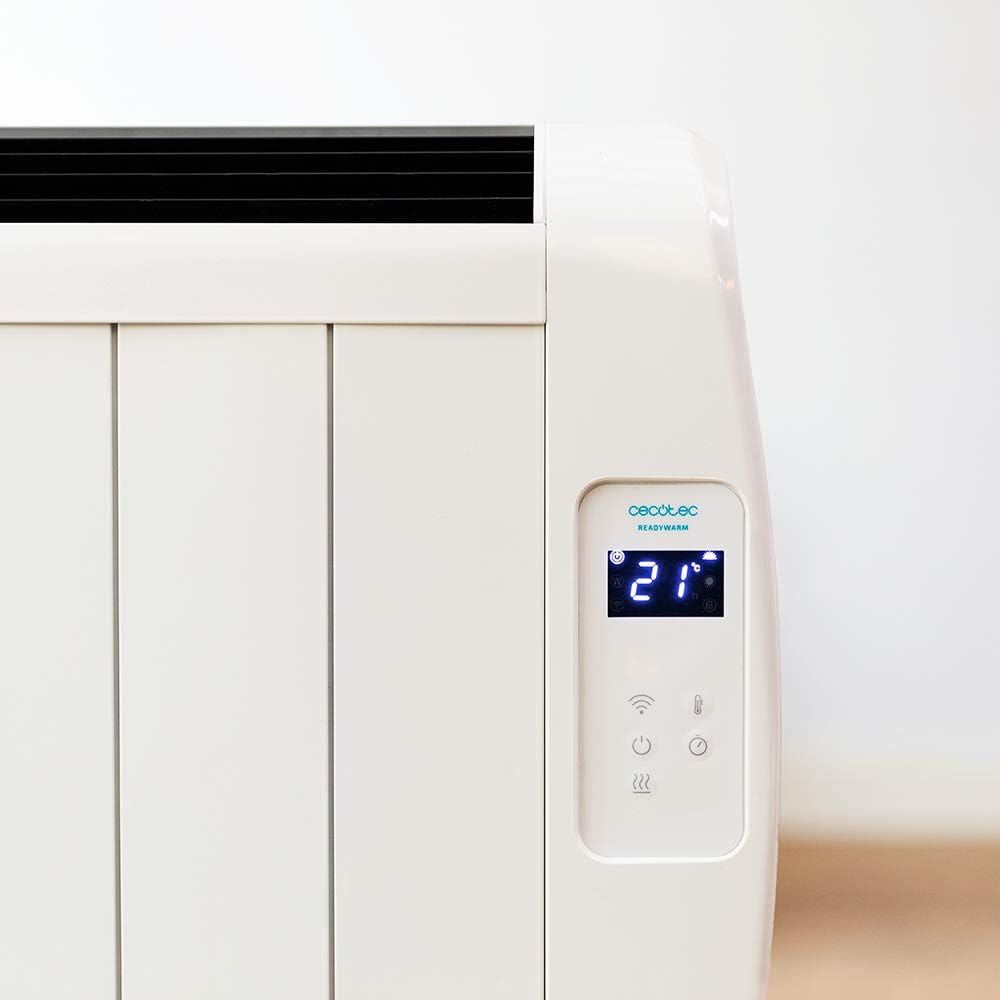
یو مفصل view of the heater's digital control panel, featuring a clear LCD screen showing '21' degrees Celsius, indicating the current temperature setting. Below the screen are touch-sensitive buttons for power, Wi-Fi, mode selection, and temperature adjustment.

This image focuses on the digital control panel, showing the LCD screen set to a timer function, displaying '04' hours. This indicates the heater is programmed to operate for a specific duration.
The digital display shows the current temperature, timer settings, and Wi-Fi status. The touch-sensitive buttons allow for easy control of the heater's functions.
د بریښنا سویچ

A close-up shot of the heater's base, revealing the physical on/off power switch. This switch provides a direct way to cut power to the unit.
A physical power switch is located at the base of the unit for complete power disconnection.
4. ترتیب کول
- بسته بندي کول: په احتیاط سره هیټر له بسته بندۍ څخه لرې کړئ. بسته بندۍ د ذخیره کولو یا لیږدولو لپاره وساتئ.
- ځای په ځای کول: Place the heater on a firm, level surface. Ensure there is at least 1 meter (3 feet) of clear space around the heater from walls, furniture, and other objects. Do not place it directly under a power outlet.
- د بریښنا پیوستون: Plug the power cord into a suitable 230V AC power outlet. Ensure the main power switch at the base of the unit is in the 'OFF' position before plugging in.
- ابتدايي بریښنا فعاله: Flip the main power switch at the base of the unit to the 'ON' position. The digital display on the control panel should illuminate.
Dimensions for Placement

This image provides a clear diagram of the heater's physical dimensions: 63 cm in width, 10.5 cm in depth, and 53.5 cm in height, useful for planning placement.
5. عملیاتي لارښوونې
بنسټیز عملیات
- پاور آن/بند: د بریښنا ت buttonۍ فشار کړئ (U) د کنټرول پینل کې د هیټر د فعالولو یا بندولو لپاره.
- د حرارت درجه تنظیمول: Use the temperature up (+) او ښکته (-) buttons to set your desired room temperature. The display will show the set temperature.
- د موډل انتخاب: Press the mode button to cycle through available heating modes (e.g., Low, Medium, High, or Eco, depending on the model's specific programming).
- د ټیمر فعالیت: Press the timer button to set an operating duration. Use the temperature adjustment buttons to set the desired hours (e.g., 0-24 hours). The heater will automatically turn off after the set time.
د وای فای اتصال او د اپلیکیشن کنټرول
The Cecotec Ready Warm 800 features Wi-Fi connectivity, allowing you to control the heater remotely via a smartphone application.

A hand holding a smartphone with the Cecotec Ready Warm mobile application open. The app interface shows a large dial indicating '33°C' and various control options, demonstrating remote control capabilities.
- اپلیکیشن ډاونلوډ کړئ: لټون the 'Cecotec Ready Warm' app in your smartphone's app store (iOS or Android).
- نوم لیکنه/ننوتل: یو حساب جوړ کړئ یا لاګ ان شئ که تاسو دمخه یو حساب لرئ.
- وسیله اضافه کړئ: Follow the in-app instructions to add your Ready Warm 800 heater. This typically involves putting the heater into pairing mode (often by pressing and holding the Wi-Fi button on the control panel) and connecting it to your home Wi-Fi network.
- ریموټ کنټرول: Once connected, you can control the heater's power, temperature, modes, and timer functions from your smartphone.
6. ساتنه
منظم ساتنه ستاسو د هیټر غوره فعالیت او اوږد عمر تضمینوي.
- پاکول: تل د هیټر خلاص کړئ او پریږدئ چې په بشپړه توګه یخ شي مخکې له دې چې پاک کړئ. نرم، ډamp د بهرنۍ سطحې د پاکولو لپاره ټوکر. د کثافاتو پاکوونکي یا محلولونه مه کاروئ.
- د دوړو لرې کول: Periodically use a vacuum cleaner with a brush attachment to remove dust from the air intake and exhaust vents.
- ذخیره کول: که چیرې هیټر د اوږدې مودې لپاره ذخیره کوئ، نو هغه یې خلاص کړئ، په بشپړه توګه یې پاک کړئ، او په یخ، وچ ځای کې یې وساتئ، په غوره توګه په اصلي بسته بندۍ کې.
- د کارونکي د خدمت وړ برخې نشته: د هیټر د خلاصولو یا ترمیم کولو هڅه مه کوئ. ټولې خدمتونه وړ پرسونل ته راجع کړئ.
7. ستونزه حل کول
If you encounter issues with your heater, refer to the following table for common problems and solutions.
| ستونزه | احتمالي لامل | د حل لاره |
|---|---|---|
| هیټر نه چالانیږي. | No power supply. Main power switch off. | Check if the power cord is securely plugged in. Ensure the main power switch at the base is ON. Check the wall outlet. |
| د تودوخې تولید نشته. | Temperature setting too low. Overheat protection activated. | Increase the desired temperature setting. Unplug the heater, let it cool for 30 minutes, then plug it back in. Ensure vents are not blocked. |
| د وای فای اتصال ناکام شو. | Incorrect Wi-Fi password. Heater too far from router. App issues. | Verify Wi-Fi password. Move heater closer to the router. Restart the app and heater. Ensure your router is 2.4GHz compatible. |
| هیټر په ناڅاپي ډول بندیږي. | Timer function activated. Overheat protection. | Check if the timer is set. If not, unplug the heater, let it cool, and check for obstructions. |
8. مشخصات
| فیچر | تفصیل |
|---|---|
| برانډ | Cecotec |
| د ماډل شمیره | 05372 |
| بریښنا / واټtage | 600W |
| والیtage | 230 ولټه |
| د محصول ابعاد | 63 x 10.5 x 53.5 سانتي متره |
| وزن | 3.4 کیلو ګرامه |
| ځانګړي ځانګړتیاوې | Portable, Wireless (Wi-Fi Control), LCD Screen |
| د تودوخې طریقه | روښانه |
| د کور دننه / بهر کارول | دننه |
| د نصب کولو ډول | Wall Mount (optional, accessories not included) / Freestanding |
9. تضمین او ملاتړ
Your Cecotec Ready Warm 800 Digital Heater is covered by a manufacturer's warranty. Please refer to the warranty card included with your purchase for specific terms and conditions, including the warranty period and coverage details.
For technical support, troubleshooting assistance beyond this manual, or warranty claims, please contact Cecotec customer service. Contact information can typically be found on the Cecotec official webپه سایټ یا ستاسو د محصول په بسته بندۍ کې.
کله چې د ملاتړ سره اړیکه ونیسئ، مهرباني وکړئ د خپل محصول ماډل شمیره (۱۷۴۲۲) او د پیرود ثبوت په اسانۍ سره شتون ولري.


