1. پیژندنه
This manual provides detailed instructions for the installation, operation, and maintenance of the SINOTIMER TM919A-2 LCD Digital Programmable Timer Switch. This device is designed for automatic control of electrical appliances based on programmed time schedules, offering daily and weekly programming options.
2. د محصول ب Featuresې
- Weekly 7-day programmable digital time switch.
- څو ټوکtage options (5V, 12V, 24V, 110V, 220V, 85-265V). This specific model is 220V.
- Detachable battery design for backup power.
- 35mm DIN rail mounting for easy installation.
- LCD display for clear time and program viewing.
- 16 ON/OFF programs per day or week.
- د لاسي بیاکتنې فعالیت.
- High capacity 16A switching contact.
3. د خوندیتوب معلومات
WARNING: Risk of electric shock. Installation should only be performed by a qualified electrician or competent person.
- ډاډ ترلاسه کړئ چې د نصب یا ساتنې دمخه بریښنا قطع شوې ده.
- Do not exceed the maximum load capacity of 16A.
- صحیح والیت تایید کړئtage supply for the specific model (220V for TM919A-2).
- وسیله د لندبل او سختې تودوخې څخه لرې وساتئ.
4. محصول ختم شوview او اجزا
The SINOTIMER TM919A-2 features an LCD display, control buttons, and wiring terminals for power input and load control.

شکل 4.1: مخکی view of the SINOTIMER TM919A-2 Digital Timer Switch, showing the LCD display, control buttons (P, D+, H+, M+, RESET, MANUAL), and wiring terminals.

شکل 4.2: The timer switch with its transparent protective cover opened, revealing the control buttons for programming and manual operation.
د کنټرول تڼۍ:
- پي (پروګرام): Enters program setting mode.
- D+ (ورځ): Adjusts day of the week or program day.
- H+ (ساعت): Adjusts hour or program hour.
- M+ (دقیقه): Adjusts minute or program minute.
- بیا تنظیم کړئ: ټولې تنظیمات د فابریکې ډیفالټونو ته تنظیموي.
- لارښود: Toggles output ON/AUTO/OFF.
5. ترتیب او نصب کول
5.1 د تارونو ډیاګرام
Refer to the wiring diagram on the side of the device and the illustration below for correct connection. Ensure all connections are secure.

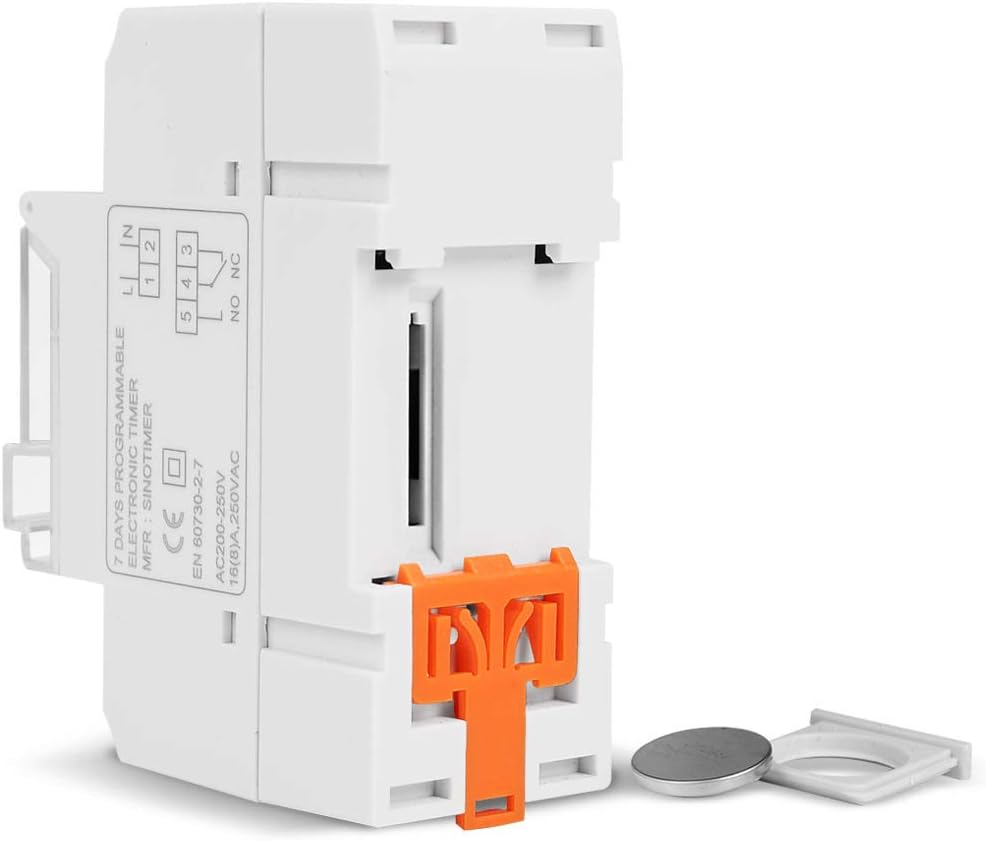
شکل 5.1: اړخ view of the timer switch displaying the wiring diagram. Terminals 1 and 2 are for power input (L and N). Terminals 3, 4, and 5 are for the relay output (Common, Normally Open, Normally Closed).
- Terminals 1 & 2 (L, N): Connect to the main power supply (220V AC for this model).
- Terminal 3 (NO - Normally Open): Connects to the load when the timer is ON.
- Terminal 4 (COM - Common): Connects to one side of the load and the power supply.
- Terminal 5 (NC - Normally Closed): Connects to the load when the timer is OFF (less common for typical applications).
5.2 Initial Power-up and Reset
Upon first power-up or after a long period without power, the LCD display may be blank. The internal battery provides backup for settings. If the display is unresponsive or shows garbled characters, press the RESET button using a pointed object (e.g., a pen tip). This will clear all settings and restore the timer to its default state.
۴.۳ د اوسني وخت او ورځې ټاکل
- فشار ورکړئ P یو ځل تڼۍ. ښودنه به د اوسني وخت ترتیب وښيي.
- مطبوعاتي D+ د اونۍ د نن ورځې د ټاکلو لپاره.
- مطبوعاتي H+ د اوسني ساعت ټاکلو لپاره.
- مطبوعاتي M+ د اوسنۍ دقیقې ټاکلو لپاره.
- فشار ورکړئ P button again to exit time setting mode and return to normal operation.
6. عملیاتي لارښوونې
۵.۱ د فعال/بند سایکلونو پروګرام کول
ټایمر تر ۲۰ پورې د فعال/بند پروګرامونو ملاتړ کوي. هر پروګرام د فعال وخت او بند وخت څخه جوړ دی.
- فشار ورکړئ P button repeatedly until "1 ON" appears on the display. This is the first ON program.
- مطبوعاتي D+ د دې پروګرام لپاره ورځې (ورځې) غوره کولو لپاره. اختیارونو کې انفرادي ورځې، د اونۍ ورځې، د اونۍ پای، یا ټولې 7 ورځې شاملې دي.
- مطبوعاتي H+ to set the desired hour for the "ON" event.
- مطبوعاتي M+ to set the desired minute for the "ON" event.
- مطبوعاتي P again. "1 OFF" will appear. This is the first OFF program.
- Repeat steps 2-4 to set the day(s), hour, and minute for the "OFF" event.
- فشار ته دوام ورکړئ P to cycle through "2 ON", "2 OFF", up to "16 ON", "16 OFF". If you do not need all 16 programs, simply press P until the display returns to the current time.
- To save and exit programming mode, press the P button until the current time is displayed.
6.2 په لاسي ډول پورته کول
د لارښود button allows you to override the programmed settings temporarily or permanently.
- مطبوعاتي لارښود once: Toggles between ON/AUTO/OFF modes.
- په: The output is continuously ON, ignoring programs.
- بند: The output is continuously OFF, ignoring programs.
- اتو: ټایمر د پروګرام شوي ON/OFF دورې سره سم کار کوي. دا د عملیاتي معیاري حالت دی.
7. ساتنه
7.1 د بیټرۍ بدلول
The timer includes a detachable CR2032 lithium battery to maintain time and program settings during power outages. If the display becomes dim or resets frequently, the battery may need replacement.

شکل 7.1: The timer switch shown with its battery compartment open and a CR2032 lithium battery, indicating the detachable battery design.
- Disconnect power to the timer before attempting battery replacement.
- د بیټرۍ کڅوړه ومومئ، معمولا د واحد په اړخ یا شا کې.
- زوړ CR2032 بیټرۍ په احتیاط سره لرې کړئ.
- Insert a new CR2032 battery, ensuring correct polarity (+ side up).
- د بیټرۍ کڅوړه وتړئ.
- Reconnect power and reset the current time and day if necessary.
8. ستونزه حل کول
- ښودنه خالي ده:
- Check power supply connections (Terminals 1 & 2).
- Ensure the internal battery is charged or replaced if old.
- فشار ورکړئ RESET تڼۍ
- Programs are not running:
- ډاډ ترلاسه کړئ چې ټایمر فعال دی آټو mode (check the display for "AUTO"). Press لارښود د سایکل طریقو ته.
- ډاډ ترلاسه کړئ چې اوسنی وخت او ورځ په سمه توګه تنظیم شوي دي.
- Check that the ON/OFF programs are correctly entered and enabled for the desired days.
- Confirm wiring to the load (Terminals 3, 4, 5) is correct.
- Timer resets unexpectedly:
- The internal battery may be low or depleted. Replace the CR2032 battery.
- Ensure stable power supply to the unit.
9. مشخصات
| فیچر | مشخصات |
|---|---|
| ماډل | TM919A-2 |
| د بریښنا رسول | 220V AC (as per model) |
| د بریښنا مصرف | 4.5 VA (MAX) |
| د حرارت درجه | -20 درجې تر +50 درجو پورې |
| ښودل | LCD |
| Switching Contact | 1 د بدلون سویچ |
| پروګرامونه | په ورځ یا اونۍ کې ۱۶ ځلي فعال/بند |
| هیسټریسیس | 2 sec/day (at 25°C) |
| ظرفیت | 16A |
| د ټایمر سلسله | له 1 دقیقې څخه تر 168 ساعتونو پورې |
| لږترلږه وقفه | ۱ دقیقه |
| Black-out Memory | 60 days (with internal battery) |
| د توکي وزن | 0.15 کیلو ګرامه (5.3 اونس) |
| پورته کول | 35 ملي متري DIN ریل |
| د سکرین اندازه | ۷۸۷ انچه |
شکل 9.1: Dimensional drawing of the SINOTIMER TM919A-2, showing measurements in centimeters for height, width, and depth.
10. تضمین او ملاتړ
Specific warranty information for the SINOTIMER TM919A-2 is not provided in the product details. For warranty claims or technical support, please contact your retailer or the manufacturer directly. Keep your purchase receipt as proof of purchase.


