1. محصول ختم شوview
The Yanzeo YZ2002 is a compact and lightweight 1D laser barcode scanner designed for portability and ease of integration into various business processes. Weighing only 30 grams (1.1 ounces) and measuring 2.36" x 1.2" x 0.6", it fits easily into a pocket, making it ideal for mobile use in environments such as bookstores, online stores, retail outlets, and warehouses.
This scanner supports multiple connection methods and advanced scanning technology, ensuring efficient and reliable barcode data capture. It is equipped with a rechargeable battery for extended operation.

Image 1.1: The Yanzeo YZ2002 barcode scanner, showcasing its small, pocket-friendly design.
2. د بسته محتويات
مهرباني وکړئ تصدیق کړئ چې ټول توکي په کڅوړه کې شتون لري:
- Yanzeo YZ2002 Barcode Scanner
- د USB کیبل (د چارج کولو او تار لرونکي اتصال لپاره)
- پټه
- د چټک پیل کارت
3. د محصول ب Featuresې
3.1. Super Mini Portable Design
The YZ2002 is exceptionally lightweight at 30g (1.1 oz) and compact (2.36" x 1.2" x 0.6"), making it highly portable for various applications. Its small form factor ensures it can be carried conveniently in a pocket or attached with the included strap.
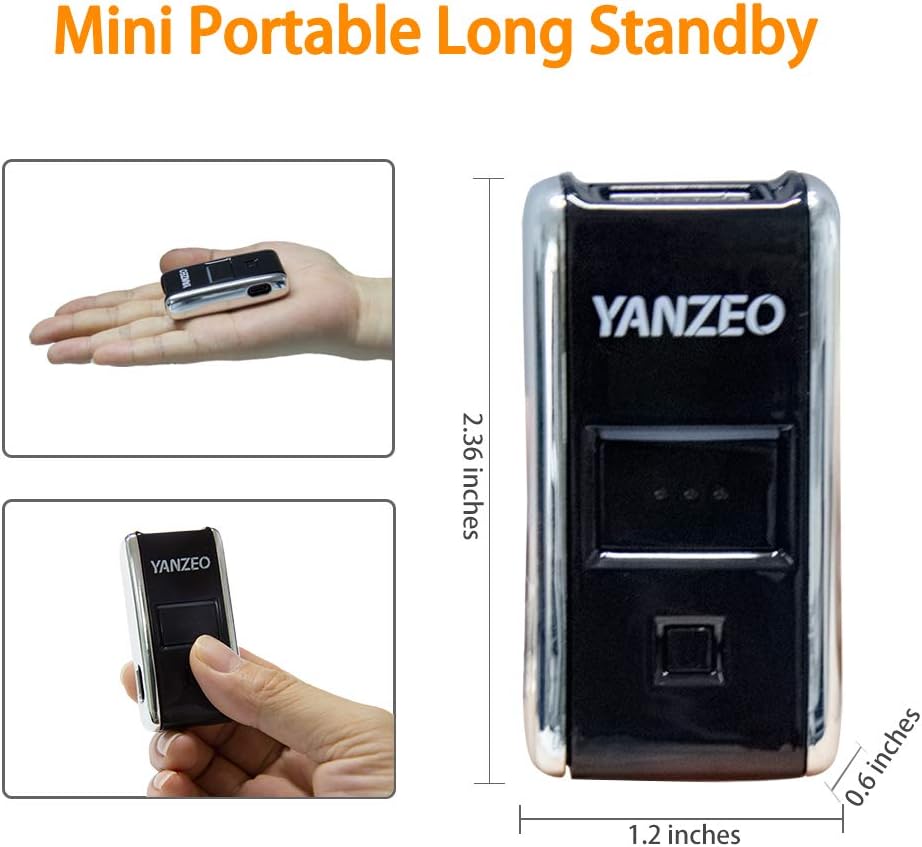
Image 3.1: Dimensions and portability of the Yanzeo YZ2002 scanner.
3.2. Versatile 3-in-1 Connection Methods
The scanner offers three flexible connection options to suit different operational needs:
- 2.4G بې سیم اتصال: Provides a barrier-free transmission distance of up to 30m (98 feet) using the included USB dongle.
- بلوتوث پیوستون Supports Bluetooth 4.1 with a barrier-free transmission distance of up to 50m (164 feet). It offers flexibility with both HID and SPP Bluetooth profiles.
- د USB تار نښلول: Direct connection via USB cable for reliable data transfer and simultaneous charging.

انځور 3.2: اوورview د 3-in-1 اتصال انتخابونو څخه.
3.3. Advanced 1D Scan Technology
The Yanzeo YZ2002 efficiently captures various 1D barcodes, including UPC/EAN, Code39, Interleaved 2 of 5, Code93, Code 128, Codabar, Industry25, and Matrix25. Its super decoding function allows scanning of damaged, distorted, colorful, and reflective barcodes, including those displayed on screens.

Image 3.3: Scanning a digital barcode on a screen.
3.4. High Compatibility and Battery Life
This Bluetooth scanner is compatible with a wide range of devices and operating systems, including laptops, PCs, POS systems, smartphones, tablets, iPhones, and iPads. It works seamlessly with Windows XP/7/8/10, Mac OS, Linux, and Windows Mobile.
The built-in 650mAh rechargeable battery provides up to 5 hours of continuous operation on a 2-hour full charge.

Image 3.4: Device and OS compatibility of the scanner.
3.5. Multiple Configuration Options
The scanner supports two primary usage modes:
- د فوري اپلوډ حالت: Scanned data is immediately sent to the connected device.
- د ذخیره کولو حالت: Scanned data is saved in the scanner's internal memory (up to 15,000 barcodes). To upload stored data, connect the scanner via USB and follow the instructions in the quick start guide for data transfer.
Additional customizable options include sound and vibration alerts (on/off) and custom non-display/addition settings.

Image 3.5: Illustration of Upload/Storage Modes.
4. ترتیب کول
۵.۱. د سکینر چارج کول
Before first use, fully charge the scanner. Connect the scanner to a USB power source (e.g., computer USB port, USB wall adapter) using the provided USB cable. The charging indicator light will show the charging status.
۲. د سکینر سره نښلول
The Yanzeo YZ2002 offers three connection methods:
- د USB تار نښلول:
Connect the scanner directly to your computer's USB port using the USB cable. The scanner will be recognized as a keyboard input device, and scanned data will appear wherever your cursor is positioned.
- 2.4G بې سیم اتصال:
- د 2.4G USB ډونګل په خپل کمپیوټر کې موجود USB پورټ کې دننه کړئ.
- Turn on the scanner. It should automatically pair with the dongle.
- A successful connection is indicated by a specific sound or light pattern (refer to the quick start guide for details).
- بلوتوث پیوستون
The scanner supports both HID (Human Interface Device) and SPP (Serial Port Profile) Bluetooth modes. HID mode is generally plug-and-play, while SPP mode may require specific driver installation or application support.
- Ensure your host device (computer, smartphone, tablet) has Bluetooth enabled.
- سکینر چالان کړئ.
- Scan the "Bluetooth Pairing" barcode from the quick start guide (if provided) or enter pairing mode as per the guide.
- On your host device, search for Bluetooth devices and select "Yanzeo YZ2002" (or similar name) to pair.
- د جوړه کولو پروسې بشپړولو لپاره هر ډول د پردې پرامپټس تعقیب کړئ.
5. عملیاتي لارښوونې
5.1. د بارکوډونو سکین کول
To scan a barcode, point the scanner's laser beam at the center of the barcode. Press the scan button. A successful scan is typically indicated by a beep or vibration. Ensure the barcode is within the scanner's reading range and properly illuminated.
5.2. Switching Between Instant Upload and Storage Mode
The scanner can operate in two data transmission modes. To switch between them, scan the corresponding configuration barcodes provided in the quick start guide or full manual:
- د فوري اپلوډ حالت: Scanned data is immediately sent to the connected device.
- د ذخیره کولو حالت: Scanned data is saved in the scanner's internal memory (up to 15,000 barcodes). To upload stored data, connect the scanner via USB and follow the instructions in the quick start guide for data transfer.
۳. د غږ او وایبریشن ترتیبات
The scanner provides audible beeps and/or vibrations to confirm successful scans. Refer to the quick start guide for barcodes to enable or disable these feedback options.
6. ساتنه
- پاکول: Use a soft, dry cloth to clean the scanner's exterior. Do not use abrasive cleaners or solvents. Keep the scanning window clean to ensure optimal performance.
- ذخیره کول: سکینر په یخ او وچ ځای کې د مستقیم لمر وړانګو او سختې تودوخې څخه لرې وساتئ.
- د بیټرۍ پاملرنه: د بیټرۍ د ژوند اوږدولو لپاره، د بیټرۍ په مکرر ډول د بشپړ چارج کولو څخه ډډه وکړئ. که چیرې د اوږدې مودې لپاره ذخیره کوئ، نو بیټرۍ شاوخوا 50٪ ته چارج کړئ او په هرو څو میاشتو کې یې چارج کړئ.
7. ستونزه حل کول
| ستونزه | احتمالي لامل | د حل لاره |
|---|---|---|
| سکینر نه چالانېږي. | ټیټ بیټرۍ. | سکینر لږ تر لږه د ۲.۵ ساعتونو لپاره چارج کړئ. |
| Scanner not connecting via Bluetooth/2.4G. | Not paired, out of range, or incorrect mode. | Ensure scanner is in pairing mode, within range, and try re-pairing. Verify correct connection mode (HID/SPP). |
| سکینر بارکوډونه نه لولي. | Barcode damaged, poor lighting, incorrect barcode type, dirty scanning window. | Ensure barcode is clear and well-lit. Clean scanning window. Check if the barcode type is supported. |
| سکین شوي معلومات په وسیله نه ښکاري. | Not connected, in storage mode, or application issue. | Confirm connection. Switch to Instant Upload Mode. Ensure cursor is in a text field. |
8. مشخصات
| برانډ | یانزیو |
| د ماډل شمیره | YZ2002 |
| د محصول ابعاد | ۳۷.۵ x ۲۶.۵ x ۳۴ سانتي متره (تقریبا ۱۴.۷۶ x ۱۰.۴۳ x ۱۳.۳۹ انچه) |
| د توکي وزن | ۵۰ ګرامه (تقریبا ۱.۷۶ اونس) |
| د ارتباط ټیکنالوژي | USB Cable, 2.4G Wireless, Bluetooth 4.1 |
| د بریښنا سرچینه | د بیټرۍ چلول |
| د بیټرۍ ډول | 1 لیتیم آئن بیټرۍ (شامل ده) |
| د بیټرۍ ظرفیت | 650mAh |
| مطابقت لرونکې وسیلې | Smartphones, Tablets, Laptops, PCs, POS systems |
| ملاتړ شوی OS | Windows XP/7/8/10, Mac OS, Linux, Windows Mobile |
| ملاتړ شوي بارکوډونه | UPC/EAN، کوډ ۳۹، انټرلیوډ ۲ له ۵ څخه، کوډ ۹۳، کوډ ۱۲۸، کوډابار، انډسټري ۲۵، میټریکس ۲۵ |
9. تضمین او ملاتړ
د تضمین معلوماتو، تخنیکي ملاتړ، یا خدماتو پوښتنو لپاره، مهرباني وکړئ مستقیم خپل پرچون پلورونکي یا تولیدونکي سره اړیکه ونیسئ. د پیرود ثبوت په توګه د پیرود رسید وساتئ.


