1. پیژندنه
This manual provides comprehensive instructions for the One For All URC4912 Sony TV Replacement Remote Control. Designed to function identically to your original Sony TV remote, the URC4912 offers immediate compatibility with all Sony TV models (LCD, LED, Plasma) without requiring any setup. It also includes a learning feature for personalized customization of functions.
2. ترتیب کول
2.1 د بیټرۍ نصب کول
د URC4912 ریموټ کنټرول دوه AA بیټرۍ ته اړتیا لري (شامل ندي). د نصبولو لپاره دا ګامونه تعقیب کړئ:
- د ریموټ کنټرول شاته د بیټرۍ کمپارټ پوښ ومومئ.
- پوښ ښکته خوا ته وغورځوئ یا د خلاصولو لپاره یې قلف فشار ورکړئ.
- دوه AA بیټرۍ دننه کړئ، ډاډ ترلاسه کړئ چې مثبت (+) او منفي (-) ټرمینلونه د خونې دننه د نښانونو سره په سمه توګه سمون لري.
- د بیټرۍ د برخې پوښ بیرته خپل ځای ته د سلایډ کولو سره بدل کړئ تر هغه چې په خوندي ډول کلیک وکړي.
Note: Always use new batteries and dispose of old batteries responsibly.
2.2 Initial Setup (No Configuration Required)
The One For All URC4912 remote control is pre-programmed for all Sony televisions. No setup or programming is required. Simply insert the batteries, and the remote is ready for immediate use with your Sony TV.
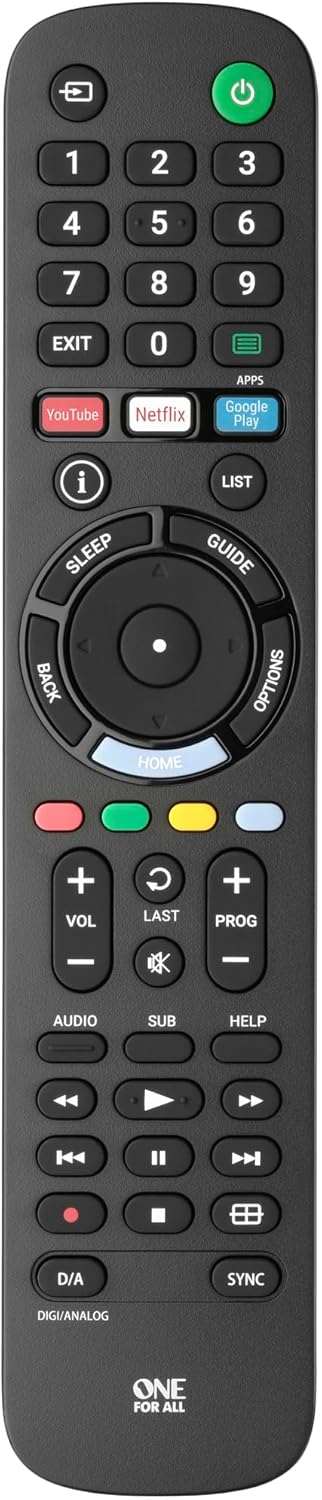
انځور 1: مخکی view of the One For All URC4912 remote control. This image displays the remote's layout, including number buttons, navigation pad, volume and channel controls, and dedicated app buttons for services like YouTube and Netflix.
3. د ریموټ کنټرول چلول
3.1 اساسي دندې
The URC4912 remote provides all standard functions found on an original Sony TV remote:
- د بریښنا تڼۍ: تلویزیون چالان یا بند کړئ.
- د شمېرې تڼۍ (0-9): د مستقیم چینل انتخاب لپاره.
- حجم پورته / ښکته (+/-): د تلویزیون حجم تنظیموي.
- Channel Up/Down (PROG +/-): د تلویزیون چینلونه بدلوي.
- تteۍ غږول: د تلویزیون غږ خاموشوي.
- د نیویګیشن پیډ (پورته، ښکته، کیڼ، ښي، سمه): د مینو نیویګیشن او انتخاب لپاره.
- د شا تڼۍ: مخکینۍ سکرین یا مینو ته راستنیږي.
- د کور تڼۍ: د تلویزیون اصلي کور سکرین یا سمارټ تلویزیون انٹرفیس ته لاسرسی لري.
3.2 Specific Sony Functions
This remote supports common Sony-specific functions, including:
- تیاتر: Activates or deactivates Theatre mode.
- i-Manual: Accesses the TV's electronic instruction manual.
- اختیارونه: د اوسني سکرین لپاره د شرایطو حساس انتخابونه ښیې.
۳.۳ د زده کړې ځانګړتیا
The URC4912 remote includes a learning feature, allowing you to copy functions directly from your original remote control. This is useful for any specific functions not pre-programmed or for personalizing button assignments.
- Place the URC4912 remote and your original remote on a flat surface, facing each other, with their IR emitters approximately 1-2 inches apart.
- On the URC4912, press and hold the چمتو کول button (if available, or refer to the full manual for specific button combination to enter learning mode) until the LED indicator blinks twice and then stays lit.
- Press the button on the URC4912 that you wish to program. The LED will blink rapidly.
- On your original remote, press and hold the corresponding function button until the URC4912's LED blinks twice to confirm successful learning.
- د نورو هغو تڼیو لپاره چې تاسو یې پروګرام کول غواړئ، ۳ او ۴ مرحلې تکرار کړئ.
- د زده کړې حالت څخه د وتلو لپاره، فشار ورکړئ چمتو کول ت buttonۍ بیا ت .ۍ. LED به بند شي.
Note: If the LED shows a long blink, the learning was unsuccessful. Try again, ensuring both remotes are stable and the original remote's batteries are fresh.

انځور ۱.۱: زاویه لرونکی view of the One For All URC4912 remote control, highlighting its ergonomic design and button placement for easy access to various functions.
4. ساتنه
ستاسو د ریموټ کنټرول د اوږد عمر او غوره فعالیت ډاډمن کولو لپاره:
- پاکول: Wipe the remote with a soft, dry cloth. Do not use abrasive cleaners or liquids.
- د بیټرۍ بدلول: Replace batteries when the remote's response becomes sluggish or the LED indicator (if present) signals low power. Always replace both batteries simultaneously.
- ذخیره کول: ریموټ په وچ ځای کې وساتئ، د مستقیم لمر وړانګو او سختې تودوخې څخه لرې.
5. ستونزه حل کول
| ستونزه | د حل لاره |
|---|---|
| ریموټ ځواب نه ورکوي. |
|
| ځینې تڼۍ کار نه کوي. |
|
| Learning feature fails. |
|
6. مشخصات
| برانډ | یو د ټولو لپاره |
| ماډل | URC4912 |
| مطابقت لرونکې وسیلې | Television (All Sony TV types: LCD, LED, Plasma) |
| ځانګړي ځانګړتیاوې | Infrared, Learning Function |
| د توکو شمیر | 1 |
| د بیټرۍ ډول | 2 x AA بیټرۍ (شامل ندي) |
| د محصول ابعاد | 19.5 x 4.4 x 2.5 سانتي متره |
| د توکي وزن | 100 ګرامه |
7. د تضمین معلومات
For detailed warranty information regarding your One For All URC4912 remote control, please refer to the official One For All webسایټ یا د تضمین کارت چې ستاسو د پیرود سره شامل دی. د تضمین شرایط او مقررات ممکن د سیمې له مخې توپیر ولري.
8. ملاتړ
Should you require further assistance, technical support, or have questions not covered in this manual, please visit the official One For All support website or contact their customer service. You can often find FAQs, additional guides, and contact information on their brand page:


