1. پیژندنه
This manual provides comprehensive instructions for the installation, operation, and maintenance of your Aigo Warrior AK700 Max 700W Power Supply. Designed for high-performance desktop computers, this power supply unit (PSU) delivers stable and efficient power to your system components. Please read this manual thoroughly before installation and use to ensure proper functionality and safety.
2. د خوندیتوب معلومات
Always observe the following safety precautions to prevent injury or damage to the product and other components:
- Ensure the power supply is disconnected from the main power outlet before installation or handling.
- د برېښنا رسونه مه خلاصوئ casinج. لوړ حجمtages are present inside, even when disconnected, and can cause electric shock.
- د ډیر تودوخې مخنیوي لپاره د بریښنا رسولو په ښه هوا لرونکي ځای کې نصب کړئ.
- یوازې هغه کیبلونه وکاروئ چې د بریښنا رسولو سره چمتو شوي وي.
- د واحد د رطوبت یا سختې تودوخې سره د مخ کیدو څخه ډډه وکړئ.
- دا محصول یوازې د داخلي کارونې لپاره ډیزاین شوی.
3. د بسته محتويات
ډاډ ترلاسه کړئ چې ټول توکي ستاسو په کڅوړه کې شتون لري:
- Aigo Warrior AK700 Max 700W Power Supply Unit
- د AC بریښنا تار
- Modular Cables (if applicable, otherwise fixed cables)
- د سکرو نصب کول
- د کارونکي لارښود (دا لاسوند)
4. محصول ختم شوview
The Aigo Warrior AK700 Max is a 700-watt power supply designed to meet the demands of modern gaming and high-performance computing systems. It features an energy-efficient design with a silent 12cm hydraulic bearing fan for optimal cooling and quiet operation. The unit incorporates a built-in Power Factor Correction (PFC) and a dual magnetic ring magnetic amplifier circuit, along with high-frequency low-resistance filter capacitors, to ensure a pure and stable current output. Multiple protection circuits are integrated to safeguard against overvoltage, overcurrent, overload, undervoltage، او لنډ سرکټونه.
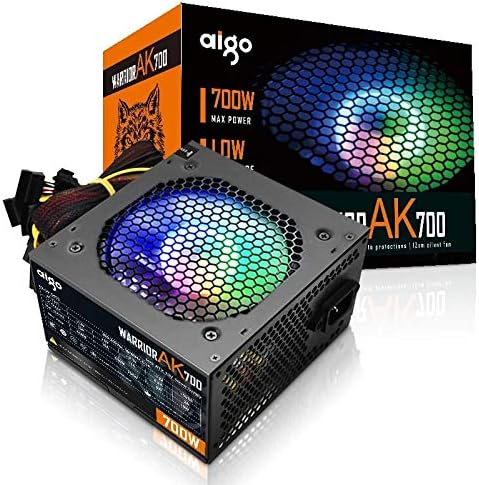
Figure 4.1: The Aigo Warrior AK700 Max 700W Power Supply, showcasing its RGB fan and retail packaging.
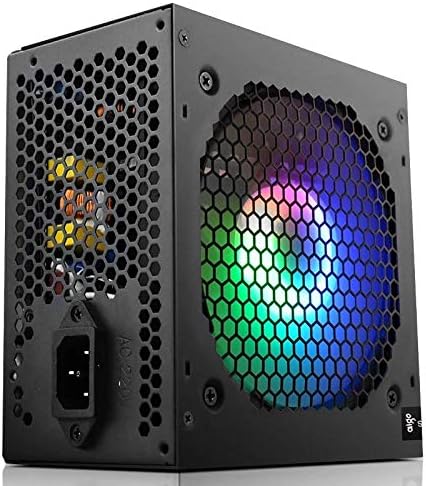
شکل 4.2: اړخ view of the power supply, highlighting the 12cm RGB cooling fan and honeycomb grille.

شکل 4.3: شاته view of the power supply, illustrating the exhaust grille and AC power input socket.
5. ترتیب او نصب کول
Follow these steps to properly install the Aigo Warrior AK700 Max power supply into your computer system:
- چمتووالی: ډاډ ترلاسه کړئ چې ستاسو کمپیوټر په بشپړ ډول بند دی او د دیوال له ساکټ څخه خلاص شوی دی. د خپل کمپیوټر کیس پرانیزئ.
- زوړ PSU لرې کړئ (که چیرې تطبیق شي): ټول کیبلونه د خپل زاړه بریښنا رسولو څخه جلا کړئ او د نصب کولو پیچونه یې لرې کړئ. په احتیاط سره یې د قضیې څخه بهر وغورځوئ.
- نوی PSU نصب کړئ: Gently slide the Aigo Warrior AK700 Max into the power supply bay of your computer case. Ensure the fan is oriented correctly for optimal airflow (usually facing down or up, depending on your case design).
- خوندي PSU: Align the screw holes on the power supply with those on your case. Secure the power supply using the provided mounting screws.
- کیبلونه وصل کړئ:
- د ۲۴ پن ATX مدر بورډ نښلونکی: اصلي ۲۴ پن کیبل خپل مور بورډ سره وصل کړئ.
- CPU Power Connector (4+4 pin or 8-pin EPS): Connect the CPU power cable to the appropriate socket on your motherboard.
- PCIe Power Connectors (6+2 pin): Connect these to your graphics card(s) if required.
- د SATA بریښنا نښلونکي: Connect to your storage drives (HDDs, SSDs) and optical drives.
- پردی (مولیکس) نښلونکي: د اړتیا په صورت کې نورو پردیو سره وصل شئ.
- د کیبل مدیریت: ستاسو په قضیه کې د هوا جریان او جمالیات ښه کولو لپاره کیبلونه په ښه توګه تنظیم کړئ.
- قضیه بنده کړئ: Once all connections are made and verified, close your computer case.
- د AC بریښنا سره وصل کړئ: د AC بریښنا تار د بریښنا رسولو سره وصل کړئ او بیا د دیوال آوټ لیټ سره وصل کړئ.
6. عملیاتي لارښوونې
After successful installation, follow these steps to operate your computer system with the Aigo Warrior AK700 Max power supply:
- پاور آن: Ensure the power switch on the back of the PSU is in the 'ON' (I) position. Press the power button on your computer case.
- سیسټم بوټ: Your computer should now power on and begin its boot sequence. The RGB fan on the power supply will illuminate.
- بندول: To turn off your computer, use the operating system's shutdown function. For a complete power cycle, switch the PSU to the 'OFF' (O) position after shutting down the computer.
The intelligent temperature control design automatically adjusts the fan speed to maintain optimal cooling and extend the lifespan of the unit, ensuring quiet operation under various loads.
7. ساتنه
مناسب ساتنه ستاسو د بریښنا رسولو اوږد عمر او غوره فعالیت تضمینوي:
- د دوړو پاکول: د کمپریس شوي هوا په کارولو سره د بریښنا رسولو د فین او وینټونو څخه په دوره یي ډول دوړې پاکې کړئ. ډاډ ترلاسه کړئ چې کمپیوټر بند دی او د پاکولو دمخه یې پلګ خلاص دی.
- د هوا جریان: Ensure that the power supply's intake and exhaust vents are not obstructed by cables or other components within the computer case.
- د چاپیریال شرایط: Operate the power supply in a clean, dry environment with adequate ventilation.
- بې ځایه مه کوئ: Never attempt to open the power supply unit. There are no user-serviceable parts inside, and doing so will void your warranty and poses a risk of electric shock.
8. ستونزه حل کول
If you encounter issues with your Aigo Warrior AK700 Max power supply, refer to the following common problems and solutions:
| ستونزه | احتمالي لامل | د حل لاره |
|---|---|---|
| کمپیوټر نه چالانېږي. |
|
|
| سیسټم چالان کیږي مګر سمدلاسه بندیږي. |
|
|
| Fan is not spinning or is excessively loud. |
|
|
If the problem persists after attempting these solutions, please contact Aigo customer support for further assistance.
9. مشخصات
Detailed technical specifications for the Aigo Warrior AK700 Max 700W Power Supply:
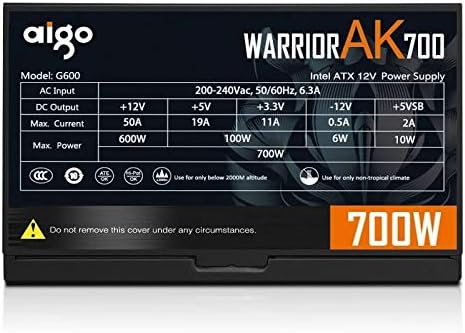
Figure 9.1: The specifications label found on the Aigo Warrior AK700 Max Power Supply.
| فیچر | تفصیل |
|---|---|
| ماډل | AK700 میکس |
| واټtage | 700 واټ |
| د فارم فکتور | ATX, ATX12V |
| ننوتۍ جلدtage | 220V (Minimum 220V, Maximum 220V) |
| د یخولو طریقه | د هوا یخ کول |
| د فین اندازه | 120 Millimeters (Hydraulic Bearing) |
| مطابقت لرونکې وسیلې | شخصي کمپیوټر |
| د نښلونکي ډول | SATA, PCIe (6+2 pin), ATX 24-pin, EPS 4+4 pin |
| د ساتنې ځانګړتیاوې | اوورولtage, Overcurrent, Overload, Undervoltage, Short Circuit, Light Protection |
| د توکي وزن | 1.9 کیلوګرامه |
| د کڅوړې ابعاد | ۱ x ۱ x ۱ سانتي متره (تقریبا) |
10. تضمین او ملاتړ
For warranty information and technical support, please refer to the official Aigo webسایټ یا خپل محلي پرچون پلورونکي سره اړیکه ونیسئ. د تضمین ادعاوو لپاره د پیرود ثبوت وساتئ.
Aigo Official Webسایټ: www.aigocorp.com (یادونه: دا یو ځای ساتونکی دی URL لکه څنګه چې رسمي نه وي website was provided in the product data. Please refer to actual product documentation for correct contact information.)


