پیژندنه
This manual provides essential information for the installation, operation, and maintenance of your Aiphone IX-DV SIP Compatible Surface Mounted IP Video Door Station. The IX-DV is a robust, surface-mount IP video intercom designed for security and communication, featuring vandal resistance and weather resistance, enclosed in an aluminum die-cast cover.
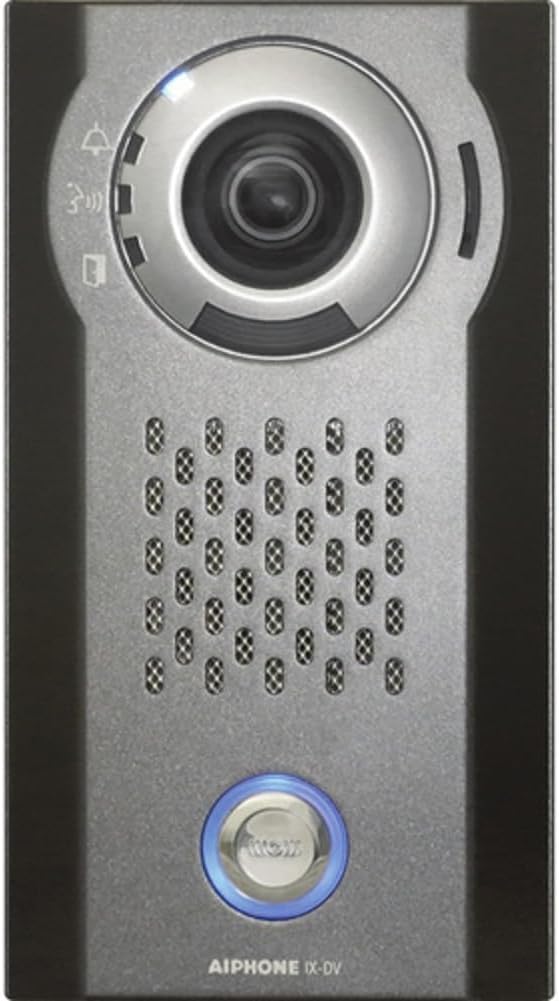
انځور: مخکینۍ برخه view of the Aiphone IX-DV SIP Video Door Station, showing the camera lens, speaker grille, and call button with a blue LED ring.
چمتو کول
The Aiphone IX-DV is designed for hardwired installation. Proper setup ensures optimal performance and security. It is suitable for both indoor and outdoor applications.
د نصب کولو نظرونه:
- پورته کول: The unit is surface-mounted. Ensure the mounting surface is stable and can support the device's weight.
- تارونه: This device requires hardwiring for power and network connectivity. Consult a qualified technician for electrical and network wiring to ensure compliance with local codes and safety standards.
- د شبکې پیوستون: Connect the door station to your network via an Ethernet cable. The device supports SIP protocol for integration with compatible IP communication systems.
- د بریښنا سرچینه: The unit operates on a corded electric power source. Verify the power supply meets the specified voltage او واټtage requirements (3 watts).
- د چاپیریال ساتنه: For outdoor installations, ensure proper sealing and protection against environmental elements, although the unit itself is weather-resistant with an IP67 rating.
عملیاتي لارښوونې
The Aiphone IX-DV provides clear video and audio communication for visitor identification and access control.
کلیدي دندې:
- د ویډیو څارنه: The integrated camera provides a 720p video feed, allowing you to visually identify visitors. The camera features manual focus and night color low-light technology for clear images in various lighting conditions.
- آډیو اړیکه: Two-way audio communication is enabled through the built-in speaker and microphone. Visitors can speak to you, and you can respond from your indoor station or integrated system.
- د تلیفون تڼۍ: Visitors press the illuminated call button to initiate a call to your indoor station or designated receiving device.
- د لاسرسي کنټرول: Depending on your system's configuration, you may have the ability to remotely grant access (e.g., "buzz in") after verifying the visitor.
ساتنه
Regular maintenance helps ensure the longevity and optimal performance of your Aiphone IX-DV door station.
- پاکول: Periodically clean the camera lens and the unit's exterior with a soft, damp cloth. Avoid abrasive cleaners or solvents that could damage the aluminum finish or lens.
- د فرم ویئر تازه معلومات: Check the Aiphone official website for any available firmware updates. Keeping the firmware updated can improve performance, add features, and enhance security.
- د پیوستون چک: Occasionally inspect the wiring connections to ensure they are secure and free from corrosion, especially for outdoor installations.
- د چاپیریال ساتنه: While weather-resistant, extreme conditions can still impact performance. Ensure the unit is not exposed to direct, prolonged water spray or extreme temperatures beyond its operating range.
د ستونزو حل کول
If you encounter issues with your Aiphone IX-DV, refer to the following common problems and solutions:
| ستونزه | احتمالي لامل | د حل لاره |
|---|---|---|
| هیڅ ویډیو فیډ نشته | Network connectivity issue, power loss, camera malfunction. | Check network cable connection. Verify power supply. Restart the unit if possible. Consult support if problem persists. |
| No audio (two-way) | Microphone/speaker issue, network audio settings. | Check audio settings on your indoor station/system. Ensure no physical obstructions on speaker/mic. |
| د کال تڼۍ بې ځوابه | Wiring issue, internal fault. | Verify wiring to the call button. If the unit is powered and connected, and the button still doesn't work, contact technical support. |
| د ویډیو خراب کیفیت | Dirty lens, poor lighting, network bandwidth. | Clean the camera lens. Ensure adequate lighting. Check network bandwidth and congestion. Adjust manual focus if applicable. |
مشخصات
| فیچر | تفصیل |
|---|---|
| برانډ | آیفون |
| ماډل | IX-DV |
| د بریښنا سرچینه | د بریښنا تار شوی |
| د ارتباط پروتوکول | وای فای |
| د نصب کولو ډول | دیوال غر |
| د ویډیو نیول حل | 720p |
| مواد | المونیم |
| واټtage | ۴۵ واټه |
| د توکو ابعاد L x W x H | 9 x 6 x 3 انچه |
| د توکي وزن | ۲.۴۵ پونډه |
| د نړیوال خوندیتوب درجه بندي | IP67 |
| د ویډیو نیول بڼه | MPEG-4 |
| د ټیټ رڼا ټیکنالوژي | د شپې رنګ |
| د تمرکز ډول | لاسي تمرکز |
| د کور دننه / بهر کارول | بهر |
| ځانګړی ځانګړنه | د HD پریکړه |
تضمین او ملاتړ
For detailed warranty information and technical support, please refer to the official Aiphone webسایټ ته مراجعه وکړئ یا مستقیم د دوی د پیرودونکو خدماتو سره اړیکه ونیسئ. د تضمین ادعاوو لپاره د پیرود ثبوت په توګه د پیرود رسید وساتئ.
آنلاین سرچینې: www.aiphone.com


