1. پیژندنه
The Lepro PR902103-US Smart Table Lamp offers versatile lighting solutions for your home. This LED touch lamp features RGB color changing capabilities, tunable warm to cool white light, and dimmable brightness. It is designed for seamless integration with smart home ecosystems, supporting both Amazon Alexa and Google Assistant for voice control, as well as control via a dedicated mobile application. This manual provides comprehensive instructions for setup, operation, and maintenance.

Figure 1: Lepro Smart Table Lamp شوکasing its app control interface.
۲. په بکس کې څه دي؟
مهرباني وکړئ تصدیق کړئ چې ټولې برخې په بسته بندۍ کې شتون لري:
- 1 x Lepro Smart Table Lamp (Model: PR902103-US)
- 1 x 4.9 ft USB Cable
- 1 x د بریښنا اډاپټر
- ۱ x د کارونکي لارښود (دا سند)
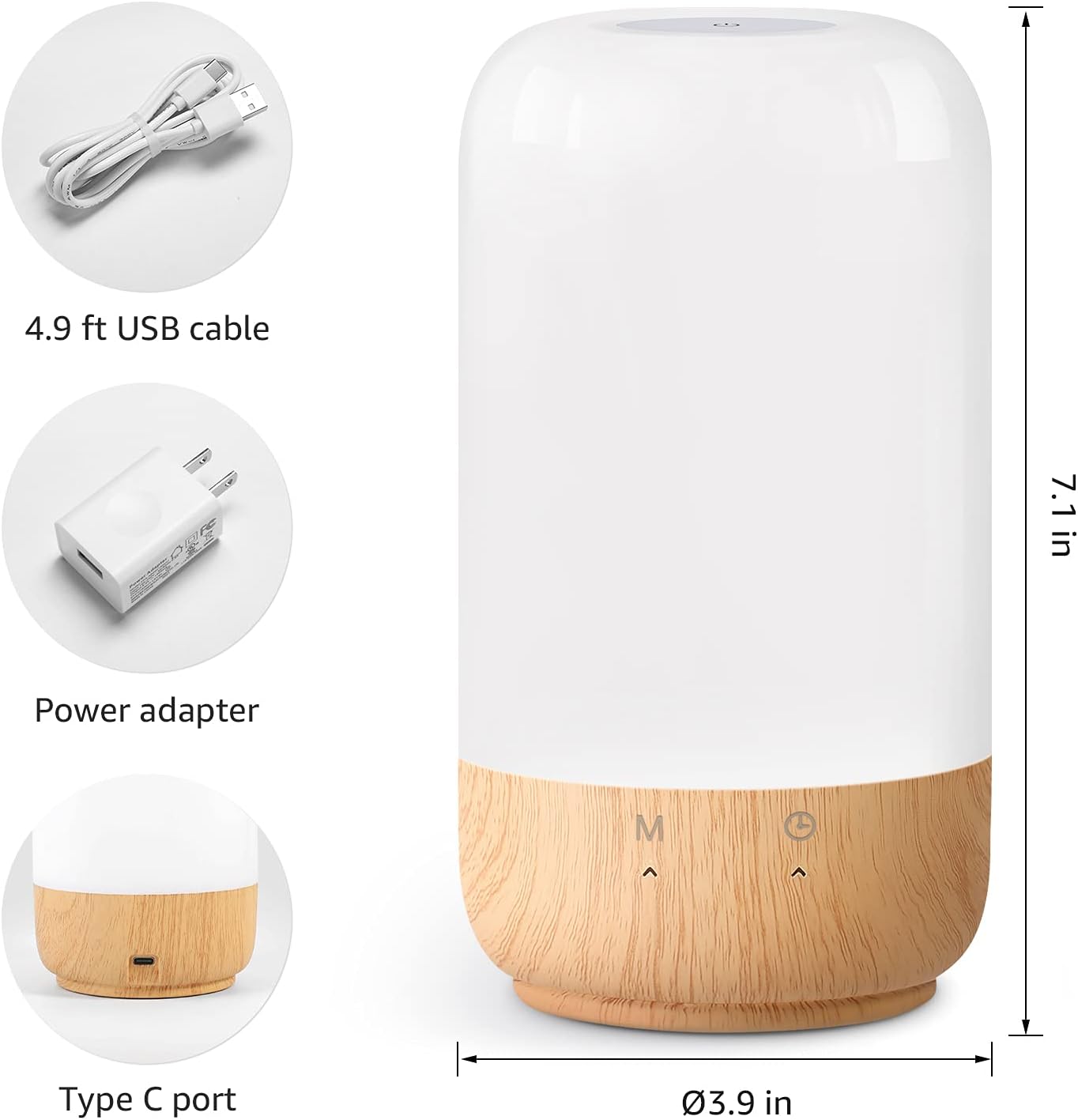
شکل ۳.۱: شامل شوي برخې او د محصول ابعاد.
3. ترتیب کول
Follow these steps to set up your Lepro Smart Table Lamp:
- د بریښنا پیوستون: چمتو شوی USB کیبل د l سره وصل کړئamp's Type-C port and the power adapter. Plug the power adapter into a standard wall outlet. The lamp روښانه کړي.
- اپلیکیشن ډاونلوډ: Download the 'Lepro LampUX' app from your mobile device's App Store (iOS) or Google Play Store (Android).
- د حساب ثبتول: Open the 'Lepro LampUX' app and register a new account or log in if you already have one.
- د وسایلو جوړه کول:
- په اپلیکیشن کې، 'وسیله اضافه کړئ' یا '+' آیکون باندې کلیک وکړئ.
- Select 'Table Lamp' from the lighting category.
- ډاډ ترلاسه کړئ چې lamp is powered on. Long press the timer button on the lamp's base for at least 5 seconds until the indicator light blinks rapidly.
- Confirm the indicator light is blinking rapidly in the app and proceed.
- Select your 2.4 GHz Wi-Fi network and enter the password. (Note: The lamp only supports 2.4 GHz Wi-Fi networks. If your router is 5 GHz, please set it to 2.4 GHz during setup.)
- The app will begin adding the device. Once successfully added, you can rename your lamp for easier identification.
Video 1: Detailed steps on how to set up your Lepro Smart Lamp د ګرځنده غوښتنلیک کارول.
4. عملیاتي لارښوونې
د لیپرو سمارټ میز Lamp can be controlled via touch, the mobile app, or voice commands.
4.1. د ټچ کنټرولونه
- پاور آن/بند: Short press the power button (marked 'M') on the lampاساس
- د روښانتیا سمون: Slide your finger along the left side of the lamp's base to adjust brightness.
- Color Change (RGB): Slide your finger along the right side of the lamp's base to cycle through RGB colors.
- د حالت بدلول: Short press the timer button (clock icon) to switch between white light modes (warm white, cool white) and RGB color mode.
4.2. Mobile App Controls
The 'Lepro LampUX' app provides comprehensive control over your lamp:
- Brightness & Color Temperature: Adjust the brightness level and select color temperatures from 2700K (warm white) to 5700K (cool white).
- د RGB رنګ انتخاب: Choose from 16 million colors using the color wheel in the app.
- صحنې: Select from pre-set scenes like 'Night', 'Read', 'Meeting', 'Leisure', or customize your own scenes with specific colors and effects.
- Timer & Wake-up: د l لپاره مهالویشونه تنظیم کړئamp to turn on/off automatically. Utilize the 'Sunrise Simulation' feature to gradually increase light for a gentle wake-up.

Figure 3: Mobile application interface for controlling lamp ترتیبات.

شکل 4: د lamp's timer and wake-up functions in use.
4.3. د غږ کنټرول
د لیپرو سمارټ میز Lamp is compatible with Amazon Alexa and Google Assistant. To enable voice control:
- ډاډ ترلاسه کړئ چې ستاسو ایلamp is successfully paired with the 'Lepro LampUX' app.
- د ایمیزون الیکسا یا ګوګل کور ایپ خلاص کړئ.
- 'مهارتونه او لوبې' (الیکسا) یا 'د ګوګل سره کار کوي' (ګوګل کور) برخې ته لاړ شئ.
- لټون and enable the 'Lepro LampUX' skill/service.
- Link your 'Lepro LampUX' account with your Alexa/Google account.
- یوځل چې وصل شو، تاسو کولی شئ د غږ امرونه وکاروئ لکه:
- "الیکسا، چالان کړه [Lamp نوم]."
- "سلام ګوګل، [L] تنظیم کړئamp نوم] ګرم سپین ته."
- "الیکسا، بدل کړئ [Lamp نوم] نیلي ته."
- "Hey Google, dim [Lamp نوم] تر ۵۰٪ پورې."

Figure 5: Voice control integration with Amazon Alexa.
Video 2: Demonstration of the Lepro Smart Table Lamp working with Alexa and Google Home.
5. ساتنه
To ensure the longevity and optimal performance of your Lepro Smart Table Lamp, please follow these maintenance guidelines:
- پاکول: د پاکولو دمخه بریښنا قطع کړئ. د پاکولو لپاره نرم، وچ ټوکر وکاروئamp's surface. Avoid using abrasive cleaners, solvents, or harsh chemicals, as these may damage the finish or electronic components.
- ذخیره کول: که چیرې د l ذخیره کولamp د اوږدې مودې لپاره، ډاډ ترلاسه کړئ چې دا پاک او وچ وي. دا په یخ او وچ ځای کې د مستقیم لمر وړانګو او سخت تودوخې څخه لرې وساتئ.
- سمبالول: l سمبال کړئamp with care. Avoid dropping it or subjecting it to strong impacts.
6. ستونزه حل کول
If you encounter issues with your Lepro Smart Table Lamp، لاندې عامو ستونزو او حل لارو ته مراجعه وکړئ:
| ستونزه | احتمالي لامل | د حل لاره |
|---|---|---|
| Lamp نه چلیږي. | بریښنا نشته. | وګورئ چې ایا د بریښنا اډاپټر په خوندي ډول په l کې پلګ شوی دیamp او د دیوال ساکټ. ډاډ ترلاسه کړئ چې ساکټ فعال دی. |
| د وائی فای سره وصل نشو. | Incorrect Wi-Fi band (5 GHz). غلط پټنوم. کمزوری وای فای سیګنال. | Ensure your Wi-Fi network is 2.4 GHz. Verify the Wi-Fi password. Move the lamp closer to your router. |
| د غږ کنټرول کار نه کوي. | Skill not enabled/linked. د وسیلې نوم غلط دی. | Ensure the 'Lepro LampUX' skill is enabled and linked in your Alexa/Google Home app. Use the exact device name configured in the app. |
| Lamp بې ځوابه دی. | د سافټویر لنډمهاله ستونزه. | l خلاص کړئamp from the power outlet for 10 seconds, then plug it back in to perform a soft reset. |
7. مشخصات
| فیچر | تفصیل |
|---|---|
| برانډ | لیپرو |
| د ماډل شمیره | PR902103-US |
| د محصول ابعاد | ۱۶"د x ۲۶"وچ x ۴۷"ح |
| د توکي وزن | ۲.۴۵ پونډه |
| مواد | پلاستیک ، چوب |
| د رڼا سرچینې ډول | LED |
| واټtage | ۴۵ واټه |
| روښانتیا | 350 Lumen |
| رڼا رنګ | RGB + CCT (Tunable White 2700-5700K) |
| د کنټرول طریقه | App, Touch, Voice (Alexa, Google Assistant) |
| ارتباط | 2.4 GHz WiFi Only |
| د کور دننه / بهر کارول | دننه |
8. تضمین او ملاتړ
Lepro products are designed and manufactured to the highest quality standards. For warranty information and technical support, please refer to the contact details provided on the product packaging or visit the official Lepro webسایټ. د تضمین ادعاوو لپاره د پیرود ثبوت په توګه د پیرود رسید وساتئ.


