پیژندنه
The Mi Electric Toothbrush T100 is designed to provide an efficient and superior cleaning experience compared to traditional manual toothbrushes. It incorporates advanced features such as high-frequency vibrations, multiple brushing modes, and a smart timer to enhance your daily oral hygiene routine. This manual provides essential information for the proper use, maintenance, and care of your device.

شکل 1: Mi Electric Toothbrush T100 and packaging.
کلیدي ځانګړتیاوې:
- Ultra Soft Bristles: Designed for effective yet gentle cleaning.
- د لوړې فریکونسۍ وایبریشن: Up to 18,000 vibrations per minute for thorough cleaning.
- Dual Pro Brush Modes: Two distinct modes to suit individual preferences.
- EquiClean Auto Timer: Ensures optimal brushing duration for each quadrant of your mouth.
- IPX7 پنروک ډیزاین: Allows for safe use and easy cleaning under running water.
- اوږدمهاله بیټرۍ: Up to 30 days of usage on a single charge.
- د USB چټک چارج کول: Convenient and quick recharging.
- د LED شاخص: Provides battery status alerts.
- د ټیټ شور عملیات: Operates at approximately 60 dB.
- د پرچی ضد ډیزاین: د کارولو پرمهال خوندي گرفت ډاډمن کوي.
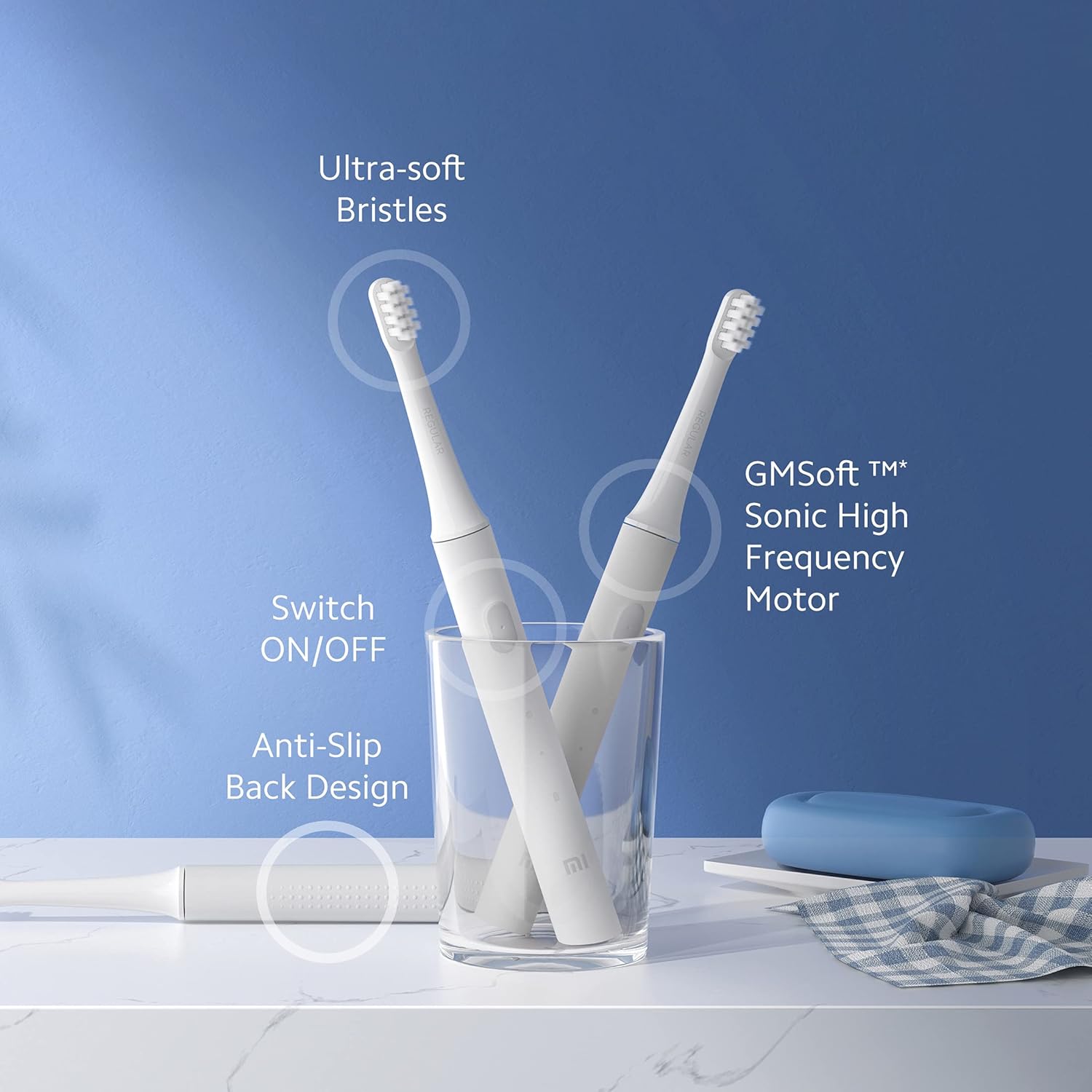
شکل 2: اوورview of Mi Electric Toothbrush T100 features.
د بسته محتويات
مخکې له دې چې تنظیم پیل کړئ، مهرباني وکړئ تصدیق کړئ چې ټول توکي په بسته کې شتون لري:
- Mi Electric Toothbrush T100 Handle
- Brush Head (Ultra Soft Bristles)
- د USB چارج کیبل
- د کارونکي لارښود (دا لاسوند)
چمتو کول
۱. ابتدايي چارج کول
Before first use, fully charge the toothbrush. The device is equipped with a rechargeable Lithium-Ion battery.
- Locate the USB charging port at the bottom of the toothbrush handle.
- د چارج کولو بندر محافظتي پوښ خلاص کړئ.
- Connect the provided USB charging cable to the toothbrush and a compatible USB power adapter (not included).
- Plug the adapter into a power outlet. The LED indicator on the handle will illuminate to show charging status.
- Allow the toothbrush to charge until the LED indicator shows a full charge (refer to the LED indicator section for details). A full charge typically provides up to 30 days of usage.

شکل 3: USB fast charging port.
۲. د برش سر نښلول
د برش سر د غاښونو برش د لاستي د فلزي شافټ سره سم کړئ او په کلکه یې ښکته کړئ تر هغه چې ځای ته راشي. ډاډ ترلاسه کړئ چې دا د کارولو دمخه په خوندي ډول وصل دی.
عملیاتي لارښوونې
۱. غاښونه برش کول
- برشونه لوند کړئ او لږ مقدار د غاښونو پیسټ تطبیق کړئ.
- د برش سر د غاښونو په وړاندې په یو څه زاویه کې د ګوم کرښې په لور کېږدئ.
- د غاښونو برش فعالولو لپاره د بریښنا تڼۍ فشار ورکړئ.
- Gently move the brush head slowly across each tooth, allowing the high-frequency vibrations to clean. Avoid scrubbing vigorously.
- د EquiClean Auto Timer will pause briefly every 30 seconds to indicate when to move to the next quadrant of your mouth. After 2 minutes, the toothbrush will automatically turn off, signaling the completion of the recommended brushing time.
- After brushing, press the power button again to turn off the toothbrush if it hasn't already.
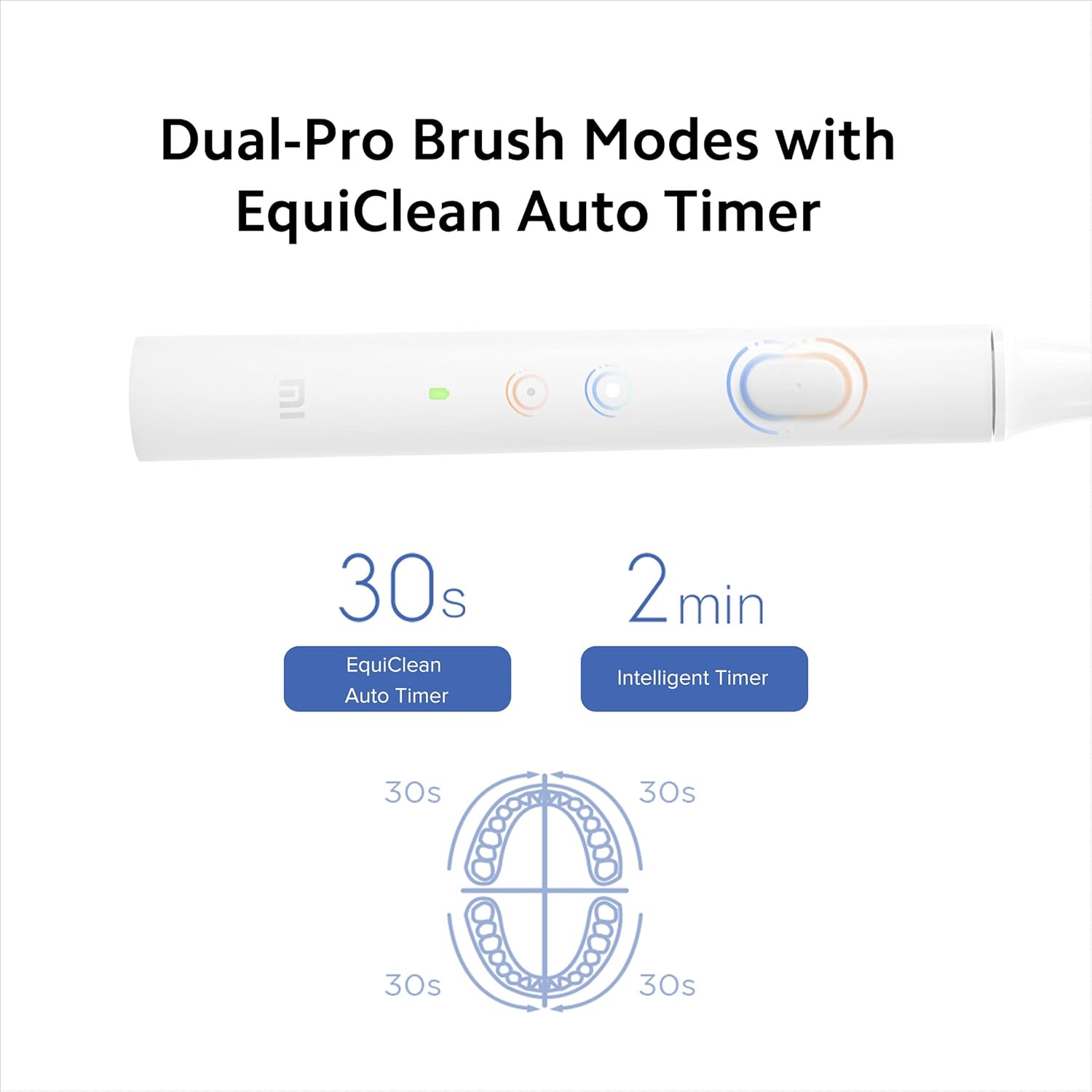
شکل 4: Dual-Pro Brush Modes and EquiClean Auto Timer.
2. Dual Pro Brush Modes
The Mi T100 offers two brushing modes. Press the power button repeatedly to cycle through the modes:
- معیاري حالت: د ورځني پاکولو لپاره.
- نرم حالت: For sensitive teeth and gums.

شکل 5: GMSoft Sonic High Frequency Motor for multi-dimensional cleaning.
ساتنه
۱. د غاښونو برش پاکول
Regular cleaning ensures hygiene and extends the lifespan of your toothbrush.
- After each use, rinse the brush head thoroughly under running water while the toothbrush is still on to remove any remaining toothpaste or debris.
- د غاښونو برش بند کړئ او د برش سر لرې کړئ.
- Rinse both the brush head and the handle separately under running water. Pay attention to the junction area between the head and the handle to prevent accumulation of residue.
- لاستی د نرم ټوکر سره وچ کړئ.
- The toothbrush is IPX7 waterproof, allowing it to be safely rinsed under water.

شکل 6: IPX7 Waterproof design for easy cleaning.
۲. د برش سر بدلول
It is recommended to replace the brush head every three months, or sooner if the bristles become frayed or worn. Worn bristles are less effective at cleaning and can irritate gums.
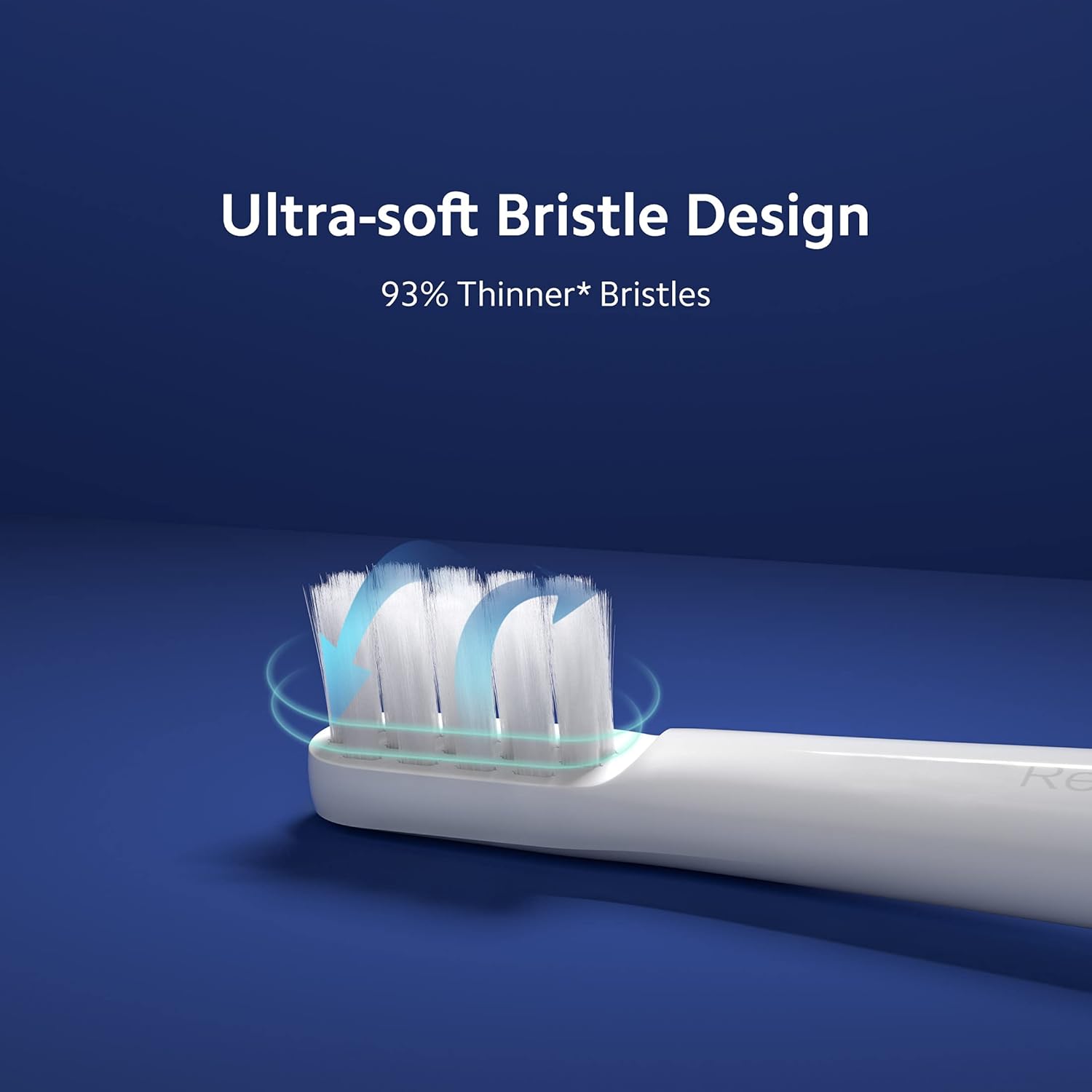
شکل 7: Ultra-soft bristle design.
3. د بیټرۍ پاملرنه
To maintain optimal battery performance, avoid fully discharging the battery frequently. Recharge the toothbrush when the LED indicator signals low battery.
د ستونزو حل کول
If you encounter issues with your Mi Electric Toothbrush T100, refer to the following common problems and solutions:
| ستونزه | احتمالي لامل | د حل لاره |
|---|---|---|
| د غاښونو برش نه چالانېږي. | ټیټ یا ختم شوی بیټرۍ. | Charge the toothbrush fully using the provided USB cable. |
| Reduced vibration intensity. | Low battery or worn brush head. | Recharge the battery. Replace the brush head if it is old or worn. |
| Toothbrush stops unexpectedly during use. | Battery protection mechanism or residue accumulation. | Ensure the battery is sufficiently charged. Clean the junction between the brush head and handle thoroughly to remove any dried toothpaste or water residue. |
| د چارج کولو شاخص کار نه کوي. | غلط کیبل یا د بریښنا سرچینه. | Try a different USB cable or power adapter. Ensure the charging port is clean and free of debris. |
مشخصات
| فیچر | تفصیل |
|---|---|
| ماډل | T100 (Item model number: 26283) |
| ابعاد (LxWxH) | 21.9 x 2.1 x 2 سانتي متره |
| وزن | 46 ګرامه |
| د وایبریشن فریکونسی | تر 18,000 rpm پورې |
| د بیټرۍ ژوند | Up to 30 days (based on typical usage) |
| د پنروک درجه | IPX7 |
| د بریسټل ډول | الټرا نرم |
| د بریښنا سرچینه | د بیټرۍ چلول (د ریچارج وړ لیتیم آیون) |
| د شور کچه | نږدې 60 dB |
| رنګ | سپین |
| د موادو ځانګړتیا | د بیا رغونې وړ |
| د وړاندیز شوي عمر سلسله | له 15 څخه تر 65 کلونو پورې |
| جوړونکی | Wuxi Qinghe Xiaobei Technolody Co. Ltd. |
| واردونکي | د شیاومي ټکنالوژۍ هند پرایویټ لمیټډ |

شکل 8: Low noise design for comfortable use.

شکل 9: د خوندي سمبالولو لپاره د پرچی ضد ډیزاین.
تضمین او ملاتړ
د تضمین معلومات
The Mi Electric Toothbrush T100 comes with a One Year Pan-India Warranty covering all manufacturing defects. Please retain your purchase receipt for warranty claims.
د خوندیتوب معلومات
- دا محصول د لویانو لخوا د کارولو لپاره دی.
- Recommended for individuals 18 years and older.
- Do not use if you have severe oral conditions or have recently undergone oral surgery without consulting a dentist.
د پیرودونکي ملاتړ
For further assistance, technical support, or warranty inquiries, please contact Xiaomi Technology India Pvt. Ltd. customer service. Refer to the official MI webد اړیکو د جزیاتو لپاره سایټ یا ستاسو د پیرود اسناد.