1. پیژندنه
This manual provides essential information for the safe and efficient operation of your DOOGEE S97 Pro Rugged Smartphone. Please read it thoroughly before using your device.

Image 1.1: The DOOGEE S97 Pro Rugged Smartphone, showcasinد دې قوي ډیزاین او ښودنې سره.
2. وسیله ختمه شوهview
The DOOGEE S97 Pro is a rugged smartphone designed for durability and performance. Key features include:
- عملیاتي سیسټم: Android 11
- پروسیسر: هیلیو جي ۱۰۰ اوکټا کور ۲.۲ ګیګاهرتز ۶ نانو متره
- حافظه: 8GB رام + 128GB روم
- بیټرۍ: 8500mAh Super Battery with 33W Fast Charging and 10W Wireless Charging
- ښکاره کول: 5.71-inch Corning Gorilla Glass
- شاته کیمره: Samsung 48MP AI Main Camera (48MP + 8MP + 2MP + 2MP)
- مخکینۍ کیمره: 16MP
- ځانګړي ځانګړتیاوې: 40m Rangefinder, IP68 Waterproof, Dustproof, Shockproof, NFC Support
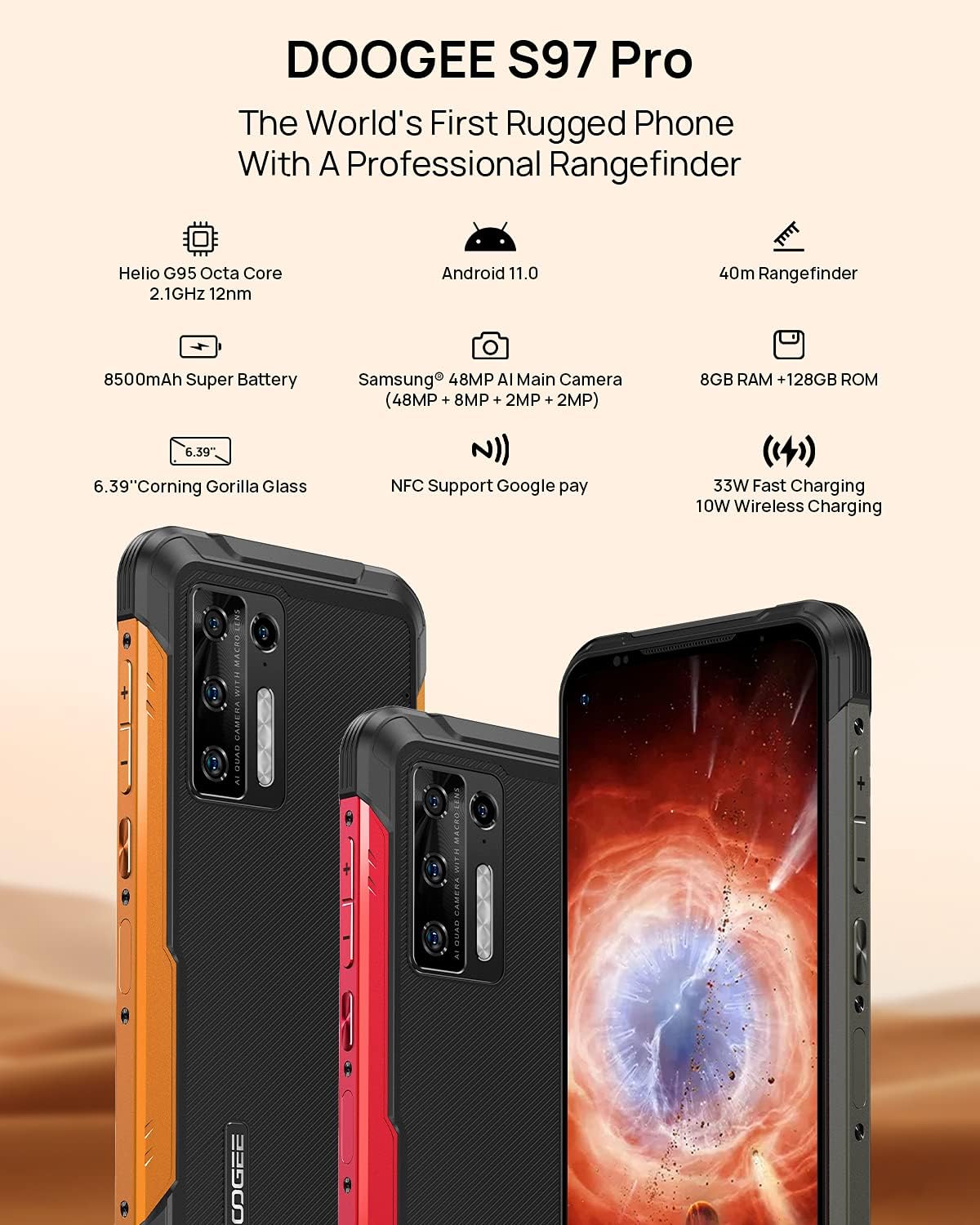
Image 2.1: Visual representation of the DOOGEE S97 Pro's main features, including processor, battery, camera, and display.
3. ترتیب کول
3.1 د سیم کارت نصب کول
- د خپل وسیلې په اړخ کې د سیم کارت ټری ومومئ.
- د ټرې د خلاصولو لپاره د چمتو شوي سیم ایجکټور وسیلې څخه کار واخلئ.
- Carefully place your Nano SIM card(s) into the designated slots. Ensure proper orientation.
- Gently push the SIM card tray back into the device until it is flush with the body.
یادونه: This device supports specific frequency bands. Please verify compatibility with your network carrier before use. The DOOGEE S97 Pro does not support certain CDMA network carriers such as Verizon, Sprint, Xfinity, and TracFone.
3.2 ابتدايي پاور آن
- Press and hold the Power button located on the side of the device until the DOOGEE logo appears.
- د لومړني تنظیم بشپړولو لپاره د سکرین پرامپټس تعقیب کړئ، پشمول د ژبې انتخاب، د وای فای اتصال، او د ګوګل حساب تنظیم کول.
4. عملیاتي لارښوونې
4.1 بنسټیز نیویګیشن
- Back Function: Swipe from the left or right edge of the screen towards the center.
- کور سکرین: د کور سکرین ته د بیرته راستنیدو لپاره د سکرین له ښکته څخه پورته پورته کړئ.
- وروستي اطلاقات: Swipe up from the bottom of the screen and hold briefly to view recent applications. Swipe left or right along the very bottom of the screen to scroll through recent apps.
- د اپلیکیشن دراز: The device does not feature a traditional app drawer. All installed applications are displayed on the home screen. Additional home screens are automatically added to the right as more apps are installed.
۴.۴ د کیمرې کارول
The DOOGEE S97 Pro is equipped with a versatile camera system:
- شاته کیمره: 48MP main sensor, 8MP ultra-wide angle, 2MP portrait, and 2MP macro lens.
- مخکینۍ کیمره: د سیلفي او ویډیو زنګونو لپاره ۱۶ میګاپکسله.
To access the camera, tap the Camera icon on your home screen. Select desired modes (Photo, Video, Portrait, Macro, etc.) from the interface.

انځور ۳.۱: نږدې انځور view of the Samsung 48MP AI Quad Rear Camera system on the DOOGEE S97 Pro.
4.3 Rangefinder Functionality
The integrated 40m laser rangefinder allows for precise distance measurements. To use:
- Locate and open the 'Rangefinder' application on your device.
- Select the desired measurement mode (Length, Area, Volume, Pythagoras).
- Follow the on-screen instructions to aim the laser and take measurements.

Image 4.2: Screenshots of the DOOGEE S97 Pro's 40m Rangefinder application interface, showing various measurement modes.
4.4 د بیټرۍ مدیریت
The DOOGEE S97 Pro features an 8500mAh battery. To optimize battery life and charging:
- د تار چارج کول: Use the provided USB Type-C cable and a compatible 33W fast charger for optimal charging speed.
- بې سیم چارج کول: The device supports 10W wireless charging. Place the phone on a compatible wireless charging pad.
- د بیټرۍ اصلاح کول: Access battery settings to manage app power usage and enable power-saving modes.

Image 4.3: Illustration of the DOOGEE S97 Pro's 8500mAh Super Battery and charging capabilities.
۴.۷ د دوام ځانګړتیاوې
The S97 Pro is built to withstand harsh environments:
- د IP68 درجه بندي: Provides protection against dust ingress and immersion in water up to 1.5 meters for 30 minutes.
- شاک پروف: Designed to resist drops and impacts.
- د کارنینګ ګوریلا شیشه: Enhances screen durability against scratches and minor impacts.

Image 4.4: Demonstrations of the DOOGEE S97 Pro's waterproof, dustproof, and shockproof capabilities.
Video 4.5: An official video from DOOGEE showcasing the rugged features and capabilities of the S59 Pro smartphone.
۳.۱ د Android ۱۳ عملیاتي سیسټم
The device runs on Android 11, offering enhanced privacy controls, improved notification management, and a streamlined user experience.

Image 4.6: Visual representation of the Android 11 operating system interface on the DOOGEE S97 Pro.
5. ساتنه
۳.۲ ستاسو د آلې پاکول
Due to its waterproof design, the DOOGEE S97 Pro can be cleaned with water. Ensure all ports are securely closed before rinsing. Use a soft, damp cloth to wipe the screen and body. Avoid harsh chemicals or abrasive materials.
5.2 د سافټویر تازه معلومات
د غوره فعالیت، امنیت، او نویو ځانګړتیاو ته د لاسرسي ډاډ ترلاسه کولو لپاره په منظم ډول د سافټویر تازه معلومات وګورئ او نصب کړئ. ته لاړ شئ ترتیبات> سیسټم> د سیسټم تازه کول د شته تازه معلوماتو د چک کولو لپاره.
6. ستونزه حل کول
که تاسو په خپل وسیله کې ستونزې سره مخ شئ، لاندې عام حلونو ته مراجعه وکړئ:
- وسیله ځواب نه ورکوي: د بریښنا تڼۍ د شاوخوا ۱۰-۱۵ ثانیو لپاره فشار ورکړئ او ونیسئ ترڅو بیا پیل کړئ.
- د شبکې د اتصال مسلې: Verify your SIM card is correctly inserted. Check network settings (ترتیبات> شبکه او انټرنیټ> ګرځنده شبکه). وسیله بیا پیل کړئ.
- د چارج کولو ستونزې: Ensure the USB cable and charger are securely connected and undamaged. Try a different charger or cable. For wireless charging, ensure the phone is correctly positioned on the charging pad.
- Fingerprint Sensor Inaccuracy: ډاډ ترلاسه کړئ چې ستاسو ګوته پاکه او وچه ده. د ګوتو نښې بیا ثبت کړئ ترتیبات> امنیت> د ګوتو نښه.
- ورو فعالیت: Close unused applications. Clear cache (ترتیبات > ایپسونه او خبرتیاوې > ټول ایپسونه وګورئ > [د اپلیکیشن نوم] > ذخیره او زیرمه > کیچ پاک کړئ). Consider a factory reset as a last resort (ترتیبات> سیسټم> د بیا تنظیم کولو اختیارونه> ټول معلومات پاک کړئ (د فابریکې بیا تنظیم کول)).
7. مشخصات
| فیچر | تفصیل |
|---|---|
| د محصول ابعاد | 6.41 x 3.19 x 0.63 انچه |
| د توکي وزن | ۰.۹۸۶ اونس (۲۷.۹۴ ګرامه) |
| عملیاتي سیسټم | Android 11.0 |
| RAM | 8 GB (Note: Product data shows 4GB RAM, but images and title indicate 8GB. This manual uses 8GB as per prominent product claims.) |
| د حافظې د ذخیره کولو ظرفیت | 128 جي بي |
| د سکرین اندازه | ۷۸۷ انچه |
| د بیټرۍ ظرفیت | 8500 ملیونهamp Hours (Note: Product data shows 10050 mAh, but images and title indicate 8500 mAh. This manual uses 8500 mAh as per prominent product claims.) |
| بېسیم مخابراتي ټکنالوژۍ | ګرځنده، وای فای |
| سیلولر ټیکنالوژي | LTE |
| د نښلونکي ډول | د USB ډول C |
| د انسان انٹرفیس ننوت | تڼۍ |
| په بکس کې څه دي | USB کیبل |
For detailed specifications, please refer to the product packaging or the official DOOGEE webسایټ

Image 7.1: The DOOGEE S97 Pro highlighting its 8GB RAM and 128GB ROM, powered by a Helio G95 Octa Core processor.
8. تضمین او ملاتړ
Your DOOGEE S97 Pro smartphone is covered by a manufacturer's warranty. Please refer to the warranty card included in your product packaging for specific terms and conditions, including warranty duration and coverage details.
For technical support, product inquiries, or service requests, please visit the official DOOGEE website or contact their customer service department. Contact information can typically be found on the DOOGEE webسایټ یا د محصول بسته بندي کې.


