1. پهview
The Logitech C505/C505e HD Wired Business Webcam is designed to enhance your video communication experience. It provides crisp, smooth, and colorful widescreen HD 720p video with a 60° diagonal field of view. د webcam features fixed focus and automatic light correction, adapting to various lighting conditions. Its single, omnidirectional microphone incorporates noise-reduction technology, supporting clear conversations up to 3 meters away, even in noisy environments. The extra-long USB-A cable and universal clip offer flexible placement options on your computer or up to 7 feet away.
۴. د تنظیم لارښوونې
Setting up your Logitech C505/C505e webcam is a straightforward plug-and-play process. No additional software installation or charging is required.
- سره وصل کړئ Webکیم: د USB-A کیبل له webcam into an available USB port on your desktop or laptop computer.
- موقعیت ورکړئ Webکیم: Use the universal clip to securely mount the webcam on your monitor, laptop screen, or place it on a flat surface. The extra-long cable allows for flexible positioning.
- غوره کړئ Webکیم: ستاسو کمپیوټر باید په اتوماتيک ډول کشف کړي webcam. If you have multiple cameras or microphones, you may need to select the "Logitech C505/C505e" in your application's settings (e.g., video conferencing software, recording applications) or your operating system's device settings.

Image: The Logitech C505/C505e webcam easily clips onto a monitor for convenient placement.
۲. د چلولو Webکمره
Once connected, the Logitech C505/C505e is ready for use with most video conferencing and recording applications.
- د ویډیو کیفیت: د webcam delivers HD 720p video at 30 frames per second, providing clear visuals for your calls and recordings.
- د ډګر View: د 60 ° اختراع ساحه view ensures you are framed appropriately without capturing excessive background.
- ثابت تمرکز: The fixed focus lens maintains sharpness for subjects within its optimal range, simplifying operation.
- د اتوماتیک رڼا سمون: د webcam automatically adjusts to the lighting conditions of your environment, helping to ensure you appear well-lit even in varying light. Optimal lighting conditions will yield the best video quality.
- مایکروفون: The integrated omnidirectional microphone with noise-reduction technology is designed to capture your voice clearly from up to 3 meters away, minimizing background distractions.

Image: The Logitech C505/C505e provides HD 720p widescreen video for clear communication.
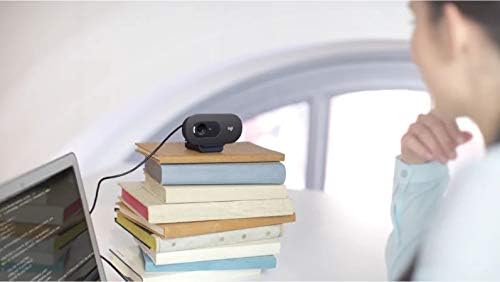
Image: Flexible placement options allow the webcam to be positioned on various surfaces.
4. ساتنه
To ensure optimal performance and longevity of your Logitech C505/C505e webکیم، د ساتنې لپاره دا ساده لارښوونې تعقیب کړئ:
- د لینز پاکول: په نرمۍ سره پاک کړئ webcam lens with a soft, lint-free cloth. Avoid using harsh chemicals or abrasive materials that could scratch the lens.
- ذخیره کول: کله چې کارول نه وي، ذخیره کړئ webکیم په پاک او وچ ځای کې د سختې تودوخې او مستقیم لمر وړانګو څخه لرې وساتئ.
- د کیبل پاملرنه: Avoid sharply bending or crimping the USB cable to prevent internal damage.
5. ستونزه حل کول
If you encounter issues with your Logitech C505/C505e webکیم، د ستونزو د حل لپاره لاندې ګامونه هڅه وکړئ:
- ویډیو/آډیو نشته:
- ډاډ ترلاسه کړئ چې د USB کیبل په خوندي ډول په دواړو کې ولګول شوی دی webکیم او ستاسو کمپیوټر.
- د پلګ کولو هڅه وکړئ webکیم په مختلف USB پورټ کې.
- Check your application's settings (e.g., Zoom, Microsoft Teams) to confirm the Logitech C505/C505e is selected as the active camera and microphone.
- Verify your operating system's privacy settings allow applications to access the camera and microphone.
- د ویډیو خراب کیفیت:
- په خپل چاپیریال کې مناسب رڼا ډاډمن کړئ. webcam performs best with good illumination.
- پاک کړئ webد کیمرې لینز د نرم ټوکر سره.
- Check for any obstructions in front of the lens.
- ضعیف آډیو کیفیت:
- ډاډ ترلاسه کړئ webcam's microphone is selected in your application and system audio settings.
- ستاسو په چاپیریال کې د شاليد شور کم کړئ.
- Ensure you are within the 3-meter optimal range of the microphone.
- Webcam Not Recognized:
- خپل کمپیوټر بیا پیل کړئ.
- Check your computer's Device Manager (Windows) or System Information (macOS) to see if the webcam is listed. You may need to update or reinstall drivers, though typically the webcam is plug-and-play.
6. مشخصات
| برانډ | Logitech |
| د ماډل شمیره | Logitech C505/C505e |
| د ویډیو نیول حل | 720p |
| د ویډیو حل | 720p |
| د ارتباط ټیکنالوژي | تار لرونکی (USB-A) |
| د تمرکز ډول | ثابت تمرکز |
| Viewزاویه | 60 درجې |
| مایکروفون | Omnidirectional with Noise-Reduction |
| عملیاتي سیسټم | Multiple (Windows 8 or later, macOS 10.10 or later, ChromeOS) |
| جوړ شوی میډیا | USB Cable, Universal Clip |
| ځانګړتیاوې | Automatic Light Correction, Low Light Performance |
7. تضمین او ملاتړ
د تفصيلي تضمین معلوماتو او تخنیکي ملاتړ لپاره، مهرباني وکړئ د لوجیټیک رسمي ملاتړ ته مراجعه وکړئ. webسایټ. تاسو کولی شئ هلته د موټر چلوونکي، FAQs، او د پیرودونکو خدماتو لپاره د اړیکو معلومات ومومئ.


