پیژندنه
This manual provides instructions for the operation and maintenance of your WIITHINK Portable CD Boombox, model WTB771. This device features multiple audio playback options including CD, FM radio, Bluetooth, USB, and AUX input, designed for versatile use.

انځور: مخکینۍ برخه view of the WIITHINK Portable CD Boombox WTB771, black color, showing the display, control buttons, speakers, and handle.
د بسته محتويات
- 1 x WIITHINK Portable CD Radio Boombox (WTB771)
- 1 x د بریښنا کیبل
- 1 x AUX کرښه
- 1 x د کارونکي لارښود
- 1 x ریموټ کنټرول
چمتو کول
د بریښنا رسول
The boombox can be powered by AC power or batteries.
- د AC بریښنا: Connect the provided power cable to the AC port on the back of the unit and plug it into a standard wall outlet (AC voltage: 220V / 50Hz, 110V / 60Hz).
- د بیټرۍ ځواک: For portable use, insert 4 C-sized batteries (not included) into the battery compartment located on the bottom of the unit. Ensure correct polarity.
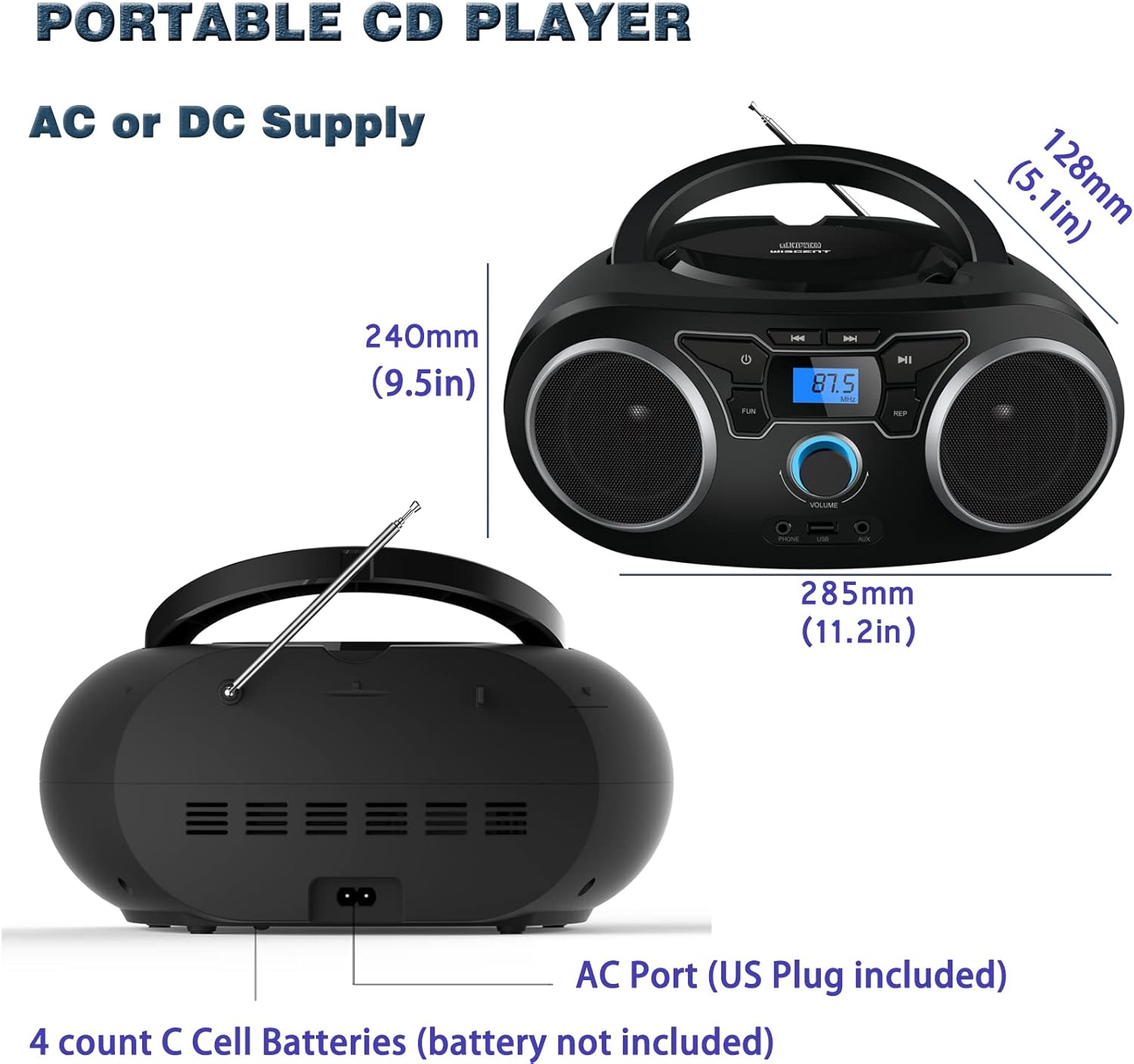
انځور: شاته view of the boombox, highlighting the AC power port and the battery compartment for 4 C-sized batteries.
عملیاتي لارښوونې
عمومي کنټرولونه
The unit features a digital LCD screen and various control buttons and knobs. The main volume control is a rotary knob on the front. A remote control is also included for convenient operation.

انځور: پورته-ښکته view of the boombox, showing the CD compartment, control buttons, and volume knob.
1. CD پلے بیک
- د سي ډي کمپارټمنټ پوښ چې د واحد په سر کې موقعیت لري خلاص کړئ.
- Place a CD (CD, CD-R, CD-RW, MP3-CD) onto the spindle with the label side facing up.
- د سي ډي کمپارټ لپټ بند کړئ.
- فشار ورکړئ موډ د CD حالت غوره کولو لپاره ت buttonۍ.
- فشار ورکړئ پلی/پاز د پلی بیک پیل کولو لپاره تڼۍ.
- د کارولو SKIP / لټون د ټریکونو ترمنځ د تګ راتګ لپاره تڼۍ.
- د تکرار کړئ button allows for repeating a single track or all tracks.
- د پروګرام function allows you to create a custom playback order for tracks.
The boombox supports MP3 and WMA audio formats on compatible discs.
2. د ایف ایم راډیو عملیات
- د غوره استقبال لپاره ټیلسکوپیک انتن پراخ کړئ.
- فشار ورکړئ موډ د FM راډیو حالت غوره کولو لپاره تڼۍ.
- د سټیشنونو د اتوماتیک سکین کولو او خوندي کولو لپاره، فشار ورکړئ او ونیسئ سکین button. The unit will automatically search for and store up to 30 FM stations.
- په لاسي ډول د ټون کولو لپاره ، وکاروئ TUNING غوټۍ یا SKIP / لټون buttons to find desired frequencies.
- د کارولو PRESET ت savedۍ د خوندي شوي سټیشنونو له لارې تګ راتګ لپاره.
Video: A user demonstrating the FM radio tuning function on the WIITHINK Portable CD Boombox WTB771, showing the digital display changing frequencies.
3. د بلوتوټ ارتباط
- فشار ورکړئ موډ button to select Bluetooth mode. The display will indicate "BT" and the unit will enter pairing mode.
- On your Bluetooth-enabled device (e.g., smartphone, tablet), search for available devices and select "WTB771".
- یوځل چې جوړه شي، تاسو کولی شئ د خپل وسیلې څخه بوم باکس ته په بې سیم ډول آډیو واستوئ.
ویډیو: یوه لنډه کتنهview demonstrating Bluetooth connectivity, showing a smartphone wirelessly connected to the boombox.
4. USB پلی بیک
- یو USB فلش ډرایو داخل کړئ چې MP3 ولري fileد واحد په مخ کې د USB پورټ ته ننوځي.
- فشار ورکړئ موډ د USB حالت غوره کولو لپاره تڼۍ.
- دا واحد به په اتوماتيک ډول د MP3 کشف او غږول پیل کړي fileد USB ډرایو څخه.
- Use the playback controls (PLAY/PAUSE, SKIP/SEARCH) to manage your music.
5. د AUX داخل
- Connect an external audio device (e.g., MP3 player, laptop) to the AUX input jack on the front of the unit using the provided 3.5mm AUX cable.
- فشار ورکړئ موډ د AUX حالت غوره کولو لپاره تڼۍ.
- Audio from the connected device will now play through the boombox speakers. Control playback from your external device.
Controls and Ports Overview
| فیچر | تفصیل |
|---|---|
| د بریښنا تڼۍ | واحد فعال/بندوي. |
| د موډ تڼۍ | Switches between CD, FM, Bluetooth, USB, and AUX modes. |
| د حجم نوب | Adjusts the audio output level (up to 32 levels). |
| د PLAY/PAUSE تtonۍ | Starts or pauses playback in CD, USB, and Bluetooth modes. |
| د پریښودو/لټون تڼۍ | Navigates tracks in CD/USB mode; tunes frequencies in FM mode. |
| د تکرار تڼۍ | Repeats current track or all tracks in CD/USB mode. |
| د پروګرام تڼۍ | Sets a custom playback order for CD/USB tracks. |
| FM انتن | د ایف ایم راډیو استقبال لپاره ټیلسکوپیک انتن. |
| USB پورټ | Connects USB flash drives for MP3 playback. |
| د AUX ان پټ جیک | د بهرني آډیو وسیلو د نښلولو لپاره 3.5 ملي میتر ان پټ. |
| هیډفون جیک | د شخصي اوریدلو لپاره 3.5 ملي میتر محصول. |
| ریموټ کنټرول | Provides wireless control over all functions. |

Image: Close-up of the front panel, showing the USB port, AUX input, and headphone jack.
ساتنه
- واحد د نرم او وچ ټوکر سره پاک کړئ. د کثافاتو پاکوونکي یا محلول مه کاروئ.
- د سي ډي کڅوړه پاکه او له دوړو څخه پاکه وساتئ.
- د واحد د سختې تودوخې، رطوبت، یا مستقیم لمر وړانګو سره د مخ کیدو څخه ډډه وکړئ.
- When not in use for extended periods, remove batteries and unplug the AC power cable.
د ستونزو حل کول
| ستونزه | د حل لاره |
|---|---|
| هیڅ ځواک نشته |
|
| نه غږ |
|
| CD Skipping/Not Playing |
|
| د ایف ایم کمزوری استقبال |
|
| د بلوتوټ جوړه کولو مسلې |
|
مشخصات
- ماډل: د WTB771
- د محصول ابعاد: 7 x 10 x 4.8 انچه (17.8 x 25.4 x 12.2 سانتي متره)
- د توکي وزن: ۶ پونډه (۳ کیلو ګرامه)
- د بریښنا تولید: 2 x 2W RMS
- ارتباط: مرستندویه، بلوتوث، USB
- د سپیکر ډول: جوړ شوی
- د بریښنا رسول: AC (220V/50Hz, 110V/60Hz) or 4 x C batteries (not included)
- د ملاتړ شوي ډیسک ډولونه: سي ډي، سي ډي-آر، سي ډي-آر ډبليو، ايم پي ۳-سي ډي
- ملاتړ شوي آډیو فارمیټونه: MP3، WMA
- FM Radio Presets: Up to 30 stations
تضمین او ملاتړ
WIITHINK offers an 18-month after-sales service for this product. For any inquiries or technical support, please contact WIITHINK customer service through your purchase platform. Lifetime technical support is provided.
For further assistance, you may refer to the "Your Orders" section on Amazon, locate your order, and contact "WIITHINK Direct".

Image: Graphic illustrating WIITHINK's customer support, including 18-month replacement and lifetime technical support.
