1. پیژندنه
This user manual provides essential information for the safe and effective operation of your ITECH IT6952A Programmable DC Power Supply. Please read this manual thoroughly before using the device to ensure proper functionality and to prevent damage or injury. The IT6952A is a high-performance, programmable DC power supply designed for laboratory and industrial applications, offering precise control over voltage او اوسنی محصول.
2. د خوندیتوب معلومات
Always observe the following safety precautions to prevent electric shock, injury, or damage to the instrument:
- Ensure the power supply is connected to a grounded AC outlet.
- وسیله په لوند یا d کې مه چلوئamp شرایط
- سي مه خلاصوهasing؛ دننه د کارونکي لپاره د خدمت وړ برخې نشته. ټولې خدمتونه وړ پرسونل ته راجع کړئ.
- تایید کړئ چې د ننوتلو حجمtage matches the power supply's rating before connecting to the mains.
- Avoid short-circuiting the output terminals, especially at high power settings.
- ډاډ ترلاسه کړئ چې د واحد شاوخوا شاوخوا هوا مناسبه وي ترڅو د ډیر تودوخې مخه ونیسي.
3. محصول ختم شوview
The ITECH IT6952A features a clear VFD display and intuitive controls for easy operation.
۳.۲ د مخکینۍ تختې ترتیب

Figure 3.1: Front Panel of IT6952A
The front panel includes the VFD display for voltage and current readings, a rotary knob for precise adjustments, number keys (0-9) and ESC for direct input, function keys (V-SET, I-SET, Save, Recall, Meter, Trigger, Enter, On/Off) for various operations, navigation keys (UP/DOWN/LEFT/RIGHT) for cursor movement, and output terminals for connecting loads. The 'Shift' and 'Local' keys provide additional control options, and the main power switch is integrated.
3.2 د شا پینل ترتیب
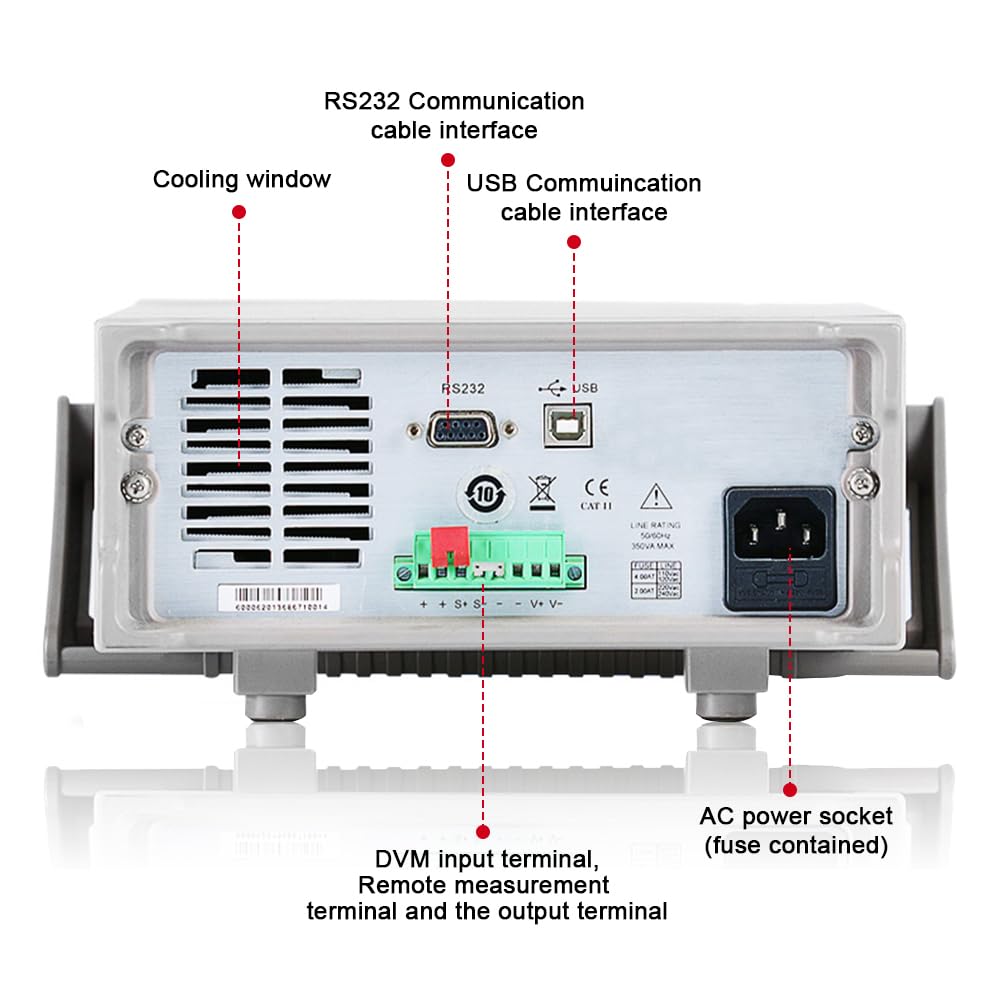
Figure 3.2: Rear Panel of IT6952A
The rear panel features the AC power socket (with integrated fuse), cooling windows for heat dissipation, an RS232 communication cable interface, a USB communication cable interface, and DVM input terminals along with remote measurement terminals and additional output terminals for specific applications.
4. ترتیب کول
د لومړني تنظیم کولو لپاره دا ګامونه تعقیب کړئ:
- بسته بندي کول: د بریښنا رسولو وسیله په احتیاط سره د هغې له بسته بندۍ څخه لرې کړئ. د لیږد پرمهال د زیان کومې نښې وګورئ.
- ځای په ځای کول: Place the unit on a stable, level surface with adequate ventilation around all sides. Do not block the cooling vents on the sides and rear.
- د بریښنا پیوستون: Connect the provided AC power cord to the AC power socket on the rear panel of the IT6952A. Plug the other end into a grounded electrical outlet.
- پاور آن: Press the main power switch on the front panel to turn on the unit. The VFD display should illuminate.
- د محصول پیوستون: Connect your load to the output terminals on the front panel using appropriate test leads. Ensure correct polarity (positive to positive, negative to negative).
5. عملیاتي لارښوونې
This section covers basic operation of the IT6952A.
5.1 د ترتیب حجمtage او اوسنی
- د حجم ټاکلtage: فشار ورکړئ V-SET تڼۍ. حجمtage display will become active. Use the rotary knob to adjust the voltage, or use the number keys for direct input followed by ننوتل.
- اوسنی تنظیم کړئ: فشار ورکړئ I-SET button. The current display will become active. Use the rotary knob to adjust the current limit, or use the number keys for direct input followed by ننوتل.
- محصول فعال کړئ: د مطلوب حجم تنظیم کولو وروستهtage او اوسنی، فشار ورکړئ آن/بند button to enable the output. The output indicator will illuminate.
- د محصول بندول: To disable the output, press the آن/بند بیا تڼۍ.
5.2 Using Memory Functions (Save/Recall)
The IT6952A allows you to save and recall frequently used voltage او اوسني ترتیبات.
- د خوندي کولو ترتیب: مطلوب حجم تنظیم کړئtage and current. Press the خوندي کړئ button. Use the navigation keys or number keys to select a memory location (e.g., 0-9) and press ننوتل to store the settings.
- Recall Setting: فشار ورکړئ یادول button. Use the navigation keys or number keys to select the desired memory location and press ننوتل to load the stored settings.
6. ساتنه
Proper maintenance ensures the longevity and reliability of your power supply.
- پاکول: Disconnect the power supply from the mains before cleaning. Use a soft, dry cloth to wipe the exterior. For stubborn dirt, a slightly damp د نرم صابون سره ټوکر کارول کیدی شي، ډاډ ترلاسه شي چې هیڅ مایع واحد ته ننوځي.
- وینټیلیشن: Regularly check that the cooling vents are free from dust and obstructions. Use compressed air to clear dust if necessary.
- ذخیره کول: When not in use for extended periods, store the power supply in a cool, dry, and dust-free environment.
7. ستونزه حل کول
If you encounter issues with your IT6952A, refer to the following common problems and solutions:
| ستونزه | احتمالي لامل | د حل لاره |
|---|---|---|
| هیڅ بریښنا نشته کله چې تیریږي | Power cord not connected; Blown fuse; No power from outlet | Check power cord connection; Replace fuse (refer to specifications for type); Test outlet with another device |
| د محصول حجم نشتهtage/ اوسني | Output disabled; Overload protection activated; Incorrect settings | مطبوعاتي آن/بند to enable output; Reduce load or increase current limit; Verify voltage/اوسني ترتیبات |
| Display shows 'Error' | Internal fault; Over-temperature | Turn off unit, wait 5 minutes, restart; Ensure proper ventilation, allow unit to cool down. If error persists, contact support. |
| ناسم لوستل | Poor connection; Calibration needed | Check all connections; Contact ITECH support for calibration information. |
8. مشخصات
Key technical specifications for the ITECH IT6952A Programmable DC Power Supply:
| مشخصات | ارزښت |
|---|---|
| برانډ | ITECH |
| ماډل | IT6952A |
| د محصول Voltage | 60 ولټه |
| Ampزمانه | 25 Amps |
| د واټ محصولtage | 600 واټ |
| د فارم فکتور | بنچټاپ |
| د نښلونکي ډول | USB |
| مواد | فلزي |
| رنګ | سور، تور |
9. تضمین او ملاتړ
ITECH products are designed for reliability and performance. For warranty information, technical support, or service inquiries, please refer to the warranty card included with your product or visit the official ITECH webسایټ. د تضمین ادعاوو لپاره د پیرود ثبوت په توګه د پیرود رسید وساتئ.
For further assistance, you may contact ITECH customer service through their official channels. Always provide your product model (IT6952A) and serial number when seeking support.


