1. پیژندنه
The TechniSat DIGITRADIO 21 is a compact DAB+ and FM radio designed for under-cabinet installation, ideal for kitchens or other spaces where a space-saving audio solution is desired. It features digital radio reception (DAB+), traditional FM radio, Bluetooth audio streaming, and a clear color display. This manual provides essential information for the safe and efficient use of your device.
2. د خوندیتوب معلومات
- د وسیله چلولو دمخه ټولې لارښوونې په دقت سره ولولئ.
- وسیله د اوبو، رطوبت او مستقیم تودوخې سرچینو څخه لرې وساتئ.
- ډاډ ترلاسه کړئ چې د واحد شاوخوا شاوخوا هوا مناسبه وي ترڅو د ډیر تودوخې مخه ونیسي.
- یوازې چمتو شوي بریښنا اډاپټر وکاروئ.
- د وسیلې د خلاصولو یا ترمیم کولو هڅه مه کوئ. ټولې خدمتونه وړ پرسونل ته راجع کړئ.
- وسیله د نرم او وچ ټوکر سره پاکه کړئ. د مایع پاکوونکو څخه کار مه اخلئ.
3. د بسته محتويات
ډاډ ترلاسه کړئ چې ټول توکي په کڅوړه کې شتون لري:
- TechniSat DIGITRADIO 21 Unit
- د بریښنا اډاپټر
- Mounting Material (screws, mounting plate)
- د کارونکي لارښود (دا لاسوند)
4. محصول ختم شوview
4.1 د مخکني پینل کنټرولونه او ښودنه
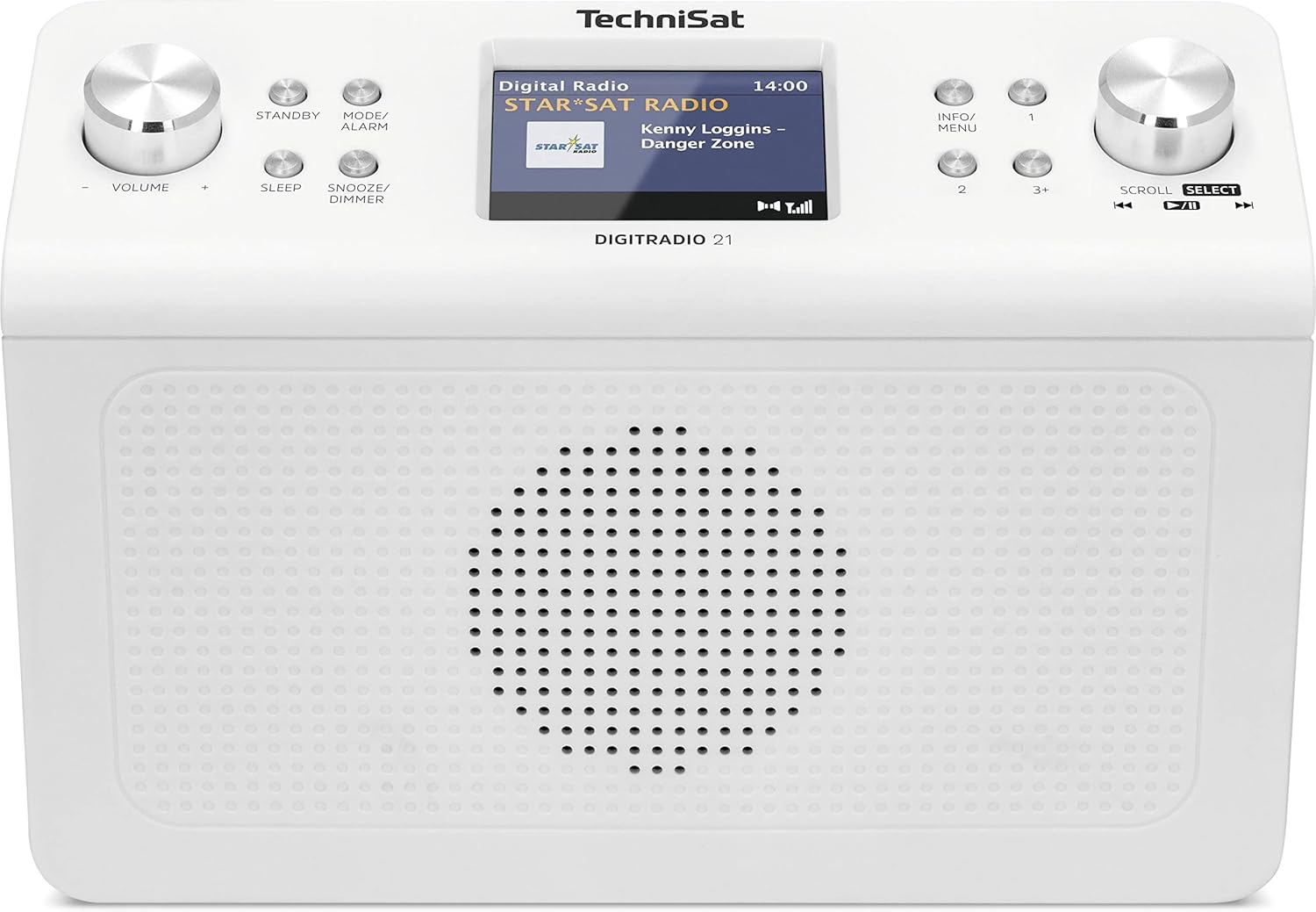
انځور 4.1: مخکی view of the TechniSat DIGITRADIO 21. This image displays the central 2.8-inch color TFT display, the large volume knob on the left, and the scroll/select knob on the right. Surrounding buttons include Standby, Mode/Alarm, Sleep, Snooze/Dimmer, Info/Menu, and preset buttons 1, 2, 3+.
- ښکاره کول: 2.8-inch TFT color display for showing station information, time, and menu options.
- د حجم نوب: د حجم تنظیم کولو لپاره وګرځوئ.
- یوځای تtonۍ: واحد فعال یا بندوي.
- Mode/Alarm Button: Switches between radio modes (DAB+, FM, Bluetooth) and accesses alarm settings.
- د خوب تڼۍ: د خوب ټایمر فعالیت فعالوي.
- د سنوز/کمولو تڼۍ: الارم سنوز کوي یا د سکرین روښانتیا تنظیموي.
- معلومات/مینو تڼۍ: Displays additional information or accesses the main menu.
- Preset Buttons (1, 2, 3+): Quickly access stored favorite stations.
- سکرول/ټاکنه غوټۍ: Rotate to navigate menus or tune stations, press to confirm selection.
4.2 د شا پینل پیوستون

انځور 4.2: شاته view of the TechniSat DIGITRADIO 21. This image highlights the power input port (DC IN) and the 3.5mm headphone jack located on the back of the unit.
- په DC کې: د بریښنا اډاپټر د اتصال بندر.
- د هیډفون جیک (3.5mm): د شخصي اوریدلو لپاره د هیډفونونو سره وصل کولو لپاره.
5. ترتیب کول
5.1 د راډیو نصب کول
The DIGITRADIO 21 is designed for under-cabinet mounting. The included mounting plate and screws facilitate installation.
- Select a suitable location under a cabinet or shelf, ensuring sufficient space for the unit and access to controls.
- Position the mounting plate and mark the screw holes.
- د اړتیا په صورت کې پیلوټ سوراخونه ډرل کړئ.
- Secure the mounting plate to the underside of the cabinet/shelf using the provided screws.
- Slide the DIGITRADIO 21 onto the mounted plate until it clicks securely into place.
Alternatively, the radio can be used as a standalone unit on a flat surface.
5.2 د بریښنا نښلول
- Connect the power adapter cable to the "DC IN" port on the rear of the DIGITRADIO 21.
- د بریښنا اډاپټر په مناسب دیوال آوټ لیټ کې ولګوئ.
- دا واحد به فعال شي یا به سټینډ بای حالت ته ننوځي.
6. عملیاتي لارښوونې
۸ پاور آن/بند
- فشار ورکړئ ولاړ د راډیو د فعالولو یا بندولو لپاره تڼۍ.
6.2 د حالت انتخاب
- فشار ورکړئ Mode/Alarm button repeatedly to cycle through available modes: DAB+, FM, Bluetooth.
۶.۲ د DAB+ راډیو عملیات
- د DAB+ حالت غوره کړئ چې په کارولو سره Mode/Alarm تڼۍ
- The radio will automatically scan for available DAB+ stations upon first use or if no stations are found.
- وګرځوئ سکرول/انتخاب د شته سټیشنونو لیست د لیدلو لپاره نوب.
- فشار ورکړئ سکرول/انتخاب knob to select and listen to a station.
- To store a favorite station: While listening, press and hold one of the Preset buttons (1, 2, 3+) until "Preset Saved" appears on the display.
- To recall a favorite station: Briefly press the corresponding مخکینۍ تڼۍ.
د ۶.۵ ایف ایم راډیو عملیات
- د FM حالت غوره کړئ چې په کارولو سره Mode/Alarm تڼۍ
- وګرځوئ سکرول/انتخاب د فریکونسۍ سره په لاسي ډول د ټون کولو لپاره غوټۍ.
- د راتلونکي موجود سټیشن لپاره د اتوماتیک سکین کولو لپاره، فشار ورکړئ او ونیسئ سکرول/انتخاب غوټۍ
- To store a favorite station: While listening, press and hold one of the Preset buttons (1, 2, 3+) until "Preset Saved" appears on the display.
- To recall a favorite station: Briefly press the corresponding مخکینۍ تڼۍ.
۵.۳ د بلوتوث آډیو سټریمینګ
- د بلوتوث حالت غوره کړئ چې په کارولو سره Mode/Alarm button. The display will show "Bluetooth Pairing".
- ستاسو په بلوتوث فعال شوي وسیله (د مثال په توګه، سمارټ فون، ټابلیټ) کې، بلوتوث فعال کړئ او د شته وسیلو لټون وکړئ.
- Select "DIGITRADIO 21" from the list of devices to pair.
- یوځل چې جوړه شي، تاسو کولی شئ آډیو له خپل وسیله څخه راډیو ته واستوئ.
6.6 Alarm, Sleep Timer, and Snooze
- الارم: فشار ورکړئ او ونیسئ Mode/Alarm button to enter alarm settings. Use the سکرول/انتخاب knob to set time, source, and volume.
- د خوب وخت فشار ورکړئ خوب button repeatedly to set a sleep timer (e.g., 15, 30, 60 minutes) after which the radio will automatically turn off.
- سنوز: کله چې د الارم غږ کیږي ، فشار ورکړئ سنوز/ډیمر د یوې ټاکلې مودې لپاره د لنډمهاله خاموشولو لپاره تڼۍ.
6.7 د ښودلو ترتیبات
- فشار ورکړئ سنوز/ډیمر button (when not snoozing an alarm) to adjust the display brightness.
- فشار ورکړئ معلومات/مینو button to cycle through different display information (e.g., program type, frequency, date/time).
7. ساتنه
- پاکول: Wipe the radio with a soft, dry, lint-free cloth. Do not use abrasive cleaners, waxes, or solvents.
- ذخیره کول: که چیرې یونټ د اوږدې مودې لپاره ذخیره کوئ، نو دا د بریښنا رسولو څخه جلا کړئ او په یخ او وچ ځای کې یې وساتئ.
8. ستونزه حل کول
| ستونزه | احتمالي لامل | د حل لاره |
|---|---|---|
| هیڅ ځواک نشته | د بریښنا اډاپټر وصل شوی نه دی یا خراب آوټ لیټ دی. | ډاډ ترلاسه کړئ چې د بریښنا اډاپټر په خوندي ډول وصل دی او آوټ لیټ فعال دی. |
| Poor DAB+ / FM reception | Weak signal, antenna position. | Adjust the position of the wire antenna for better reception. Perform a full scan for stations. |
| د بلوتوټ جوړه کولو مسلې | Device not in pairing mode, radio not discoverable. | Ensure the radio is in Bluetooth pairing mode. Check your device's Bluetooth settings and try re-pairing. |
| غږ نشته | غږ ډېر ټیټ دی، هیډفونونه وصل دي. | Increase volume. Disconnect headphones if external sound is desired. |
9. مشخصات
- ماډل: ډیجیټراډیو 21
- نښه: TechniSat
- د ماډل شمیره: ۹/۹۷
- د راډیو بندونه: DAB+, FM (with RDS and PLL)
- د بلوتوت نسخه: 4.2
- سپیکر: 2 W (RMS) Mono Speaker
- ښکاره کول: ۳.۵ انچه TFT رنګ ښودنه
- د سټیشن غوره حافظه: د DAB+ لپاره 10، د FM لپاره 10
- اړیکې: 3.5mm Headphone Jack, DC IN
- ځانګړي ځانګړتیاوې: Clock, Alarm, Sleep Timer, Snooze Function, Display Dimmer, Bluetooth Audio Streaming
- د بریښنا رسول: External Power Adapter (DC 5.9 V / 1000 mA)
- ابعاد (W x H x D): ۱۰ x ۱۰ x ۱۰ سانتي متره (تقریبا ۳.۹۴ x ۳.۹۴ x ۳.۹۴ انچه)
- رنګ: سپین (غیر جانبدار)
10. تضمین او ملاتړ
Specific warranty details are not provided in the product information. For warranty claims or technical support, please refer to the official TechniSat website or contact your retailer. Keep your proof of purchase for any warranty-related inquiries.
د نورو مرستو لپاره، لیدنه وکړئ TechniSat official webسایټ.


