1. پیژندنه
This user manual provides essential information for the safe and efficient operation of your Redmi Smart LED TV X55. Please read this manual thoroughly before using the product and retain it for future reference.
The Redmi Smart LED TV X55 offers a 55-inch 4K Ultra HD display, powered by Android TV, and features advanced audio and visual technologies for an immersive entertainment experience.
۱.۱. د خوندیتوب مهم معلومات
د دې محصول کارولو پرمهال تل د خوندیتوب لومړني احتیاطي تدابیر تعقیب کړئ ترڅو د اور، بریښنا شاک او ټپي کیدو خطر کم کړئ.
- تلویزیون باران یا رطوبت ته مه ښکاره کوئ.
- تلویزیون مه خلاصوه casinز؛ ټولې خدمتونه وړ پرسونل ته راجع کړئ.
- ډاډ ترلاسه کړئ چې د تلویزیون شاوخوا مناسب هوا ورکول.
- Use only the power cord and accessories supplied by the manufacturer.
- تلویزیون د مستقیم لمر وړانګو، تودوخې سرچینو او قوي مقناطیسي ساحو څخه لرې وساتئ.
- تلویزیون د نرم او وچ ټوکر سره پاک کړئ. د مایع یا ایروسول پاکوونکو څخه کار مه اخلئ.
3. د بسته محتويات
د خلاصولو پر مهال، ډاډ ترلاسه کړئ چې لاندې لیست شوي ټول توکي شتون لري او په ښه حالت کې دي:
- 1 x Redmi Smart LED TV X55
- ۲ x د میز سټینډ اساسات
- 1 x ریموټ کنټرول
- 4 x Screws for stand assembly
- ۱ x د کارونکي لارښود (دا سند)
- 1 x د بریښنا کیبل
4. محصول ختم شوview
The Redmi Smart LED TV X55 is designed to deliver a premium viewing and audio experience. Below are its key features and components.
4.1. Visual Features
Experience stunning clarity and vibrant colors with the 55-inch 4K LED panel. Advanced technologies enhance your viewing:
- 4K LED Panel: Delivers ultra-high-definition resolution for sharp images.
- ډولبي ویژن او HDR10: Provides superior contrast, brightness, and color depth.
- HLG (هایبرډ لاګ ګاما): Supports broadcast HDR content.
- Reality Flow & Vivid Picture Engine: Enhances motion smoothness and picture quality.
- MEMC (د حرکت اټکل، د حرکت جبران): Reduces motion blur for fast-paced scenes.

شکل 1: مخکی view of the Redmi Smart LED TV X55.

شکل 2: پایview of key visual features including Dolby Vision, 4K HDR, and Vivid Picture Engine.
۴. د آډیو ځانګړتیاوې
Immerse yourself in rich, powerful sound with the integrated audio system:
- 30W Output Speakers: Delivers clear and robust sound.
- دولبي آډیو: Provides enhanced sound quality for movies and music.
- د DTS مجازی: ایکس: څو اړخیزه آډیو تجربه رامینځته کوي.
- Dolby Atmos Pass-through via eARC: Allows for advanced audio formats to be sent to compatible sound systems.
- DTS-HD: High-definition audio decoding for a cinematic sound.
4.3. Smart Features & Performance
The Redmi Smart LED TV X55 runs on Android TV 10, offering a user-friendly interface and access to a vast ecosystem of apps.
- د انډرایډ تلویزیون ۹.۰: Provides a smooth and intuitive smart TV experience.
- PatchWall 4 with IMDb Integration: A curated content platform with smart recommendations and IMDb ratings.
- د کواډ کور پروسسر: Ensures seamless performance and quick app loading.
- 2GB RAM + 16GB Storage: Ample memory and storage for apps and system operations.
- Built-in Wi-Fi (2x2 Dual Band) & Chromecast: Easy wireless connectivity and content casting from mobile devices.
- ښه ګوګل: Voice control for searching content, controlling smart home devices, and more.
- د اتومات ټیټ ځنډ حالت (ALLM): د لوبو لپاره ترتیبات غوره کوي، د ان پټ ځنډ کموي.
- میرکاسټ: Wireless display mirroring from compatible devices.
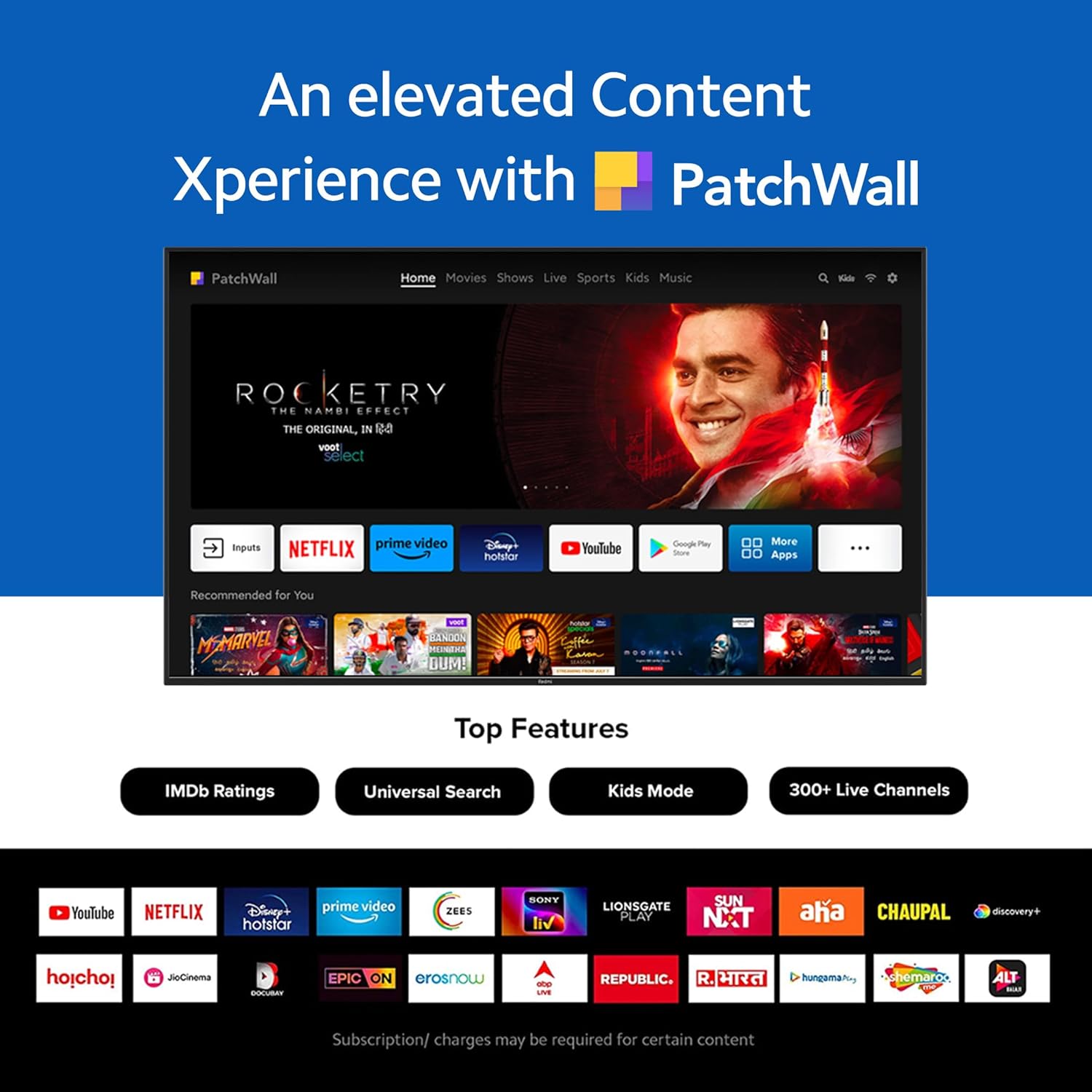
Figure 3: The PatchWall interface displaying various streaming apps and content.

Figure 4: Details on the TV's performance, including 2GB RAM, 16GB Storage, and Quad-core A55 processor.

Figure 5: Android TV 10 interface with Google Play, Ok Google, and Chromecast built-in.
4.4. ارتباط
The TV offers multiple connectivity options for various devices:
- HDMI2.1: Multiple ports for high-definition audio and video input, supporting eARC.
- USB 2.0: د بهرني ذخیره کولو وسیلو سره وصل کولو لپاره.
- ایترنیټ: د شبکې تار لرونکی اتصال.
- آپټیکل پورټ: ډیجیټل آډیو تولید.
- 3.5mm آډیو پورټ: د هیډفونونو یا بهرنیو سپیکرو لپاره.
- Bluetooth 5.0 with BLE: Wireless connectivity for audio devices and accessories.

شکل 6: شاته view of the Redmi Smart TV X55 highlighting various input/output ports.

Figure 7: Close-up of the TV's ports, including HDMI 2.1, USB 2.0, Ethernet, Optical, and Headphone Jack.
5. د تنظیم کولو لارښود
5.1. فزیکي نصب کول
Your Redmi Smart LED TV X55 can be installed on a table stand or wall-mounted.
- د میز سټینډ نصب کول: Attach the two provided table stand bases to the bottom of the TV using the included screws. Ensure the TV is placed on a stable, flat surface.
- د دیوال نصب کول: For wall mounting, use a compatible VESA wall mount kit (sold separately). Follow the instructions provided with the wall mount kit and ensure professional installation for safety.

Figure 8: Dimensions of the Redmi Smart TV X55 for planning installation.
۲. لومړنی بریښنا فعالول او د شبکې اتصال
- د بریښنا کیبل تلویزیون او د بریښنا سایټ سره وصل کړئ.
- په ریموټ کنټرول یا تلویزیون کې د بریښنا تڼۍ فشار ورکړئ.
- Follow the on-screen instructions to select your language, country, and connect to your Wi-Fi network or plug in an Ethernet cable.
- Sign in with your Google account to access Android TV features and the Play Store.
5.3. Setting Up Alexa Control
You can control your Redmi TV hands-free with Alexa devices. Follow these steps to set up Alexa:
Video 1: Instructions on how to set up Alexa control for your Redmi Smart TV.
To enable advanced settings for Alexa control, refer to the following video guide:
Video 2: Guide to enabling advanced settings on Redmi TV for Alexa control.
6. عملیاتي لارښوونې
6.1. ریموټ کنټرول
The sleek remote control provides quick access to essential functions:
- چټک ویښیدل: په پنځو ثانیو کې تلویزیون چالان کړئ.
- چټک چوپتیا: Double-tap the volume down button to mute.
- ګړندي تنظیمات: Long press the PatchWall button to enter the quick settings menu.

Figure 9: The sleek remote control for the Redmi Smart TV X55, highlighting quick access features.
۳. د سمارټ تلویزیون انٹرفیس نیویګیټ کول
Use the remote's directional pad and OK button to navigate through the Android TV and PatchWall interfaces. Access apps, settings, and content recommendations easily.
۵.۲. د غږ کنټرول کارول
Press the dedicated voice assistant button on your remote and speak commands to control your TV, search for content, or interact with connected smart home devices via Ok Google or Alexa.
6.4. App Usage and Casting
The TV supports popular streaming services like Prime Video, Netflix, Disney+ Hotstar, YouTube, and Apple TV. You can also cast content from your mobile devices using Chromecast built-in or Miracast.
7. ساتنه
- پاکول: Gently wipe the screen and TV body with a soft, dry, lint-free cloth. Do not use abrasive cleaners or solvents.
- د سافټویر تازه معلومات: Ensure your TV's software is up to date for optimal performance and security. Navigate to Settings > Device Preferences > About > System update to check for updates.
- د بریښنا مدیریت: د برېښنا د طوفانونو په وخت کې یا کله چې د اوږدې مودې لپاره نه کارول کیږي، تلویزیون خلاص کړئ.
8. ستونزه حل کول
If you encounter issues with your Redmi Smart LED TV X55, refer to the following common problems and solutions:
| ستونزه | احتمالي حل |
|---|---|
| هیڅ ځواک نشته | وګورئ چې د بریښنا کیبل په خوندي ډول وصل دی او د بریښنا آوټ لیټ کار کوي. یو بل آوټ لیټ هڅه وکړئ. |
| انځور نشته، خو غږ شته | Ensure the correct input source is selected. Check HDMI cable connections. |
| غږ نشته، خو انځور شته | Check volume levels and mute status. Verify audio output settings (e.g., internal speakers, external soundbar). |
| ریموټ کنټرول کار نه کوي | Replace batteries. Ensure no obstructions between the remote and the TV. Re-pair the remote if necessary. |
| د شبکې د پیوستون ستونزې | Restart your router and modem. Check Wi-Fi password. Try connecting via Ethernet. |
9. مشخصات
Detailed technical specifications for the Redmi Smart LED TV X55:
| فیچر | مشخصات |
|---|---|
| برانډ | ریډمي |
| د ماډل نوم | X55 |
| د سکرین اندازه | ۷۸۷ انچه |
| ټیکنالوژي ښکاره کول | د LED-LCD |
| قرارداد | 3840 x 2160 پکسلز (4K) |
| د تازه کولو نرخ | 60 Hz |
| عملیاتي سیسټم | د Android تلویزیون 10 |
| پروسیسر | کواډ کور A55 |
| RAM | 2 جي بي |
| ذخیره کول | 16 جي بي |
| د آډیو تولید | 30 واټ |
| د ارتباط ټیکنالوژي | HDMI, USB, Wi-Fi (2x2 Dual Band), Ethernet, Bluetooth 5.0 |
| د HDMI بندرونه | 3 (HDMI 2.1, eARC compatible) |
| USB بندرونه | 2 (USB 2.0) |
| Viewزاویه | 178 درجې |
| د اړخ نسبت | 16:9 |
| د توکي وزن | ۱ کیلوګرامه ۱ ګرامه |
| د نصب کولو ډول | Wall Mount; Table Mount |
10. تضمین او ملاتړ
Your Redmi Smart LED TV X55 comes with a standard brand warranty. For specific warranty terms, duration, and service procedures, please refer to the warranty card included in your package or visit the official Redmi support webسایټ

Figure 10: Information regarding Mi Extended Warranty, offering benefits like zero documentation, genuine spare parts, cashless repairs, authorized service centers, and on-site support.
For installation services, Amazon will coordinate with the brand within 48 hours of delivery. Scheduled delivery options are available in select cities. Installation charges may apply.


