پیژندنه
This manual provides comprehensive instructions for the setup, operation, and maintenance of your Gen Game S6 Wireless Bluetooth Gamepad. This device is designed to enhance your gaming experience on compatible Android smartphones, tablets, PCs, and TV boxes.
محصول پای ته ورسیدview
د بسته محتويات
- Gen Game S6 Wireless Bluetooth Gamepad
- د USB چارج کیبل
- د کارونکي لارښود (دا لاسوند)
د اجزاوو پیژندنه
Familiarize yourself with the various buttons and features of your gamepad:

انځور: مخکینۍ برخه view of the Gen Game S6 Wireless Bluetooth Gamepad, showing the D-pad, left and right analog joysticks, action buttons (A, B, X, Y), Start, Select, and Home buttons, and the 'GEN GAME' logo.
- کیڼ انالوګ جویسټیک: د لارښوونې کنټرول لپاره.
- ښي انلاګ جویسټیک: For camera control or additional directional input.
- D-pad: Digital directional pad for precise movements.
- د عمل تڼۍ (A، B، X، Y): د لوبې دننه کړنو لپاره.
- د اوږو تڼۍ (L1، R1): پورته نصب شوي تڼۍ.
- Trigger Buttons (L2, R2): Bottom-mounted buttons.
- د پیل تڼۍ: Typically for pausing or menu access.
- د انتخاب تtonۍ: د لوبې دننه د مختلفو دندو لپاره.
- د کور تڼۍ: To power on/off or return to the main menu.
- د تلیفون لرونکی: Integrated adjustable clip for mounting smartphones.
- د چارج کولو بندر: د USB چارج کولو کیبل د نښلولو لپاره.
- د شاخص څراغونه: To show connection status, charging status, or mode.
چمتو کول
1. د لوبې پیډ چارج کول
- Connect the small end of the USB charging cable to the charging port on the gamepad.
- Connect the larger end of the USB charging cable to a USB power source (e.g., computer, USB wall adapter).
- د شاخص څراغ به معمولا د چارج کولو پرمهال سور ښکاره کوي او کله چې په بشپړ ډول چارج شي نو بند یا رنګ بدلوي.
- د لومړي استعمال څخه دمخه د بشپړ چارج لپاره شاوخوا 2-3 ساعته وخت ورکړئ.
2. د بلوتوث جوړه کول
The Gen Game S6 supports various pairing modes for different devices. Refer to your device's specific requirements for optimal connection.
- پاور آن: فشار ورکړئ او ونیسئ کور button for 3 seconds to power on the gamepad. The indicator lights will flash.
- د جوړه کولو حالت دننه کړئ: Depending on your device, you may need to press a specific button combination while powering on (e.g., HOME + X د Android لپاره، HOME + A for PC). Refer to the quick start guide included with your gamepad for specific mode instructions. The indicator lights will flash rapidly, indicating it's searching for a device.
- په خپل وسیله کې بلوتوث فعال کړئ: On your Android smartphone, tablet, PC, or TV Box, go to the Bluetooth settings and ensure Bluetooth is enabled.
- د وسایلو لپاره سکین وکړئ: Your device will scan for available Bluetooth devices. Look for "Gen Game S6" or a similar name in the list.
- نښلول: Select the gamepad from the list to initiate pairing. Once successfully paired, the indicator light on the gamepad will typically become solid.
- د ازموینې اړیکه: Open a compatible game or a gamepad testing application to verify the connection and button functionality.
عملیاتي لارښوونې
بنسټیز عملیات
- پاور آن: فشار ورکړئ او ونیسئ کور د 3 ثانیو لپاره تڼۍ.
- بندول: فشار ورکړئ او ونیسئ کور button for 5 seconds until the indicator lights turn off. The gamepad will also automatically power off after a period of inactivity to conserve battery.
- بیا نښلول: Once paired, the gamepad should automatically reconnect to the last paired device when powered on and Bluetooth is active on the device. If not, manually select it from your device's Bluetooth settings.
د تلیفون لرونکی کارول
- Gently extend the integrated phone holder upwards.
- Carefully place your smartphone into the holder, ensuring it is securely gripped without obstructing any buttons or ports.
- د غوره لپاره زاویه تنظیم کړئ viewد لوبې په جریان کې.
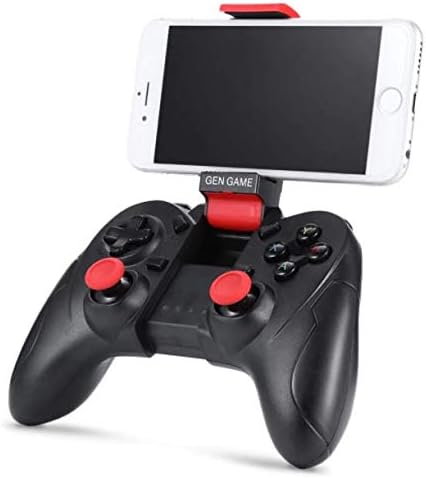
Image: The Gen Game S6 Gamepad with a smartphone securely mounted in the integrated holder, demonstrating its use for mobile gaming.
ساتنه
- پاکول: Use a soft, dry cloth to wipe the surface of the gamepad. Avoid using harsh chemicals or abrasive materials.
- ذخیره کول: د لوبې پیډ په یخ او وچ ځای کې د مستقیم لمر وړانګو او سختې تودوخې څخه لرې وساتئ.
- د بیټرۍ پاملرنه: To prolong battery life, avoid fully discharging the gamepad frequently. Charge it regularly, even if not in use for extended periods.
- له څاڅکو ډډه وکړئ: د لوبې پیډ د څاڅکو او اغیزو څخه خوندي کړئ، کوم چې کولی شي داخلي برخو ته زیان ورسوي.
د ستونزو حل کول
| ستونزه | احتمالي لامل | د حل لاره |
|---|---|---|
| د لوبې پیډ نه فعالیږي. | ټیټ بیټرۍ. | د لوبې پیډ په بشپړه توګه چارج کړئ. |
| د وسیلې سره جوړه نشي کیدی. | Bluetooth not enabled on device; Gamepad not in pairing mode; Device out of range. | Ensure Bluetooth is on; Put gamepad in pairing mode (refer to Setup); Move gamepad closer to device (within 8 meters). |
| Gamepad disconnects frequently. | Low battery; Interference; Device out of range. | Charge the gamepad; Avoid strong electromagnetic interference; Stay within Bluetooth range. |
| Buttons are unresponsive or incorrect. | Incorrect pairing mode; Game not compatible; Software glitch. | Ensure correct pairing mode for your device; Verify game compatibility; Restart gamepad and device. |
مشخصات
- ماډل: S6
- نښه: د جنرال لوبه
- ارتباط: بلوتوټ 3.0 بې سیم
- مطابقت لرونکي وسایل: Android Smartphones, Tablets, PCs, TV Boxes
- د توکي وزن: 240 ګرامه
- د بسته ابعاد: 20 x 14.2 x 7.2 سانتي متره
- رنګ: تور
تضمین او ملاتړ
د تضمین معلوماتو یا تخنیکي ملاتړ لپاره، مهرباني وکړئ د پیرودلو په وخت کې چمتو شوي اسنادو ته مراجعه وکړئ یا خپل پرچون پلورونکي سره اړیکه ونیسئ. د هر ډول تضمین ادعا لپاره د پیرود ثبوت وساتئ.


