پیژندنه
This manual provides detailed instructions for the operation and maintenance of your mooas MC-M3 Digital Mirror LED Alarm Clock. This device features a large LED display, dual alarm functionality, adjustable brightness, temperature and humidity display, and a convenient USB charging port.

انځور: اوورview of the mooas MC-M3 Digital Mirror LED Alarm Clock, showcasing its design and available colors (Mint, Dark Gray, White).
د بسته محتويات
- mooas MC-M3 Digital Mirror LED Alarm Clock
- USB Cable (1.2A)
- د کارن لارښود
چمتو کول
د وسیلې ځواک ورکول
The mooas MC-M3 clock can be powered via a USB cable or AAA batteries. For continuous display of the LED, the clock must be connected to a USB power source.
- د USB پاور: Connect the provided USB cable to the DC 5V power terminal on the back of the clock and plug the other end into a USB power adapter (not included) or a powered USB port.
- د بیټرۍ ځواک: Insert 3 AAA batteries (not included) into the battery compartment on the back of the clock. When operating on battery power, the LED display will only light up for 10 seconds after a button press to conserve energy.
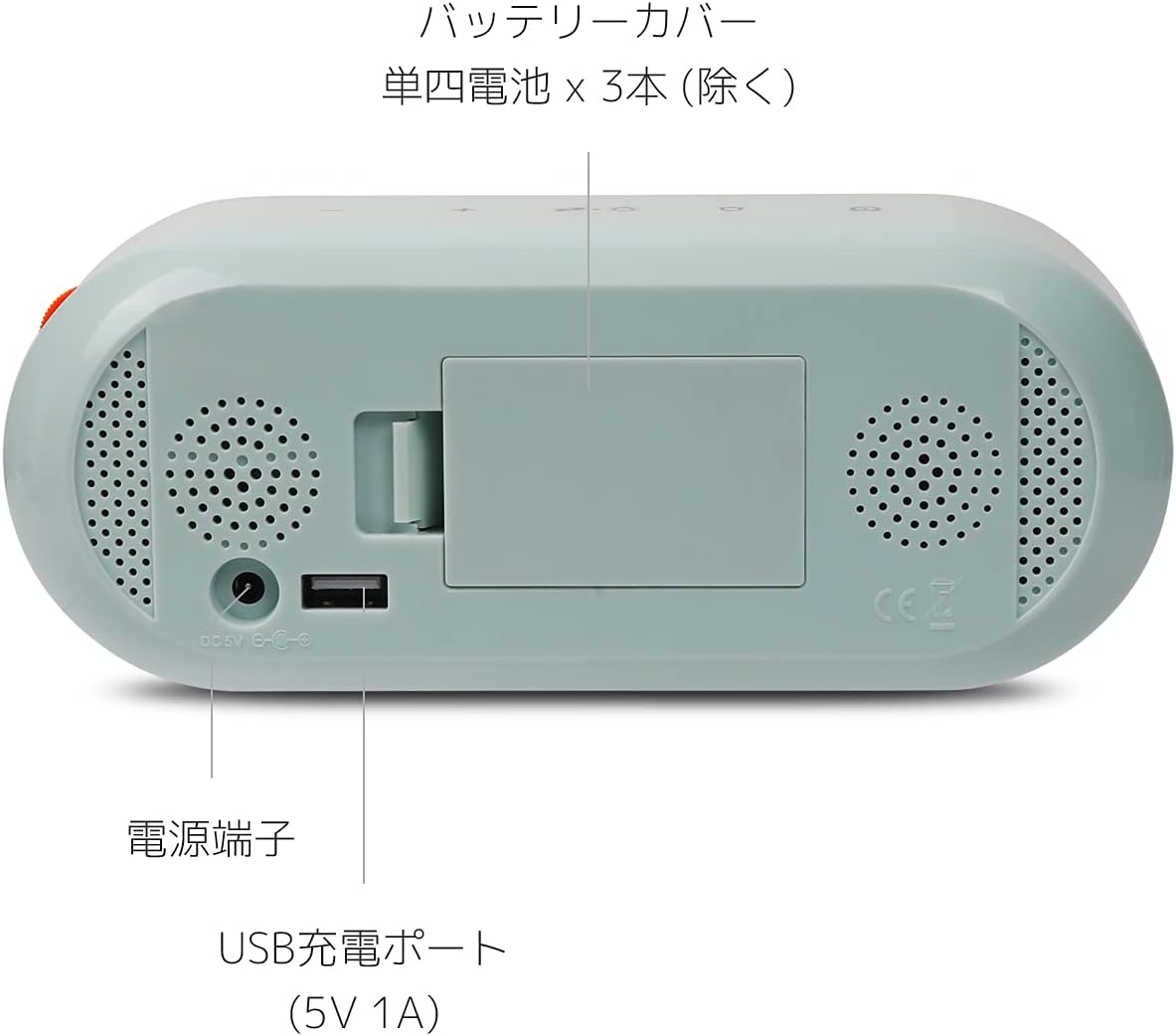
Image: Rear panel of the clock, highlighting the battery cover, power input, and USB charging port.
عملیاتي لارښوونې
د کنټرول تڼۍ اوورview
The clock features intuitive touch sensor buttons on the top panel and a rolling button on the side for brightness control.

Image: Top panel of the clock with touch sensor buttons clearly visible.
د وخت او نیټې ترتیب کول
- فشار ورکړئ او ونیسئ وخت button (clock icon) on the top panel until the time display flashes.
- د کارولو + او - د ساعت تنظیم کولو لپاره تڼۍ.
- فشار ورکړئ وخت button again to move to minute setting, then use + او - تنظیم کول
- فشار ته دوام ورکړئ وخت button to cycle through year, month, and day settings, adjusting each with + او -.
- فشار ورکړئ وخت button one last time to confirm and exit time/date setting.
Setting Alarms (Dual Alarms)
- فشار ورکړئ او ونیسئ الارم button (bell icon) on the top panel until the alarm time display flashes. The alarm indicator (1 or 2) will also flash.
- د کارولو + او - د الارم ساعت تنظیم کولو لپاره تڼۍ.
- فشار ورکړئ الارم button again to move to minute setting, then use + او - تنظیم کول
- فشار ورکړئ الارم button again to set the second alarm, repeating steps 2 and 3.
- فشار ورکړئ الارم button one last time to confirm and exit alarm setting.
د الارم فعالولو یا غیر فعالولو لپاره، لنډ فشار ورکړئ الارم button. The corresponding alarm indicator (1 or 2) will appear or disappear on the display.

انځور: تفصیلي view of the display, indicating time, alarm status, humidity, and temperature.
Snooze فعالیت
کله چې الارم غږیږي، فشار ورکړئ snooze button (Zz icon) on the top panel to activate the snooze function. The alarm will temporarily stop and sound again after a set interval. If no buttons are pressed when the alarm rings, it will automatically sound at the same time the next day.
د روښانتیا تنظیم کول
Adjust the LED display brightness using the orange rolling button located on the upper right side of the clock. Roll the button up or down to increase or decrease brightness. This allows for fine-tuned adjustment to suit various lighting conditions, including dimming for nighttime use.

Image: The rolling button for detailed brightness control.
12/24 Hour Mode and Temperature Units
To switch between 12-hour and 24-hour time formats, or between Celsius (°C) and Fahrenheit (°F) for temperature display, short press the موډ button (sun/moon icon with Zz) on the top panel. Cycle through the options until your desired format is displayed.
د USB چارج کولو بندر
The clock is equipped with a USB charging port on its back, allowing you to charge compatible devices such as smartphones. The maximum output for this port is 5V 1A.

Image: The clock displaying time, temperature, and humidity, with a smartphone charging from its USB port.
ساتنه
- Clean the clock's surface with a soft, dry cloth. Avoid abrasive cleaners or solvents.
- Ensure the USB cable and power adapter are in good condition.
- If using batteries, replace them when the display becomes dim or unresponsive (when not connected to USB power).
- ساعت د سختې تودوخې، مستقیم لمر وړانګو، یا لوړې رطوبت سره مخ کیدو څخه ډډه وکړئ.
د ستونزو حل کول
| ستونزه | احتمالي لامل | د حل لاره |
|---|---|---|
| Display is off or very dim. | Not connected to USB power, or batteries are low/dead. | Connect the clock to a USB power source for continuous display. If using batteries, replace them. Adjust brightness with the rolling button. |
| الارم نه غږېږي. | الارم فعال شوی نه دی یا په غلط ډول تنظیم شوی دی. | Ensure the alarm indicator (1 or 2) is visible on the display. Re-check alarm time settings. |
| وخت/نیټه غلطه ده. | Time/Date was not set or reset due to power interruption. | د بیا تنظیمولو لپاره د "وخت او نیټې تنظیم کول" لارښوونې تعقیب کړئ. |
| د USB چارج کولو پورټ کار نه کوي. | Device not properly connected or power source insufficient. | Ensure the clock is connected to a stable USB power source. Check the charging cable of the device you are trying to charge. |
مشخصات
| برانډ | mooas |
| د ماډل شمیره | MC-M3 |
| د ښودلو ډول | ډیجیټل LED |
| د بریښنا سرچینه | Corded Electric (USB DC 5V) / 3 x AAA Batteries (not included) |
| د USB محصول | 5V 1A (زیات) |
| د محصول ابعاد | ۷.۵"W x ۷"H (۱۹ سانتي متره W x ۱۷.۸ سانتي متره H) |
| د توکي وزن | ۰.۹۸۶ اونس (۲۷.۹۴ ګرامه) |
| مواد | اکریلونایتریل بوټاډین سټیرین (ABS) |
| ځانګړي ځانګړتیاوې | Dual Alarm, Snooze, Brightness Adjustment, 12/24H Mode, Temperature (°C/°F) & Humidity Display, Mirror Display |

Image: The mooas MC-M3 clock in its three available colors, illustrating its compact size.
تضمین او ملاتړ
Specific warranty information is not provided in the product details. For support or warranty inquiries, please contact mooas customer service through their official webسایټ یا پرچون پلورونکی چیرې چې محصول اخیستل شوی و.


