پیژندنه
The Denon DJ LC6000 PRIME is a versatile DJ controller designed to expand creative possibilities for both standalone and laptop-based DJ workflows. It provides professional hardware control for the second dual-layer audio output of Engine OS powered DJ Media Players, such as the SC6000 and SC5000 series. Additionally, it functions as a dedicated DJ controller for compatible DJ applications, offering a club-style layout and control.

Image: The Denon DJ LC6000 PRIME controller, showcasing its jog wheel, performance pads, and various controls.

Image: A DJ setup with two Denon DJ media players, demonstrating how the LC6000 PRIME can expand control by managing secondary layers.
د تنظیم کولو لارښوونې
Follow these steps to set up your Denon DJ LC6000 PRIME controller:
- بسته بندي کول: Carefully remove the LC6000 PRIME from its packaging. Ensure all components are present, including the unit itself and any included cables.
- ځای په ځای کول: Position the LC6000 PRIME on a stable, flat surface. Ensure adequate ventilation around the unit.
- د بریښنا پیوستون: The LC6000 PRIME is USB powered. Connect the provided USB cable from the LC6000 PRIME to an available USB port on your computer or a compatible Denon DJ media player (e.g., SC6000, SC5000 series).
- Software Installation (for computer use): If using the LC6000 PRIME with DJ software on a computer (e.g., Serato DJ Pro, Virtual DJ, Algoriddim djay Pro AI), ensure the latest version of your chosen software is installed and updated. Drivers may be automatically installed upon USB connection; refer to your operating system's device manager if issues arise.
- Connecting to Denon DJ Media Players: For sub-layer control with Denon DJ SC series media players, connect the LC6000 PRIME via USB to the media player. This enables physical control over the second audio layer of the media player.

Image: The Denon DJ LC6000 PRIME integrated into a DJ setup with a laptop and mixer, demonstrating its use with DJ software.

Image: Visual representation of the LC6000 PRIME's compatibility with popular DJ software applications.
عملیاتي لارښوونې
The LC6000 PRIME offers a comprehensive set of controls for precise DJ performance. Familiarize yourself with the key components:
Jog Wheel and Display

انځور: یو مفصل view of the LC6000 PRIME's 8.5-inch jog wheel, highlighting its central HD display and tension adjust feature.
- 8.5" Capacitive Touch Jog Wheel: Use this large jog wheel for scratching, nudging, and precise track manipulation.
- Tension Adjust: A dedicated knob allows you to adjust the resistance of the jog wheel to your preference.
- HD Central Display: This color display shows essential information such as track artwork, custom DJ logos, play head position, and other performance data.
د فعالیت کنټرول

Image: A diagram labeling key performance features of the LC6000 PRIME, including the track search strip, loop controls, navigation, pitch fader, pitch bend buttons, and performance pads.
- Track Search Touch Strip: Quickly navigate through tracks.
- Dedicated Loop Control: Buttons for Auto Loop, Manual Loop In/Out, and Loop On/Off provide precise control over looping sections.
- Dedicated Navigation Control: Use the browse knob and load buttons to navigate your music library and load tracks.
- 100mm Dual-Precision Pitch Fader: Adjust track tempo with high accuracy.
- Pitch Bend Buttons: Temporarily adjust the track's tempo for beatmatching.
- 8 Multi-Function Performance Pads: These robust pads offer various modes for creative performance:
- ګرمه اشاره: Jump to predefined points in your track.
- لوپ: Trigger saved loops.
- رول: Create momentary loop rolls.
- سلیسر: Chop and re-arrange sections of your track on the fly.
Dual-Layer Control
The LC6000 PRIME is designed to control the second layer of compatible Denon DJ media players (e.g., SC6000, SC5000 series). This allows you to control two tracks from a single media player using the LC6000 PRIME for the second layer, effectively creating a two-deck setup with one media player and one controller.
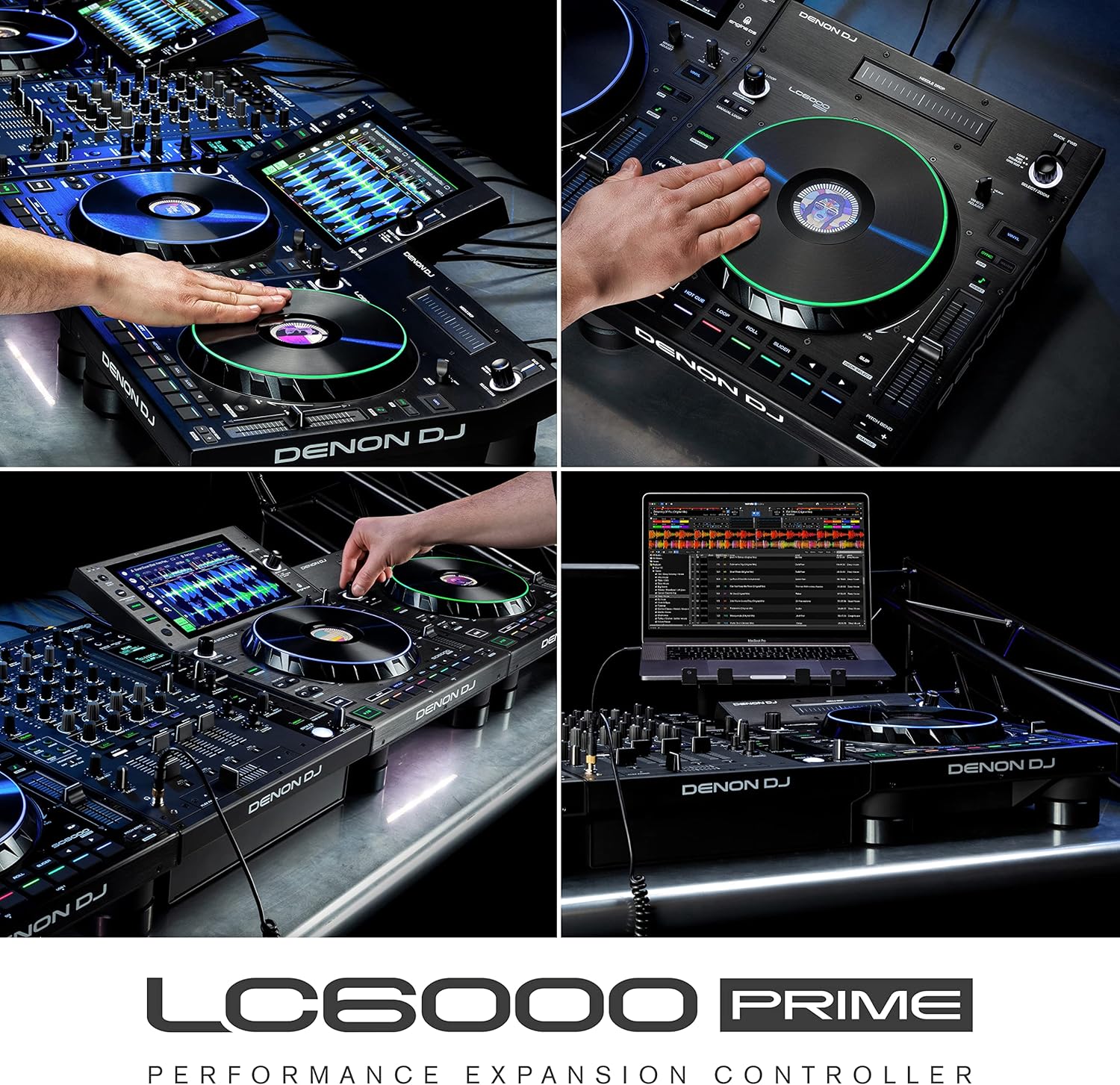
Image: The LC6000 PRIME integrated with a Denon DJ Prime 4, demonstrating its capability to provide dedicated sub-layer control for enhanced performance.

Image: An expanded DJ setup featuring multiple LC6000 PRIME units paired with a 4-channel controller, illustrating advanced control possibilities.
ساتنه
Proper maintenance ensures the longevity and optimal performance of your Denon DJ LC6000 PRIME:
- پاکول: د واحد د پاکولو لپاره یو نرم، وچ ټوکر وکاروئ. د سختې خاورې لپاره، یو څه damp cloth can be used, followed by a dry cloth. Avoid abrasive cleaners, solvents, or waxes.
- د دوړو ساتنه: When not in use, cover the unit with a dust cover to prevent dust and debris from accumulating on controls and internal components.
- ذخیره کول: دا واحد په یخ او وچ ځای کې د مستقیم لمر وړانګو او سختې تودوخې څخه لرې وساتئ.
- د کیبل مدیریت: Ensure all cables are neatly organized and not under strain to prevent damage to connectors and ports.
د ستونزو حل کول
If you encounter issues with your LC6000 PRIME, refer to the following common troubleshooting steps:
- واحد فعال نه دی:
- Ensure the USB cable is securely connected to both the LC6000 PRIME and a powered USB port on your computer or media player.
- یو بل USB پورټ یا کیبل هڅه وکړئ.
- If connecting to a computer, ensure the computer is powered on and not in sleep mode.
- Software Not Recognizing LC6000 PRIME:
- Verify that your DJ software is updated to the latest version and supports the LC6000 PRIME.
- Restart your DJ software and/or your computer.
- Check your computer's device manager (Windows) or System Information (macOS) to confirm the LC6000 PRIME is detected.
- Ensure no other applications are interfering with the USB connection.
- کنټرولونه ځواب نه ورکوي:
- Confirm the LC6000 PRIME is properly connected and recognized by your software or media player.
- Check for any firmware updates for the LC6000 PRIME on the Denon DJ webسایټ
- If using with a media player, ensure the correct layer is selected for control.
- Missing Components (e.g., lifters/feet):
- If any essential components, such as rubber feet or lifters, are missing upon unboxing, contact Denon DJ customer support or your retailer immediately for assistance.
For further assistance, refer to the official Denon DJ support resources.
مشخصات
| فیچر | تفصیل |
|---|---|
| د ماډل شمیره | LC6000 |
| د توکي وزن | ۱.۹ پونډه (تقریبا ۰.۸۶ کیلوګرامه) |
| د محصول ابعاد (L x W x H) | ۲.۶۴ x ۲.۳۲ x ۲.۷۶ انچه (تقریبا ۶.۷ x ۵.۹ x ۷ سانتي متره) |
| د جوګ ویل | 8.5-inch capacitive touch with HD central display |
| پچ فادر | 100mm dual-precision |
| د فعالیت پیډونه | 8 multi-function (Hot Cue, Loop, Roll, Slicer) |
| ارتباط | USB (Plug & Play, USB Powered) |
| مطابقت | Engine OS Media Players (SC6000, SC5000 series), Serato DJ Pro, Virtual DJ, Algoriddim djay Pro AI |
تضمین او ملاتړ
For detailed warranty information, product registration, and technical support, please visit the official Denon DJ website. You can find resources such as FAQs, software downloads, and contact information for customer service.
Official Denon DJ Webسایټ: www.denondj.com
Always ensure you are using the latest firmware and software versions for optimal performance and compatibility.


