پیژندنه
This manual provides detailed instructions for the operation and maintenance of your Casio W736H Series Digital Watch, model W-736H-5AV. Please read this manual thoroughly to ensure proper use and to fully utilize all features of your watch. Keep this manual for future reference.
محصول پای ته ورسیدview
The Casio W736H Series Digital Watch is designed for durability and functionality, featuring a 1/100 second stopwatch, countdown timer, daily alarm with vibration, dual time, and a Super Illuminator LED light. It also boasts 100-meter water resistance and a 10-year battery life.
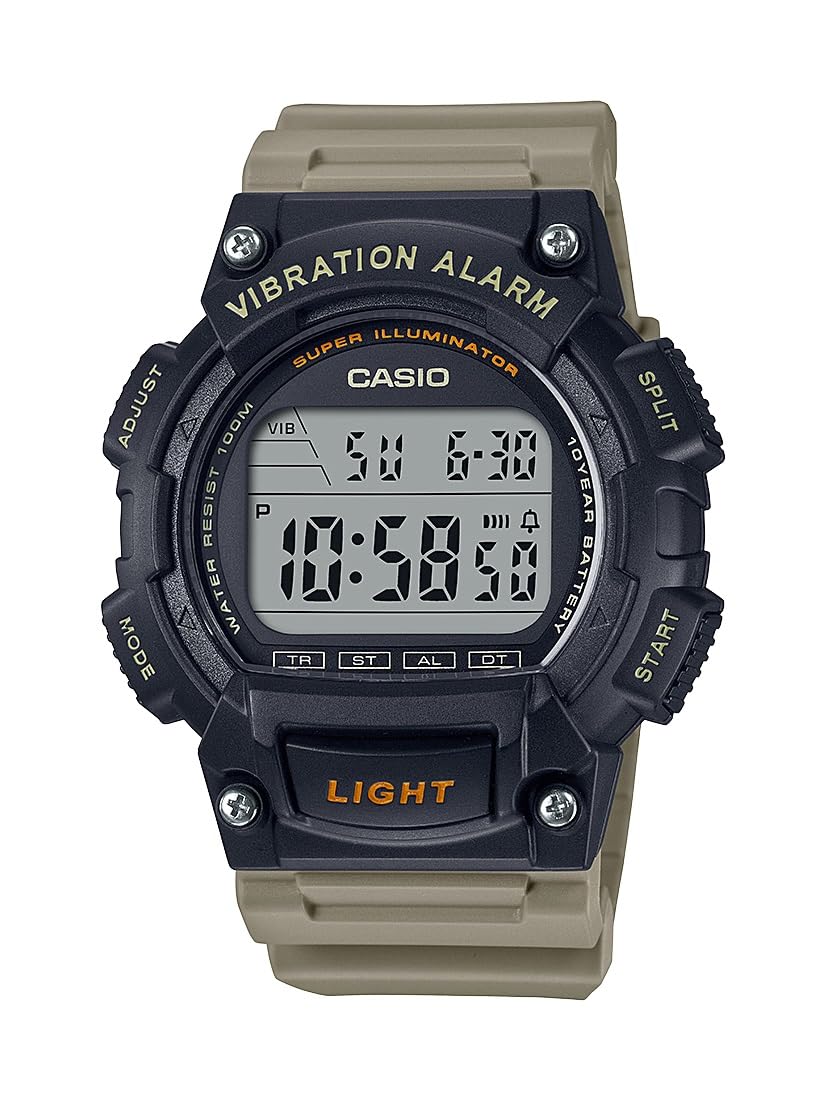
Image: Casio W736H Series Digital Watch, model W-736H-5AV. The watch features a digital display, four side buttons labeled 'ADJUST', 'MODE', 'SPLIT', 'START', and a front button labeled 'LIGHT'.
د تڼۍ دندې
- تعدیل (پورته کیڼ اړخ ته): د تنظیم کولو حالتونو ته د ننوتلو او وتلو لپاره، او د ترتیباتو تایید لپاره کارول کیږي.
- حالت (لاندې کیڼ اړخ ته): Cycles through different watch modes (Timekeeping, Stopwatch, Countdown Timer, Alarm, Dual Time).
- SPLIT / START (Top Right): In Stopwatch mode, used for split/lap timing. In other modes, may function as a start button or for value adjustment.
- START / RESET (Bottom Right): Used to start/stop functions or to reset values. Also used for value adjustment in setting modes.
- LIGHT (Front Bottom): د سوپر الیومینیټر LED بیک لایټ فعالوي.
چمتو کول
د وخت او نیټې ترتیب کول
- د وخت ساتلو حالت کې، فشار ورکړئ او ونیسئ سمون button until the seconds begin to flash, indicating the setting screen.
- فشار ورکړئ موډ button to cycle through the settings in the following order: Seconds → DST (Daylight Saving Time) → Hour → Minute → Year → Month → Day.
- د کارولو START / RESET (Bottom Right) and SPLIT / START (Top Right) buttons to adjust the flashing value.
- START / RESET: ارزښت زیاتوي.
- SPLIT / START: Decreases the value (or cycles through options).
- کله چې ټول ترتیبات تنظیم شي، فشار ورکړئ سمون button to exit the setting screen and return to Timekeeping Mode.
12/24-ساعت بڼه
د وخت ساتلو حالت کې، فشار ورکړئ START / RESET د ۱۲ ساعتونو او ۲۴ ساعتونو وخت بڼو ترمنځ د بدلولو لپاره تڼۍ.
عملیاتي طریقې
فشار ورکړئ موډ button to cycle through the watch's various modes:
- د وخت ساتلو طریقه
- د سټاپ واچ حالت (ST)
- Countdown Timer Mode (TR)
- د الارم حالت (AL)
- Dual Time Mode (DT)
د تمځیو حالت
د سټاپ واچ تیر شوی وخت ، د ویش وختونه ، او دوه پایونه اندازه کوي.
- د وخت ساتلو حالت څخه، فشار ورکړئ موډ until 'ST' appears on the display.
- مطبوعاتي START / RESET (Bottom Right) to start the stopwatch.
- مطبوعاتي START / RESET بیا د سټاپ واچ د بندولو لپاره.
- د سټاپ واچ صفر ته د بیا تنظیمولو لپاره، فشار ورکړئ SPLIT / START (Top Right) while it is stopped.
- For split times, press SPLIT / START پداسې حال کې چې سټاپ واچ چلیږي. ښودنه به د ویشلو وخت وښيي. فشار ورکړئ SPLIT / START بیا د تېر شوي وخت اندازه کولو ته د بیرته راستنیدو لپاره.
د شمېرنې شمېرل شوی وخت
The countdown timer can be set for a period from 1 minute to 24 hours.
- د وخت ساتلو حالت څخه، فشار ورکړئ موډ until 'TR' appears on the display.
- فشار ورکړئ او ونیسئ سمون تر هغه چې د ساعت ترتیب روښانه شي.
- کارول START / RESET (Bottom Right) and SPLIT / START (Top Right) to set the desired countdown start time (hours and minutes).
- مطبوعاتي سمون د ترتیب سکرین څخه وتلو لپاره.
- مطبوعاتي START / RESET د شمیرنې پیل کولو لپاره.
- مطبوعاتي START / RESET again to pause the countdown. Press it once more to resume.
- To stop and reset the timer, press SPLIT / START while the timer is paused.
- When the countdown reaches zero, the watch will emit a vibration alarm.
د الارم حالت
The watch features a daily alarm with a vibration alert.
- د وخت ساتلو حالت څخه، فشار ورکړئ موډ until 'AL' appears on the display.
- فشار ورکړئ او ونیسئ سمون تر هغه چې د ساعت ترتیب روښانه شي.
- کارول START / RESET (Bottom Right) and SPLIT / START (Top Right) to set the alarm hour and minute.
- مطبوعاتي سمون د ترتیب سکرین څخه وتلو لپاره.
- په الارم حالت کې، فشار ورکړئ START / RESET to toggle the alarm ON/OFF. An alarm indicator will appear when the alarm is active.
- To stop the alarm once it sounds/vibrates, press any button.
دوه ګونی وخت حالت
This mode allows you to keep track of a second time zone.
- د وخت ساتلو حالت څخه، فشار ورکړئ موډ until 'DT' appears on the display.
- فشار ورکړئ او ونیسئ سمون تر هغه چې د ساعت ترتیب روښانه شي.
- کارول START / RESET (Bottom Right) and SPLIT / START (Top Right) to set the desired hour and minute for the second time zone.
- مطبوعاتي سمون د ترتیب سکرین څخه وتلو لپاره.
Super Illuminator LED Light
The Super Illuminator LED light provides illumination for the display in low-light conditions.
- فشار ورکړئ رڼا button (front bottom) to illuminate the display.
- The illumination duration is preset and cannot be adjusted.
ساتنه
د بیټرۍ معلومات

Image: A gold and black emblem indicating '10 Year Battery Life'.
This watch is equipped with a long-life battery, designed to last approximately 10 years under normal use. When the display becomes dim or the light function weakens, it indicates that the battery power is low. Battery replacement should be performed by a qualified watch technician to ensure water resistance is maintained.
د اوبو مقاومت
The watch is rated for 100-meter water resistance. This means it is suitable for swimming, showering, and snorkeling. However, it is not suitable for scuba diving. Do not operate buttons while the watch is wet or submerged in water, as this can compromise the water resistance.
پاکول
Wipe the watch case and band with a soft, dry cloth to remove dirt and moisture. For resin bands, a mild soap solution and water can be used, followed by thorough rinsing and drying. Avoid using harsh chemicals or abrasive cleaners.
د ستونزو حل کول
- ښودنه خالي یا تیاره ده: The battery may be low. Consider professional battery replacement.
- وخت غلط دی: Re-adjust the time and date settings as described in the 'Setup' section. Ensure DST (Daylight Saving Time) is correctly set if applicable.
- الارم کار نه کوي: Check if the alarm is activated in Alarm Mode. Ensure the volume/vibration setting is enabled.
- تڼۍ بې ځوابه دي: Ensure the watch is not wet. If the issue persists, a reset may be required (consult a service center), or there might be an internal malfunction.
If problems persist after attempting these solutions, please contact a Casio service center for assistance.
مشخصات
- د ماډل شمیره: د W-736H-5AV لپاره تفتیش وسپارئ، موږ به په 24 ساعتونو کې له تاسو سره اړیکه ونیسو.
- ماډل: (Not specified in provided data, typically a 4-digit number)
- د اوبو مقاومت: ۱۰۰ متره (۱۰ بار)
- د بیټرۍ ژوند: Approximately 10 years (CR2032 Lithium Metal battery)
- دقت: ±30 seconds per month (average)
- وخت ساتنه: Hour, minute, second, p.m., month, date, day
- د تقویم سیسټم: بشپړ اتوماتیک کیلنڈر (تر ۲۰۹۹ کال پورې)
- تمځاي: 1/100-second; measuring capacity: 23:59'59.99''; measuring modes: elapsed time, split time, 1st-2nd place times
- د شمېرنې وخت Measuring unit: 1 second; countdown range: 24 hours; countdown start time setting range: 1 minute to 24 hours (1-minute increments and 1-hour increments)
- الارم: Daily alarm with vibration alert
- دوه ګونی وخت: هو
- روښانتیا: Super Illuminator LED backlight
- ابعاد: 6 x 6 x 4 inches (Product Dimensions as packaged)
- وزن: 3.84 ounces (Product Weight as packaged)
تضمین او ملاتړ
د تضمین معلوماتو، خدماتو، یا اضافي ملاتړ لپاره، مهرباني وکړئ رسمي کاسیو ته مراجعه وکړئ webسایټ ته مراجعه وکړئ یا د خپل محلي مجاز کاسیو پلورونکي سره اړیکه ونیسئ. د تضمین ادعاوو لپاره د پیرود ثبوت وساتئ.
رسمي کیسیو Webسایټ: www.casio.com