1. پیژندنه او وروستهview
This manual provides detailed instructions for the operation and maintenance of your Casio G-Shock GMA-S2100-4A2DR Analog-Digital Watch. Designed for durability and functionality, this watch features a shock-resistant structure and 200-meter water resistance, making it suitable for various activities.
The GMA-S2100-4A2DR model features a compact and slim design, characterized by its octagonal bezel, flat face, and simple bar hour markers. It incorporates a Carbon Core Guard structure for enhanced protection.

انځور 1.1: مخکی view of the Casio G-Shock GMA-S2100-4A2DR watch. This image displays the watch's pink analog-digital dial, octagonal bezel, and matching pink resin strap. The digital display shows "6.30" and "36".
2. کلیدي ځانګړتیاوې
- انالوګ-ډیجیټل ښودنه: Combines traditional analog hands with a digital display for versatile timekeeping.
- د شاک مقاومت: Built with G-Shock's renowned shock-resistant structure to withstand impacts and vibrations.
- د ۱۰۰ متره اوبو مقاومت: Suitable for swimming, snorkeling, and other water sports, but not for deep diving.
- د کاربن کور ساتونکي جوړښت: Enhances durability and protection of the watch module.
- دوه ګونی LED څراغ: Provides illumination for both the analog and digital displays in low-light conditions.
- نړیوال وخت: Displays the current time in 31 time zones (48 cities + coordinated universal time).
- تمځاي: ۱/۱۰۰۰ ثانیې سټاپ واچ چې تر ۹۹:۵۹'۵۹.۹۹۹'' پورې د اندازه کولو ظرفیت لري.
- د شمېرنې وخت Measuring unit: 1 second; Countdown range: 24 hours.
- ورځني الارمونه: Five daily alarms with one snooze alarm.
- د لاس بدلون ځانګړتیا: Moves the analog hands away from the digital display for easier viewing.
- معدني شیشه: Durable and scratch-resistant dial glass material.
- Resin Case and Band: Lightweight and comfortable pink resin material.
3. Watch Components and Controls
Familiarize yourself with the main components and buttons of your watch:
- A (Adjust) Button: د تنظیم کولو حالتونو ته د ننوتلو او وتلو لپاره کارول کیږي.
- B (Light) Button: د LED بیک لایټ فعالوي.
- C (Mode) Button: Cycles through different modes (Timekeeping, Stopwatch, Countdown Timer, Alarm, World Time).
- D (Start) Button: Used to start/stop stopwatch, set values, or toggle features.

انځور 3.1: کیڼ اړخ view of the watch, highlighting the 'Adjust' and 'Mode' buttons on the left side of the case.
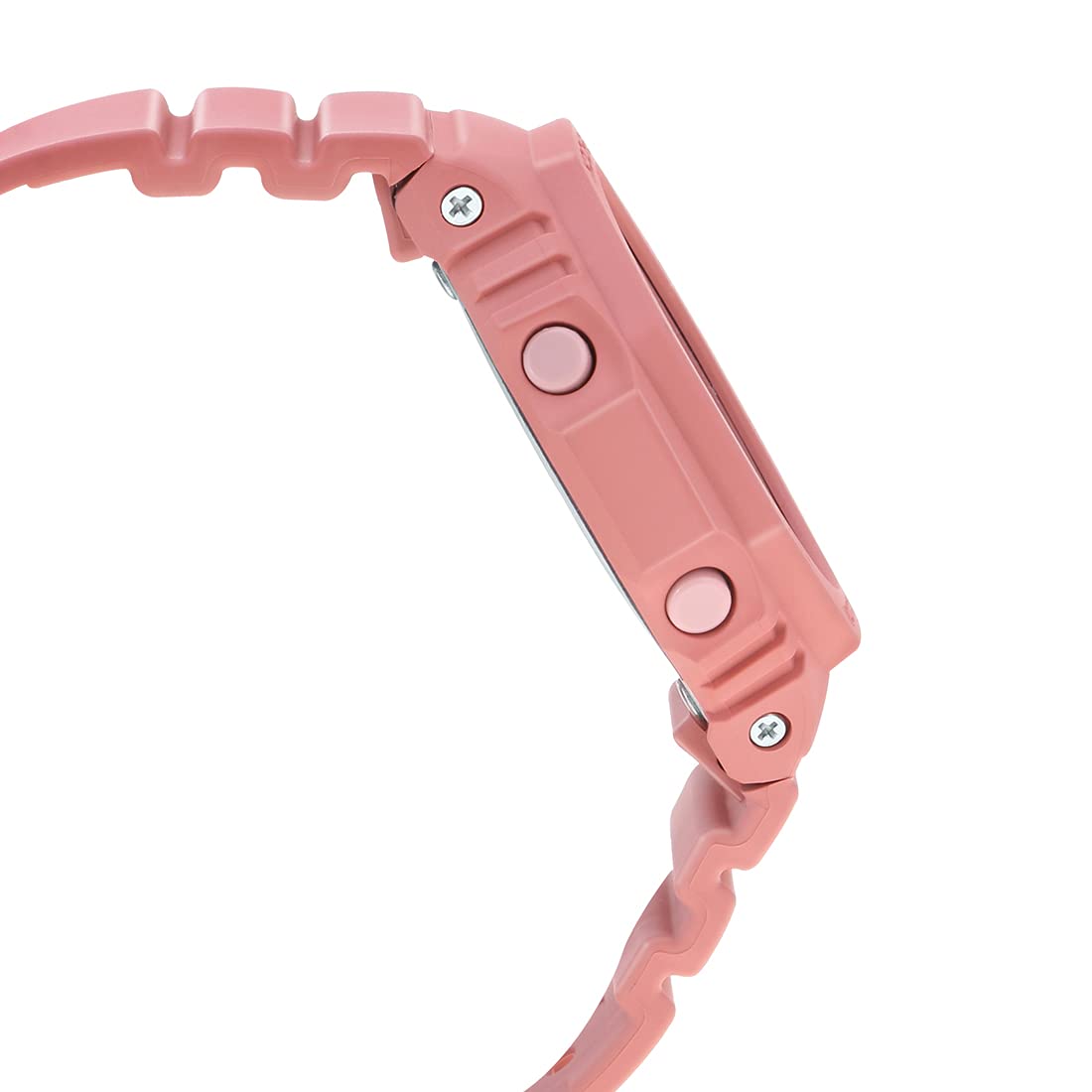
انځور 3.2: ښي خوا ته view of the watch, highlighting the 'Light' and 'Start' buttons on the right side of the case.
4. ابتدايي ترتیب
4.1 Setting the Home City and Time Zone
- د وخت ساتلو حالت کې، لاندې ونیسئ A (Adjust) button until the city code starts to flash on the digital display.
- د کارولو D (Start) او B (Light) د خپل مطلوب کور ښار کوډ غوره کولو لپاره تڼۍ.
- فشار ورکړئ C (Mode) button to cycle through other settings like DST (Daylight Saving Time) and 12/24-hour format. Adjust these using D (Start) or B (Light).
- To set the digital time, press C (Mode) until the hour or minute digits flash. Use D (Start) او B (Light) تنظیم کول
- مطبوعاتي A (Adjust) to exit the setting mode. The analog hands will automatically adjust to the digital time.
۲.۳ د لاس د کور موقعیت اصلاح
If the analog hands do not match the digital time, you may need to correct their home position:
- د وخت ساتلو حالت کې، لاندې ونیسئ A (Adjust) button for approximately five seconds until "H.SET" appears and the hour hand starts to flash.
- د کارولو D (Start) button to advance the minute hand and the B (Light) button to advance the hour hand until both are aligned at 12 o'clock.
- مطبوعاتي A (Adjust) to confirm and exit. The hands will then move to the current time.
5. Operating the Watch Functions
۶.۱ د نیویګیشن حالت
فشار ورکړئ C (Mode) button to cycle through the different modes in the following order:
- د وخت ساتلو طریقه
- د وخت وخت حالت
- د الارم حالت
- د شمېرنې شمېرل شوی وخت
- د تمځیو حالت
۹.۳ د سټاپ واچ فعالیت
- د سټاپ واچ حالت ته د فشار ورکولو سره ننوځئ C (Mode) تڼۍ
- فشار ورکړئ D (Start) د سټاپ واچ پیل کولو لپاره تڼۍ.
- مطبوعاتي D (Start) بیا ځنډول.
- فشار ورکړئ A (Adjust) د سټاپ واچ صفر ته د بیا تنظیمولو لپاره تڼۍ.
5.3 د شمېرنې ټایمر
- د شمېرنې ټایمر حالت ته د فشار ورکولو سره ننوځئ C (Mode) تڼۍ
- لاندې ونیسئ A (Adjust) button until the hour setting flashes.
- کارول D (Start) او B (Light) د مطلوب شمېرنې وخت ټاکلو لپاره.
- مطبوعاتي A (Adjust) د تنظیم کولو حالت څخه وتلو لپاره.
- مطبوعاتي D (Start) to start the countdown. An alarm will sound when the countdown reaches zero.
5.4 د الارم فعالیت
- د فشارولو سره د الارم حالت ته ننوځئ C (Mode) تڼۍ
- کارول D (Start) to scroll through the five alarms (AL1 to AL5) and the snooze alarm (SNZ).
- د الارم تنظیمولو لپاره، لاندې ونیسئ A (Adjust) تڼۍ تر هغه وخته پورې چې د الارم وخت روښانه شي.
- کارول D (Start) او B (Light) د ساعت او دقیقې ټاکلو لپاره.
- مطبوعاتي A (Adjust) د تنظیم کولو حالت څخه وتلو لپاره.
- مطبوعاتي D (Start) د الارم فعال/بند کولو لپاره.
۳.۳ نړیوال وخت
- د فشارولو سره د نړۍ وخت حالت ته ننوځئ C (Mode) تڼۍ
- کارول D (Start) او B (Light) to scroll through different city codes and view their current times.
- To swap your Home City time with the World Time City time, hold down the A (Adjust) button for approximately three seconds.
5.6 Double LED Light
فشار ورکړئ B (Light) button to illuminate the watch face. The illumination duration can be configured in the Timekeeping Mode settings.
۳.۶ د لاس بدلون ځانګړتیا
If the analog hands obstruct the digital display, press the C (Mode) او D (Start) buttons simultaneously to temporarily move the hands. Press any button to return them to normal timekeeping.
6. ساتنه او پالنه
۲.۷ د اوبو مقاومت
Your Casio G-Shock GMA-S2100-4A2DR is water-resistant up to 200 meters. This means it is suitable for recreational diving, swimming, snorkeling, and other water sports. However, it is نه suitable for saturation diving.
- کله چې ساعت لوند وي یا په اوبو کې ډوب وي، تڼۍ مه چلوئ.
- د مالګې اوبو سره د تماس وروسته، ساعت په تازه اوبو سره ومینځئ او وچ یې کړئ.
- ساعت د ګرمو اوبو یا بخار سره د مخ کیدو څخه ډډه وکړئ، ځکه چې دا کولی شي مهرونو ته زیان ورسوي.
6.2 پاکول
د خپل ساعت ظاهري بڼه ساتلو لپاره:
- د ساعت بکس او بند په منظم ډول د نرم او وچ ټوکر سره پاک کړئ.
- For stubborn dirt, use a soft brush with mild soap and water, then rinse thoroughly and dry.
- Avoid using chemical cleaners or solvents, as they can damage the resin materials.
6.3 د بیټرۍ بدلول
The watch is powered by a Silver Oxide battery. When the display becomes dim or functions become erratic, it may be time for a battery replacement. It is recommended to have the battery replaced by an authorized Casio service center to ensure proper water resistance and functionality.
7. ستونزه حل کول
- ناسم وخت: Ensure your Home City and DST settings are correct. Perform a Hand Home Position Correction if analog hands are misaligned.
- ښودنه خالي یا تیاره ده: The battery may be low. Consider professional battery replacement.
- تڼۍ چې ځواب نه ورکوي: Ensure the watch is not in a locked mode (if applicable, though not a feature of this model). If wet, dry thoroughly before use.
- د اوبو دننه څارنه: ساعت سمدلاسه یو مجاز خدمت مرکز ته یوسئ. هڅه مه کوئ چې پخپله یې وچ کړئ.
8. مشخصات
| فیچر | تفصیل |
|---|---|
| د ماډل شمیره | GMA-S2100-4A2DR |
| د ښودلو ډول | انژیک - ډیجیټل |
| د قضیې مواد | Resin (Carbon Core Guard Structure) |
| بانډ مواد | رال |
| د ډایل شیشې مواد | د معدني شیشې |
| د اوبو مقاومت | 200 متره |
| د بریښنا سرچینه | Battery Powered (Silver Oxide) |
| ابعاد (LxWxH) | 20.5 x 1.1 x 4.3 سانتي متره |
| د توکي وزن | 41 ګرامه |
| د اصلي هیواد | تایلینډ |

انځور 8.1: Watch dimensions illustration. This image provides a visual comparison of the watch's size (46.2 mm length) against a standard credit card (54 mm width).
9. تضمین او ملاتړ
Your Casio G-Shock GMA-S2100-4A2DR watch comes with a manufacturer's warranty. Please refer to the warranty card included with your purchase for specific terms and conditions, including warranty period and coverage details.
For technical support, service, or warranty claims, please contact an authorized Casio service center or visit the official کاسیو webسایټ د اړیکو معلوماتو لپاره.
۹. د محصول ویډیوګانې
10.1 Casio G-Shock GMA-S2100-4A2DR Product Overview
ویډیو 10.1: دا ویډیو عمومي معلومات وړاندې کويview of the Casio G-Shock GMA-S2100-4A2DR watch, showcasing its design, color, and key features such as the resin case and band, round dial, and water resistance. It highlights the watch's suitability for casual wear.
10.2 Casio G-Shock GMA-S2100-4A2DR 360-Degree View
ویډیو 10.2: This video offers a comprehensive 360-degree rotation view of the Casio G-Shock GMA-S2100-4A2DR watch, allowing users to observe its design from all angles, including the dial, case, strap, and buckle clasp.


