پیژندنه
The Cellularline Clip Pro is a mono Bluetooth® earbud designed for convenience and portability. It features a unique charging base with an integrated clip, allowing you to easily attach it to clothing. The earbud itself is wireless and its capsule can be rotated for comfortable use in either the right or left ear. This manual provides detailed instructions for setting up, operating, and maintaining your Clip Pro earbud.

Image: The Cellularline Clip Pro earbud detached from its charging base, showcasing its compact design and the charging contacts.
د بسته محتويات
مهرباني وکړئ د لاندې توکو لپاره په بسته کې وګورئ:
- Cellularline Clip Pro Mono Headset
- د چارج کیبل
- د غوږونو بدلول
- د لارښود لارښود (دا سند)
محصول پای ته ورسیدview
Familiarize yourself with the components of your Cellularline Clip Pro:

انځور: پورته view of the Clip Pro charging base with the earbud securely docked. A blue indicator light is visible on the earbud.
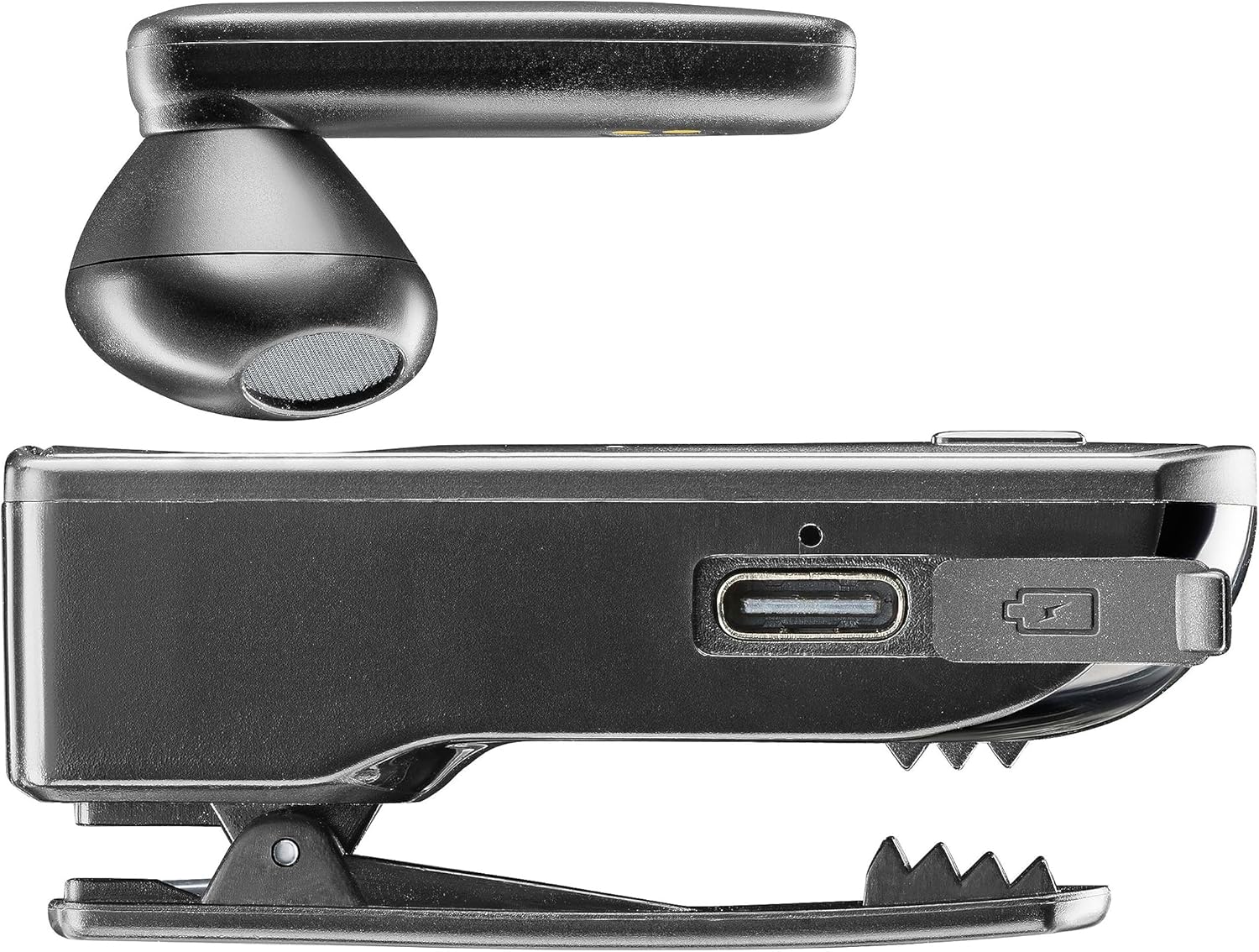
انځور: اړخ view of the Clip Pro charging base, highlighting the USB-C charging port and the integrated clip mechanism.

انځور: تفصیلي view of the earbud's inner surface, showing the two gold charging contacts and the speaker mesh.
چمتو کول
1. د وسیلې چارج کول
Before first use, fully charge your Cellularline Clip Pro. The charging base provides additional power for the earbud.
- Connect the provided charging cable to the USB-C port on the charging base.
- د کیبل بل پای د یو مناسب USB بریښنا سرچینې سره وصل کړئ (د مثال په توګه، دیوال اډاپټر، د کمپیوټر USB پورټ).
- Place the earbud into the charging base. Ensure the charging contacts align.
- The charging indicator light on the earbud will show charging status. A full charge takes approximately 1.5 hours.
2. د بلوتوت وسیلې سره جوړه کول
To use the earbud, you must first pair it with your smartphone or other Bluetooth-enabled device.
- Ensure the earbud is charged and powered off.
- Remove the earbud from the charging base. It will automatically enter pairing mode (indicator light will flash).
- On your device (e.g., smartphone), go to the Bluetooth settings and enable Bluetooth.
- لټون available devices. Select "Cellularline Clip Pro" from the list.
- Once connected, the earbud's indicator light will stop flashing and remain solid or turn off, depending on the model.
- The earbud is now ready for use. It will automatically reconnect to the last paired device when powered on and within range.
عملیاتي لارښوونې
پاور آن/بند
- پاور آن: Remove the earbud from the charging base. It will automatically power on. Alternatively, press and hold the multifunction button on the earbud for a few seconds.
- بندول: Place the earbud back into the charging base. It will automatically power off. Alternatively, press and hold the multifunction button on the earbud for a few seconds until the indicator light turns off.
د اړیکې مدیریت
- ځواب / پای کال: یو ځل د ملټي فنکشن تڼۍ فشار ورکړئ.
- زنګ رد کړئ: Press and hold the multifunction button for approximately 2 seconds.
- وروستنۍ شمیره بیا ولیکئ: د ملټي فنکشن تڼۍ دوه ځله فشار ورکړئ.
- Vibrator Feature: The charging base will vibrate when you receive an incoming call, even if the earbud is docked.
د حجم کنټرول
The charging base features dedicated volume adjustment buttons.
- حجم زیات کړئ: Press the '+' button on the charging base.
- حجم کم کړئ: Press the '-' button on the charging base.
د ایربډ اغوستل
The earbud capsule is rotatable, allowing for comfortable use in either the right or left ear.
- Gently rotate the earbud capsule to align with your preferred ear.
- Insert the earbud into your ear canal. Adjust for a secure and comfortable fit.

Image: A man wearing the Cellularline Clip Pro earbud, with the charging base clipped to his shirt collar, demonstrating its hands-free use.
ساتنه
To ensure the longevity and optimal performance of your Cellularline Clip Pro, follow these maintenance guidelines:
- پاکول: Use a soft, dry cloth to clean the earbud and charging base. Do not use abrasive cleaners or solvents.
- غوږونه: Regularly check and clean the eartips. Replace them if they become worn or damaged.
- ذخیره کول: When not in use, store the earbud in its charging base to protect it and keep it charged. Store in a cool, dry place away from direct sunlight and extreme temperatures.
- د اوبو مقاومت: This device is not waterproof. Avoid exposure to water, moisture, or excessive humidity.
د ستونزو حل کول
If you encounter issues with your Cellularline Clip Pro, try the following solutions:
| ستونزه | احتمالي حل |
|---|---|
| Earbud does not power on. | Ensure the earbud is charged. Place it in the charging base for at least 15 minutes. |
| د وسیلې سره جوړه نشي کیدی. | Make sure Bluetooth is enabled on your device. Ensure the earbud is in pairing mode (flashing indicator light). Try forgetting the device in your phone's Bluetooth settings and re-pairing. |
| غږ نشته یا ټیټ غږ. | Check the volume levels on both the earbud (using the charging base buttons) and your connected device. Ensure the earbud is properly seated in your ear. |
| Charging base not vibrating for calls. | Ensure the earbud is correctly docked in the charging base and the base itself has sufficient power. |
| Earbud disconnects frequently. | Ensure your device is within the Bluetooth range (typically 10 meters/33 feet) and there are no significant obstructions. Fully charge both the earbud and the charging base. |
مشخصات
- د موډل نوم: BTCLIPPROK
- نښه: سیلولر لائن
- د ارتباط ټیکنالوژي: بې سیم بلوتوټ
- د فورم فکتور: Earbud (Capsule)
- د غوږ ځای پرځای کول: په غوږ کې
- رنګ: تور
- مواد: PC + ABS پلاستيک
- د توکي وزن: 94 ګرامه
- د چارج کولو وخت: ۸ ساعته
- د بیټرۍ جوړښت: لیتیم آیون (۱ پکې شامل دی)
- د چارج وړ بیټرۍ: هو
- ځانګړي ځانګړتیاوې: Multifunction answer button, Volume adjustment buttons, Vibrating charging base
- مطابقت لرونکي وسایل: iPhone, Samsung, Huawei, Xiaomi, and all Bluetooth-enabled devices
- د کنټرول ډول: Media control, Volume control, Touch
د خوندیتوب معلومات
مهرباني وکړئ دا خوندیتوب احتیاطي تدابیر ولولئ او تعقیب یې کړئ ترڅو وسیله ته زیان ونه رسوي یا ځان ته زیان ونه رسوي:
- وسیله د سختې تودوخې، مستقیم لمر وړانګو، یا لوړې رطوبت سره مه مخ کوئ.
- د قوي تاثیراتو سره د وسیله له مینځه وړلو یا تابع کولو څخه ډډه وکړئ.
- د وسیلې د جلا کولو، ترمیم کولو یا بدلولو هڅه مه کوئ. د مرستې لپاره د مجاز خدماتو پرسونل سره اړیکه ونیسئ.
- وسیله د ماشومانو او څارویو څخه لرې وساتئ.
- وسیله او د هغې بیټرۍ د ځایی مقرراتو سره سم په مسؤلیت سره تصفیه کړئ.
- Do not use the earbud at excessively high volumes for prolonged periods, as this may cause hearing damage.
تضمین او ملاتړ
For warranty information and customer support, please refer to the official Cellularline webسایټ یا خپل پرچون پلورونکي سره اړیکه ونیسئ. د تضمین ادعاوو لپاره د پیرود ثبوت وساتئ.


