پیژندنه
This manual provides comprehensive instructions for the Ozuly Universal Replacement Remote Control, model NS-RC4NA-18, designed for Insignia LED LCD HDTVs. This remote offers direct functionality without the need for complex setup or programming, serving as a reliable replacement for your original Insignia TV remote.

شکل 1: مخکی view of the Ozuly Universal Insignia TV Remote Control. The remote is black with clearly labeled buttons for power, input, numbers, navigation, volume, channel, and media playback.
چمتو کول
The Ozuly Universal Replacement Remote Control is designed for immediate use with compatible Insignia TVs. No programming or pairing is required.
د بیټرۍ نصب کول
- د ریموټ کنټرول شاته د بیټرۍ کڅوړه ومومئ.
- د بیټرۍ د برخې پوښ د خلاصولو لپاره ښکته خوا ته وغورځوئ.
- Insert two (2) AAA batteries (not included) into the compartment, ensuring the positive (+) and negative (-) terminals align correctly with the indicators inside the compartment.
- د بیټرۍ پوښ بیرته خپل ځای ته وغورځوئ تر هغه چې په خوندي ډول کلیک وکړي.
Once batteries are installed, the remote control is ready for operation.

شکل 2: شاته view of the remote control, illustrating the battery compartment and its cover. The compartment requires two AAA batteries for operation.
عملیاتي لارښوونې
This remote control provides full functionality for your Insignia TV, mirroring the original remote's capabilities.
کلیدي دندې:
- د چالانېدو تڼۍ (🏻): تلویزیون چالان یا بند کړئ.
- د ننوتلو تڼۍ: د شته ان پټ سرچینو (HDMI، AV، او داسې نورو) له لارې تیریږي.
- د شمېرې تڼۍ (0-9): په مستقیم ډول د تلویزیون چینلونه غوره کړئ.
- د مینو تڼۍ: د تلویزیون اصلي مینو ته لاسرسی لري.
- د نیویګیشن تڼۍ (پورته، ښکته، کیڼ، ښي، ننوتل): د مینو له لارې لاړ شئ او انتخابونه تایید کړئ.
- حجم پورته / ښکته (+/-): د تلویزیون حجم تنظیموي.
- تteۍ غږول: د تلویزیون آډیو خاموش یا غیر خاموش کوي.
- چینل پورته/ښکته (CH +/-): د تلویزیون چینلونه بدلوي.
- د وتلو تtonۍ: Exits current menu or function.
- Info* Button: د پروګرام معلومات ښکاره کوي.
- ACC Button: Accesses accessibility features.
- CC Button: Toggles Closed Captions.
- Media Playback Controls (Play, Pause, Stop, Rewind, Fast Forward, Skip): Controls media playback if supported by the TV.
- Sleep, Aspect, Game, Picture, Audio: Dedicated buttons for quick access to specific TV settings.
The remote is designed for a fast response time, typically under 0.2 seconds, and offers precise control up to a range of 15 meters.

Figure 3: A user holding the remote control, demonstrating its comfortable fit and ease of use while operating a television.
ساتنه
مناسب ساتنه ستاسو د ریموټ کنټرول اوږد عمر او غوره فعالیت تضمینوي.
د بیټرۍ بدلول
Replace batteries when the remote's response becomes sluggish or it stops functioning. Always replace both batteries simultaneously with new AAA batteries. Do not mix old and new batteries, or different types of batteries.
پاکول
د ریموټ کنټرول د پاکولو لپاره، په نرمۍ سره د هغې سطحه د نرم، وچ ټوکر سره پاک کړئ. د سختې خاورې لپاره، یو څه کم کړئampټوکر د اوبو یا یو نرم، غیر خړوبونکي کلینر سره ومینځئ. د سخت کیمیاوي موادو یا خړوبونکي موادو کارولو څخه ډډه وکړئ، ځکه چې دا کولی شي د ریموټ پای یا داخلي برخو ته زیان ورسوي.
ذخیره کول
Store the remote in a cool, dry place away from direct sunlight and extreme temperatures. If the remote will not be used for an extended period, it is recommended to remove the batteries to prevent leakage.
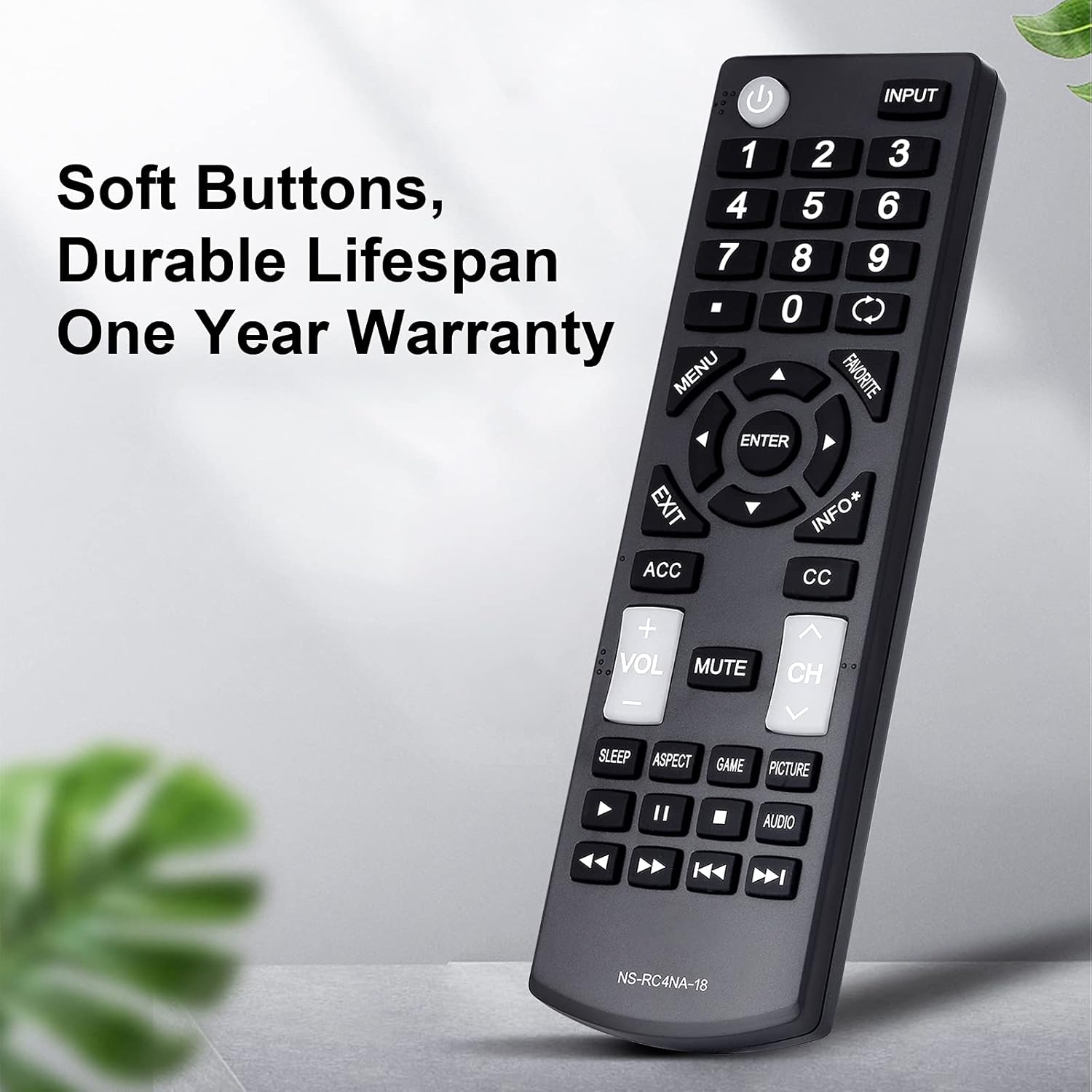
شکل ۵: یو مفصل view of the remote control, emphasizing its soft, durable buttons and robust ABS plastic construction, designed for long-term use.
د ستونزو حل کول
که تاسو د خپل ریموټ کنټرول سره ستونزې سره مخ شئ، مهرباني وکړئ لاندې عامې ستونزې او حل لارې وګورئ:
| ستونزه | احتمالي لامل | د حل لاره |
|---|---|---|
| ریموټ ځواب نه ورکوي. | مړه یا په غلط ډول داخل شوي بیټرۍ. | بیټرۍ د نوي AAA بیټریو سره بدل کړئ، ترڅو سم قطبي والی ډاډمن شي. |
| ریموټ په وقفه يي ډول کار کوي. | Low battery power; obstruction between remote and TV; remote sensor on TV is blocked. | Replace batteries. Ensure a clear line of sight between the remote and the TV's infrared sensor. Remove any objects blocking the TV's sensor. |
| ځینې تڼۍ کار نه کوي. | Button stuck or damaged; TV model incompatibility for specific advanced functions. | Gently press the button multiple times to dislodge any debris. Verify your TV model is listed as compatible for all functions. |
| ریموټ تلویزیون نه کنټرولوي. | TV is not an Insignia brand or is an incompatible Insignia model. | Confirm your TV is an Insignia brand and its model number is listed in the compatible models section of this manual or product description. This remote is specifically designed for Insignia TVs. |
If troubleshooting steps do not resolve the issue, please contact customer support for assistance.
مشخصات
- د ماډل شمیره: NS-RC4NA-18
- نښه: اوزولي
- مطابقت لرونکي وسایل: Insignia Televisions (LED LCD HDTVs)
- د ملاتړ شوي وسایلو اعظمي شمیر: 1
- رنګ: تور
- د محصول ابعاد: 6 x 2 x 1 انچه (تقریبا)
- د توکي وزن: ۳.۰۶ اونس (تقریبا)
- ځانګړې ځانګړنه: Universal replacement, no programming required
- د بریښنا سرچینه: 2 x AAA بیټرۍ (شامل ندي)
- د ځواب وخت: له 0.2 ثانیو څخه لږ
- عملیاتي لړۍ: تر 15 مترو پورې
- مواد: دوامدار ABS پلاستیک
- د لومړي شتون نیټه: د ۲۰۲۴ کال د جنورۍ ۲۸ مه

Figure 5: An illustration highlighting the upgraded internal chip of the remote control, contributing to its longer lifespan and improved performance.
تضمین او ملاتړ
د تضمین معلومات
دا محصول د الف سره راځي یو کال تضمین د پیرود نیټې څخه، د تولید نیمګړتیاوې او د عادي استعمال لاندې د موادو نیمګړتیاوې پوښي. مهرباني وکړئ د تضمین ادعاوو لپاره د پیرود ثبوت وساتئ.
د پیرودونکي ملاتړ
For any questions, concerns, or assistance with your Ozuly Universal Replacement Remote Control, please do not hesitate to contact our customer service team. We are committed to providing timely and high-quality service to ensure your satisfaction.
Please refer to the contact information provided with your purchase or on the product packaging for the most direct support channels.


